Customizing Tabular View| Zoho Analytics Help

Customizing a Tabular View

Customizing a Tabular View

You can modify your Tabular View - format, sort, apply themes, and tailor it to your needs with our wide range of customization options. 

In this section, we will discuss the various customization options available in a Tabular View:

Note: The customization options will be available in Tabular View - View Mode upon saving the created Tabular View.

Format a Column

Zoho Analytics offers options to change the format of a column like an alignment, decimal places, date formats, currency symbol etc., depending on its data type. Using these options you can choose how you would like to have your column data displayed in your Tabular View.

To format a column in your Tabular View, 

  1. Open the Tabular View in View Mode.
  2. Select a cell/column and click Format Column from the drop-down. Alternatively, you can also format a column by selecting the required cell and clicking Format > Format Column from the toolbar available at the top of your Tabular View.
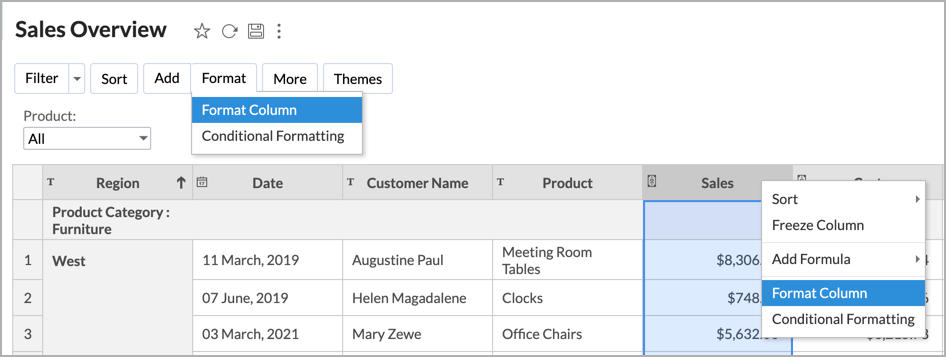
  3. You can make the necessary formatting changes in the Format Column dialog that opens. As shown in the below screenshots, the formatting options vary based on the data type of the selected column.
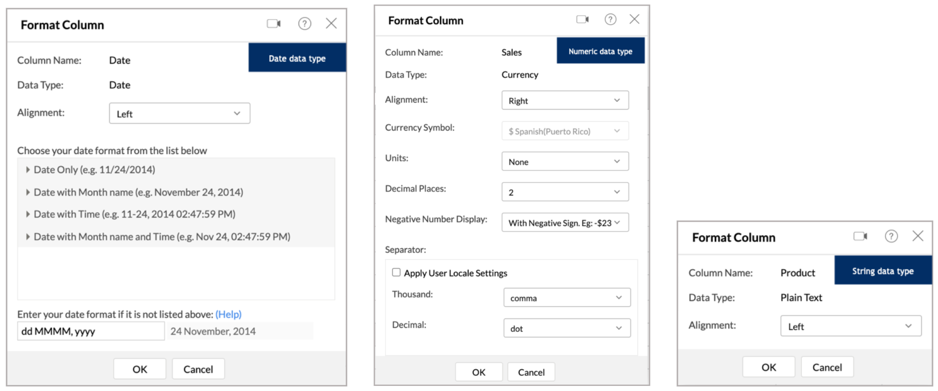
Read more about formatting options.

Note: The Format Columns option will be disabled for shared users.

Conditional Formatting

Conditional formatting allows you to highlight cells in a column with different backgrounds and font colors based on a condition. You can specify a condition/criteria for formatting and when data in a cell meets the condition, Zoho Analytics applies the corresponding formatting style that you have specified. 

Conditional formatting is currently supported in Tables, Pivot Views, Tabular Views, and Query Tables.

To apply conditional formatting to your Tabular View data:

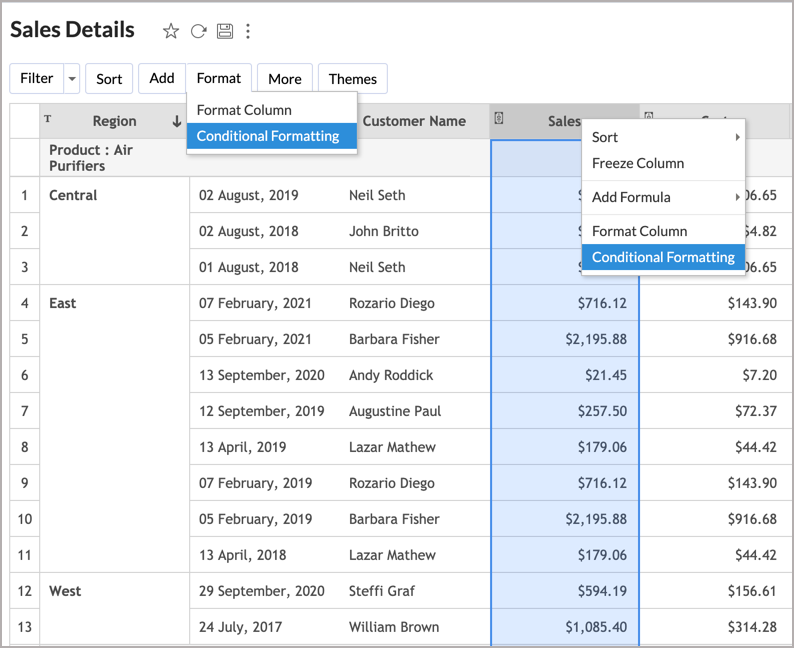
  1. Right-click on any of the cells in the Tabular View for which you want to apply conditional formatting and click Conditional Formatting from the drop-down.  Alternatively, you can click Format > Conditional Formatting from the toolbar.
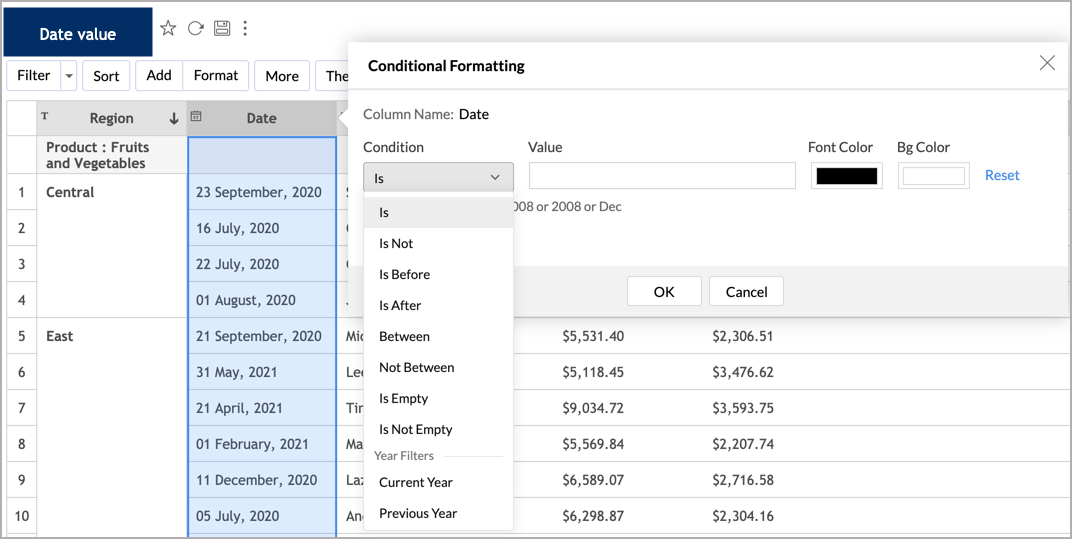
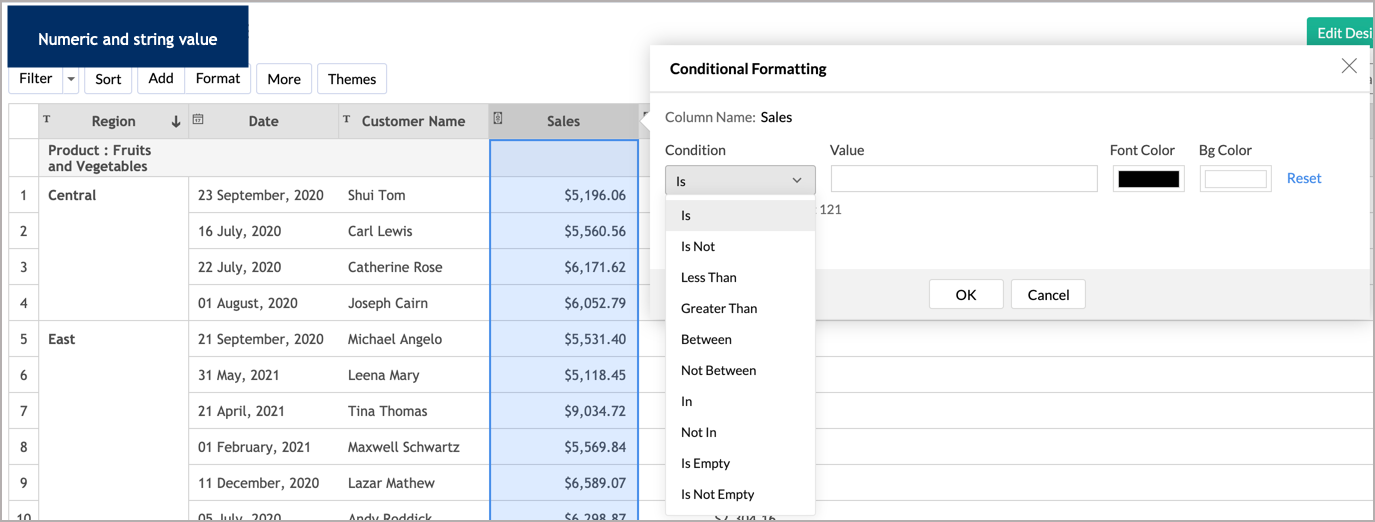
  2. The Conditional Formatting dialog will open. Click the drop-down box under the Condition section and select the type of condition that you want to apply. The conditions that appear here vary based on the data type on which the conditions are being applied. 
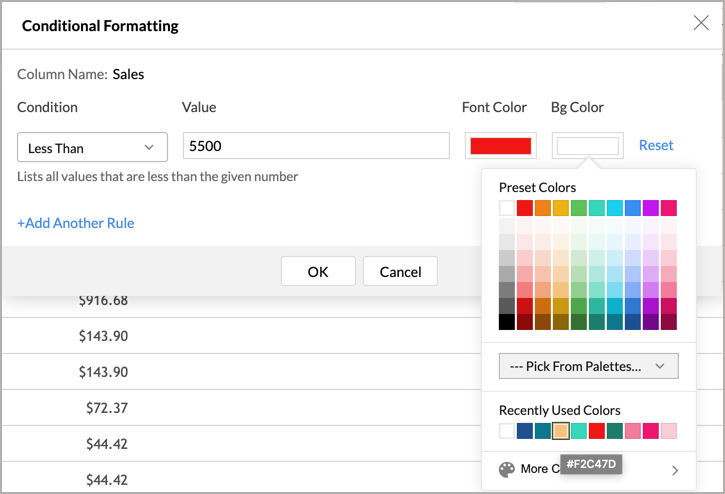
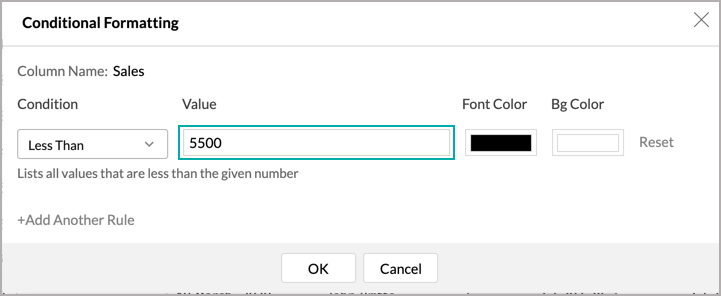
  3. Enter the condition or criteria value in the Value text box.
  4. Select the required colors for the font and background color by clicking the Font Color and Bg Color boxes.
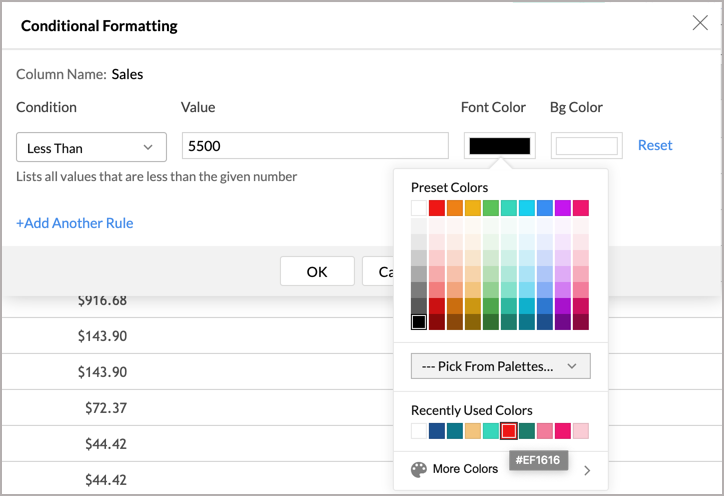
  5. You can add any number of conditions using the +Add Another Rule link. Specified conditions will be evaluated from top to bottom, and the corresponding formatting options will be applied on the data cell that meets the condition.
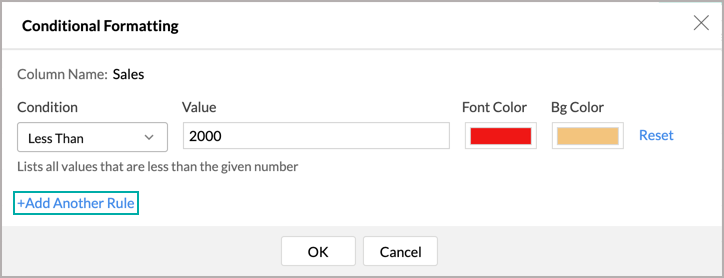
  6. Click OK after you have added all the conditions. 

All the cells that meet the criteria will be formatted accordingly.
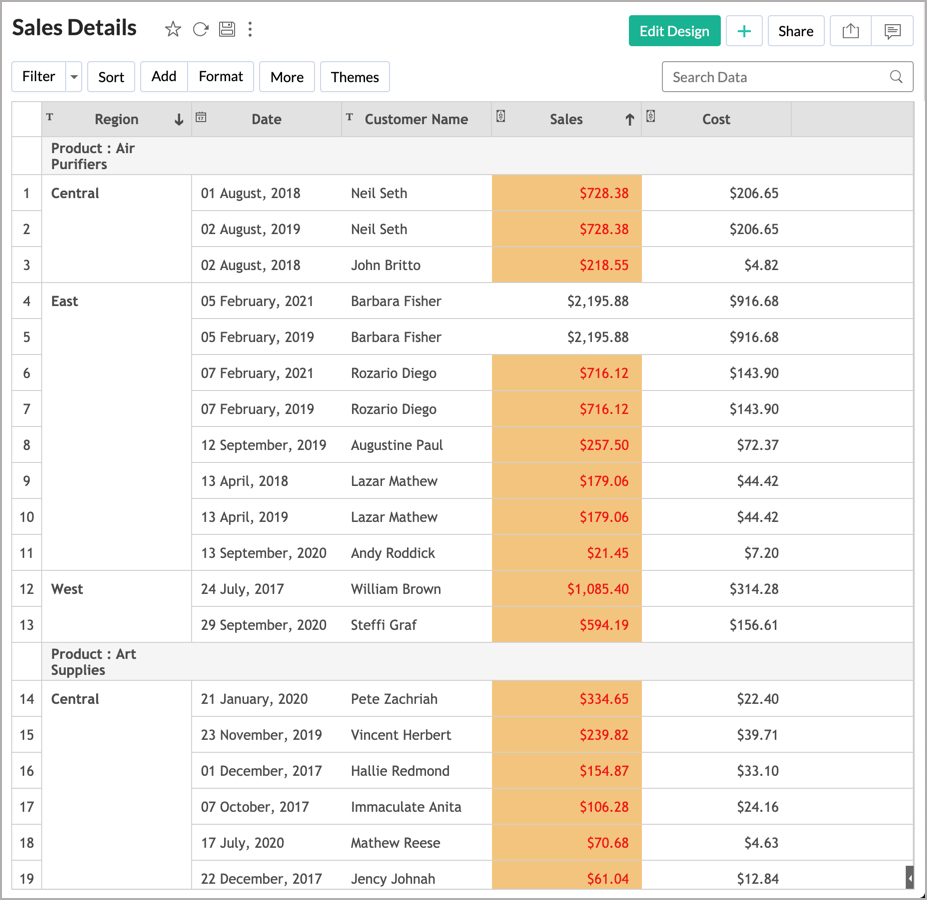
Note: The Conditional Formatting option will be disabled for shared users.

Applying Themes


Zoho Analytics allows you to customize the look and feel of your Tabular View using colorful and attractive themes. You can customize your Tabular View using the options provided to suit your taste. Please do note that this option is available only as a part of the new charting library that was released recently.

To change your Tabular View theme:

  1. Open the required Tabular View.
  2. Click the Themes button from the toolbar. 
  3. The Themes dialog will list the various theme customization options available in Zoho Analytics. You can make the following modifications from this dialog,
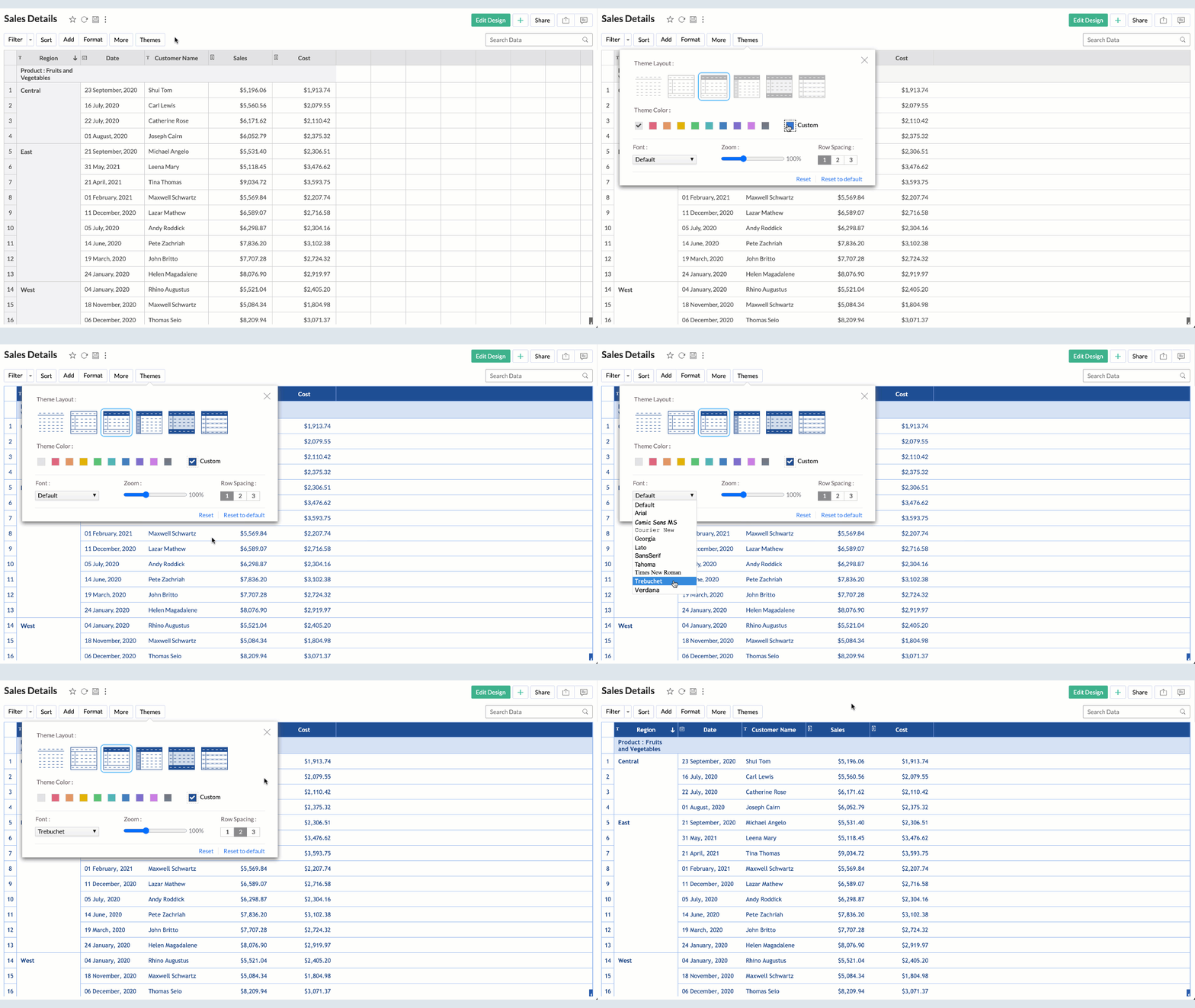
    • Theme Layout: You can choose a layout from the available set of seven layouts.
    • Theme Color: Select a color that you wish to apply.
    • Font: Select the font for the text in your Tabular View.
    • Zoom: You can Zoom in or Zoom out. This will increase or decrease the size of your Tabular View.
    • Row spacing: You can alter the row spacing using the predefined options available.
  4. As you choose the themes, the changes will be dynamically applied in the background. If you wish to undo the changes click Reset. If you want to reset the theme to the default theme click the Reset to default option.
  5. Save the changes made once you are satisfied with the customizations.

        Create. Review. Publish.

        Write, edit, collaborate on, and publish documents to different content management platforms.

        Get Started Now


          Access your files securely from anywhere

            Zoho CRM Training Programs

            Learn how to use the best tools for sales force automation and better customer engagement from Zoho's implementation specialists.

            Zoho CRM Training
              Redefine the way you work
              with Zoho Workplace

                Zoho DataPrep Personalized Demo

                If you'd like a personalized walk-through of our data preparation tool, please request a demo and we'll be happy to show you how to get the best out of Zoho DataPrep.

                Zoho CRM Training

                  Create, share, and deliver

                  beautiful slides from anywhere.

                  Get Started Now


                    Zoho Sign now offers specialized one-on-one training for both administrators and developers.

                    BOOK A SESSION


                                Quick LinksWorkflow AutomationData Collection
                                Web FormsEnterpriseOnline Data Collection Tool
                                Embeddable FormsBankingBegin Data Collection
                                Interactive FormsWorkplaceData Collection App
                                CRM FormsCustomer ServiceAccessible Forms
                                Digital FormsMarketingForms for Small Business
                                HTML FormsEducationForms for Enterprise
                                Contact FormsE-commerceForms for any business
                                Lead Generation FormsHealthcareForms for Startups
                                Wordpress FormsCustomer onboardingForms for Small Business
                                No Code FormsConstructionRSVP tool for holidays
                                Free FormsTravelFeatures for Order Forms
                                Prefill FormsNon-Profit

                                Intake FormsLegal
                                Mobile App
                                Form DesignerHR
                                Mobile Forms
                                Card FormsFoodOffline Forms
                                Assign FormsPhotographyMobile Forms Features
                                Translate FormsReal EstateKiosk in Mobile Forms
                                Electronic Forms
                                Drag & drop form builder

                                Notification Emails for FormsAlternativesSecurity & Compliance
                                Holiday FormsGoogle Forms alternative GDPR
                                Form to PDFJotform alternativeHIPAA Forms
                                Email FormsFormstack alternativeEncrypted Forms

                                Wufoo alternativeSecure Forms

                                TypeformWCAG


                                    All-in-one knowledge management and training platform for your employees and customers.

                                              Create. Review. Publish.

                                              Write, edit, collaborate on, and publish documents to different content management platforms.

                                              Get Started Now


                                                                You are currently viewing the help pages of Qntrl’s earlier version. Click here to view our latest version—Qntrl 3.0's help articles.


                                                                    Manage your brands on social media


                                                                      • Desk Community Learning Series


                                                                      • Digest


                                                                      • Functions


                                                                      • Meetups


                                                                      • Kbase


                                                                      • Resources


                                                                      • Glossary


                                                                      • Desk Marketplace


                                                                      • MVP Corner


                                                                      • Word of the Day


                                                                      • Ask the Experts


                                                                        Zoho Sheet Resources


                                                                            Zoho Forms Resources


                                                                              Secure your business
                                                                              communication with Zoho Mail


                                                                              Mail on the move with
                                                                              Zoho Mail mobile application

                                                                                Stay on top of your schedule
                                                                                at all times


                                                                                Carry your calendar with you
                                                                                Anytime, anywhere


                                                                                      Zoho Sign Resources

                                                                                        Sign, Paperless!

                                                                                        Sign and send business documents on the go!

                                                                                        Get Started Now


                                                                                                Zoho TeamInbox Resources


                                                                                                          Zoho DataPrep Demo

                                                                                                          Get a personalized demo or POC

                                                                                                          REGISTER NOW


                                                                                                            Design. Discuss. Deliver.

                                                                                                            Create visually engaging stories with Zoho Show.

                                                                                                            Get Started Now


                                                                                                                                • Related Articles

                                                                                                                                • Tabular View

                                                                                                                                  A Tabular View as the name implies is a simple, yet powerful table-like (or spreadsheet-like) report that you can create over your data tables in Zoho Analytics. Though lightweight, the Tabular View is one of the powerful reporting options offered by ...
                                                                                                                                • Introduction to Summary View

                                                                                                                                  Summary View, as the name indicates, is a report type that enables you to view your summarized data in tabular formats. This report type is extremely useful when you need to analyze huge amount of data with logical grouping and appropriate ...
                                                                                                                                • Creating a Tabular View

                                                                                                                                  A Tabular View as the name implies is a simple table-like report, that can be created with an intuitive drag and drop interface, over your data tables. With Tabular View, you can easily summarize, structure, group, filter, and customize data the way ...
                                                                                                                                • Working with a Tabular View

                                                                                                                                  Like any other table in Zoho Analytics database you can sort, filter, format, freeze and show or hide columns in tabular view. In this section we will discuss about each of these options in detail. Searching Filtering Sorting Show/Hide Columns Freeze ...
                                                                                                                                • Customizing a Pivot Table

                                                                                                                                  When designing a Pivot Table, Zoho Analytics offers a wide range of options to customize it and improve the overall appearance in different ways. In this section, we will discuss about various options provided by Zoho Analytics to customize the Pivot ...
                                                                                                                                  Wherever you are is as good as
                                                                                                                                  your workplace

                                                                                                                                    Resources

                                                                                                                                    Videos

                                                                                                                                    Watch comprehensive videos on features and other important topics that will help you master Zoho CRM.


                                                                                                                                    eBooks

                                                                                                                                    Download free eBooks and access a range of topics to get deeper insight on successfully using Zoho CRM.


                                                                                                                                    Webinars

                                                                                                                                    Sign up for our webinars and learn the Zoho CRM basics, from customization to sales force automation and more.


                                                                                                                                    CRM Tips

                                                                                                                                    Make the most of Zoho CRM with these useful tips.


                                                                                                                                      Zoho Show Resources