Creating a Workspace

Creating a Workspace


Zoho Analytics offers various easy options to create a Workspace in your account. The Workspaces you create are listed at the top of the home screen. This section discusses on various option to create a Workspace.

1. What is a Workspace?

Workspaces are where you create and manage all your views for reporting and analysis. This allows you to logically group your data sets (stored in entities called Tables) and create insightful reports and Dashboard over your data. Further, it provides various methods to collaborate with other users.

2. Who can create a Workspace?

Only the Account Administrator and Organization Administrator can create Workspaces. They have the privilege to perform all possible operations such as creating Workspace, creating reports and dashboards, managing users, sharing reports etc.

3. How can I create a Workspace?

You can create a Workspace from the Zoho Analytics Home page. To create a workspace:

  1. Login to your Zoho Analytics account.
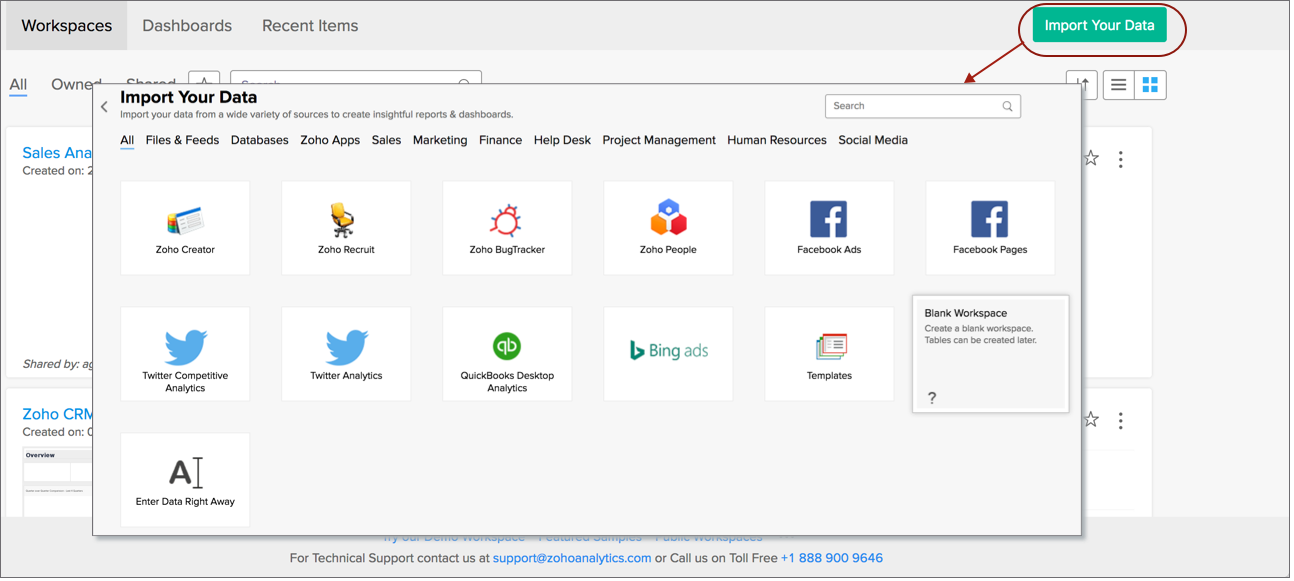
  2. In your Zoho Analytics Home page, click Import Your Data button.


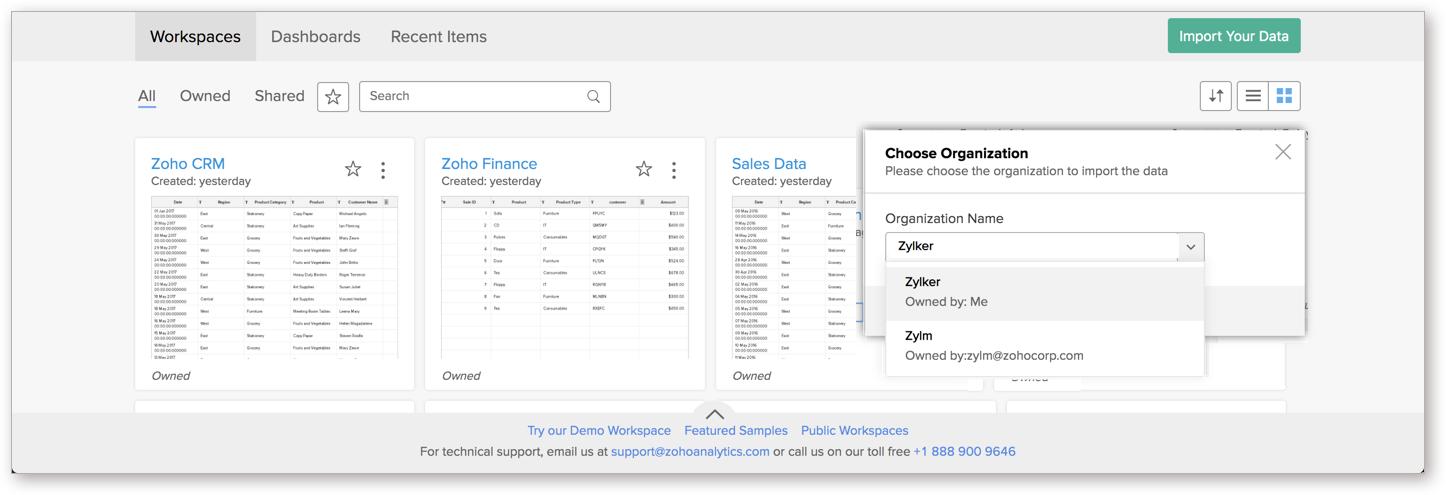
  3. If you are part of more than one account as an Account/Organization Administrator, you will be prompted to choose the Organization Name into which you want to import. In the Choose Organization dialog, select the desired Organization Name.


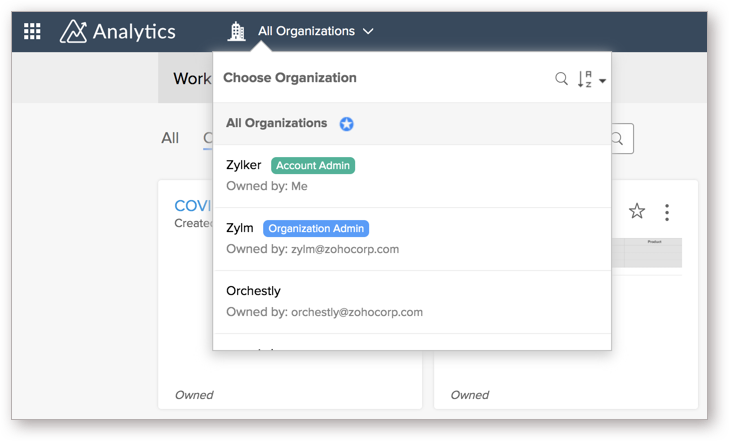
    Alternatively, you can also choose the Organization from the drop-down available at the top-left corner, before clicking Import Your Data button.
  4. Click OK.
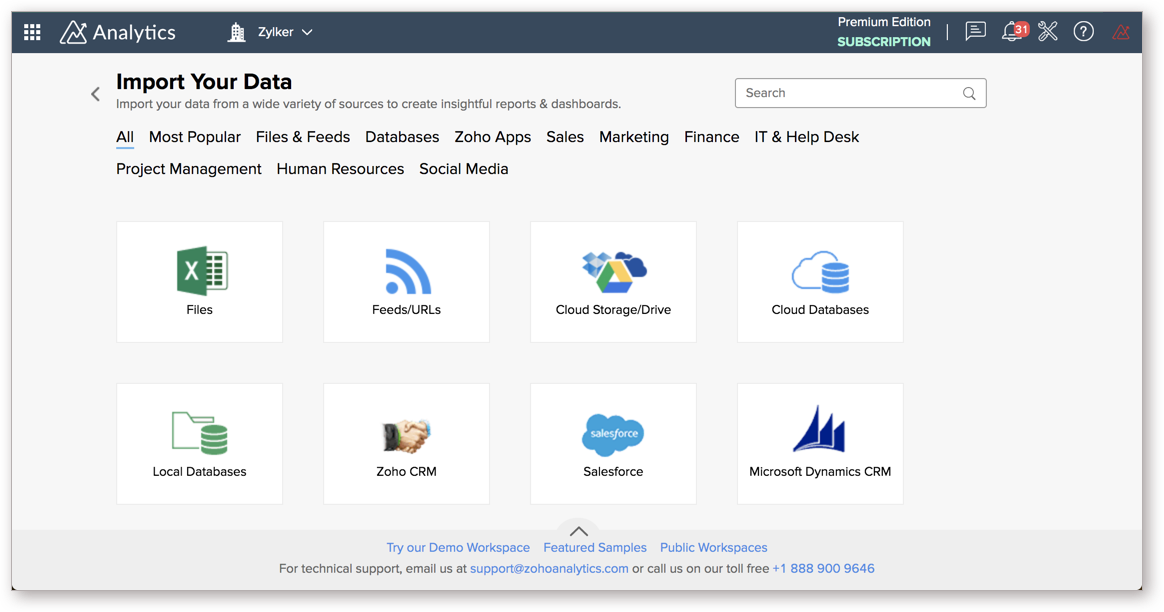
  5. You will be navigated to the Import Your Data page. From here, you can choose from a wide variety of data sources to import from. Refer to Import/Connect to Data help documentation section from more details on importing data.

  6. Once your import is complete, a workspace will be created on your Zoho Analytics account.

4. What are the options to create a Workspace?

Zoho Analytics provides the following options for creating Workspaces:

  • Blank Workspace
  • By importing data from 
    • Files
    • Feeds
    • Cloud Storage
    • Cloud Databases
    • Local Databases
    • Business Application
  • From Templates

5. How can I create a blank Workspace?

You can create a blank Workspace and then subsequently add your data/datasets as tables into it. 
Follow the below steps to create a blank Workspace.

  1. From the Home page, Import Data section, click on the Blank Workspace option.

     
  2. Provide a unique name for the Workspace name. This option is mandatory. You can also provide a Description to your workspace. 
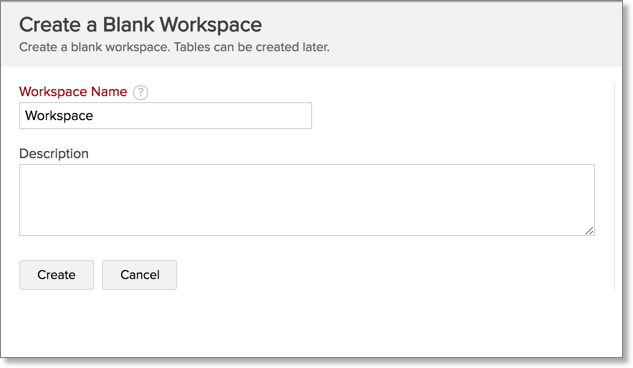

     
  3. Click Create to create the blank Workspace.
On successful creation, you will be taken inside the Workspace where you can add your data as tables and create reports.

6. How can I create a Workspace by importing data from Files & Feeds?

Often you already have data locally stored in tabular file formats like CSV, XLS/XLSX (Excel), XML, JSON and HTML files, which you would like to import into Zoho Analytics. In Zoho Analytics, you can easily import your data from such file formats using the Import from Files and Feed option and jump start your activities.

To create a Workspace by importing data follow this link to read more about creating a database using this import data option.

7. How can I create a Workspace by importing from Cloud Storage?

You can also create a Workspace by importing data from cloud storage like Zoho Docs, Google Drive, Dropbox, Box and OneDrive using the Import from Cloud Storage option. 

Follow this link to read more about creating a Workspace using this import data option.

8. How can I create a Workspace by importing data from Local Databases?

In case you maintain your data in databases such as MS Access, Microsoft SQL Server, Oracle, MySQL, Sybase, PostgreSQL SQLite, DB2, DB2 AS/400, and other applications behind firewall then you could synchronize data from your databases into Zoho Analytics Workspace using our Upload Tool.

Zoho Analytics Upload Tool is a downloadable standalone utility, that enables you to pull data from application databases behind firewall to upload the same into Zoho Analytics Workspace.

The Upload Tool also allows you to automate the import process at scheduled intervals. With this your Workspace will be updated with latest data without manual intervention and thus keeps your reports and dashboards latest for better analysis.

To know how to fetch data from your database using Upload Tool, refer to the Import from Local Databases section.

9. How can I create a Workspace by importing Data from Cloud Databases?

Zoho Analytics allows you to import the data stored in different Cloud databases such as Amazon RDS, Amazon Redshift and Microsoft SQL Azure for advanced reporting & analysis. 

You can easily setup data import from the cloud databases using the simple setup wizard. It is very simple and does not require any software to be installed. You can completely manage the import process from the Zoho Analytics web interface itself. Click to learn more

 10. How can I create a Workspace by importing Data from Business Application?

Zoho Analytics offers integration with various Business applications. You can import data from a wide range of popular business applications like Salesforce CRM, Google Analytics, Google Adwords, Zoho CRM, Zoho Projects etc.

The powerful reporting tool of Zoho Analytics allows you to create dynamic reports and dashboards for easy and effective analysis. You can also benefit from the default reports created by Zoho Analytics on data import for easier and faster consumption of data. Click here to know more

 11. How can I create a Workspace from Templates?

Zoho Analytics offers a useful set of business relevant templates which you can use to easily create your Workspace. Follow the steps given below to create a Workspace from template.

  1. Click Template from Import Data section.
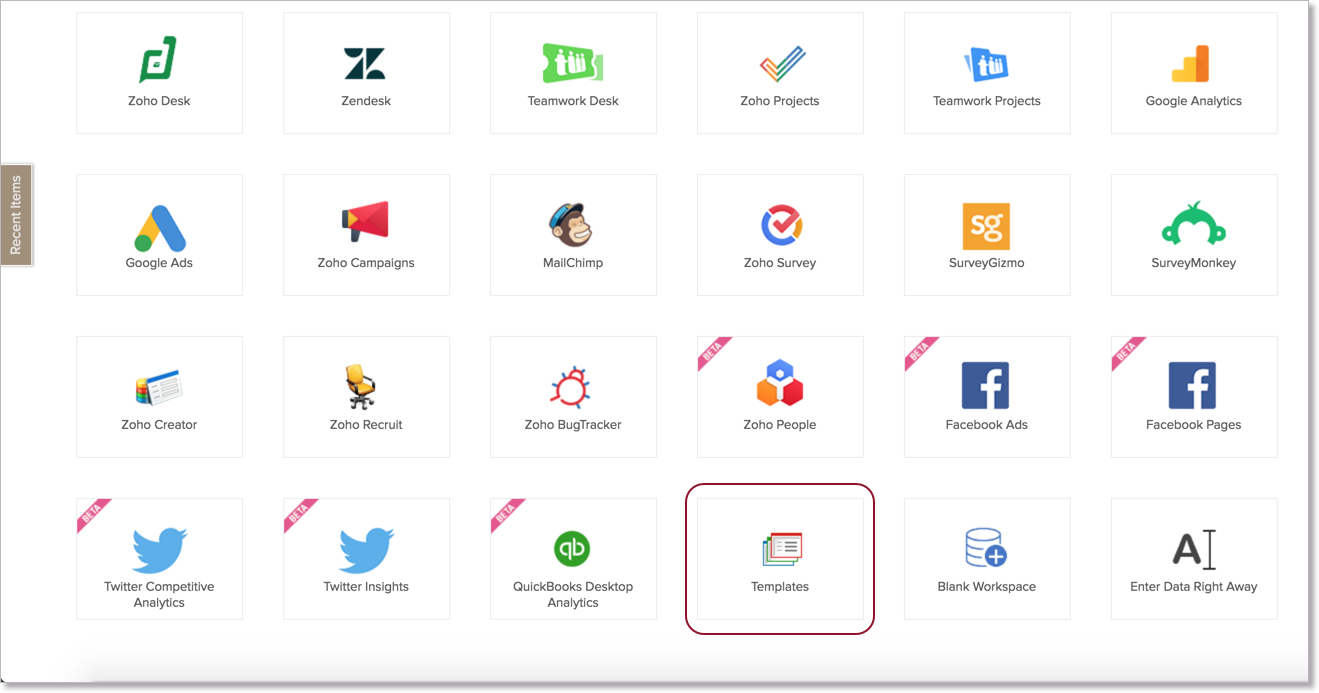

     
  2. Provide the Workspace name (mandatory and should be unique).
  3. Select the template to be used from the list provided under Templates
  4. If you would like to create the Workspace with sample data (dummy data rows) then, check the option Populate with Sample Data.
  5. Click Create to create the Workspace.

On successful creation, you will be taken inside the database where you will see a list of tables and reports created by default for the template that you had chosen. The database will contain some sample data if you had checked the option Populate with Sample Data in the database creation step.

Zoho Analytics provides the following templates:

  • Google Adword Campaign Performance Analysis template - Analyze the performance of your Google Adword Campaigns with detailed reports & dashboards.
  • Google Adwords Ad Groups Performance Analysis template - Analyze the performance of your Google Adwords Campaigns at the Ad Groups level.
  • Project Manager Template - Manage your projects and track the tasks in it with detailed reporting.
  • Issue Manager Template - Collect, Assign and Track issues/bugs in your development projects with detailed reporting.

12. Can I customise Workspace settings?

Zoho Analytics allows you to specify a set of preferences for your Workspace which will be applied across the view in the Workspace. To learn more about these settings, refer to the Workspace section.


        Create. Review. Publish.

        Write, edit, collaborate on, and publish documents to different content management platforms.

        Get Started Now


          Access your files securely from anywhere

            Zoho CRM Training Programs

            Learn how to use the best tools for sales force automation and better customer engagement from Zoho's implementation specialists.

            Zoho CRM Training
              Redefine the way you work
              with Zoho Workplace

                Zoho DataPrep Personalized Demo

                If you'd like a personalized walk-through of our data preparation tool, please request a demo and we'll be happy to show you how to get the best out of Zoho DataPrep.

                Zoho CRM Training

                  Create, share, and deliver

                  beautiful slides from anywhere.

                  Get Started Now


                    Zoho Sign now offers specialized one-on-one training for both administrators and developers.

                    BOOK A SESSION


                                Quick LinksWorkflow AutomationData Collection
                                Web FormsEnterpriseOnline Data Collection Tool
                                Embeddable FormsBankingBegin Data Collection
                                Interactive FormsWorkplaceData Collection App
                                CRM FormsCustomer ServiceAccessible Forms
                                Digital FormsMarketingForms for Small Business
                                HTML FormsEducationForms for Enterprise
                                Contact FormsE-commerceForms for any business
                                Lead Generation FormsHealthcareForms for Startups
                                Wordpress FormsCustomer onboardingForms for Small Business
                                No Code FormsConstructionRSVP tool for holidays
                                Free FormsTravelFeatures for Order Forms
                                Prefill FormsNon-Profit

                                Intake FormsLegal
                                Mobile App
                                Form DesignerHR
                                Mobile Forms
                                Card FormsFoodOffline Forms
                                Assign FormsPhotographyMobile Forms Features
                                Translate FormsReal EstateKiosk in Mobile Forms
                                Electronic Forms
                                Drag & drop form builder

                                Notification Emails for FormsAlternativesSecurity & Compliance
                                Holiday FormsGoogle Forms alternative GDPR
                                Form to PDFJotform alternativeHIPAA Forms
                                Email FormsFormstack alternativeEncrypted Forms

                                Wufoo alternativeSecure Forms

                                TypeformWCAG


                                    All-in-one knowledge management and training platform for your employees and customers.

                                              Create. Review. Publish.

                                              Write, edit, collaborate on, and publish documents to different content management platforms.

                                              Get Started Now


                                                                You are currently viewing the help pages of Qntrl’s earlier version. Click here to view our latest version—Qntrl 3.0's help articles.


                                                                    Manage your brands on social media


                                                                      • Desk Community Learning Series


                                                                      • Digest


                                                                      • Functions


                                                                      • Meetups


                                                                      • Kbase


                                                                      • Resources


                                                                      • Glossary


                                                                      • Desk Marketplace


                                                                      • MVP Corner


                                                                      • Word of the Day


                                                                      • Ask the Experts


                                                                        Zoho Sheet Resources


                                                                            Zoho Forms Resources


                                                                              Secure your business
                                                                              communication with Zoho Mail


                                                                              Mail on the move with
                                                                              Zoho Mail mobile application

                                                                                Stay on top of your schedule
                                                                                at all times


                                                                                Carry your calendar with you
                                                                                Anytime, anywhere


                                                                                      Zoho Sign Resources

                                                                                        Sign, Paperless!

                                                                                        Sign and send business documents on the go!

                                                                                        Get Started Now


                                                                                                Zoho TeamInbox Resources


                                                                                                          Zoho DataPrep Demo

                                                                                                          Get a personalized demo or POC

                                                                                                          REGISTER NOW


                                                                                                            Design. Discuss. Deliver.

                                                                                                            Create visually engaging stories with Zoho Show.

                                                                                                            Get Started Now


                                                                                                                                • Related Articles

                                                                                                                                • Workspace Settings

                                                                                                                                  Zoho Analytics allows you to specify a set of preferences for your Workspaces such as setting the beginning of your fiscal year, set chart color or grid theme across the reports and manage users, data alerts and slideshows. This section briefs you on ...
                                                                                                                                • Introduction to Workspace

                                                                                                                                  Workspaces are where you create and manage all your views for reporting and analysis. This allows you to logically group your data sets (stored in entities called Tables) and create insightful reports and Dashboard over your data. Further, it ...
                                                                                                                                • Creating a New Table

                                                                                                                                  Zoho Analytics provides different options to create a table to store your tabular data. As already discussed, once you create a workspace you can create any number of tables within it. When you create a table in a workspace using any of the options ...
                                                                                                                                • Creating A Summary View

                                                                                                                                  Creating A Summary View Creating a Summary view Applying Filters Creating User Filters A Summary View allows you to dynamically summarize large amounts of data for easy analysis and visualization. You can transform data in table(s) into interactive ...
                                                                                                                                • Creating a New Chart

                                                                                                                                  Zoho Analytics provides an easy to use drag and drop interface to create charts fast & easy. You can create various types of charts including Bar, Line, Pie, Bubble, Packed Bubble, Stacked, Scatter, Area, Combination, Funnel, Web etc., by simply ...
                                                                                                                                  Wherever you are is as good as
                                                                                                                                  your workplace

                                                                                                                                    Resources

                                                                                                                                    Videos

                                                                                                                                    Watch comprehensive videos on features and other important topics that will help you master Zoho CRM.


                                                                                                                                    eBooks

                                                                                                                                    Download free eBooks and access a range of topics to get deeper insight on successfully using Zoho CRM.


                                                                                                                                    Webinars

                                                                                                                                    Sign up for our webinars and learn the Zoho CRM basics, from customization to sales force automation and more.


                                                                                                                                    CRM Tips

                                                                                                                                    Make the most of Zoho CRM with these useful tips.


                                                                                                                                      Zoho Show Resources