YouTube for Zoho Desk
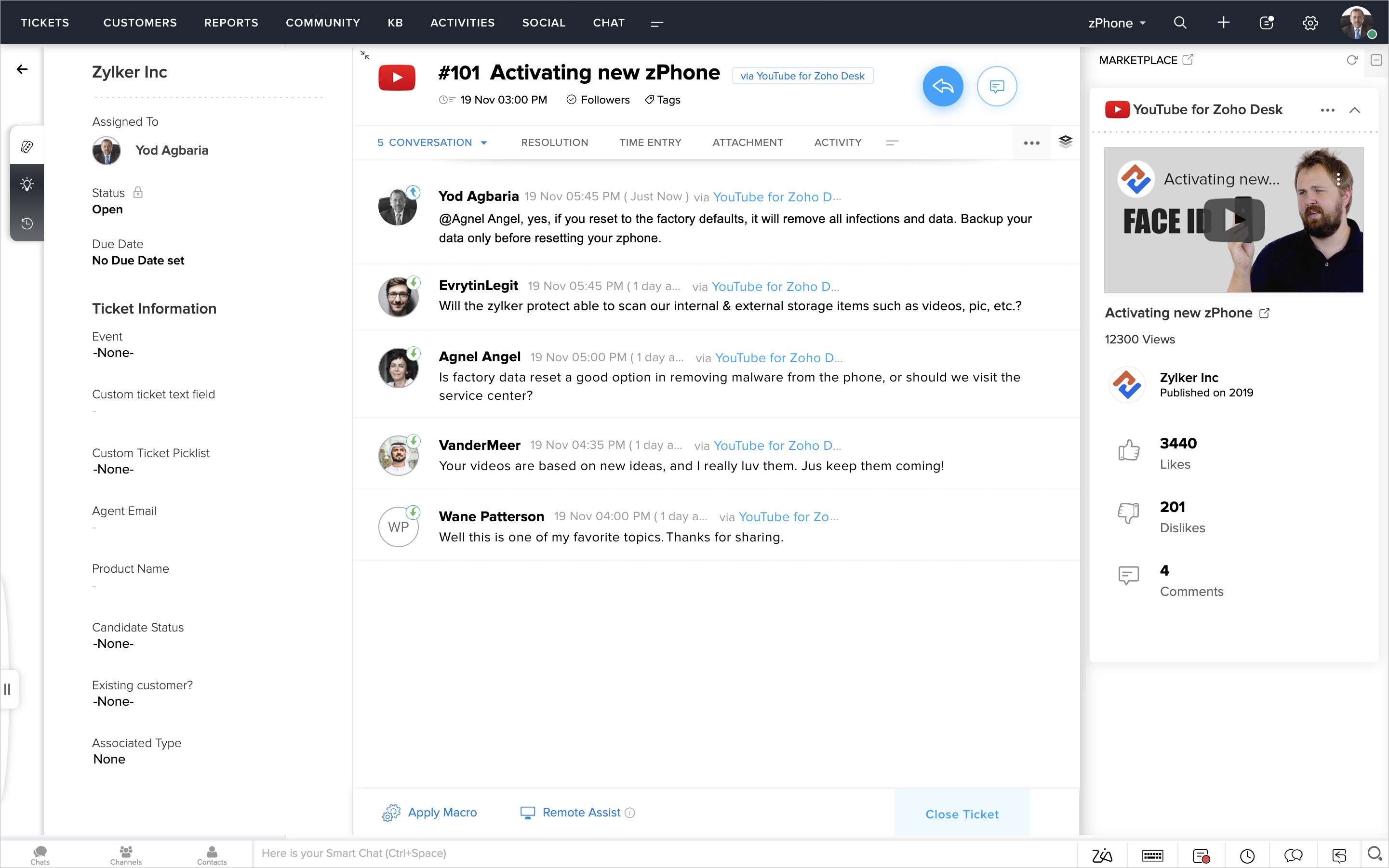
YouTube comments are a fantastic engagement point that can tell how your audience feels about your videos. By replying to them—positive or negative—you give your commenters value when they take the time to say something, especially if they're giving you kudos. It's also an excellent way to foster further engagement and grow your community. But switching between too many tools can be counterproductive, causing you actually to lose focus on the task at hand. Keeping track of comment threads across all your videos would get overwhelming quickly.
The YouTube for Zoho Desk extension aims to keep your focus on customers by allowing you to manage YouTube comments inside Zoho Desk. You can create tickets for YouTube videos to track their comments and reply to them just like you would for regular tickets. Your ticket replies get added as replies to the video on the YouTube channel.
Notes:
- The extension is capable of adding 100 YouTube comments to a ticket every 4 minutes.
- The extension can work with only one YouTube channel at a time.
- A video's description will be added as the description of its corresponding ticket.
- Due to technical constraints:
- Video comments will not create individual tickets.
- Replies to video comments will not be nested beneath that of the original poster.
- Mentions will not work and will not actually notify anyone on YouTube.
Key Features
- Send video comments to the relevant team by mapping departments within Zoho Desk to the related videos on a YouTube channel.
- Track all comments of a particular video on a single ticket
- Agents can reply to the comments by adding a reply in Zoho Desk
- Since Zoho Desk connects to YouTube as a ticket channel, you will be able to resolve tickets by taking advantage of Zoho Desk's views, workflows, and macros
Installing the Extension
To install the extension:
- Log in to your Zoho Desk account with Administrator privileges.
- Click the Setup icon (
) > Integrations > Marketplace.
- Search for 'YouTube' in the search bar on the right-hand side of the screen.
- Select the YouTube for Zoho Desk extension and click Install.
- Click Install on the Confirm Installation window.
You will land on the General Settings page. - On the General Settings page, do the following:
- Select the department where you would like to create tickets from video comments.
- Select the channel type or enter a new channel that represents such tickets.
Note: Entering a new channel name will automatically add it to the Channel field. - Specify the profiles whose agents can access this extension.
- Agree to the Terms of Use.
- Click Install.
- Click Authorize in the pop-up window to activate the extension.
- Click Accept to allow Zoho Workflow to access data in your Zoho Desk account.
- Click Authorize again in the pop-up window to authorize your YouTube account to be used within Zoho Desk.
You will land on the Preference page. - On the Preference page, do the following:
- Enter the YouTube Channel ID whose videos will be added here and then click Add.
This will open the container to add target videos from the channel. - Select the videos whose comments you would like to capture on tickets.
- Select the department where you would like to create the tickets.
Note: You can add up to 10 videos per department. Each video will have its corresponding ticket created in the department. - Click Update.
- Voila! You are now ready to track the video comments on tickets.
You can click Add Video to track comments from other videos in a different department.
Tracking Video Comments
You will begin to receive new comments from videos on their corresponding tickets in your help desk. Each comment will be added as an individual conversation. You can click the Reply icon on the ticket to leave a reply to a comment on the YouTube video. Meanwhile, here's how a ticket created from a video will look like:
Uninstalling the Extension
You can uninstall the YouTube for Zoho Desk extension at any time. Once uninstalled, your agents cannot track videos comments from inside Zoho Desk.
To uninstall the extension:
- Go to Setup > Integrations > Marketplace.
- In the Marketplace page, select the Installed Extensions tab.
- Choose YouTube for Zoho Desk from the list of extensions.
- Click the More Actions icon (
) at the upper-right corner of the YouTube for Zoho Desk extension setup page.
- Select Uninstall Extension.
- Click Confirm to uninstall the extension.