How to use Audit Logs
An audit log is a record of activities and changes taking place within your organization. Devices across your network create logs based on activities. Audit logs bring these together to give you a clear view of what’s happening. They typically track a sequence of actions or a specific activity capturing details such as who performed an action, what activity was performed, and how the system responded.
Zoho Campaigns allows you to export these audit logs to save them as a backup. By default, audit log data is available for up to six months. Because of this limited retention period, it’s a good idea to export your logs periodically and maintain a backup for future reference.
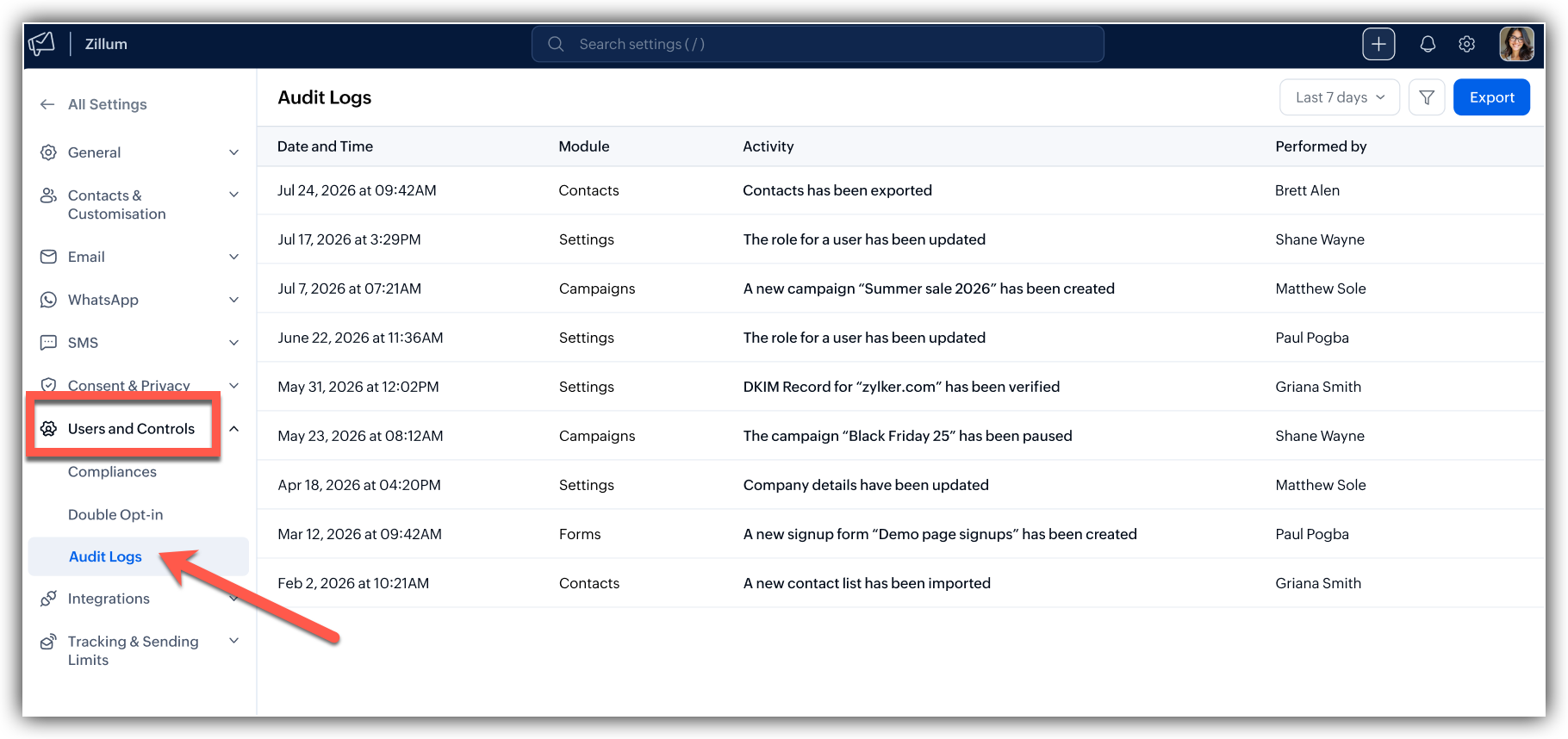 To view audit logs
Click the Settings icon in the top-right corner of the screen,
Click Audit logs under Consent and privacy.
The audit logs will be displayed based on the most recent activity.
If you're looking for older logs and don't find them listed, you can use the timeline drop down to choose an appropriate timeline.
By default, only 10 logs are displayed per page, but you can adjust this setting to view up to a maximum of 200 logs per page.
To export audit logs:
Click the Settings icon on the top-right corner of the screen.
Click Audit logs under Consent and Privacy.
Click the Export button in the top-right corner of the page.
In the popup that follows, choose how you want to export the logs.
Enter a name for the export file.
Enable password protection if required.
Select the preferred file format.
Click Export button to complete the export