Integrate with Video Hosting Platforms
Wistia
Features
- Import videos from Wistia into Zoho Campaigns.
- Embed videos in campaigns using video tags.
- Add videos as components in email campaigns.
- View video engagement reports in Wistia.
- Manage connected account details from the integration dashboard.
Prerequisites
- You must have an active Wistia account. If you have multiple accounts, only one account can be selected for integration.
- Only users with Administrator permission in both Wistia and Zoho Campaigns can setup the sync.
- You must have at least one video created in your Wistia account.
Integrate with Wistia 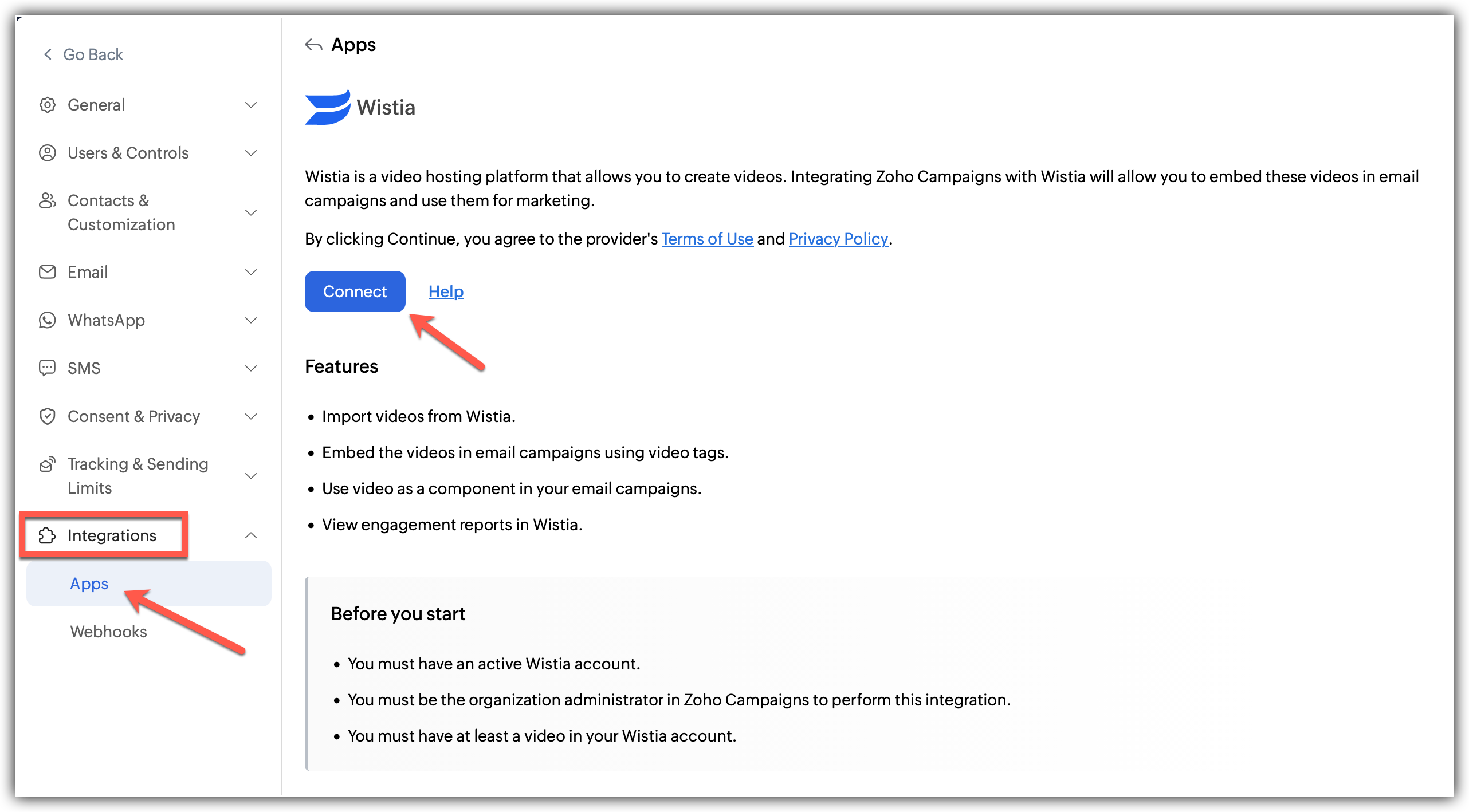
Click Settings icon on the top-right corner of the screen.
Choose Apps under Integration.
Select Wistia under Marketing Apps and click Connect
Log into your Wistia account in the new page that opens
Once you are logged in, your Wistia account will now be automatically synced with Zoho Campaigns.
What happens if I deny my Wistia account integration?
If you deny/change Wistia integration,
You cannot sync further videos from Wistia
You won't be able to use the videos in your email campaigns.
Denying access to Wistia
Follow the steps given below to disconnect your Wistia account.
Click the Settings icon in the top-right corner.
Click Apps under Integrations.
Select Wistia under Connected Apps.
Click the Disconnect option after clicking the three dots in the right.
A pop appears informing about the effect of disconnecting.
Click Proceed.