advanced email strategies
Where can you validate a coupon code and view its details?
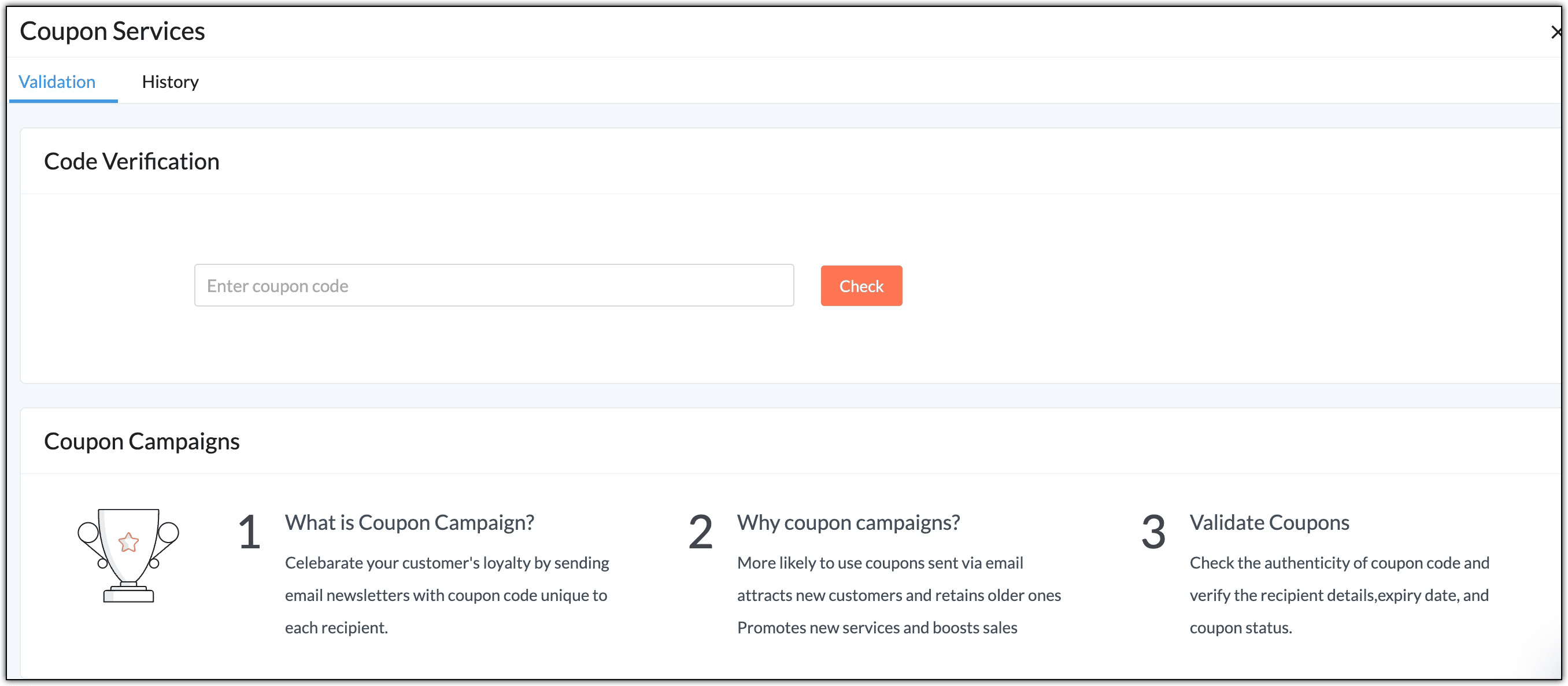
From the navigation toolbar, click Campaigns > Email Campaigns > Coupon Services icon in the top-right corner. You’ll be sent to the Coupon Services page; enter the coupon code and click Check to view the coupon information.

Note
- The "Coupon Expiration Date" is entered at the very beginning of the setup process, along with the Coupon Prefix.
- Use $[CT:COUPONCODE]$ to generate and display the coupon code.
What is the difference between a chain campaign and a child campaign?
Chain Campaign: A chain campaign lets you retarget recipients of previously sent campaigns based on their actions, such as opens or unopens. Unlike a single follow-up, chain campaigns allow you to set up to five campaigns in sequence to maximize engagement and results.
Child Campaign: A child campaign allows you to send a new campaign to recipients based on their actions in the parent campaign. Unlike chain campaigns, child campaigns aren’t sequential; they are triggered as a single follow-up email. You can also create a child campaign for another child campaign. In Zoho Campaigns, a child campaign is always marked with a follow-up symbol.
Can you send RSS campaigns to existing items?
No. You need to create a new campaign because RSS campaigns trigger only when the new feed is updated.
Note
- We provide a set of predefined merge tags for RSS campaigns to customize the blog title, link, date, description, author, image, and RSS items.
- If the feed contains images, you can add an image component with a merge tag, so that whenever the RSS feed is published, all of the images will be reflected accordingly in the feed URL.
I am unable to select a few of my events in EventBrite while creating an advanced campaign. Why?
Only public events in EventBrite will be displayed during the advanced campaign creation process. Private events will not be displayed in your Campaigns account. To create an Eventbrite Campaign,
Create an Eventbrite campaign
As soon as you connect Eventbrite and Zoho Campaigns, you can easily select any of your events to be added to your campaigns. Once the authorization of account is complete, you can proceed with creating an event-based campaign.
To create an Eventbrite campaign:
- From the Navigation toolbar, choose Campaigns and select Advanced Campaigns.
- Click Create Campaign in the top-right corner of the screen.
- Hover over the Eventbrite category and click Create New.
- Fill out the following information on the Basic Info page:
- Name
- Sender Details
- Subject Line
- Event
- Select one of our specially designed Eventbrite templates for sending an invite to your mailing list.
- Select a mailing list or segment to receive your campaign, then click Proceed.
- The Eventbrite campaign will be sent for review. Once the review is complete, you'll be able to send the campaign.
How can I view the updated survey reports in Zoho Campaigns?
To view the updated reports:
- From the navigation toolbar, choose Reports and select Sent Campaigns.
- Select a survey campaign.
- Switch to the Survey Reports tab.
- Click Refresh to update the survey reports.
I am trying to send a survey through Zoho Campaigns but it says that none exist. Why?
Check to see whether the surveys have been published in Zoho Survey. You can only use surveys that have been published in your Zoho Survey account.
Will I be able to view survey reports in Zoho Campaigns if I deny the SurveyMonkey integration?
No, if you do not integrate with SurveyMonkey, you cannot view the survey reports in Zoho Campaigns. To get the survey reports updated, it is mandatory to integrate the SurveyMonkey account with your Zoho Campaigns account.
Why can't I view any SurveyMonkey-related surveys in my Zoho Campaigns account?
There are two reasons this issue may occur:
1. If you’ve integrated with one SurveyMonkey account and created a survey in another SurveyMonkey account, check the integration and re-integrate using the SurveyMonkey account with the surveys you want to send.
2. Surveys must be created in your SurveyMonkey account before proceeding to add them to your campaigns.
Are merge tags mandatory in survey templates?
No, merge tags aren't mandatory in survey templates because we’ve embedded survey links inside the survey templates. However, if you are using a general template, you'll need to include merge tags so your survey links are visible in the template.
Where can I find the e-commerce stats in my Shopify account?
You can view the e-commerce stats in the Reports section of your account.
Note:
- Only paid users can view e-commerce stats in their Shopify account.
What if I already have a track code in the order processing script?
You can paste the Shopify track code alongside other codes in the same script box. This will not impact reports generated by respective code-related websites.
Where can I view the coupon campaigns, exclusively?
Follow these steps to view coupon campaigns:
- From the navigation toolbar, choose Campaigns and select Advanced Campaigns.
- Click the Coupon Services icon in the top-right corner. You will be sent to the Coupon Services page.
- Select History tab.
Where can I validate a coupon code?
To validate a coupon and view details:
From the navigation toolbar, click Campaigns and select Email Campaigns.
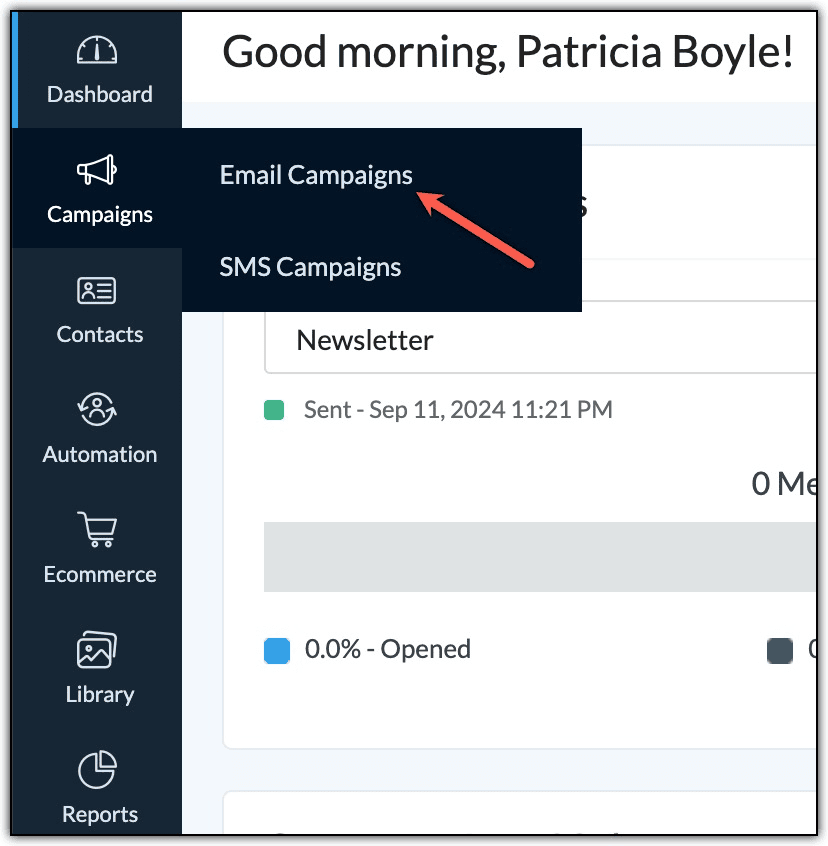
Click the Coupon Services icon in the top-right corner. You will be sent to the Coupon Services page.

Enter the coupon code, and click Check to view the coupon information.
I got an error message that says, "No live events are present in your configured Eventbrite account." - What does this mean?
Please check Eventbrite to see if the event is public or private. If it’s private, change it to public and create an Eventbrite campaign in Zoho Campaigns.
Can I promote an event using Zoho Campaigns?
Yes. If you have created the event in your Eventbrite account, you can use our Eventbrite integration with Zoho Campaigns and send the Eventbrite campaign to your recipient list within minutes.
Note:
- This only works if you publish your event using your Eventbrite account.