Personalize your email - Online Help | Zoho Campaigns

Personalize your email

Personalize your email campaigns to give customers relevant and individualised attention. Email personalization will most likely get your campaigns opened and links clicked. Read on to know the various ways you can personalize your email campaigns.

Email Subject line

Personalize your subject -- the easiest shortcut to grab your contacts' attention when they see the email in their inbox. Our easy-to-use merge tags help tailoring the subject to the audience.

Using Emoji in email subject line

This allows you to grab the attention of your contacts by using emojis in your subject lines. It is an effective technique to increase your email open rates and get more contacts engagement. All you've got to do is click the Emoji icon next to the subject text box in the campaign creation flow and select the Emoji you want to use in your subject line.

Using first name in subject line

Use your customer's first name by inserting a merge tag like this,

"Hey $[FNAME|Jin]$, Your Weekly Updates" would look like "Hey Jin, Your Weekly Updates".

It is always suggested to use a standard subject rather than adding only merge tags in the subject line. For example, if you want to send an email to a recipient about an order delivery, then it should look like

Hi $[FNAME]$, Your Shipment is Delivered rather than   $[FNAME]$.
Here are a few tips:
  • Make your subject line crisp and to the point.
  • Set a default value in the merge tags. That will act as a replacement if your customers' first names are not updated in the contact list.
  • You can also use the last name in subject merge tags.
  • Avoid using an email address within the subject line.

Sender Name

Sender Name should always be a recognizable name for the contacts. It is preferable to give your company or brand name in this field.
Note :
  1. Avoid using your personal name.
  2. Never use an email address in your sender name field.

Personalize your recipients

Add your recipients' name, address, and other details by using merge tags. Merge Tags are smart tags that pull recipient specific data directly from your mailing list into your email message. You can also add merge-tags to the subject and/or the content.

Adding Merge Tags to personalize your content

  1. Click the intended merge tag.
  2. Copy the merge tag related to the first name, last name, or email address.
  3. Paste the tag in an appropriate place in the content. (For example, if you want to replace address the recipient by his first name, copy the related merge tag ""$[FNAME]$"" and paste at the right place in the content.
  4. Click Save & Close.
Note
  • If you plan to import your campaign, copy and paste relevant merge tags in your HTML.
  • If you select HTML editor/Text editor, copy and paste relevant tags corresponding to their position within your content.

Personalize sender details using dynamic data

You can personalize your sender details such as from name and email address using custom fields and merge tags. This means a contact will receive the email campaign with the marketers' name and email address rather than a general email address like sales@zylker.com. It's easy to personalize the sender details if you've the contact details such as salesperson/marketers' name and email address in the mailing list.
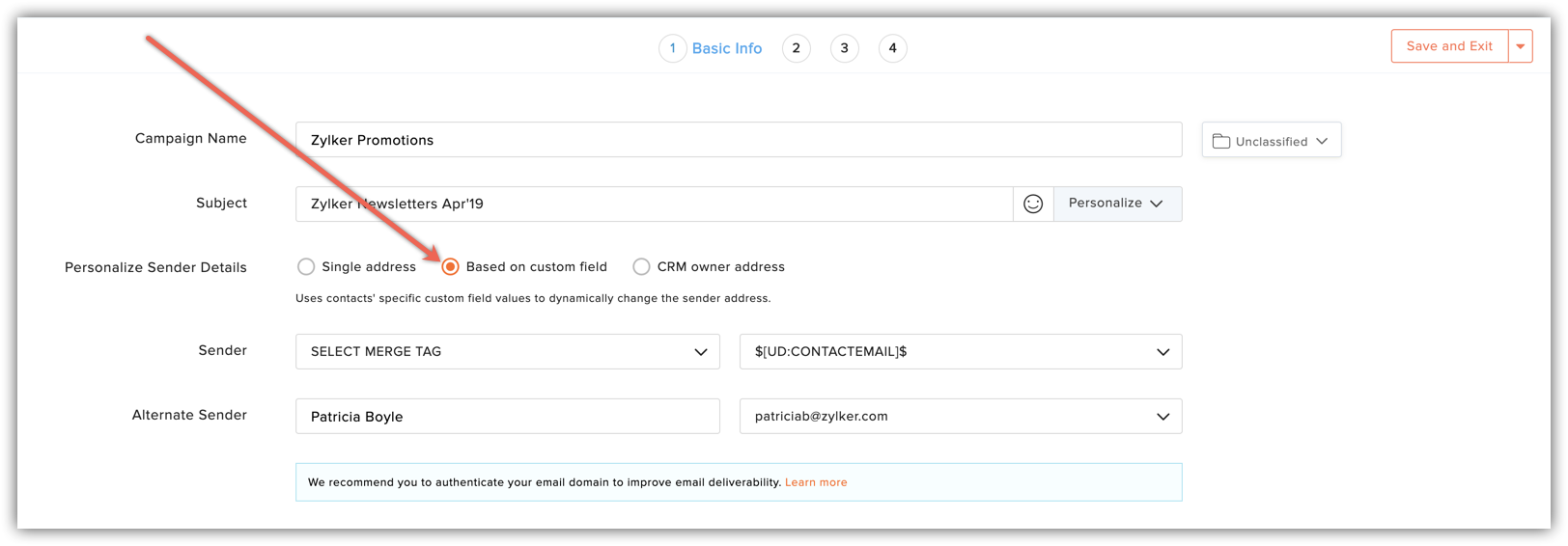
dynamic personalization
Before you personalize your sender details, you must add custom fields and create corresponding merge tags for sender name and sender address.

Add custom field

To add custom fields that you can use for sender name and email address,
  1. From Navigation toolbar, choose Settings and select Custom Fields.
  2. Click Add New and select Contact Field from top-right corner of the screen.
  3. To add custom field for sender name, select field type as Text and give a name define the field length.
    custom fields
  4. To add custom field for sender address, select field type as Email Address and give a name.
    custom fields
  5. Click Add.
The custom fields are added successfully and now you'll create the corresponding merge tags for the newly added custom fields. You’ll select these merge tags while personalizing the sender details.

Create merge tag

  1. From Navigation toolbar, choose Settings and select Merge Tags.
  2. Click Create  and select Contact Custom Tag from top-right corner of the screen.
  3. This will prompt a new window.
  4. In this window, do the following: 
  5. Contact custom field - Select the field that you created for sender name and sender address. 

  6. Merge tag – This is a tag replaced by the data from your contact details. You can have merge tags as $[UD:ACCOUNTMANAGER]$ for sender name and $[UD:AMEMAILADDRESS]$ for sender address.

Personalize sender details using Zoho CRM Data

Using Zoho Campaigns, you can send an email campaign with a personalized sender name and email address of a Contact/Lead owner who is associated with that record in CRM.
What is alternate sender name and sender email?
If the Contact/Lead owner's name/email address is not present in Zoho CRM, then you can add value in Alternate sender name and email which will be used to send the campaign. 
Note: To avail this enhancement, the user must have integrated Zoho Campaigns with their Zoho CRM account and have at least one active sync running.

Using Zoho CRM data to personalize the content

You can also use CRM based merge tags, which automatically pull information from your CRM account. All you need to do is add relevant merge tags in your campaign content. The merge tags pull specific data from CRM based on how the information is requested within the email content.
zoho CRM persnalization
This means you need to be cautious in placing the merge tags in an appropriate way.  If a record field has missing data, you can provide a default value to replace the missing information in email content. For instance, if the merge tag for account manager's name is $[CRM:CONTACTOWNER]$, you can add a default value and social default value similar to this $[CRM:CONTACTOWNER | Patricia Boyle | Patricia]$.

      Create. Review. Publish.

      Write, edit, collaborate on, and publish documents to different content management platforms.

      Get Started Now


        Access your files securely from anywhere

          Zoho CRM Training Programs

          Learn how to use the best tools for sales force automation and better customer engagement from Zoho's implementation specialists.

          Zoho CRM Training
            Redefine the way you work
            with Zoho Workplace

              Zoho DataPrep Personalized Demo

              If you'd like a personalized walk-through of our data preparation tool, please request a demo and we'll be happy to show you how to get the best out of Zoho DataPrep.

              Zoho CRM Training

                Create, share, and deliver

                beautiful slides from anywhere.

                Get Started Now


                  Zoho Sign now offers specialized one-on-one training for both administrators and developers.

                  BOOK A SESSION


                              Quick LinksWorkflow AutomationData Collection
                              Web FormsEnterpriseOnline Data Collection Tool
                              Embeddable FormsBankingBegin Data Collection
                              Interactive FormsWorkplaceData Collection App
                              CRM FormsCustomer ServiceAccessible Forms
                              Digital FormsMarketingForms for Small Business
                              HTML FormsEducationForms for Enterprise
                              Contact FormsE-commerceForms for any business
                              Lead Generation FormsHealthcareForms for Startups
                              Wordpress FormsCustomer onboardingForms for Small Business
                              No Code FormsConstructionRSVP tool for holidays
                              Free FormsTravelFeatures for Order Forms
                              Prefill FormsNon-Profit

                              Intake FormsLegal
                              Mobile App
                              Form DesignerHR
                              Mobile Forms
                              Card FormsFoodOffline Forms
                              Assign FormsPhotographyMobile Forms Features
                              Translate FormsReal EstateKiosk in Mobile Forms
                              Electronic Forms
                              Drag & drop form builder

                              Notification Emails for FormsAlternativesSecurity & Compliance
                              Holiday FormsGoogle Forms alternative GDPR
                              Form to PDFJotform alternativeHIPAA Forms
                              Email FormsFormstack alternativeEncrypted Forms

                              Wufoo alternativeSecure Forms

                              TypeformWCAG

                                All-in-one knowledge management and training platform for your employees and customers.

                                          Create. Review. Publish.

                                          Write, edit, collaborate on, and publish documents to different content management platforms.

                                          Get Started Now


                                                            You are currently viewing the help pages of Qntrl’s earlier version. Click here to view our latest version—Qntrl 3.0's help articles.


                                                                Manage your brands on social media


                                                                  • Desk Community Learning Series


                                                                  • Digest


                                                                  • Functions


                                                                  • Meetups


                                                                  • Kbase


                                                                  • Resources


                                                                  • Glossary


                                                                  • Desk Marketplace


                                                                  • MVP Corner


                                                                  • Word of the Day


                                                                  • Ask the Experts


                                                                    Zoho Sheet Resources


                                                                        Zoho Forms Resources


                                                                          Secure your business
                                                                          communication with Zoho Mail


                                                                          Mail on the move with
                                                                          Zoho Mail mobile application

                                                                            Stay on top of your schedule
                                                                            at all times


                                                                            Carry your calendar with you
                                                                            Anytime, anywhere


                                                                                  Zoho Sign Resources

                                                                                    Sign, Paperless!

                                                                                    Sign and send business documents on the go!

                                                                                    Get Started Now


                                                                                            Zoho TeamInbox Resources


                                                                                                      Zoho DataPrep Demo

                                                                                                      Get a personalized demo or POC

                                                                                                      REGISTER NOW


                                                                                                        Design. Discuss. Deliver.

                                                                                                        Create visually engaging stories with Zoho Show.

                                                                                                        Get Started Now


                                                                                                                            • Related Articles

                                                                                                                            • Key features of Zoho Campaigns

                                                                                                                              Zoho Campaigns is an email marketing tool that helps businesses communicate better with their customers. It allows you to create professional-looking email campaigns, send them to the right audience at the right time, and track how they interact with ...
                                                                                                                            • When will Zoho Campaigns suspend a campaign

                                                                                                                              At Zoho Campaigns, we are committed to offering a safe email experience for our users, which is why we built an efficient email infrastructure that wards off malicious emails with ease. We thoroughly scrutinize all the campaigns sent by users to ...
                                                                                                                            • When will Zoho Campaigns suspend an account

                                                                                                                              Zoho Campaigns has a broad spectrum of users, ranging from new businesses to seasoned players. We are committed to offering a safe and secure email experience for all our users, so our anti-spam team validates all signup requests we receive. If we ...
                                                                                                                            • Zoho Campaigns app for mobile

                                                                                                                              1. How do I delete the Zoho Campaigns account in an iOS device? You can delete your Zoho Campaigns account in iOS devices by following these steps: Open Settings in the Zoho Campaigns app. Scroll down and select Delete Account. Click Proceed. Click ...
                                                                                                                            • Migrating to Zoho Campaigns

                                                                                                                              Moving to a new email marketing platform is an exciting transition that promises better growth and conversions. However, the process of migration may be a daunting task for marketers as they will have to acclimatize to the UI, features, and ...
                                                                                                                              Wherever you are is as good as
                                                                                                                              your workplace

                                                                                                                                Resources

                                                                                                                                Videos

                                                                                                                                Watch comprehensive videos on features and other important topics that will help you master Zoho CRM.


                                                                                                                                eBooks

                                                                                                                                Download free eBooks and access a range of topics to get deeper insight on successfully using Zoho CRM.


                                                                                                                                Webinars

                                                                                                                                Sign up for our webinars and learn the Zoho CRM basics, from customization to sales force automation and more.


                                                                                                                                CRM Tips

                                                                                                                                Make the most of Zoho CRM with these useful tips.


                                                                                                                                  Zoho Show Resources