Understanding application themes

Understanding application themes

Notes
Note: This feature is currently in beta phase and is available through our Early Access program.
To use it, please go to Operations -> Early Access Features and enable the feature for your account.
Application themes in Zoho Creator let you customize the look and feel of your app, ensuring it aligns with your organization’s branding and design standards. A well-chosen theme gives your application a cohesive and professional appearance across devices, including browsers, phones, and tablets. Themes define key visual elements, such as color schemes, layouts, and navigation styles, helping your app maintain a consistent identity within your business ecosystem.

Why are themes important?
  1. Establish a cohesive brand identity:
    Themes allow you to match your application’s appearance with your organization’s branding: colors, typography, and style, ensuring every app reflects a unified visual language.
  2. Enhance usability and user engagement:
    A clean, well-organized interface improves navigation, making it easier for users to interact with the app and focus on their tasks without distraction.

Themes migration

To provide enhanced design flexibility and a better user experience, the existing application themes are being phased out gradually. Migrating to the new theme version is important to take advantage of improved customization features and ensure your applications remain modern and supported. The new themes are being rolled out progressively, and can be accessed directly within the application edit mode.
Notes
Note: You can try the new themes anytime by clicking Try New Themes while editing your application.

Theme versions

Old Version – This version has been in use for years and is being deprecated in phases.
New Version – Rolled out soon. You can access it by clicking Try New Themes in the application edit mode.
Identifying your version
To check whether you are using the new or old version, navigate to Themes in the application edit mode and look for the Try New Themes option. If available, you are currently on the old version and can switch to the new one.
Notes
Note: It is strongly recommended to update your application to the new themes for the latest design experience and continued feature support. Support for old themes will end soon, and no further updates or fixes will be provided.

Theme comparison across devices

Browser
Phone
Tablet
Browser
Navigation style:
1. Left bar navigation
2. Top & left bar navigation
3. Bottom bar navigation

Access to components
Sections and components displayed in separate panels.
Description
Best suited for desktop layouts, providing a structured view for easy navigation between sections.

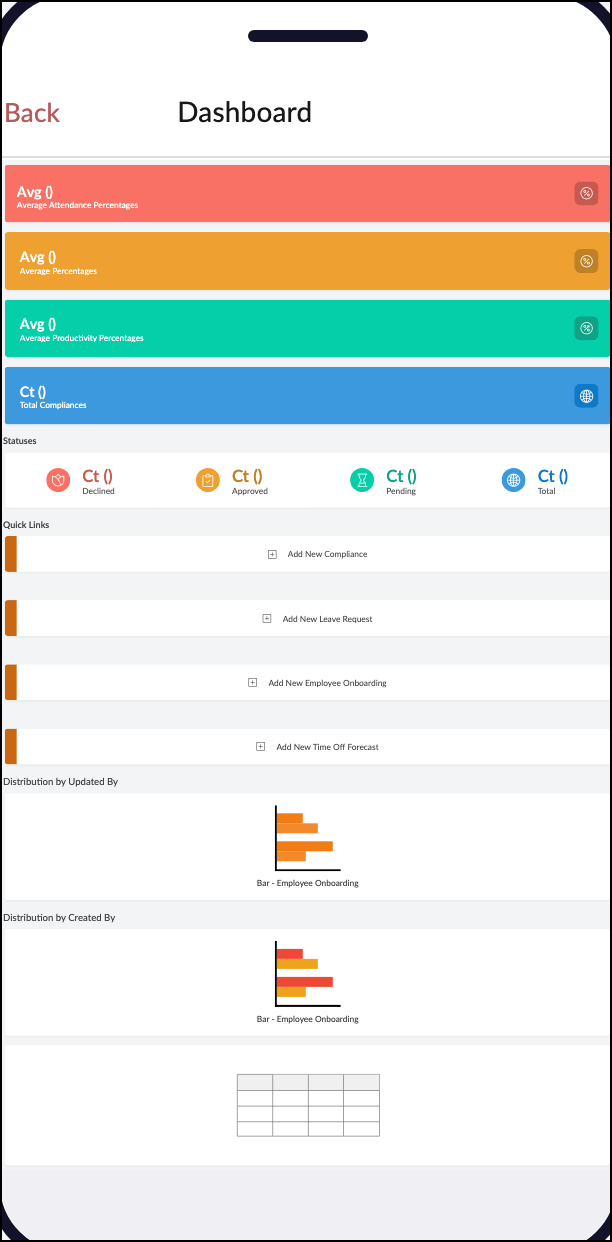
Phone
Navigation style
1. Linear Navigation
2. Hamburger Navigation
3. Bottom Bar Navigation

Access to components
Sections and components appear on demand via a slide-out menu.

Description
Optimized for small screens, allowing quick access to app sections while keeping the interface uncluttered.
Tablet
Navigation style
1. Linear Navigation

2. Hamburger Navigation
3. Bottom Bar Navigation

Access to components
Sections and components are accessed through the bottom icons.

Description
Ideal for wider screens, offering easy one-tap navigation with a focus on quick switching between sections.
  1. Set a theme for your application

      Create. Review. Publish.

      Write, edit, collaborate on, and publish documents to different content management platforms.

      Get Started Now


        Access your files securely from anywhere

          Zoho CRM Training Programs

          Learn how to use the best tools for sales force automation and better customer engagement from Zoho's implementation specialists.

          Zoho CRM Training
            Redefine the way you work
            with Zoho Workplace

              Zoho DataPrep Personalized Demo

              If you'd like a personalized walk-through of our data preparation tool, please request a demo and we'll be happy to show you how to get the best out of Zoho DataPrep.

              Zoho CRM Training

                Create, share, and deliver

                beautiful slides from anywhere.

                Get Started Now


                  Zoho Sign now offers specialized one-on-one training for both administrators and developers.

                  BOOK A SESSION


                              Quick LinksWorkflow AutomationData Collection
                              Web FormsEnterpriseOnline Data Collection Tool
                              Embeddable FormsBankingBegin Data Collection
                              Interactive FormsWorkplaceData Collection App
                              CRM FormsCustomer ServiceAccessible Forms
                              Digital FormsMarketingForms for Small Business
                              HTML FormsEducationForms for Enterprise
                              Contact FormsE-commerceForms for any business
                              Lead Generation FormsHealthcareForms for Startups
                              Wordpress FormsCustomer onboardingForms for Small Business
                              No Code FormsConstructionRSVP tool for holidays
                              Free FormsTravelFeatures for Order Forms
                              Prefill FormsNon-Profit

                              Intake FormsLegal
                              Mobile App
                              Form DesignerHR
                              Mobile Forms
                              Card FormsFoodOffline Forms
                              Assign FormsPhotographyMobile Forms Features
                              Translate FormsReal EstateKiosk in Mobile Forms
                              Electronic Forms
                              Drag & drop form builder

                              Notification Emails for FormsAlternativesSecurity & Compliance
                              Holiday FormsGoogle Forms alternative GDPR
                              Form to PDFJotform alternativeHIPAA Forms
                              Email FormsFormstack alternativeEncrypted Forms

                              Wufoo alternativeSecure Forms

                              TypeformWCAG

                                All-in-one knowledge management and training platform for your employees and customers.


                                            Create. Review. Publish.

                                            Write, edit, collaborate on, and publish documents to different content management platforms.

                                            Get Started Now


                                                              You are currently viewing the help pages of Qntrl’s earlier version. Click here to view our latest version—Qntrl 3.0's help articles.


                                                                  Manage your brands on social media


                                                                    • Desk Community Learning Series


                                                                    • Digest


                                                                    • Functions


                                                                    • Meetups


                                                                    • Kbase


                                                                    • Resources


                                                                    • Glossary


                                                                    • Desk Marketplace


                                                                    • MVP Corner


                                                                    • Word of the Day


                                                                    • Ask the Experts


                                                                      Zoho Sheet Resources


                                                                          Zoho Forms Resources


                                                                            Secure your business
                                                                            communication with Zoho Mail


                                                                            Mail on the move with
                                                                            Zoho Mail mobile application

                                                                              Stay on top of your schedule
                                                                              at all times


                                                                              Carry your calendar with you
                                                                              Anytime, anywhere


                                                                                    Zoho Sign Resources

                                                                                      Sign, Paperless!

                                                                                      Sign and send business documents on the go!

                                                                                      Get Started Now


                                                                                              Zoho TeamInbox Resources


                                                                                                        Zoho DataPrep Demo

                                                                                                        Get a personalized demo or POC

                                                                                                        REGISTER NOW


                                                                                                          Design. Discuss. Deliver.

                                                                                                          Create visually engaging stories with Zoho Show.

                                                                                                          Get Started Now


                                                                                                                              • Related Articles

                                                                                                                              • Understanding pages

                                                                                                                                1. What Does This Page Cover? Learn about pages and how they are used to create user-friendly, customized dashboards for your applications. Via these dashboards, you can display dynamic elements and visually represent the data stored in Creator. 2. ...
                                                                                                                              • Understanding integration forms

                                                                                                                                In a nutshell Integration forms are used to create a direct link between Creator applications and external services (like Salesforce) or internal services (like Zoho CRM). When records are added in the integration form, the data gets added ...
                                                                                                                              • Understanding forms

                                                                                                                                In a nutshell Forms are used to enter data, and are a core part of an application. The data gets stored in Creator which can be viewed as Reports. A form is made up of fields (for various data inputs) and buttons (to submit/update/reset) and can be ...
                                                                                                                              • Understanding application IDE

                                                                                                                                1. In a nutshell The Application IDE (Integrated Development Environment) is an editor that provides a comprehensive view of an application's components in script format(Deluge Script), such as forms, reports, pages, and workflows. It allows users to ...
                                                                                                                              • Understanding application backup

                                                                                                                                In a nutshell Application Backup helps save copies of an app’s data, configuration, and code to prevent loss during system failures or updates. It ensures automated and cloud-based backups for rapid recovery and business continuity, essential for ...
                                                                                                                                Wherever you are is as good as
                                                                                                                                your workplace

                                                                                                                                  Resources

                                                                                                                                  Videos

                                                                                                                                  Watch comprehensive videos on features and other important topics that will help you master Zoho CRM.


                                                                                                                                  eBooks

                                                                                                                                  Download free eBooks and access a range of topics to get deeper insight on successfully using Zoho CRM.


                                                                                                                                  Webinars

                                                                                                                                  Sign up for our webinars and learn the Zoho CRM basics, from customization to sales force automation and more.


                                                                                                                                  CRM Tips

                                                                                                                                  Make the most of Zoho CRM with these useful tips.


                                                                                                                                    Zoho Show Resources