Adding Layouts Rules
Your sales data are often inter-dependant. Consider the following examples.
- In a real estate company, the particulars required from a customer may be different depending on whether he/she wishes to buy an apartment or villa.
- In an educational institution, the particulars required from a student may be different depending on whether he has chosen Physics or Economics.
- In an insurance company, the particulars required for a motor insurance policy may be different depending on the vehicle type - private car or a commercial vehicle.
So, the value you enter for one field will decide the necessity for a bunch of other fields. When you are filling the details for a Car Insurance Policy, the Commercial vehicle-related fields are not even required - but they are still on your layout. You may be looking at 10 fields when you need only 5.
However, you cannot do away with the remaining 5 fields in the layout - as they are required when Commercial Vehicle is chosen. This is where conditional layouts enter the picture. Conditional layouts are created with layout rules, by which you can establish an interface in which certain fields are shown depending on the value entered in a previous field.
As a result you are able to make your layouts dynamic - as the entire structure of a layout changes based on field values you enter. Note that you are not eliminating fields from the layout, you are only controlling how a layout appears based on certain field values.
Using Layout Rules (conditional layout)
Let's look at how to create a conditional layout with the help of a scenario.
Zylker Insurance offers motor insurance products such as car insurance and commercial vehicle insurance.
In this case, if Zylker includes all these details in a single form/layout, there is a slight difficulty. That is, when a customer needs a policy for a car, the form unnecessarily asks for details regarding commercial vehicles as well. Observe the details in the table below:
| Field |
Private Car |
Commercial Vehicle |
| Purpose for which vehicle will be used |
✘ |
✔ |
| Nature of goods normally carried |
✘ |
✔ |
| Type of Permit (Goods Carrying Vehicle) |
✘ |
✔ |
| Type of Permit (Passenger Carrying Vehicles) |
✘ |
✔ |
| Hazardous Substances Description |
✘ |
✔ |
The above table lists fields that are required for a commercial vehicle but not a private car. This means an entire section in a form becomes unnecessary the moment you choose "Private Car".
This only causes clutter in your form and delays the process of creating a record.
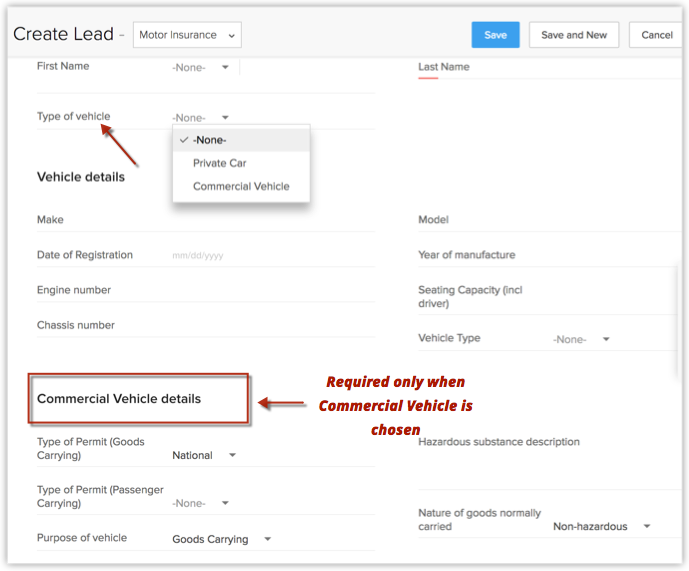
This is where conditional layouts enter the picture.
In the above example, using layout rules, you can achieve a dynamic setup in which only when " Commercial Vehicle " is chosen, the Commercial Vehicle details appear - in other cases it remains hidden. This way, you can optimize your forms.
Create layout rules
- Go to Setup > Customization > Modules and Fields .
- From the list of modules, select the required module.
In this scenario, select Leads .
- Select the required layout. Example, Motor Insurance layout.
- Go to the Layout Rules section.
- Click New Layout Rule.
- In the New Layout Rule popup, enter the following details:
- Enter a name for the rule.
- Describe the rule.
- Choose the layout for which this rule is applicable. Example, Motor Insurance
- Choose a primary field that controls this rule. Example, Type of Vehicle
- Choose a condition to initiate the rule. Example, Type of Vehicle is Commercial Vehicle.
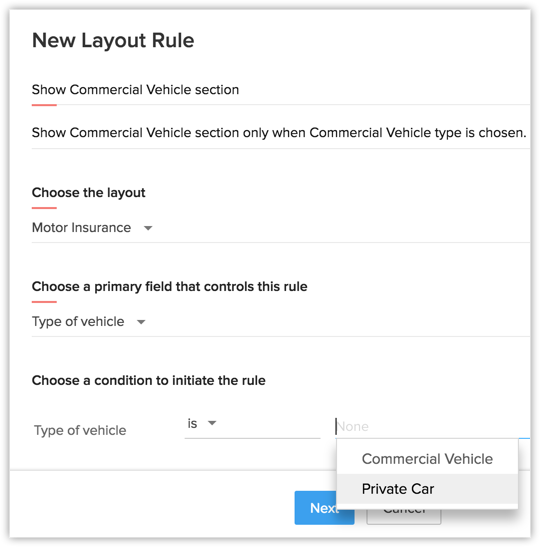
- Click Next
- Enter a name for the rule.
- In the Rule page, the Condition specified is prepopulated. So click Trigger an action.
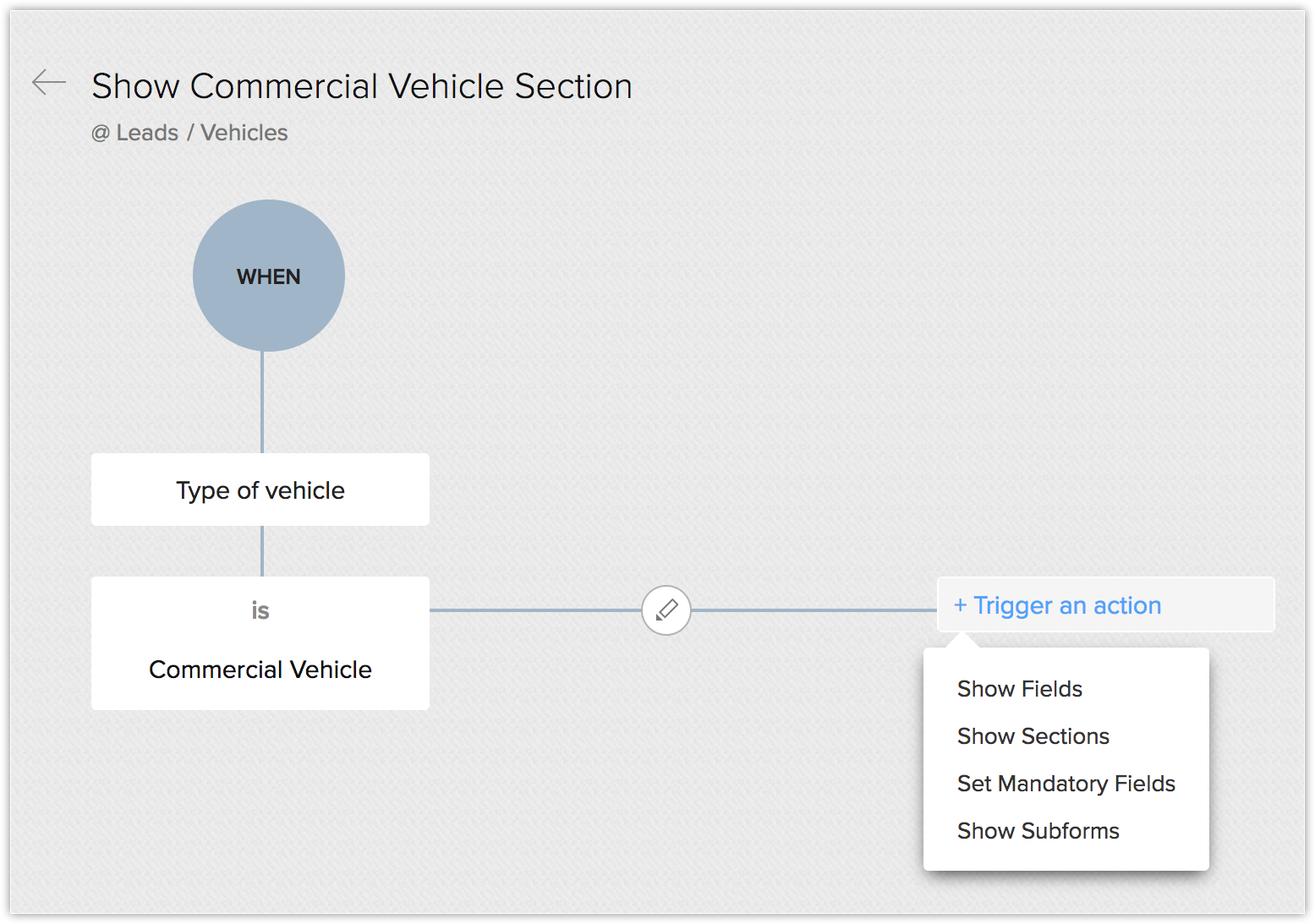
- Choose from the list of actions. Example, Show section.
- In the Create Action r ight pane, specify the section to be shown. In this scenario, Commercial Vehicle details section.
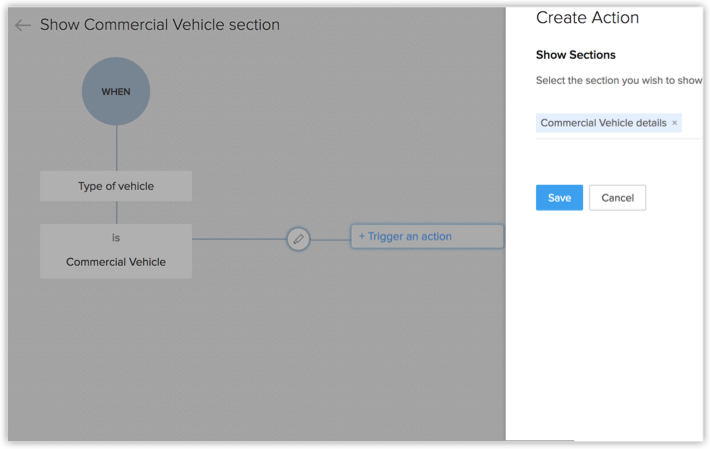
If you have further conditions and actions, you can specify them as required in a similar way.
Result of the layout rule
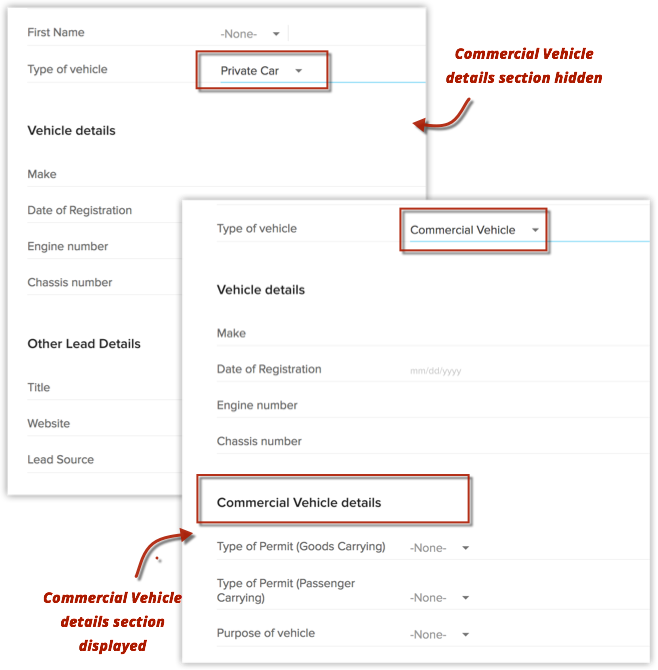
Now when you create a lead in the Motor Insurance layout, the Commercial Vehicle details section is displayed only when you select Commercial Vehicle type. Otherwise, it is hidden.
Actions that can be triggered
There are four actions that can be triggered when layout rule criteria are met.
- Show Field : Choose this action when you want specific fields to be shown only when the prescribed criteria are met.
- Show Section : Choose this action when you want specific sections to be shown only when the prescribed criteria are met.
- Set Mandatory Fields : Choose this action when you want to make a few fields mandatory only when the prescribed criteria are met.
- Show Subforms: Choose this action when you want the subform to be shown only when the prescribed criteria are met.
Example:
In the same Zylker Insurance scenario, assume the following conditions.
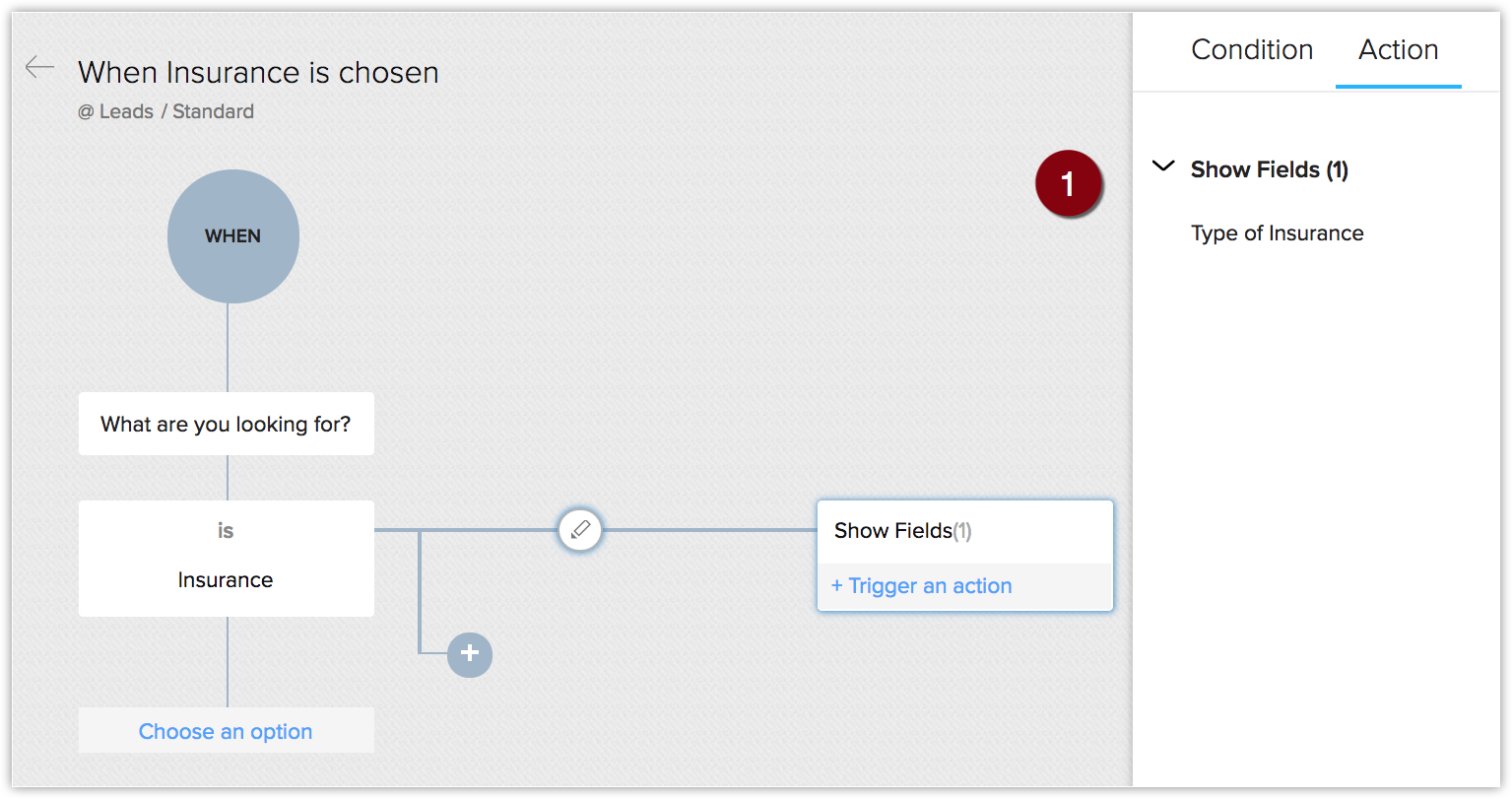
- You want to display the field Type of Insurance only if What are you looking for? field is chosen as Insurance .
- You want the Dependent Information section to be displayed only when you select the type of insurance as Life Insurance . Otherwise, it is hidden.
- Upon choosing Life Insurance , you want the Dependent's Name and Date of Birth to be mandatory. For a vehicle insurance policy, dependent details are not mandatory.
- You want to display the Life Insurance Details subform, only when the type of insurance chosen is Life Insurance . If not the subform should be hidden.
In these cases, the following could be layout rules and actions.
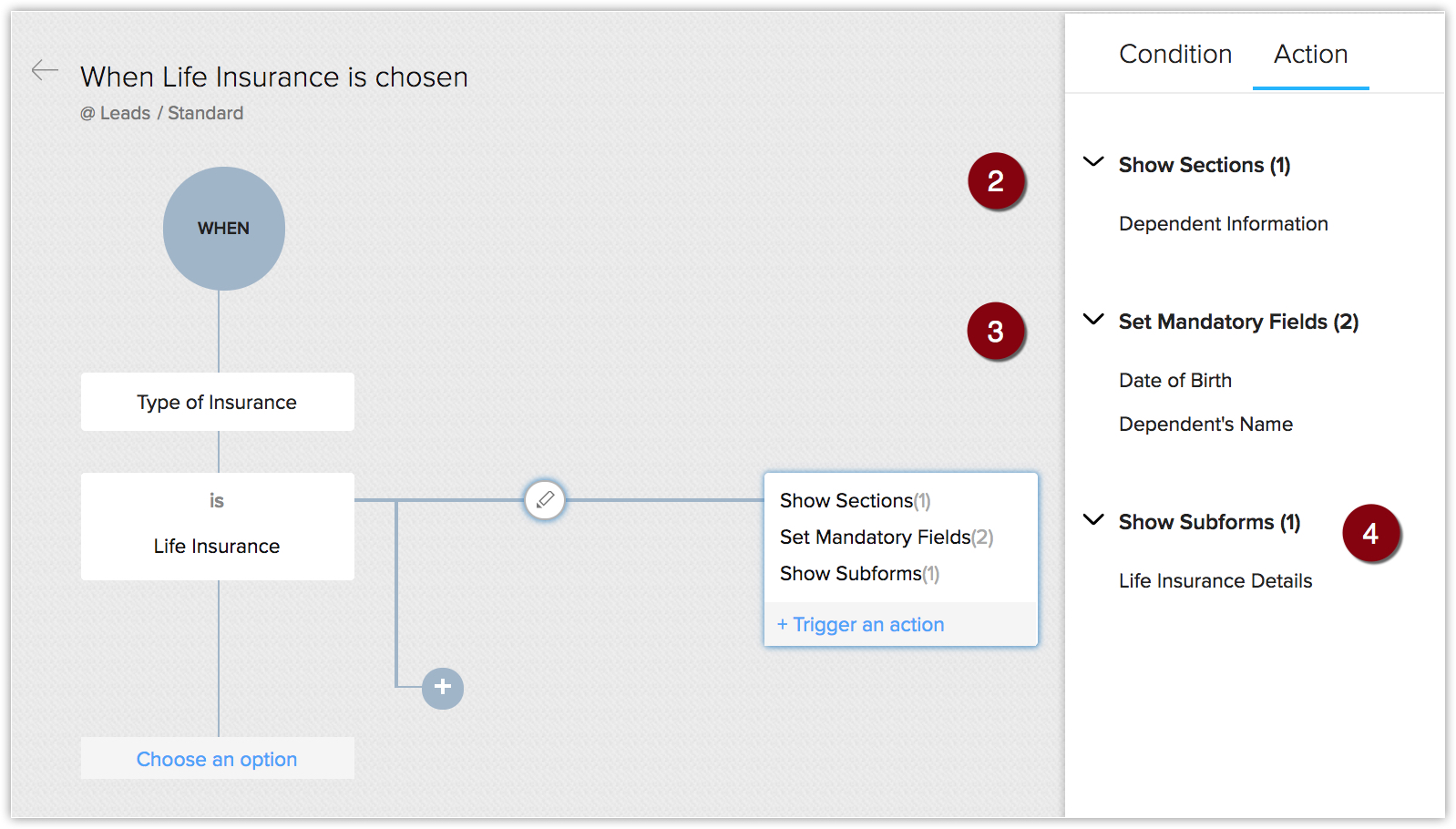
As you can see, based on specific field values, you can make fields, sections and subforms appear or disappear and mark fields as mandatory. This makes your layout very dynamic.

Points to Remember
- Click here to make a note of the instances when field updates take precedence over layout rules.
- The [Record] Owner field currently cannot be chosen as the primary field that controls the layout rule.
- Layout Rules are applied on Create/edit and view pages.
- Layout Rules cannot be used on the following field types:
- Auto Number
- Lookup
- User Lookup
- Formula
- File Upload
- Multi Line
- Multi-select Picklist
- Layout rules are not available for records generated via import, webforms, lead convert page. In case of creating or editing records via APIs, only "Set Mandatory Field" action is supported.
- While choosing trigger actions, the Show Subform option will be available only if a subform is present in the chosen layout.
- When you edit a primary field used in a layout rule, if there are mandatory fields associated to the rule, these mandatory fields will be captured via a popup prompt.
For example, let's say you have a layout rule saying, "If Amount > 50000 USD, make Discount mandatory". When you edit the Amount field from the Record Detail page, the Discount field will be prompted via a popup window.
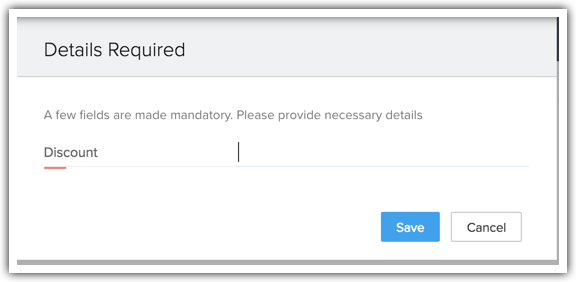
Similarly, fields mandated by the layout rules will be verified as mentioned below:
- If you have configured a layout rule based on a Deal Stage, when you edit the stage from the Detail page, Blueprint or the Pipeline view, the fields mandated by the layout rule will be captured via a popup window.
- If you have configured a layout rule based on Task Status - Example, you have mandated a Description field when a Task is Closed. In such a case, when you close a task from the Activities Related List / Kanban View / Home page or custom view, CRM will verify layout rule, before closing the task and prompt the fields as mandated by the rule.
- Layout rule support is been given to Kanban view so, drag and drop will evaluate layout rule.
- Layout rules are also effective on approval of records.
- If you have configured a layout rule based on a Deal Stage, when you edit the stage from the Detail page, Blueprint or the Pipeline view, the fields mandated by the layout rule will be captured via a popup window.
- Layout rules cannot be created based on a Multi-select picklist field as the primary field.
- Layout Rules Limits
- Maximum rules allowed - 10 per layout
- Maximum parent conditions allowed - 25
- Maximum branch conditions allowed - 5 per parent condition
- Maximum branch conditions criteria allowed - 5 per branch condition
- Maximum actions allowed - 25 per branch condition
(The total number is inclusive of all actions. There are no individual limits per action.)
- Maximum rules allowed - 10 per layout