Configuring Accessibility controls
Welcome to this document on the accessibility options available in Zoho CRM. We are committed to providing an inclusive experience for all users.
This document guides you through the 18 new accessibility controls designed to improve usability for individuals with diverse needs.
This document guides you through the 18 new accessibility controls designed to improve usability for individuals with diverse needs.
Zoho CRM is compliant with WCAG 2.2. Level AA.

Note: The video shows the previous user interface of Zoho CRM. We plan to update and replace the video in the near future.
For the millions who rely on Zoho CRM daily, accessibility controls give them the tools they deserve to achieve what they're capable of.
Just as businesses can customize our CRM to meet their specific requirements, individual users can leverage 18 accessibility controls to accommodate their unique needs. They no longer have to deal with a "standard" CRM that works for the sighted user navigating with a mouse. Instead, they can perform all their tasks with ease in a CRM that can be set up to match their unique needs.
Just as businesses can customize our CRM to meet their specific requirements, individual users can leverage 18 accessibility controls to accommodate their unique needs. They no longer have to deal with a "standard" CRM that works for the sighted user navigating with a mouse. Instead, they can perform all their tasks with ease in a CRM that can be set up to match their unique needs.
What is accessibility?
- Accessibility refers to the design of products, services, devices, or environments in such a way that they can be used by everyone, regardless of their disabilities.
- Web accessibility means that websites, tools, and technologies are designed and developed so that people with disabilities can perceive, understand, navigate, and interact with them.
Why does it matter?
- By making our CRM more accessible, users with disabilities can perform their roles effectively, thus improving productivity and satisfaction.
- A more accessible CRM fosters an inclusive workplace where all members have an opportunity to contribute to shared goals.
- Accessibility controls often improve usability for all users, not just those with disabilities. For example, voice commands and keyboard shortcuts can increase efficiency for everyone.
- Accessibility helps organizations comply with regulations, thereby reducing legal risks.
Accessibility controls in Zoho CRM
Our accessibility features are designed to help everyone create an experience that is comfortable for them. Let's look at how some of these options help users with disabilities in their work:
Alex, a sales representative with vision impairment
Alex is assigned a deal. The magnify text on hover option lets him focus on specific data points without losing context.
When he updates a deal's status, an error message appears in an accessible color with an icon, alerting him to a mandatory field that he's missed.
Alex often uses the browser's zoom option to fill forms. This means that the top bar is often not on the screen when he's working. The option to flash the screen twice for notifications ensures that he doesn't miss important updates while zoomed in.
Maria, a marketing specialist with ADHD
Maria benefits from the CRM's option to show only mandatory fields when creating or editing a record. This simplifies the form and helps her focus on essential details.
Liam, a sales manager with a motor impairment
Liam efficiently navigates and uses the CRM using keyboard shortcuts.
Kumar, a sales representative who is blind
Kumar uses the CRM with his screen reader and has also enabled the standard navigation order. This allows him to move through the CRM efficiently to complete his tasks.
Zoe, a data analyst with dyslexia
Zoe dives deep into the CRM's data to extract actionable insights. She adjusts the font size and spacing for better readability and utilizes the reading focus option to concentrate on one area at a time. This setup helps her process complex information without feeling overwhelmed or making errors.
Where can I find accessibility controls?
Navigate to Setup  > General > Personal Settings > Accessibility. The Accessibility tab will display the different accessibility controls offered in Zoho CRM along with a search box to find them quickly.
Note: When you use the search bar, go to each category (Vision, Motor, and Interaction) to see the matching results in that category.You can access certain controls using the Accessibility shortcut, located in the toolbar at the bottom. Once you've clicked it, you can enable or disable these controls. In addition, you can press Additional Settings to open the Accessibility tab.
If you've enabled Zia Voice Assistant, you can access it from the bottom toolbar by clicking the microphone icon. Another way to activate the Voice Assistant is by pressing Control + Z + V.
Accessibility controls in Zoho CRM
Our accessibility controls are categorized to support users with vision impairments, motor disabilities, and those who benefit from enhanced interaction options. You can enable or disable the different controls and configure each one to suit your unique needs.
Vision
Screen reader
A screen reader is software that reads the screen's content aloud for users with visual impairments. Some popular screen readers are Apple VoiceOver, JAWS, NVDA, Microsoft Narrator, and ChromeVox. Although Zoho CRM does not have its own screen reader, it is compatible with third-party screen readers.
How to use
- Ensure your screen reader software (e.g., JAWS, NVDA, VoiceOver) is installed and running.
- Navigate the CRM as usual; the screen reader will announce elements and actions.
Tip
For optimal navigation through the CRM when using a screen reader, you can:
- Familiarize yourself with keyboard shortcuts of the screen reader.
- Turn on the following options in your accessibility settings:
- ARIA landmark to make it easier to perceive, understand, and navigate the CRM UI.
- Standard navigation order to ensure that navigation is intuitive and doesn't skip elements.
Note: This is currently fully supported on the home page, custom view, and standard record views (detail, create, edit, clone).Zoom
Most browsers include the option to zoom in and out of pages. Users can adjust their browser's zoom option to improve the readability of the CRM interface. The layout of the CRM will remain fully functional within a zoom range of 25% to 150%.
How to use
- In most browsers, you can open the CRM and press:
- Ctrl or Cmd with + to increase zoom.
- Ctrl or Cmd with - to reduce zoom and
- Ctrl or Cmd with 0 will reset the zoom.
- Once the interface is legible and clear, you can use the CRM as usual. Adjust the zoom as and when needed, depending on your needs.
Note: This is currently fully supported on the home page, custom view, and standard record views (detail, create, edit, clone).Font
Users can pick a font family that suits their preference. The selected font will be applied across the CRM interface. The options available now are:
-
Zoho Puvi: Our very own font, designed to reflect Zoho's visual language.
-
Roboto: Designed by Google and used in many apps and websites.
How to use
-
Select the font needed. It will be applied immediately.
-
You can also click the Live Preview option. This will open a Live Preview pop-up.
-
You can then navigate around the CRM to see how various CRM pages will appear with the new font. Once satisfied, click Apply.
Font Size
Many times, users with low vision will want to improve the CRM's readability without having to zoom in and out multiple times. In such cases, they can adjust the font size by picking from four sizes: Small, Default, Large, and Largest.
How to use
- Click on one of the four font sizes available in the slider:
- Small (far left)
- Default (second from left)
- Large (third from left)
- Largest (far right).
- Selected font size will be applied immediately.
If you click Reset, the Default font size will be chosen. - You can also click the Live Preview option. This will open a Live Preview pop-up.
You can then navigate around the CRM to see how various CRM pages will appear with different font sizes. You can adjust the size in the live preview popup and, once satisfied, click Apply. - Once you're happy with the font size, you can enjoy a CRM interface where the text is much more comfortable to read!
Spacing
Along with font size, you can adjust the spacing of text to enhance its legibility within the CRM. There are four preset choices available to users: Condensed, Normal, Expanded, and Widen.
How to use
- Select one of the spacing options from the dropdown:
- Condensed (smallest spacing )
- Normal (default spacing)
- Expanded (large spacing)
- Widen (largest spacing).
- Selected spacing will be applied immediately.
If you click Reset, Normal spacing will be chosen. - You can also click the Live Preview option. This will open a Live Preview pop-up.
You can then navigate around the CRM to see how spacing affects the different CRM pages. You can select the spacing in the live preview pop-up. When you're satisfied, click Apply. - The text in the CRM should be much easier to perceive now.
Magnify text on hover
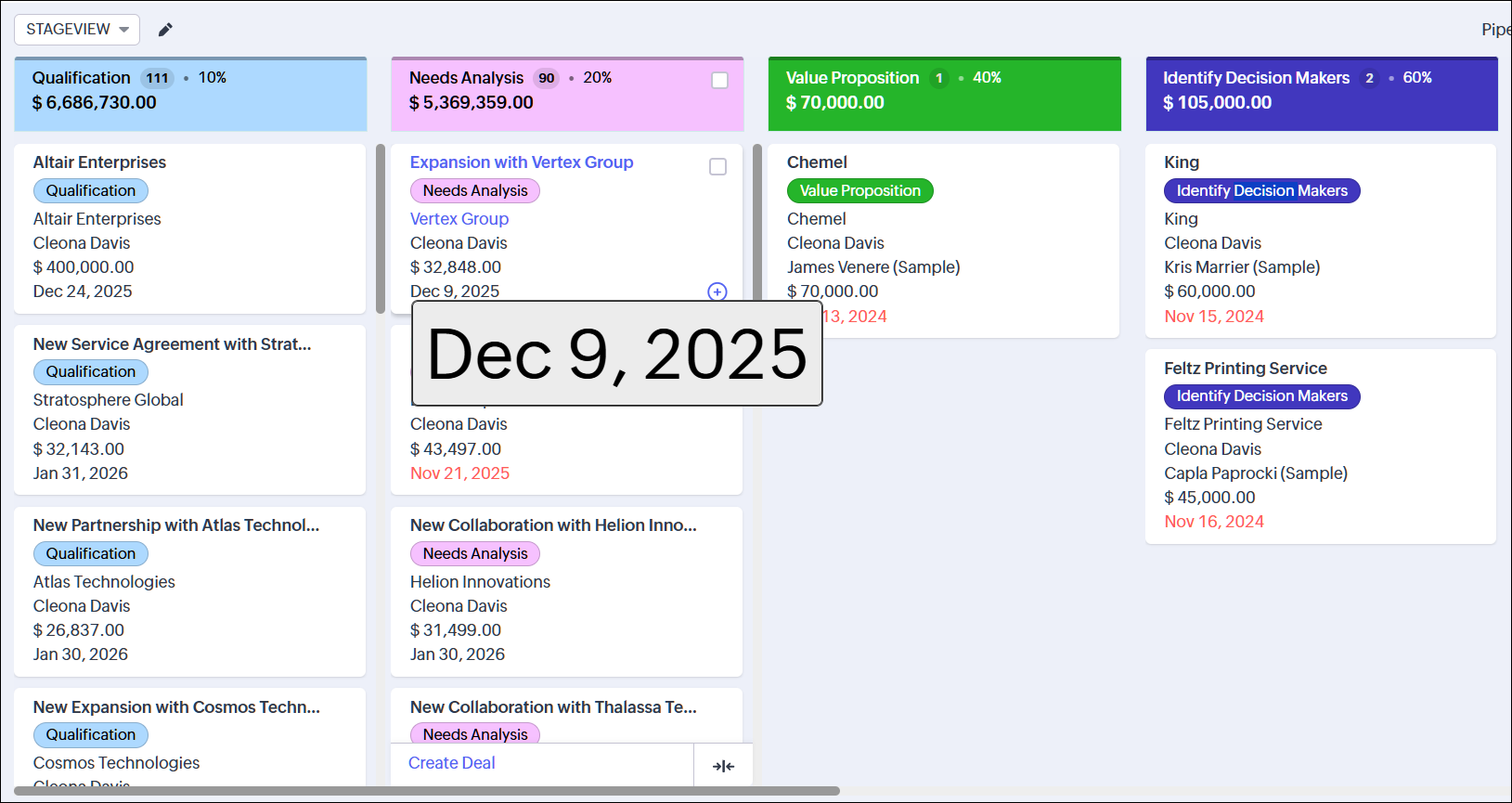
The Magnify Text on Hover option lets users magnify hard-to-read text when needed. This helps users selectively enlarge a single text element when required, while retaining the font size and spacing that is comfortable most of the time.
How to use
- Enable the toggle switch for this option.
- Hover over the text you want to magnify and press the alt (Windows) or option (Mac) key.
- The magnified text can be easily read without zooming or having to adjust the font size.
Motion control
Motion control helps minimize potential discomfort for users sensitive to motion. They can opt to:
- Minimize non-essential animations
- Continue with the animations as they are
- Match the settings in your computer. Please note that the last option will work only if supported in your computer.
How to use
- Select Minimum, Default, or System Settings based on your needs. The change will be applied immediately.
- If you've chosen Minimum, you can navigate and work in the CRM without being distracted by animations.
Switch labels
Color cues are used in the CRM to indicate if a toggle switch is active or inactive. This poses difficulties for users with color vision disabilities, who may not be able to understand the current state of the switch.
In these cases, users can enable the Switch labels option. This displays labels on switches to show their current state. This makes it immediately comprehensible to users with color vision issues and even users who are unfamiliar with the interface.
How to use
- Click the toggle switch to enable or disable it. The change will be applied immediately.
- When you encounter a switch, read the label to understand its state.
Strikethrough disabled button
When specific functions are deactivated in CRM, their buttons appear grayed out. However, this visual cue is not helpful for individuals with color vision issues. Enabling this feature will strike out these buttons, providing a more noticeable visual indicator.
How to use
- Click the toggle switch to enable or disable it. The change will be applied immediately.
- Click Preview if you want to see how the disabled buttons will appear.
- When you see a button and it is struck through, you immediately know that you cannot use it.
Form display mode
Data entry is one of the most common tasks for a CRM user. Users with vision impairments or motor disabilities benefit from short forms with essential fields in the CRM. By enabling form display mode, users can choose to view only the necessary fields in different forms in CRM. This makes data entry easier for most users.
How to use
- Click the toggle switch to enable or disable it. The change will be applied immediately.
- When you are in a form page (like the Create/Edit record page), you can fill out the form as usual if it is comfortable.
- If it is overwhelming or unnecessary, you can check the Show Mandatory Fields Alone checkbox present at the top of the form. The form will now contain only the mandatory fields needed to save the record.
- Fill out the form and save the record.
Note: This is currently fully supported on the standard record view pages (create, edit, clone).Mandatory field display
Perception of mandatory fields is crucial for users. Missing mandatory fields can lead to frustrating experiences for users saving a record. Users may have varying preferences for how mandatory fields are presented on a form:
- Most users may prefer the red accent line to indicate that a field is required.
- Others may prefer the more conventional asterisk next to the field.
- The most accessible option is to add "(Required)" to the label of the mandatory field. This makes it obvious and is suitable for most users.
Users can select the option that best suits their needs.
How to use
- Select the option that best suits your need from the drop-down. The change will be applied immediately.
- You can check the Preview section to view how the mandatory field will appear.
- When you fill a form page in the CRM, you can easily spot the mandatory fields and fill them.
Note: This is currently fully supported on the standard record view pages (create, edit, clone).Custom error message display
Error messages are important for notifying users of issues that need attention before moving forward. You can customize the error message display to make it easier to spot and act on these messages.
How to use
- Select the Error Message Color. You can choose one of the accessible colors that are available. This helps users with color vision issues who may have difficulty perceiving certain colors.
- Additionally, for users who cannot differentiate any colors, enable the Show error icon with message checkbox. This will include an error icon in the error messages to make them perceptible.
- You can check the preview section to view how the error message will appear.
- The next time you forget to fill a field or make an error, you can easily spot the error message and take corrective actions.
Note: This is currently fully supported on the home page, custom view, and standard record views (detail, create, edit, clone).Flash screen for notifications
Notifications play a crucial role in software, but users might overlook them if they are not noticeable enough. In such cases, an extra signal may be necessary. You have the option to activate the flash screen option to make the screen flash twice whenever a notification is received.
Warning: Users sensitive to flashing lights should keep this control disabled.
Warning: Users sensitive to flashing lights should keep this control disabled.
How to use
- Click Preview to see how the screen will flash.
- Click the toggle switch to enable or disable this option. The change will be applied immediately.
- The next time you receive a notification, you will see two friendly screen flashes to help you attend to the incoming notification.
ARIA landmark
ARIA is a collection of roles and attributes that help improve the accessibility of web content and applications for individuals with disabilities. ARIA landmarks make it easier for users to understand, navigate, and use a software tool. This is beneficial for users who primarily rely on keyboards and assistive technology like screen readers.
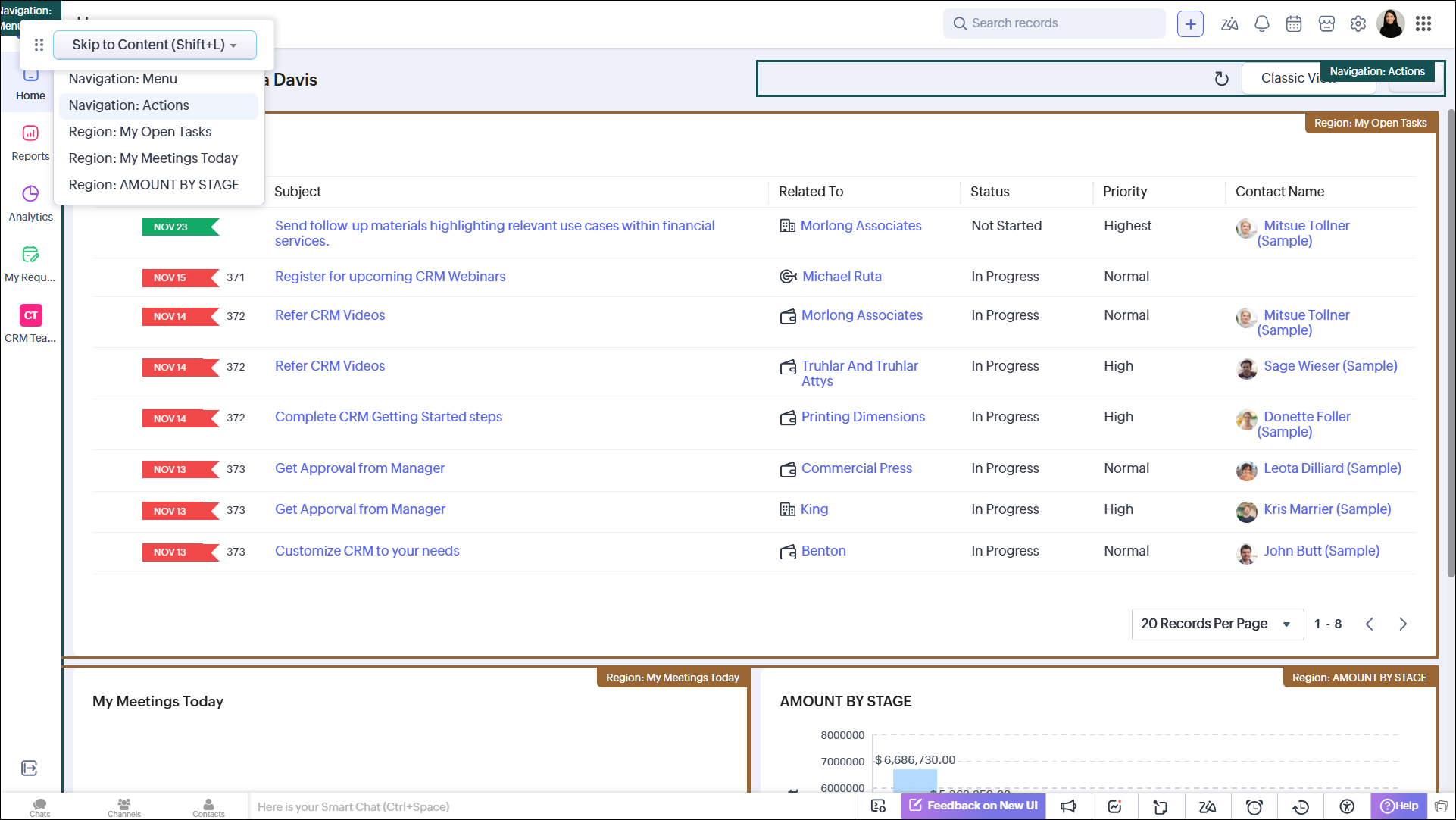
ARIA landmarks designate important sections of a page with roles and also assign labels. This has the following benefits:
- Simplifies understanding the purpose of each page section and
- Allows users to quickly navigate to the desired section instead of having to navigate through each element sequentially.
- Makes it easier to identify landmarks as they are color-coded with an accessible color.
How to use
- Click Preview to check how ARIA works for you.
- If you like what you see, click Apply to enable ARIA landmarks.
- Click the toggle switch to enable or disable this option. ARIA will be enabled immediately.
- You can optionally choose an accessible color for each section.
- When you navigate to any part of the CRM, the different landmarks will be color coded.
- Press Shift+L to access the menu that contains the list of ARIA landmarks. Select the section to immediately skip to it instead of having to tab through multiple elements.
Note: This is currently fully supported on the home page, custom view, and standard record views (detail, create, edit, clone).Motor
Keyboard shortcuts
Users frequently use the keyboard to navigate and perform actions in the CRM. This is particularly helpful for users who have difficulty with pointing devices like the mouse. Users can enable keyboard shortcuts and personalize the keys for different functions in the CRM.
How to use
- Click the toggle switch to enable or disable this option. The shortcuts will be applied immediately.
- Configure shortcuts as per your wish. You can learn more about keyboard shortcuts and how to set them up using this help document: Keyboard shortcuts in Zoho CRM.
- Click View Shortcuts whenever you need to see or change the shortcuts.
- If you need to refer to the shortcuts, you can always press [Z] + [/]. This is the default key combination. You can modify this as well.
Zia Voice Assistant
Zia voice assistant helps you control the CRM using your voice. Once you've enabled it, you can use it when needed to navigate and take actions on whatever is displayed on your screen. Once activated, you can use predefined voice commands to navigate and perform actions.
Please note that only English language voice commands are supported for now; it isn't yet available in CN, SA, or JP DCs.
Please note that Zia voice assistant is completely private. It does not store any of your voice data or use it for training purposes. Sometimes, it may conflict with your system's assistant. For the best experience, disable the system assistant while using Zia.
How to use
- Click the toggle switch to enable or disable this option.
- Enable Number Overlay if you want clickable elements to be numbered. You can use the number instead of the element's name in your voice commands.
- You can also set the Assist Idle Time Out. If there is no voice input for this set time, Zia Voice Assistant will become inactive. You can press Control + Z + V or click the microphone icon in the bottom bar to activate it.
- You can click the settings icon in the Zia Voice Assistant pop-up to enable number overlay or navigate to the Accessibility page.
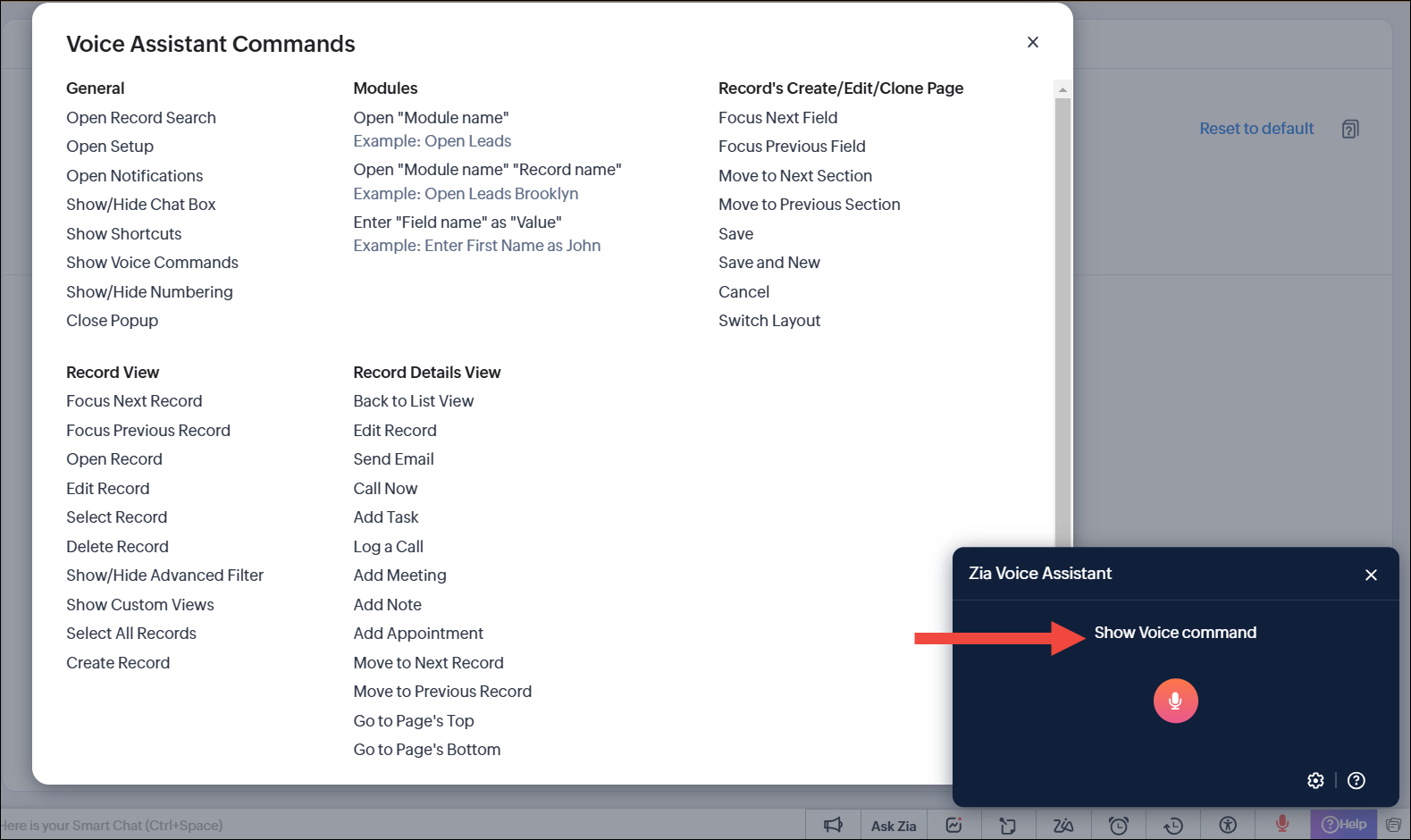
Tip: Not sure about the commands? Just say "Show Voice Commands" to view a list of voice commands.
Interaction
Reading focus
Users who have cognitive disabilities may speed up task completion by removing distractions through the use of the reading focus tool. This will block out most of the screen surrounding their cursor. They have the choice to pick from different mask sizes like small, medium, large, or customize it to fit their requirements. Furthermore, they can modify the transparency of the mask to align with their preferences.
How to use
- Click the Live Preview option. This will open a Live Preview popup. You can then navigate around the CRM to see how the mask looks on the different CRM pages. Once satisfied, click Apply.
- Click the toggle switch to enable or disable this option. The reading mask will appear immediately.
- Select one of the focus modes from the dropdown:
- Small
- Medium
- Large
- Custom.
- If you've chosen Custom, you can select the Focus Height, Focus Width, and Mask Opacity.
For Focus Height and Focus Width, the smallest option is on the left while the largest option is on the right.
For Mask Opacity, the lightest option is on the left, while the darkest option is on the right. - You can focus on what's near your mouse while the rest of the UI is masked to prevent distractions.
Underline links
Users with color blindness may struggle to differentiate links from regular text in a CRM system, so now links can be underlined to make them more distinct.
How to use
- Click the toggle switch to enable or disable this option. The change is applied immediately.
- Wherever you are in the CRM, you can immediately spot a link because it is underlined.
Standard navigation order
Users may navigate through the CRM with their keyboards and screen readers. In such cases, they can enable standard navigation order to:
- Help them navigate in a consistent and intuitive order, moving from left to right and top to bottom.
- Avoid skipping elements that are disabled and not accessible by default.
Navigation starts from the first DOM element. We recommend that you enable this configuration if you're using a screen reader for a better user experience.
How to use
- Click the toggle switch to enable or disable this option. The change is applied immediately.
- Enjoy a more intuitive and clean experience while navigating the CRM using your keyboard.
Note: This is currently fully supported on the home page, custom view, and standard record views (detail, create, edit, clone).