Using Brand Studio - Creating marketing projects with Zia

Using Brand Studio - Creating marketing projects with Zia

Zia is Zoho's advanced AI assistant capable of helping you with various business processes by contextually being part of the Zoho ecosystem of products. In Zoho CRM Plus, Zia works together with OpenAI and helps suggest various marketing activities based on your campaign objective, duration, the types of marketing channels, target audience, and so on, that enables you to get started with ease and work with your team. 

The need for AI in suggesting marketing activities 

As marketeers, a lot goes into planning a marketing campaign. It starts with defining the objective, the target audience, understanding and analyzing vital metrics that shape the way we decide and execute the various marketing activities.
 
With Zia, Zoho CRM Plus aims to combine the expertise of the marketers along with the power of Artificial Intelligence and provide a playground with intuitive marketing campaign suggestions that can be further personalized for your business requirements. Think of Zia as a marketing companion who's there to help you get started so that you don't have to start with a blank page always.


Understanding Zia in Brand Studio 

Zia in CRM Plus integrates with OpenAI's ChatGPT to help suggest highly personalized marketing activities for your marketing projects. 

Step 1: Integrating with OpenAI 

Zia can be integrated with your OpenAI account with the help of the API key. You can create one from your OpenAI account and use it in CRM Plus to establish the integration. 


Data privacy and security 
The data that you specify in the following fields will only be shared with OpenAI.
  1. What's your campaign objective?
  2. Specify campaign duration
  3. What Marketing Campaign will you use?
  4. Who's your target audience?
  5. How would you describe your campaign?

Step 2: Creating the project with Zia 

Working with the prompt 

  1. Specify the campaign objective: This lets you define the purpose of the marketing project, which lets the AI tailor personalized activities accordingly.
  2. Specify the campaign duration: Zia understands the duration of the campaign, which makes it easy to create activities scattered across the specified timeline.

  3. Marketing Channels: The different types of marketing activities that you would like to create for the marketing project can be specified here. For example, you can select Email Campaigns, Social Posts, Surveys, Events, Blogs, Videos, and so on.

  4. Target Audience: The target audience lets Zia specify additional information such as Location, Age, Gender, Target Market, and Audience type. You can also specify a custom description of your audience apart from the specified options.

  5. How would you describe your campaign: Apart from all the information specified, you can add more information regarding your marketing project that can help even further personalize the activities accordingly. The more information we share with Zia, the more personalized the responses will be. 

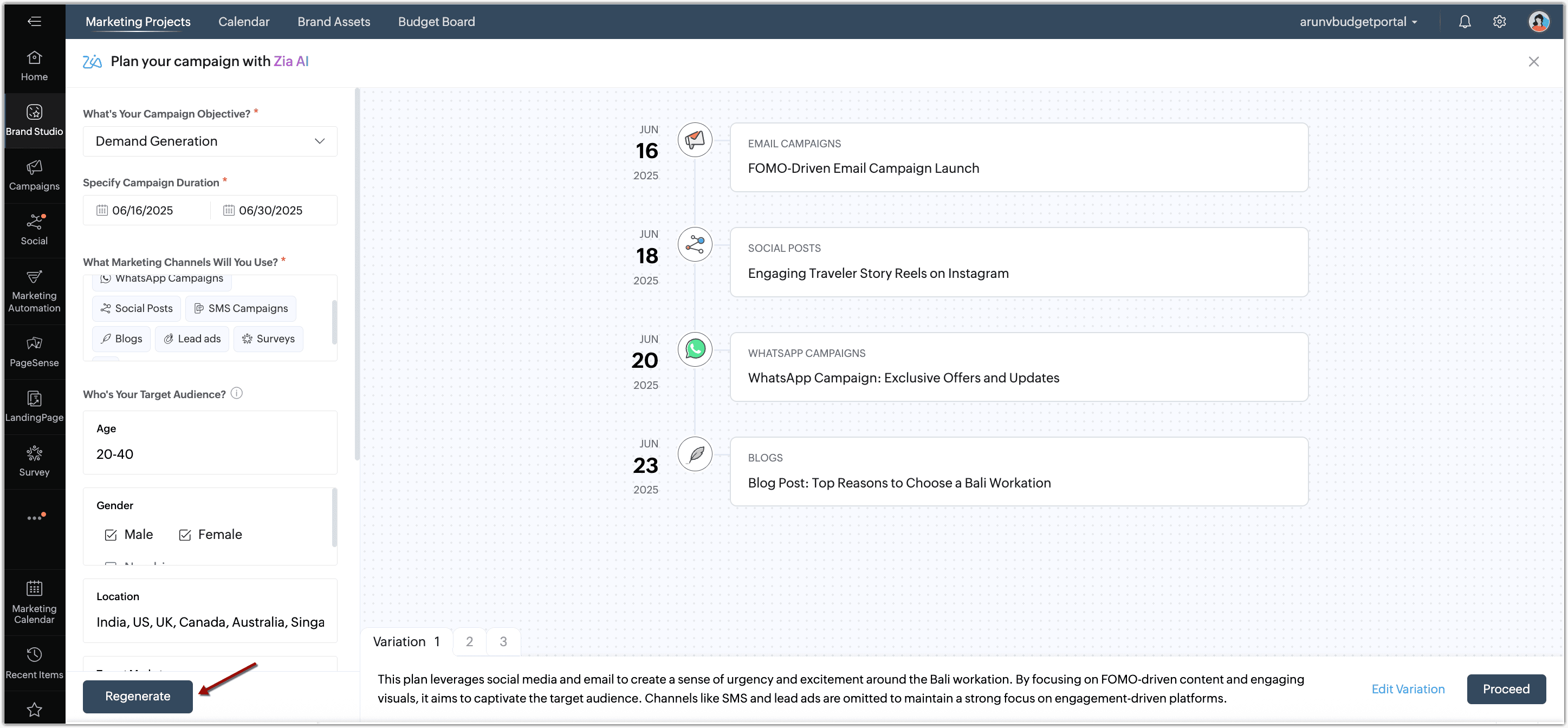
Regenerating the activity suggestions 

Zia can refine and rephrase the suggested marketing activities until you are satisfied with the results. The editing playground lets you change the criteria specified to fine tune the suggestions to your expectations.
Working with variations 

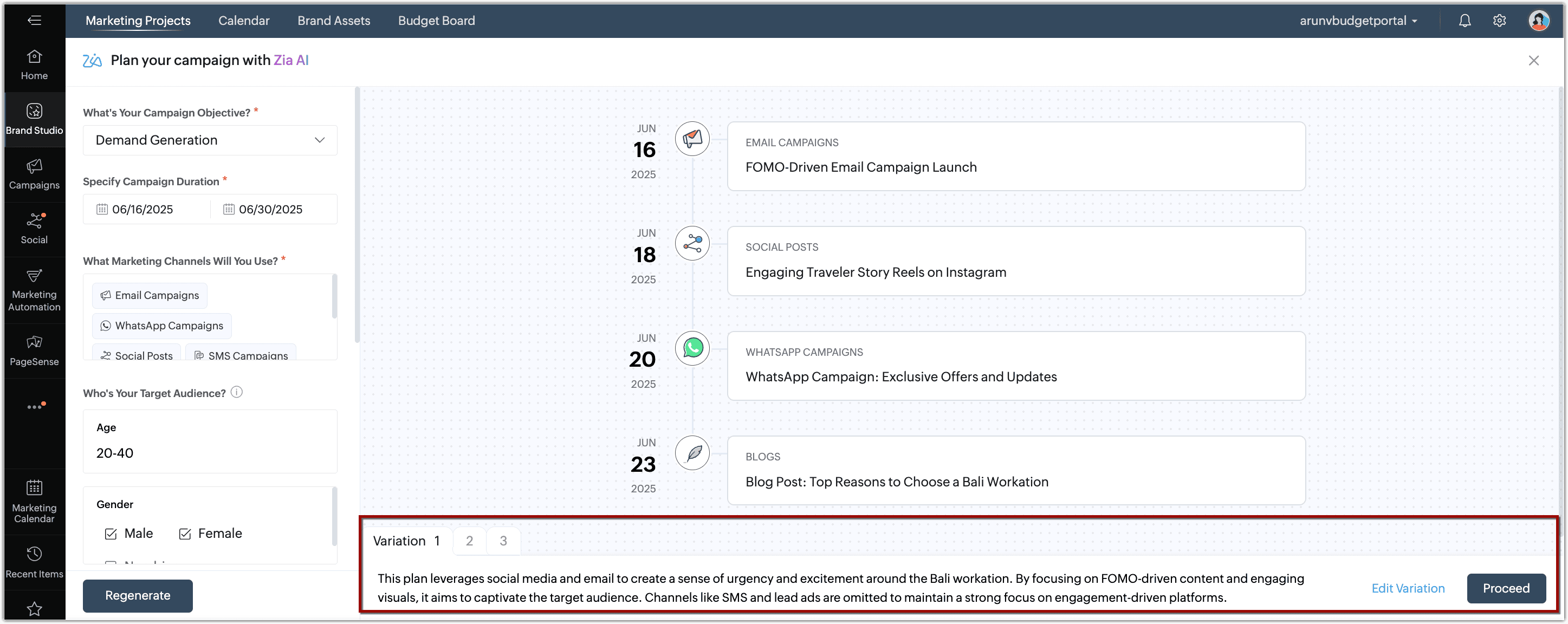
For the criteria specified, Zia suggests three variations of marketing activities. You also get a description of how each variation was formed along with the purpose; all designed based on your criteria. This also gives you the space to edit a variation as required by adding new activities on top of the existing ones suggested by Zia. The drag and drop builder makes creation of activities extremely simplified, where you can specify the activity type, name, owner, and the expected launch date on the timeline. You can also choose to remove any activity as per your preferences.
Working with Zia in CRM Plus 

To integrate with OpenAI 

Admins in Zoho CRM Plus can setup the integration between Zia and OpenAI. This process can be done the first time you use 'Create with Zia' in Zoho CRM Plus.

Step 1: Generating the Secret Key

To setup the integration, the Secret Key from OpenAI has to be generated. 
  1. Go to https://platform.openai.com/api-keys.
  2. Click + Create new secret key.

  3. Enter the Name, Project, and define the Permissions.
  4. Click Create secret key.

  5. Copy the Secret Key and click Done

Step 2: Integrating OpenAI's ChatGPT with Zia

  1. Go to Brand Studio and select the Marketing Projects tab.
  2. Click Create Project > Create with Zia.
  3. In the Plan your campaigns with Zia AI popup, click Configure Now.
  4. Enter the Secret Key from your OpenAI account and click Proceed.
  5. In the Data privacy notice popup, click Proceed and Start Generating in the following popup. 

To create marketing projects with Zia 

  1. Go to Brand Studio and select the Marketing Projects tab.
  2. Click Create Project > Create with Zia.

  3. In the Plan your campaign with Zia AI popup, do the following:
    1. Select the Campaign Objective and specify the Campaign Duration.
    2. Select the marketing channels from the list.
    3. Specify the target audience.
    4. Describe the campaign to personalize the suggestions.

    5. Click Generate.
      The marketing activities will be generated accordingly.
  4. Click Proceed.
  5. In the Marketing Project Details popup, modify the name, color, owner, and type if required, and click Create to create the Marketing Project. You can also click Create as Draft to save the project as a draft.

To regenerate suggestions 

In the Plan your campaign with Zia AI page, do the following:
  1. Make changes to the criteria on the left panel as required.
  2. Click Regenerate.

To edit variations 

In the Plan your campaign with Zia AI page, do the following:
  1. Select the Variation that you would like to edit.
  2. Click Edit Variation.

  3. Change the Project name, Type, Objective, and Owner as required.

  4. Click Add Activity to add an activity to this variation.
  5. Drag and drop the activity to the playground.
  6. Specify the Name, Owner, and the Expected Launch Date.

  7. Select the suggested activity and click the Delete icon   to remove an activity.
  8. Click Create.

Changing the OpenAI Secret Key 

The OpenAI secret key integrated with CRM Plus can be changed if required by following the given steps.
  1. Go to Brand Studio and select the Marketing Projects tab.
  2. Click Create Project > Create with Zia.
  3. In the Plan your campaign with Zia AI popup, click Access your secret key.

  4. Replace the Secret Key and click Proceed.

    You can click the Delete icon to remove the Secret Key, thus disabling the integration with OpenAI. 


        Create. Review. Publish.

        Write, edit, collaborate on, and publish documents to different content management platforms.

        Get Started Now


          Access your files securely from anywhere

            Zoho CRM Training Programs

            Learn how to use the best tools for sales force automation and better customer engagement from Zoho's implementation specialists.

            Zoho CRM Training
              Redefine the way you work
              with Zoho Workplace

                Zoho DataPrep Personalized Demo

                If you'd like a personalized walk-through of our data preparation tool, please request a demo and we'll be happy to show you how to get the best out of Zoho DataPrep.

                Zoho CRM Training

                  Create, share, and deliver

                  beautiful slides from anywhere.

                  Get Started Now


                    Zoho Sign now offers specialized one-on-one training for both administrators and developers.

                    BOOK A SESSION


                                Quick LinksWorkflow AutomationData Collection
                                Web FormsEnterpriseOnline Data Collection Tool
                                Embeddable FormsBankingBegin Data Collection
                                Interactive FormsWorkplaceData Collection App
                                CRM FormsCustomer ServiceAccessible Forms
                                Digital FormsMarketingForms for Small Business
                                HTML FormsEducationForms for Enterprise
                                Contact FormsE-commerceForms for any business
                                Lead Generation FormsHealthcareForms for Startups
                                Wordpress FormsCustomer onboardingForms for Small Business
                                No Code FormsConstructionRSVP tool for holidays
                                Free FormsTravelFeatures for Order Forms
                                Prefill FormsNon-Profit

                                Intake FormsLegal
                                Mobile App
                                Form DesignerHR
                                Mobile Forms
                                Card FormsFoodOffline Forms
                                Assign FormsPhotographyMobile Forms Features
                                Translate FormsReal EstateKiosk in Mobile Forms
                                Electronic Forms
                                Drag & drop form builder

                                Notification Emails for FormsAlternativesSecurity & Compliance
                                Holiday FormsGoogle Forms alternative GDPR
                                Form to PDFJotform alternativeHIPAA Forms
                                Email FormsFormstack alternativeEncrypted Forms

                                Wufoo alternativeSecure Forms

                                TypeformWCAG

                                  Zoho FSM Video Tutorials


                                        All-in-one knowledge management and training platform for your employees and customers.

                                                  Create. Review. Publish.

                                                  Write, edit, collaborate on, and publish documents to different content management platforms.

                                                  Get Started Now


                                                                    You are currently viewing the help pages of Qntrl’s earlier version. Click here to view our latest version—Qntrl 3.0's help articles.


                                                                        Manage your brands on social media


                                                                          • Desk Community Learning Series


                                                                          • Digest


                                                                          • Functions


                                                                          • Meetups


                                                                          • Kbase


                                                                          • Resources


                                                                          • Glossary


                                                                          • Desk Marketplace


                                                                          • MVP Corner


                                                                          • Word of the Day


                                                                          • Ask the Experts


                                                                            Zoho Sheet Resources


                                                                                Zoho Forms Resources


                                                                                  Secure your business
                                                                                  communication with Zoho Mail


                                                                                  Mail on the move with
                                                                                  Zoho Mail mobile application

                                                                                    Stay on top of your schedule
                                                                                    at all times


                                                                                    Carry your calendar with you
                                                                                    Anytime, anywhere


                                                                                          Zoho Sign Resources

                                                                                            Sign, Paperless!

                                                                                            Sign and send business documents on the go!

                                                                                            Get Started Now


                                                                                                    Zoho TeamInbox Resources


                                                                                                              Zoho DataPrep Demo

                                                                                                              Get a personalized demo or POC

                                                                                                              REGISTER NOW


                                                                                                                Design. Discuss. Deliver.

                                                                                                                Create visually engaging stories with Zoho Show.

                                                                                                                Get Started Now


                                                                                                                                    • Related Articles

                                                                                                                                    • Using Brand Studio - Working with Marketing Projects

                                                                                                                                      Creating a Marketing Project When you already have a complete plan on the different marketing activities, the owner, and other important specifics, you can create them as an Active Marketing Project. Start assigning the activities and the appropriate ...
                                                                                                                                    • Zoho CRM Plus - Getting started guide for Marketing teams

                                                                                                                                      A day in the life of a marketer involves diverse responsibilities. Zoho CRM Plus has all it takes for your marketing teams to reach out to your prospects with the right messages, build a strong social media presence, and get meaningful returns on ...
                                                                                                                                    • Unified marketing calendar

                                                                                                                                      As a Marketing Manager or CMO for a business of any size (small or enterprise), managing your daily activities and setting up a concrete marketing strategy for the whole year can be a daunting task. You might be working on email campaigns, social ...
                                                                                                                                    • Using finance applications inside Zoho CRM Plus

                                                                                                                                      This feature is currently available for organizations in the EU DC and will be rolled out to other data centers in phases. Managing customer relationships and having control of your financial operations go hand-in-hand in a business ecosystem. But ...
                                                                                                                                    • Communicate and collaborate with your team using Cliq

                                                                                                                                      Every team in an organization work towards various goals for the brand, such as increasing awareness, generating leads, working on marketing strategies, creating a strong social media plan to widen the audience, and much more. All of these activities ...
                                                                                                                                      Wherever you are is as good as
                                                                                                                                      your workplace

                                                                                                                                        Resources

                                                                                                                                        Videos

                                                                                                                                        Watch comprehensive videos on features and other important topics that will help you master Zoho CRM.


                                                                                                                                        eBooks

                                                                                                                                        Download free eBooks and access a range of topics to get deeper insight on successfully using Zoho CRM.


                                                                                                                                        Webinars

                                                                                                                                        Sign up for our webinars and learn the Zoho CRM basics, from customization to sales force automation and more.


                                                                                                                                        CRM Tips

                                                                                                                                        Make the most of Zoho CRM with these useful tips.


                                                                                                                                          Zoho Show Resources