Working with Leads

Working with Leads

Leads are the details gathered about an individual or representatives of an organization. They play a very important role in an organization's Sales & Marketing department and are useful in identifying potential customers. Collecting leads and managing them are the initial stages in the sales process. Leads can be obtained through trade shows, seminars, advertisements, marketing campaigns etc. Once the leads are collected, it is essential to manage them and follow them up until the leads qualify to prospective customers. The sales department's approach in managing leads can significantly impact the success of an organization.

The terminology related to lead management may differ across industries, but the basic process remains the same. The Leads module in Zoho CRM helps you manage your leads. In Zoho CRM, lead details contain a combination of company (account), person (contact), and business opportunity (deal), depending on your CRM requirement - for managing Business to Business(B2B) industry or Business to Consumer (B2C) industry.
Availability
Permission Required
Access to the Leads Tab that includes View, Create, Edit, Share and Delete permissions.

Leads Process Flow in Business


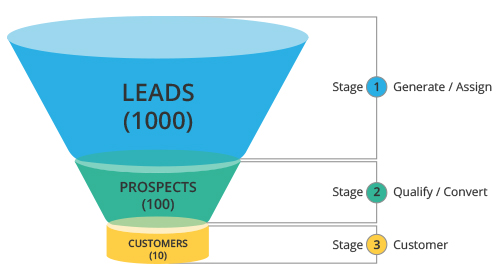
  1. Every unqualified contact/account that you receive from different sources becomes a lead and probably a prospective customer.
  2. Once a lead is generated, the Zoho CRM system automatically assigns the particular lead to a sales person, provided the Lead Assignment Rules are defined.
  3. The sales person performs the validation (or background check) of the lead and analyzes the opportunities that are available. The leads are then filtered based on these opportunities.
  4. If the opportunities are positive, the lead becomes a deal or a possible customer (Prospect).
  5. The deals are either won or lost.

Manage Leads in Zoho CRM

  1. Customize Lead Details  according to your organization's Sales & Marketing processes. Use the existing fields, disable some of the standard fields, change the order of the fields and sections or add new custom fields.
  2. Add leads into you CRM account. Set up the lead generation process by using web forms  to capture leads from your website , import leads  or directly add them by completing the lead form.
  3. Assign leads to the correct sales person manually or using the Lead Assignment rules .
  4. Follow-up with the lead until it reaches a certain stage then convert the lead  to deal. While converting leads to deals, accounts and contacts are created automatically.
  5. Follow up the leads further in the Deals module, until the deal is either won or lost.

Leads Home Page

Click the Leads tab to view the Leads Home page and perform the following operations:

  • The records are displayed in List Views. Define your own Custom Views  as per your requirements. Some system defined list views are already available, such as Unread Leads, Converted Leads, Recently Created Leads, etc.
  • Mass delete the records by selecting the check boxes corresponding to the records and clicking on the Delete button.
  • Mass email the leads by selecting the check boxes corresponding to the records and clicking on the Send Mail button.
  • Use the Lead Tools option to perform some common operations  such as mass transfer, mass delete, set up assignment rules, export leads, etc.
  • Search leads by alphabet by information , or by criteria .
  • Filter leads based on sales priorities using the advanced filters. 
  • Print the leads along with the necessary details.
SEE ALSO


        Create. Review. Publish.

        Write, edit, collaborate on, and publish documents to different content management platforms.

        Get Started Now


          Access your files securely from anywhere

            Zoho CRM Training Programs

            Learn how to use the best tools for sales force automation and better customer engagement from Zoho's implementation specialists.

            Zoho CRM Training
              Redefine the way you work
              with Zoho Workplace

                Zoho DataPrep Personalized Demo

                If you'd like a personalized walk-through of our data preparation tool, please request a demo and we'll be happy to show you how to get the best out of Zoho DataPrep.

                Zoho CRM Training

                  Create, share, and deliver

                  beautiful slides from anywhere.

                  Get Started Now


                    Zoho Sign now offers specialized one-on-one training for both administrators and developers.

                    BOOK A SESSION


                                Quick LinksWorkflow AutomationData Collection
                                Web FormsEnterpriseOnline Data Collection Tool
                                Embeddable FormsBankingBegin Data Collection
                                Interactive FormsWorkplaceData Collection App
                                CRM FormsCustomer ServiceAccessible Forms
                                Digital FormsMarketingForms for Small Business
                                HTML FormsEducationForms for Enterprise
                                Contact FormsE-commerceForms for any business
                                Lead Generation FormsHealthcareForms for Startups
                                Wordpress FormsCustomer onboardingForms for Small Business
                                No Code FormsConstructionRSVP tool for holidays
                                Free FormsTravelFeatures for Order Forms
                                Prefill FormsNon-Profit

                                Intake FormsLegal
                                Mobile App
                                Form DesignerHR
                                Mobile Forms
                                Card FormsFoodOffline Forms
                                Assign FormsPhotographyMobile Forms Features
                                Translate FormsReal EstateKiosk in Mobile Forms
                                Electronic Forms
                                Drag & drop form builder

                                Notification Emails for FormsAlternativesSecurity & Compliance
                                Holiday FormsGoogle Forms alternative GDPR
                                Form to PDFJotform alternativeHIPAA Forms
                                Email FormsFormstack alternativeEncrypted Forms

                                Wufoo alternativeSecure Forms

                                TypeformWCAG


                                      All-in-one knowledge management and training platform for your employees and customers.

                                                Create. Review. Publish.

                                                Write, edit, collaborate on, and publish documents to different content management platforms.

                                                Get Started Now


                                                                  You are currently viewing the help pages of Qntrl’s earlier version. Click here to view our latest version—Qntrl 3.0's help articles.


                                                                      Manage your brands on social media


                                                                        • Desk Community Learning Series


                                                                        • Digest


                                                                        • Functions


                                                                        • Meetups


                                                                        • Kbase


                                                                        • Resources


                                                                        • Glossary


                                                                        • Desk Marketplace


                                                                        • MVP Corner


                                                                        • Word of the Day


                                                                        • Ask the Experts


                                                                          Zoho Sheet Resources


                                                                              Zoho Forms Resources


                                                                                Secure your business
                                                                                communication with Zoho Mail


                                                                                Mail on the move with
                                                                                Zoho Mail mobile application

                                                                                  Stay on top of your schedule
                                                                                  at all times


                                                                                  Carry your calendar with you
                                                                                  Anytime, anywhere


                                                                                        Zoho Sign Resources

                                                                                          Sign, Paperless!

                                                                                          Sign and send business documents on the go!

                                                                                          Get Started Now


                                                                                                  Zoho TeamInbox Resources


                                                                                                            Zoho DataPrep Demo

                                                                                                            Get a personalized demo or POC

                                                                                                            REGISTER NOW


                                                                                                              Design. Discuss. Deliver.

                                                                                                              Create visually engaging stories with Zoho Show.

                                                                                                              Get Started Now


                                                                                                                                  • Related Articles

                                                                                                                                  • Creating Leads

                                                                                                                                    In Zoho CRM, you can create leads by: Entering data in the lead details form: You can manually fill in the Lead details gathered from various external sources, e.g. trade shows, exhibitions, colleagues, business cards, etc. Importing leads from ...
                                                                                                                                  • Converting Leads

                                                                                                                                    When there is a chance for further negotiations with a lead, it can be converted into an account, contact, and finally a deal. In short, once the lead status has reached a certain stage, it can be qualified as a deal. On conversion, a lead is ...
                                                                                                                                  • Standard Fields in Leads

                                                                                                                                    Following are the list of Zoho defined standard fields available in the Leads module: Field Name Description Data type Maximum Limit Lead Owner Select the Zoho CRM user to whom the Lead is assigned. Lookup - Salutation Select the salutation from the ...
                                                                                                                                  • FAQ: Working with Emails

                                                                                                                                    How do I add a signature to all my outgoing emails? You can add a signature to all your outgoing emails. To customize your Signature: Navigate to Setup > Channels > Email > Email Configuration. In the Compose Settings (Email Configuration), scroll ...
                                                                                                                                  • Working with Sandbox

                                                                                                                                    Rebuilding a sandbox Note: Rebuild was earlier referred to as refresh When your Sandbox setup is not in sync with the Production setup, any testing that you conduct in Sandbox will not be relevant when deployed to production. So it is important that ...
                                                                                                                                    Wherever you are is as good as
                                                                                                                                    your workplace

                                                                                                                                      Resources

                                                                                                                                      Videos

                                                                                                                                      Watch comprehensive videos on features and other important topics that will help you master Zoho CRM.


                                                                                                                                      eBooks

                                                                                                                                      Download free eBooks and access a range of topics to get deeper insight on successfully using Zoho CRM.


                                                                                                                                      Webinars

                                                                                                                                      Sign up for our webinars and learn the Zoho CRM basics, from customization to sales force automation and more.


                                                                                                                                      CRM Tips

                                                                                                                                      Make the most of Zoho CRM with these useful tips.


                                                                                                                                        Zoho Show Resources