Trend Analysis

Trend Analysis

Assume you haven't been checking the progress of deal closure for a while and suddenly notice a drop in the revenue due to less number of closures. Now, unless you monitor the status manually, there are chances that you will miss important details and fail to take action at the right time. 

Trend analysis by  Zia can help you track sales analytics without having to monitor regularly. In the Trend Dashboards you can view your sales trends and performance of your team. Built on data from the past and current usage, the Trend Dashboard displays important sales metrics as patterns.

Additionally, Zia automatically detects and notifies you of any anomalies in these patterns. A sudden spike or a dip from what is normal to your business is called an anomaly. Zia catches these anomalies and sends you prompt notifications. You do not have to look for inconsistencies in your business processes manually anymore. Zia brings them to you automatically so you can identify the problem areas at the right time to take actions or find what's helping in the growth of your business so you can invest in it more.

Availability

Permission Required
Users with reports and dashboards permissions can access this feature.

Viewing Trend Dashboards

To view Trend Dashboards in Zoho CRM, go to Home > Dashboards > Trend Dashboards. The Trend Dashboards are categorized in two folders - Sales Trend and Sales Follow-up Trend.
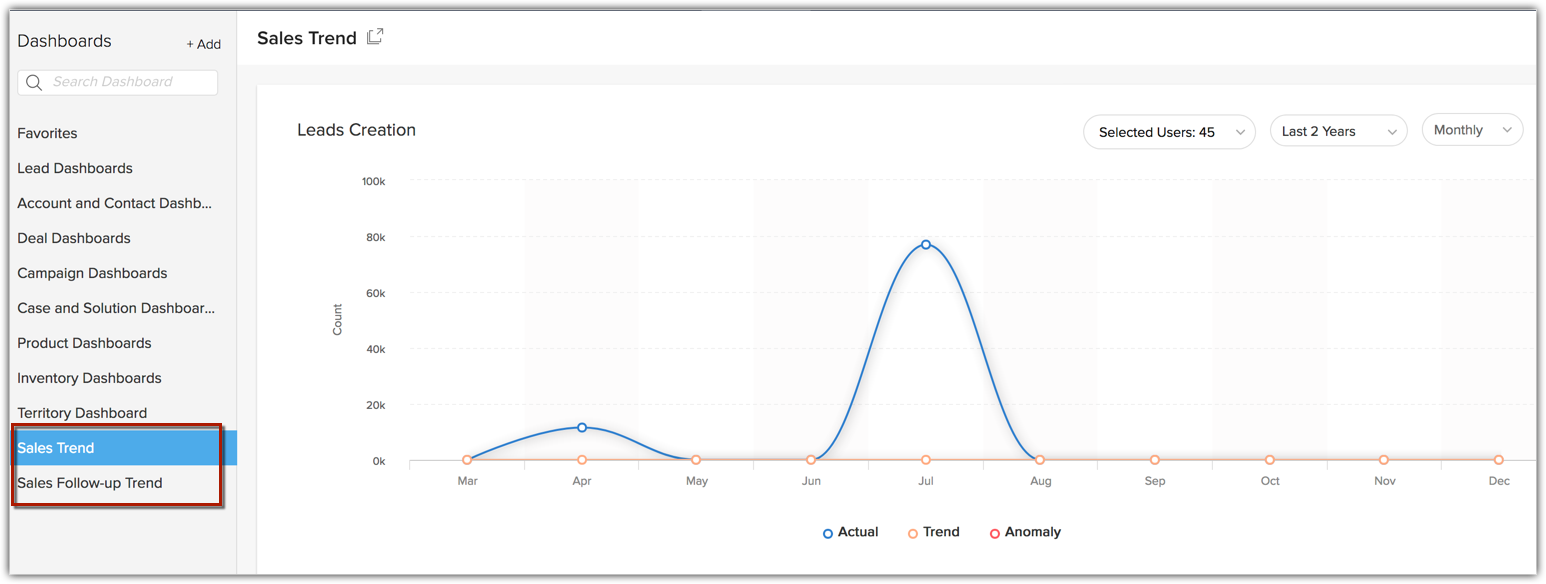

Zoho CRM currently provides eleven pre-built components in the Trend Dashboards folders. All these components are displayed as Line Charts to show trend over a period. You can only view these components but you can not modify them or add new ones.

List of Components

Component Name
Description
Lead Creation
Leads that are created.
Lead Conversion
Leads that are converted.
Contacts Creation
Contacts that are created.
Deal Creation
Deals that are created.
Deal Closing by Count
Deals that are closing count.
Deal Closing by Amount
Deals that are closing by amount.
Task Closure
Tasks that are closed.
Events Creation
Events that are created.
Calls Completed
Calls that are completed.
Notes Creation
Notes that are created.
Email Sent, Bounced, Opened
Emails that are sent, bounced or opened.

You can filter and view the trend of each dashboard based on Users or Groups and Time Period. You can see the trend for daily, weekly, monthly or yearly for the set time period. You can also select a specific portion of the graph to zoom in and view the trend of the respective time-line.
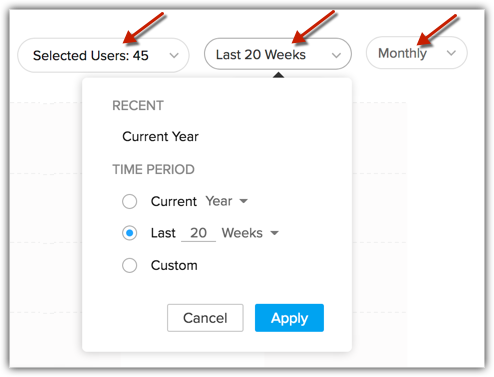

Let's take a closer look at the Leads Creation chart. It comes with three key components;

  • The Trend line - The Trend line shows the pattern in which the given business metric is supposed to fare going by your past data.
  • The Actual line - The Actual line shows how the given business metric is faring in reality as against how it is supposed to, shown in the trend line. It is this line that shows any spike or dip.
  • Anomaly - A sudden spike or a dip from what is normal to your business is called an anomaly. The red circles in the chart denotes anomaly.


As you can see, there is a steep dip in the Actual Line in the above chart, which interprets that your Leads creation has decreased radically for the month as against the previous months. Zia identifies this as an anomaly and sends you a notification, while you can look into what has caused this and fix it.


Viewing Zia Notifications

To view Zia notifications, go to the Home page and click Zia icon in the bottom right hand side corner.
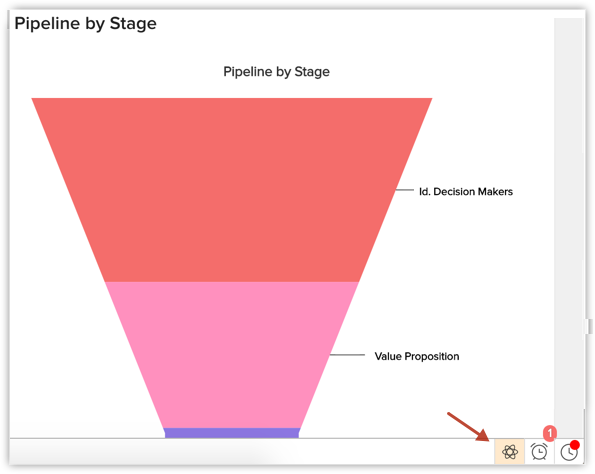

Zia shows the following types of notifications:

  • Alerts: Alerts are usually based on Leads Creation. These alerts bring anomalies in Leads Creation count into your notice.
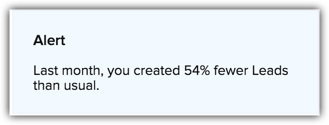

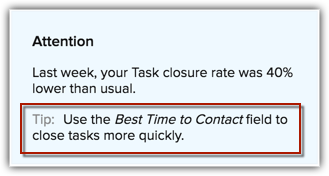
  • Attention: This gives you the status of your current sales metric as against the trend. These notifications could be based on your Team's performance or yours. They usually come with Tips. Attention could also be based on your Workflow Rules.
  • Tips: Tips are given based on the root cause of the anomalies. Say for example, when there is a drop in your tasks closure rate, the tip will be to increase the frequency of you follow-up activities or make use of the Best time to Contact field for faster tasks closure.

Note
  • Basis the historical data, Zia also takes into account seasonal effects of your work pattern to project trends. For example, the system will not show anomalies for your weekends once it identifies the pattern in your work routine.
  • With more data going into your Zoho CRM, Zia predictions get more accurate.
  • The Zia notifications stay for a time period of 15 days, after which they get erased.


        Create. Review. Publish.

        Write, edit, collaborate on, and publish documents to different content management platforms.

        Get Started Now


          Access your files securely from anywhere

            Zoho CRM Training Programs

            Learn how to use the best tools for sales force automation and better customer engagement from Zoho's implementation specialists.

            Zoho CRM Training
              Redefine the way you work
              with Zoho Workplace

                Zoho DataPrep Personalized Demo

                If you'd like a personalized walk-through of our data preparation tool, please request a demo and we'll be happy to show you how to get the best out of Zoho DataPrep.

                Zoho CRM Training

                  Create, share, and deliver

                  beautiful slides from anywhere.

                  Get Started Now


                    Zoho Sign now offers specialized one-on-one training for both administrators and developers.

                    BOOK A SESSION


                                Quick LinksWorkflow AutomationData Collection
                                Web FormsEnterpriseOnline Data Collection Tool
                                Embeddable FormsBankingBegin Data Collection
                                Interactive FormsWorkplaceData Collection App
                                CRM FormsCustomer ServiceAccessible Forms
                                Digital FormsMarketingForms for Small Business
                                HTML FormsEducationForms for Enterprise
                                Contact FormsE-commerceForms for any business
                                Lead Generation FormsHealthcareForms for Startups
                                Wordpress FormsCustomer onboardingForms for Small Business
                                No Code FormsConstructionRSVP tool for holidays
                                Free FormsTravelFeatures for Order Forms
                                Prefill FormsNon-Profit

                                Intake FormsLegal
                                Mobile App
                                Form DesignerHR
                                Mobile Forms
                                Card FormsFoodOffline Forms
                                Assign FormsPhotographyMobile Forms Features
                                Translate FormsReal EstateKiosk in Mobile Forms
                                Electronic Forms
                                Drag & drop form builder

                                Notification Emails for FormsAlternativesSecurity & Compliance
                                Holiday FormsGoogle Forms alternative GDPR
                                Form to PDFJotform alternativeHIPAA Forms
                                Email FormsFormstack alternativeEncrypted Forms

                                Wufoo alternativeSecure Forms

                                TypeformWCAG


                                    All-in-one knowledge management and training platform for your employees and customers.

                                              Create. Review. Publish.

                                              Write, edit, collaborate on, and publish documents to different content management platforms.

                                              Get Started Now


                                                                You are currently viewing the help pages of Qntrl’s earlier version. Click here to view our latest version—Qntrl 3.0's help articles.


                                                                    Manage your brands on social media


                                                                      • Desk Community Learning Series


                                                                      • Digest


                                                                      • Functions


                                                                      • Meetups


                                                                      • Kbase


                                                                      • Resources


                                                                      • Glossary


                                                                      • Desk Marketplace


                                                                      • MVP Corner


                                                                      • Word of the Day


                                                                      • Ask the Experts


                                                                        Zoho Sheet Resources


                                                                            Zoho Forms Resources


                                                                              Secure your business
                                                                              communication with Zoho Mail


                                                                              Mail on the move with
                                                                              Zoho Mail mobile application

                                                                                Stay on top of your schedule
                                                                                at all times


                                                                                Carry your calendar with you
                                                                                Anytime, anywhere


                                                                                      Zoho Sign Resources

                                                                                        Sign, Paperless!

                                                                                        Sign and send business documents on the go!

                                                                                        Get Started Now


                                                                                                Zoho TeamInbox Resources


                                                                                                          Zoho DataPrep Demo

                                                                                                          Get a personalized demo or POC

                                                                                                          REGISTER NOW


                                                                                                            Design. Discuss. Deliver.

                                                                                                            Create visually engaging stories with Zoho Show.

                                                                                                            Get Started Now


                                                                                                                                • Related Articles

                                                                                                                                • Zia Recommendation Analytics

                                                                                                                                  Zia can analyze customer data such as purchase details, interests, and requirements to recommend similar items for other customers. It also compares the behavioral pattern of customers and identifies similar attributes, which it uses to recommend the ...
                                                                                                                                • Zia Notifications

                                                                                                                                  Staying ahead of all the latest updates that come in from different resources is crucial for any business. If you have been using Zia to gain meaningful insights to improve your sales, then you might also want to take advantage of its notifications ...
                                                                                                                                • Zia Presentation

                                                                                                                                  "We rely on data to tell us what has happened, and stories to tell us what it means." - Nancy Duarte in her book, DataStory The world is gravitating towards data storytelling. A compelling narrative, built on contextual data analysis, portrays your ...
                                                                                                                                • Capabilities of Zia in Zoho CRM— A perspective

                                                                                                                                  Zoho CRM harnesses the transformative power of Artificial Intelligence (AI) to revolutionise decision-making across all critical areas of your business, from initial customer interactions to their entire journey. With Zia, AI-powered assistant, Zoho ...
                                                                                                                                • Zia Email Emotion Analysis

                                                                                                                                  Email prioritization is one of the best practices followed by businesses to enhance productivity. Each team in an organization will have different goals, based on which their email prioritization practice will also vary. For example, territory ...
                                                                                                                                  Wherever you are is as good as
                                                                                                                                  your workplace

                                                                                                                                    Resources

                                                                                                                                    Videos

                                                                                                                                    Watch comprehensive videos on features and other important topics that will help you master Zoho CRM.


                                                                                                                                    eBooks

                                                                                                                                    Download free eBooks and access a range of topics to get deeper insight on successfully using Zoho CRM.


                                                                                                                                    Webinars

                                                                                                                                    Sign up for our webinars and learn the Zoho CRM basics, from customization to sales force automation and more.


                                                                                                                                    CRM Tips

                                                                                                                                    Make the most of Zoho CRM with these useful tips.


                                                                                                                                      Zoho Show Resources