Visualize hierarchical datasets using treemap charts

Visualize hierarchical datasets using treemap charts

Treemap charts are visual representations of datasets that have hierarchical structures—for example, functions and their departments, brands and their models, industries and businesses, territories and demographics, and campaigns and conversions are all datasets with parent-child, root-node, or superset-subset classifications.
 
Also, if you have a large volume of data or want to compare proportions and contributions between the participating hierarchies, treemap charts are the type you need.

Understanding the structure of a treemap chart

Tiles and proportions:

Treemap charts have a rectangular layout built with tiles of various sizes and colors. These tiles represent different entities, their sizes represent those entities' values or contributions, and their colors distinguish the entities one from another.

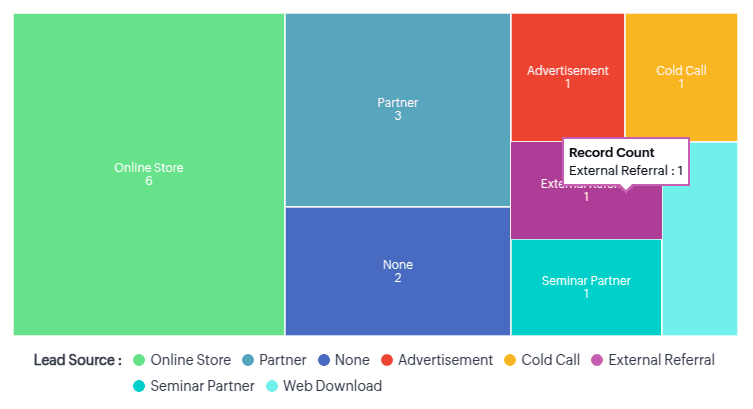
For example: Below is a treemap chart that represents a list of lead sources and compares them all at once. This is a single-grouping treemap, meaning it only uses one level of data for analysis.
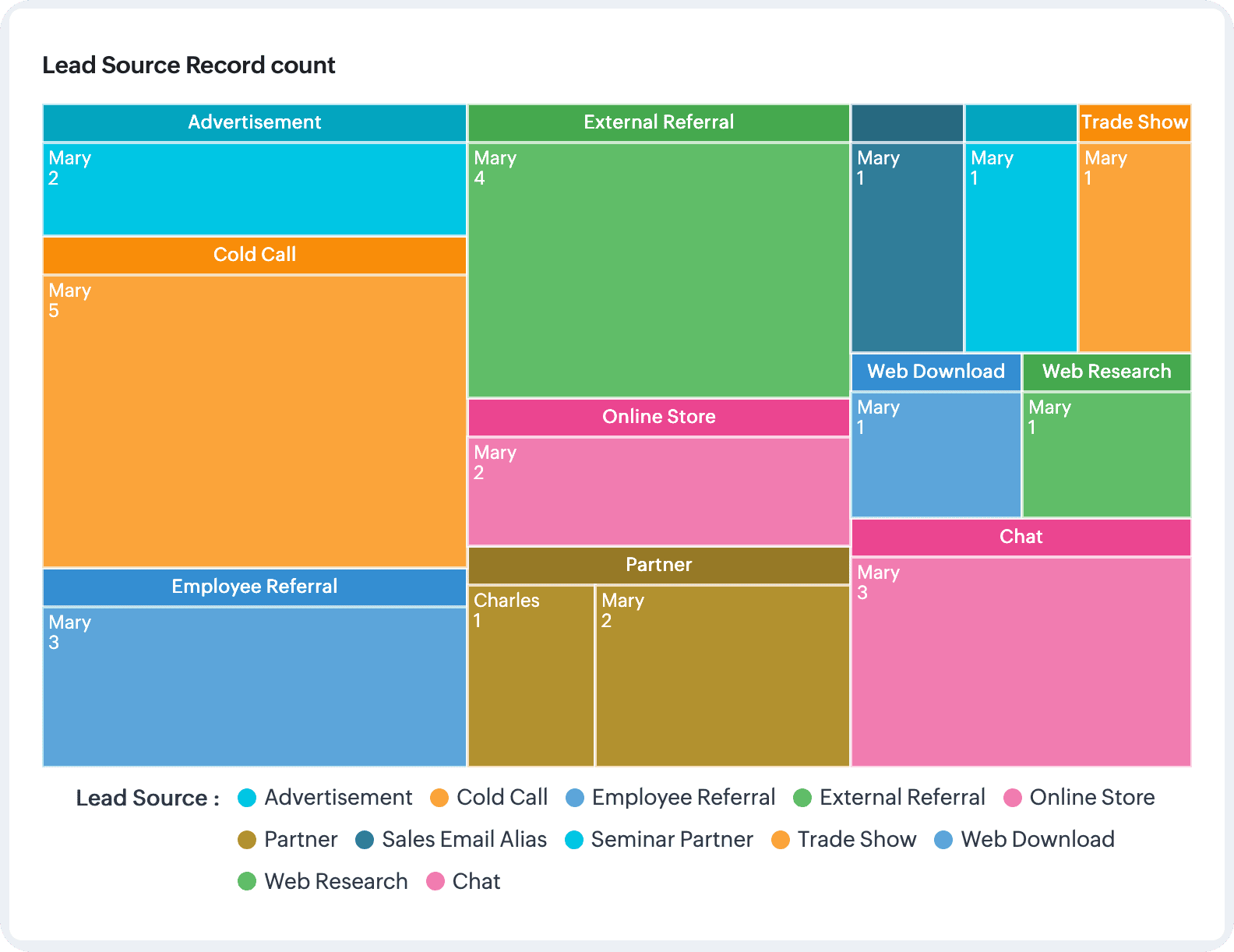
Similarly, to understand and compare the agents' involvement in each of these sources would require second-level data, for which each larger entity in the treemap will have further nested tiles representing the agents, whose contributions are again represented by the tiles' proportions. However, the nested tiles will be of the same color.
Notes
Note: You can use data with up to two groupings to build treemap charts in Zoho CRM.

Applications of a treemap charts: business scenarios

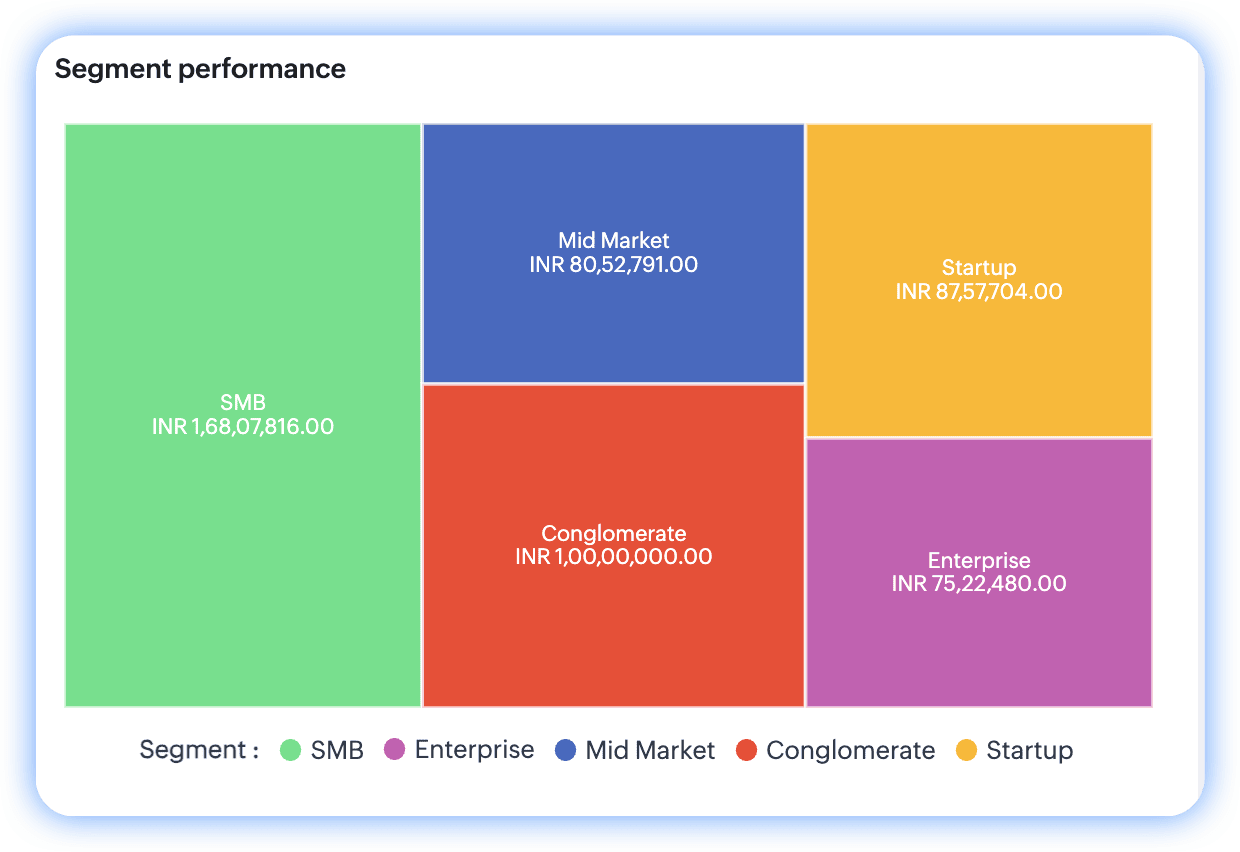
Analyzing profitable segment performances: Single-grouping treemap chart

A segment's performance is primarily related to its revenue; the more revenue, the greater its performance. That said, when businesses have more segments, those segments can be compared to identify the top contributor.
Parameters at play: Segments and their revenue
Configuration: 
  1. The objective is to compare and analyze the performance of different segments based on their profit—so the measure here is revenue.
  2. To break this revenue up based on segments, the grouping value is the Segments field.

Chart
Comparing sales volume across product categories and channels: double-grouping treemap charts

Businesses often compare different products and their sales channels to gauge their relative performances.
 Parameters at play: Sales volume, product categories, and channels
Configuration:
  1. The objective of this analysis is to compare the sales volumes of different products—so the "count of deals" is the key measure.
  2. To explore the products that contributed to these participating deals, the Products field serves as the first grouping.
  3. This analysis also functions to identify profitable channels for each product, so "channels" defines the second grouping.
Chart
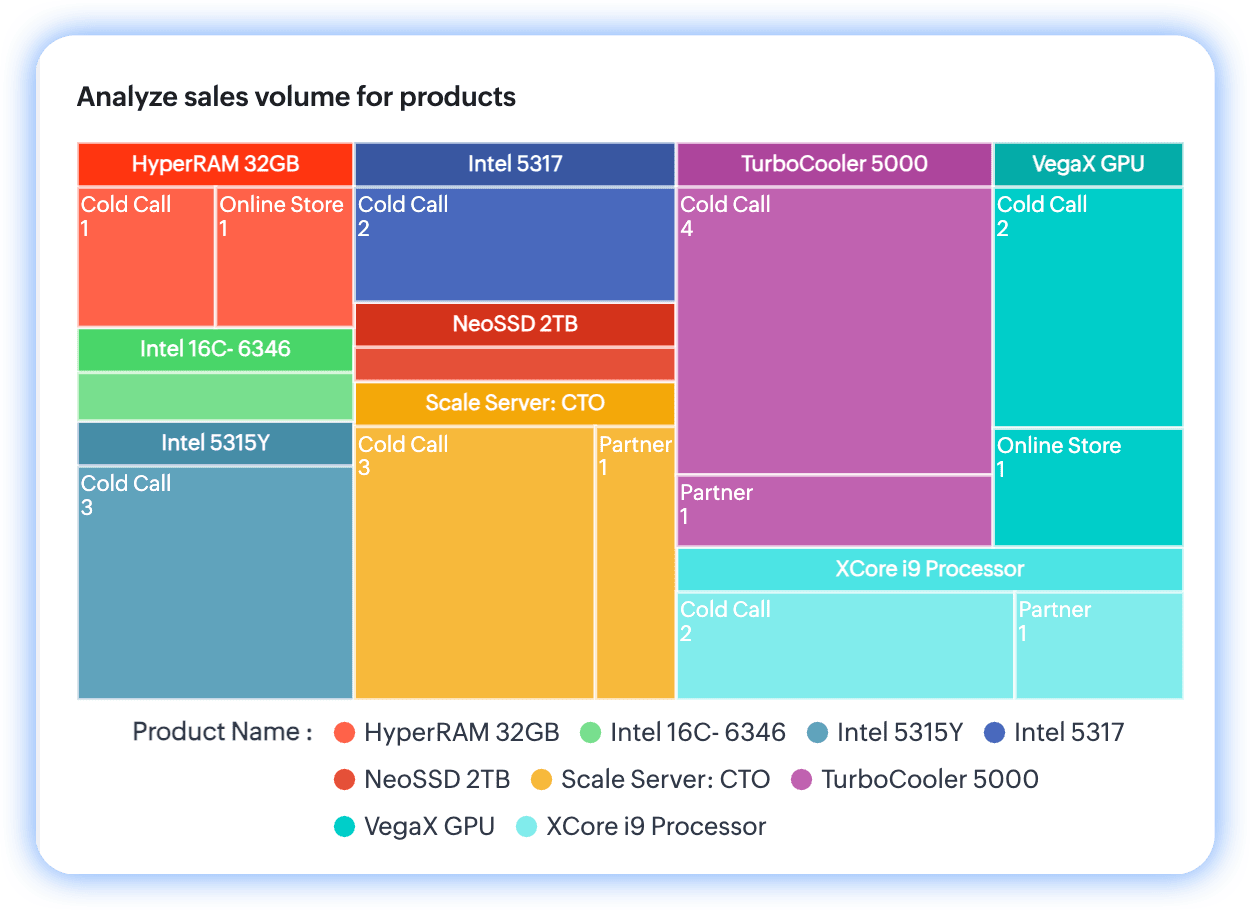
Per the chart, TurboCooler 5000 leads by volume and cold calls seem to be its most profitable channel.

To configure a treemap chart
  1. Go to the Analytics module in Zoho CRM.
  2. Select a dashboard you want to create the treemap chart in and click Add Component at the top-right.
  3. From the list of available dashboard components, select Chart.
  4. In the Add Chart screen, select Quick chart if you would like to create a chart based on data available in the module.
    1. In the configuration page, do the following:
      1. Provide a name for your component.
      2. Select the module for computation.
      3. Upon selecting the module, the available chart types will be displayed. To your right, above the chart preview, click on the dropdown.
      4. The default chart name is always "column". Click on the dropdown and select Treemap chart from the list.
    2. Select Related module.
    3. Specify the Measure (Y-axis). In the case of treemap charts, the measure represents the proportional value.
    4. Select your grouping preferences based on dates or dimensions. You can provide up to two groupings.
    5. Provide filter criteria for more precise results.
    6. Select the Combine related grouping values into categories checkbox if your grouping parameters have similar attributes.
    7. Under More options, if you'd like to have a filter in your chart, select up to two fields to display as component filters.
    8. Click Save. Your chart will be created after computation.
  5. If you'd like to use a report to create a treemap chart, click Reports in the Add Chart screen from step 3.
    1. Provide a name for your component.
    2. Select the report. Based on your report type and its exhibited relationship structure, the chart type above the preview will be enabled.
    3. Provide the rest of the field values detailed in the Quick Chart's directions.
    4. Click Save.

Actions you can perform on treemap charts

Like all chart components in Analytics, you can clone components to the same dashboard or a different dashboard, as well as edit, delete, and print them, add them to your home page, embed a URL, move them to another dashboard, download them, and add them as favorites. Go to the chart and click on the vertical ellipses button to view these options.
 
If you've enabled component filters, those filters will be added to the chart near its name.
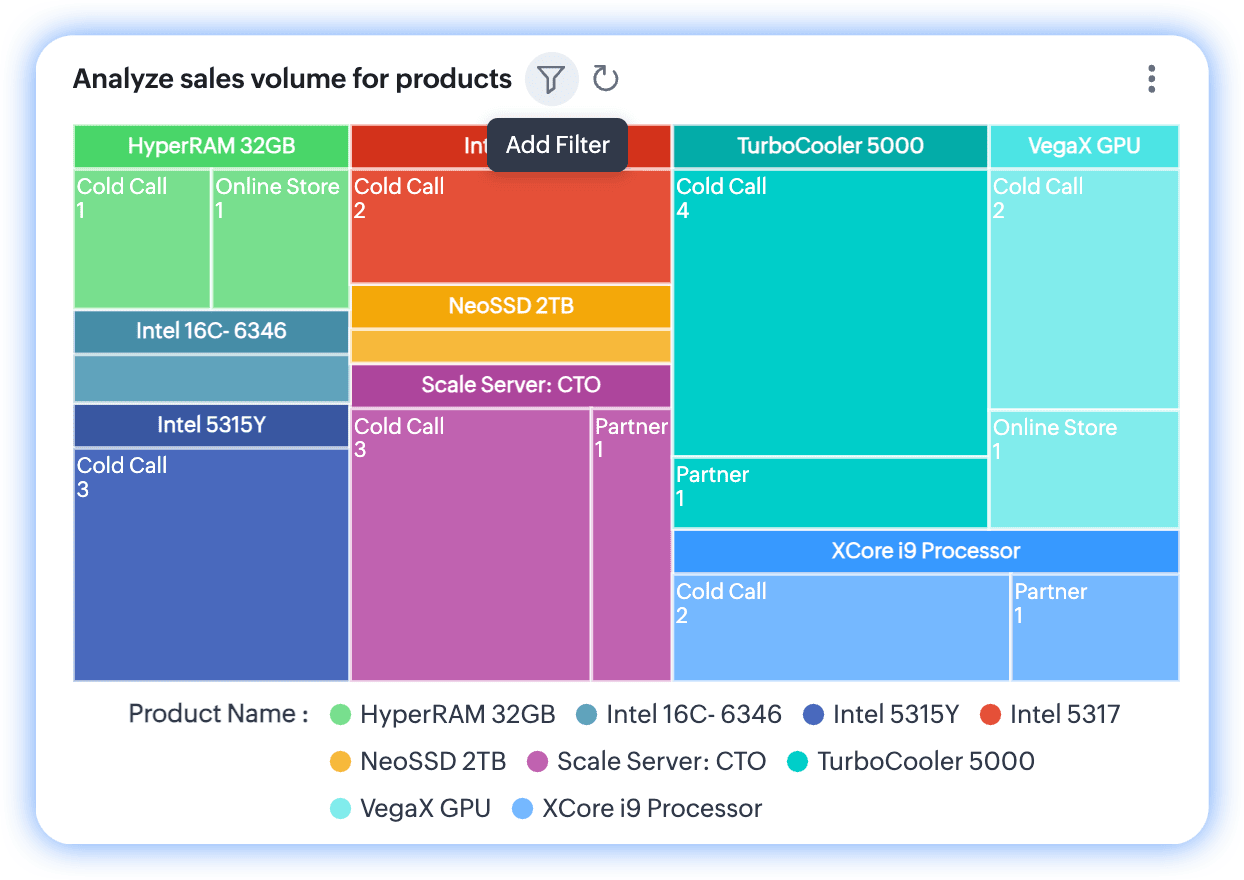
Note: You can select up to two filter parameters in the configuration. If you've applied any parameters, only the qualified data will be displayed in the chart, and the filter will hint its application by displaying a notification dot over the funnel.


        Create. Review. Publish.

        Write, edit, collaborate on, and publish documents to different content management platforms.

        Get Started Now


          Access your files securely from anywhere

            Zoho CRM Training Programs

            Learn how to use the best tools for sales force automation and better customer engagement from Zoho's implementation specialists.

            Zoho CRM Training
              Redefine the way you work
              with Zoho Workplace

                Zoho DataPrep Personalized Demo

                If you'd like a personalized walk-through of our data preparation tool, please request a demo and we'll be happy to show you how to get the best out of Zoho DataPrep.

                Zoho CRM Training

                  Create, share, and deliver

                  beautiful slides from anywhere.

                  Get Started Now


                    Zoho Sign now offers specialized one-on-one training for both administrators and developers.

                    BOOK A SESSION


                                Quick LinksWorkflow AutomationData Collection
                                Web FormsEnterpriseOnline Data Collection Tool
                                Embeddable FormsBankingBegin Data Collection
                                Interactive FormsWorkplaceData Collection App
                                CRM FormsCustomer ServiceAccessible Forms
                                Digital FormsMarketingForms for Small Business
                                HTML FormsEducationForms for Enterprise
                                Contact FormsE-commerceForms for any business
                                Lead Generation FormsHealthcareForms for Startups
                                Wordpress FormsCustomer onboardingForms for Small Business
                                No Code FormsConstructionRSVP tool for holidays
                                Free FormsTravelFeatures for Order Forms
                                Prefill FormsNon-Profit

                                Intake FormsLegal
                                Mobile App
                                Form DesignerHR
                                Mobile Forms
                                Card FormsFoodOffline Forms
                                Assign FormsPhotographyMobile Forms Features
                                Translate FormsReal EstateKiosk in Mobile Forms
                                Electronic Forms
                                Drag & drop form builder

                                Notification Emails for FormsAlternativesSecurity & Compliance
                                Holiday FormsGoogle Forms alternative GDPR
                                Form to PDFJotform alternativeHIPAA Forms
                                Email FormsFormstack alternativeEncrypted Forms

                                Wufoo alternativeSecure Forms

                                TypeformWCAG


                                      All-in-one knowledge management and training platform for your employees and customers.

                                                Create. Review. Publish.

                                                Write, edit, collaborate on, and publish documents to different content management platforms.

                                                Get Started Now


                                                                  You are currently viewing the help pages of Qntrl’s earlier version. Click here to view our latest version—Qntrl 3.0's help articles.


                                                                      Manage your brands on social media


                                                                        • Desk Community Learning Series


                                                                        • Digest


                                                                        • Functions


                                                                        • Meetups


                                                                        • Kbase


                                                                        • Resources


                                                                        • Glossary


                                                                        • Desk Marketplace


                                                                        • MVP Corner


                                                                        • Word of the Day


                                                                        • Ask the Experts


                                                                          Zoho Sheet Resources


                                                                              Zoho Forms Resources


                                                                                Secure your business
                                                                                communication with Zoho Mail


                                                                                Mail on the move with
                                                                                Zoho Mail mobile application

                                                                                  Stay on top of your schedule
                                                                                  at all times


                                                                                  Carry your calendar with you
                                                                                  Anytime, anywhere


                                                                                        Zoho Sign Resources

                                                                                          Sign, Paperless!

                                                                                          Sign and send business documents on the go!

                                                                                          Get Started Now


                                                                                                  Zoho TeamInbox Resources


                                                                                                            Zoho DataPrep Demo

                                                                                                            Get a personalized demo or POC

                                                                                                            REGISTER NOW


                                                                                                              Design. Discuss. Deliver.

                                                                                                              Create visually engaging stories with Zoho Show.

                                                                                                              Get Started Now


                                                                                                                                  • Related Articles

                                                                                                                                  • Charts

                                                                                                                                    Some of the options mentioned in this document are being released in a phased manner and may only be available to specific users. The Dashboards tab is renamed as Analytics for selected accounts. A chart presents data from various records of a ...
                                                                                                                                  • Compare and contrast competing datasets using butterfly charts

                                                                                                                                    Butterfly charts serve to compare a single metric across datasets with similar attributes, and are so-named because they appear visually similar to butterflies. They're also popularly known as tornado charts. Imagine you need to assess one of the ...
                                                                                                                                  • Using Calendar in Zoho CRM

                                                                                                                                    Knowing your calendar and the various components in it is helpful in planning all your meetings and scheduled calls efficiently. Following are some of the components in the Zoho CRM calendar that will help you understand the calendar better and make ...
                                                                                                                                  • Using Territories

                                                                                                                                    Understanding Territory Management Using Territory Management, you can segment accounts, contacts and deals into territories. You can build a territory hierarchy by creating territories and sub territories. You can define criteria for each of these ...
                                                                                                                                  • Using Zoho Sheet View

                                                                                                                                    You can tap into the power of spreadsheets within your CRM account using Zoho Sheet View. In this view, you'll be able to access your module's data in the spreadsheet format.This mode of working is particularly convenient when you need to make ...
                                                                                                                                    Wherever you are is as good as
                                                                                                                                    your workplace

                                                                                                                                      Resources

                                                                                                                                      Videos

                                                                                                                                      Watch comprehensive videos on features and other important topics that will help you master Zoho CRM.


                                                                                                                                      eBooks

                                                                                                                                      Download free eBooks and access a range of topics to get deeper insight on successfully using Zoho CRM.


                                                                                                                                      Webinars

                                                                                                                                      Sign up for our webinars and learn the Zoho CRM basics, from customization to sales force automation and more.


                                                                                                                                      CRM Tips

                                                                                                                                      Make the most of Zoho CRM with these useful tips.


                                                                                                                                        Zoho Show Resources