Waterfall

Waterfall

Overview

The Waterfall component is a dynamic visualization tool that helps you understand how a starting value changes over time or across categories due to a sequence of positive and negative contributions. Unlike traditional column charts that display individual values in isolation, the Waterfall chart focuses on cumulative impact—highlighting how each step moves the total upward or downward.

This makes it especially useful for analyzing processes like revenue breakdowns, expense tracking, or any scenario where understanding the net change from a series of contributing factors is essential. By visualizing both increases and decreases in a single flow, the Waterfall component enables you to clearly identify where value is added or lost, empowering better insights and more informed decisions. 

Let's say you’re tracking revenue fluctuations, monitoring process efficiencies, or forecasting future trends; a waterfall component will offer a clear, intuitive way to understand the dynamics of your data.

Let’s say you want to understand how your total subscriber count is impacted by different subscription status. A Waterfall component that shows the number of subscribers across statuses like Active, Trial, Upgraded, Churned, and Expired gives you a clear idea of the total subscription.

For example, you might see that while Active and Trial users drive major gains, losses from Churned and Expired users reduce the net total. This helps you identify how much total value is effected by churned and expired subscriptions and whether it needs attention to retain or recover subscriptions.
Info

Feature Availability

Available for Enterprise and editions editions of Zoho CRM.

Variants

Basic
Cumulative
Breakdown
Projection
Basic
Visualizes categorical changes where each stage is assigned as either a positive (adding) or negative (reducing) factor. The final bar represents the net result after accounting for all additions and subtractions. 
Useful for cases where predefined picklist values represent distinct stages, such as sales stages or process steps. 
Let’s say you want to understand how revenue accumulates or drops across different stages in your sales pipeline. A Waterfall component showing the revenue by stage helps you track how each stage contributes to—or reduces—the overall revenue.
For example, you may notice that stages like Qualification, Proposal, and Negotiation add significant value, but stages like Closed Lost and Closed Lost to Competitor pull down the total. This view helps you identify where your pipeline gains most of its value and where you're losing potential revenue.


Cumulative
Focuses on tracking cumulative changes over time. Users can optionally enable intermediate sums (quarterly, yearly) for better clarity. The final bar represents the total cumulative value at the end of the period. 
Useful for scenarios where values accumulate over time—such as monthly profits, expenses, or revenue trends—making it easier to track growth, fluctuations, and periodic performance.
Let’s say you want to monitor how profit has grown or declined over time. A Cumulative Waterfall that shows profit across months, with quarterly intermediate sums, helps you track month-over-month changes and quarterly performance in one view.

For instance, while you may see steady growth in Q1 and Q4, Q2 and Q3 show noticeable dips in specific months like May and October. This helps you quickly spot which months drove growth, which pulled performance down, and how each quarter contributed to your overall profit.


Breakdown
The Breakdown variant is similar to Cumulative but provides a more granular view by breaking down each time period into different segments based on the business requirements.
It's useful for tracking various subcategories within each time period — the breakdown is among the picklist options like product type, regions, etc. even though the grouping is a time-related field.
Let’s say you want to compare product-wise subscription trends over the past few years. A Breakdown Waterfall component showing the product wise subscriptions across the year and broken down by product category gives you a clear picture of which product lines grew or declined year over year.

For instance, you might find that Mobile subscriptions dropped sharply in 2022, while Tabs showed consistent growth across all three years. This helps you evaluate product performance within each time period and understand what’s driving your overall subscription trend.


Projection
Perfect for financial forecasting and scenario planning, this variant starts with a user-defined initial value and tracks incremental changes over time. The initial bar’s value can be set as "All Time" (historical total) or "Previous Period" (last period’s final value). The final bar will show the total after incorporating all positive and negative changes over time.
It is ideal for scenarios where past values influence the present and future.
Let’s say you want to visualize how profit is expected to grow across the current year, starting from an initial value. A Projection Waterfall that shows the profit across quarters, with an initial value set from all-time data, helps you track projected gains quarter over quarter.

For example, you might see growth of 4k, 3k, 2k, and 3k in the quarters, building toward a total profit of 15k by year-end. This helps in forecasting quarterly performance and understanding how current trends may shape your overall annual outcome.


Creating a Waterfall component

To create a waterfall component:

1. Navigate to the Analytics module, and select a dashboard.
2. Click Add Component, and select Waterfall.

3. Select the variant based on your requirement.

3.1 for Basic variant
  1. Provide the Component Name
  2. Select the Primary Module and the Related Module
  3. Select the measure for the waterfall.

  4. Next, select the Grouping field.
    Add criteria if needed for the grouping.
  5. Set the objective of the grouping values for the component—same or varied.

    1. For Same Objective, select whether the groupings should be positive or negative.
    2. For Varied Objectives, choose between automatic objectives or customize your own objectives by setting positive and negative stages for varied purposes.


3.2 for Cumulative variant
  1. Provide the Component Name
  2. Select the Primary Module and the Related Module
  3. Select the measure for the waterfall.

  4. Next, select the Grouping field.
    Add criteria if needed for the grouping.
  5. Select the intermediate sum, and select the required value from the dropdown.


3.3 for Breakdown variant
  1. Provide the Component Name
  2. Select the Primary Module and the Related Module
  3. Select the measure for the waterfall.
  4. Next, select the Grouping field.
  5. Choose the required Breakdown from the dropdown.

    Add criteria if needed for the grouping.


3.4 for Projection variant
  1. Provide the Component Name
  2. Select the Primary Module and the Related Module
  3. Select the measure for the waterfall.
  4. Next, select the Duration — the date/time field and the duration.
  5. Choose the frequency from the drop-down based on the duration.
  6. Set additional criteria if required.
  7. Set the initial value to All Time or Previous Period


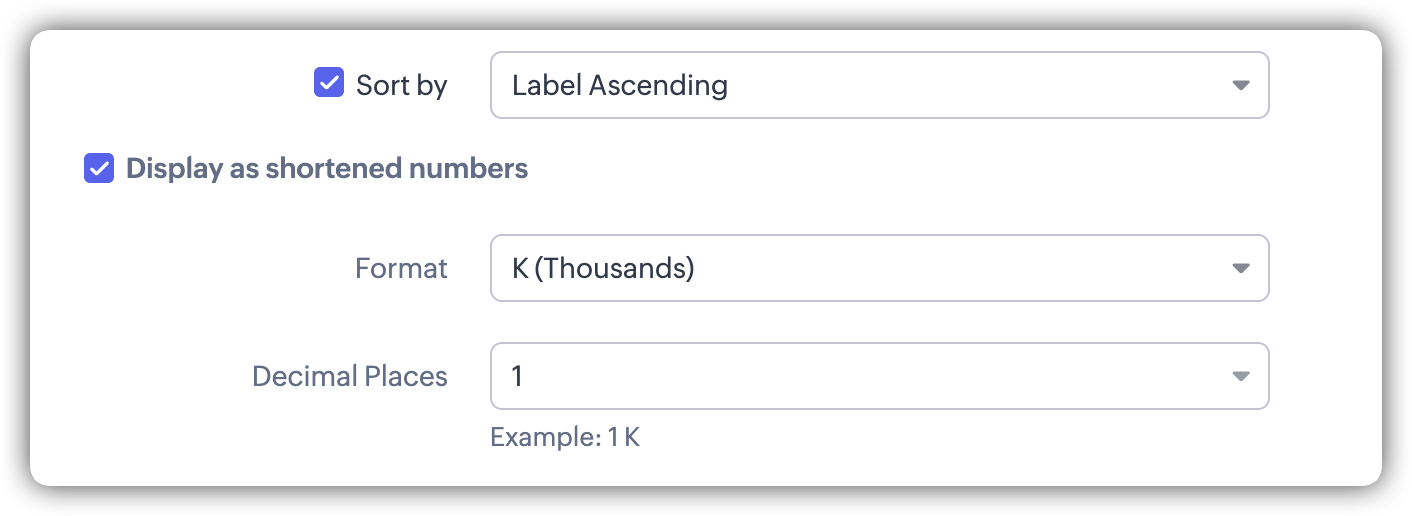
 5. Select display as shortened numbers if needed, and choose the format and decimal places.
6. Click Save.

        Create. Review. Publish.

        Write, edit, collaborate on, and publish documents to different content management platforms.

        Get Started Now


          Access your files securely from anywhere

            Zoho CRM Training Programs

            Learn how to use the best tools for sales force automation and better customer engagement from Zoho's implementation specialists.

            Zoho CRM Training
              Redefine the way you work
              with Zoho Workplace

                Zoho DataPrep Personalized Demo

                If you'd like a personalized walk-through of our data preparation tool, please request a demo and we'll be happy to show you how to get the best out of Zoho DataPrep.

                Zoho CRM Training

                  Create, share, and deliver

                  beautiful slides from anywhere.

                  Get Started Now


                    Zoho Sign now offers specialized one-on-one training for both administrators and developers.

                    BOOK A SESSION


                                Quick LinksWorkflow AutomationData Collection
                                Web FormsEnterpriseOnline Data Collection Tool
                                Embeddable FormsBankingBegin Data Collection
                                Interactive FormsWorkplaceData Collection App
                                CRM FormsCustomer ServiceAccessible Forms
                                Digital FormsMarketingForms for Small Business
                                HTML FormsEducationForms for Enterprise
                                Contact FormsE-commerceForms for any business
                                Lead Generation FormsHealthcareForms for Startups
                                Wordpress FormsCustomer onboardingForms for Small Business
                                No Code FormsConstructionRSVP tool for holidays
                                Free FormsTravelFeatures for Order Forms
                                Prefill FormsNon-Profit

                                Intake FormsLegal
                                Mobile App
                                Form DesignerHR
                                Mobile Forms
                                Card FormsFoodOffline Forms
                                Assign FormsPhotographyMobile Forms Features
                                Translate FormsReal EstateKiosk in Mobile Forms
                                Electronic Forms
                                Drag & drop form builder

                                Notification Emails for FormsAlternativesSecurity & Compliance
                                Holiday FormsGoogle Forms alternative GDPR
                                Form to PDFJotform alternativeHIPAA Forms
                                Email FormsFormstack alternativeEncrypted Forms

                                Wufoo alternativeSecure Forms

                                TypeformWCAG


                                      All-in-one knowledge management and training platform for your employees and customers.

                                                Create. Review. Publish.

                                                Write, edit, collaborate on, and publish documents to different content management platforms.

                                                Get Started Now


                                                                  You are currently viewing the help pages of Qntrl’s earlier version. Click here to view our latest version—Qntrl 3.0's help articles.


                                                                      Manage your brands on social media


                                                                        • Desk Community Learning Series


                                                                        • Digest


                                                                        • Functions


                                                                        • Meetups


                                                                        • Kbase


                                                                        • Resources


                                                                        • Glossary


                                                                        • Desk Marketplace


                                                                        • MVP Corner


                                                                        • Word of the Day


                                                                        • Ask the Experts


                                                                          Zoho Sheet Resources


                                                                              Zoho Forms Resources


                                                                                Secure your business
                                                                                communication with Zoho Mail


                                                                                Mail on the move with
                                                                                Zoho Mail mobile application

                                                                                  Stay on top of your schedule
                                                                                  at all times


                                                                                  Carry your calendar with you
                                                                                  Anytime, anywhere


                                                                                        Zoho Sign Resources

                                                                                          Sign, Paperless!

                                                                                          Sign and send business documents on the go!

                                                                                          Get Started Now


                                                                                                  Zoho TeamInbox Resources


                                                                                                            Zoho DataPrep Demo

                                                                                                            Get a personalized demo or POC

                                                                                                            REGISTER NOW


                                                                                                              Design. Discuss. Deliver.

                                                                                                              Create visually engaging stories with Zoho Show.

                                                                                                              Get Started Now


                                                                                                                                  • Related Articles

                                                                                                                                  • Organizing the homepage in Zoho CRM iOS app

                                                                                                                                    Your homepage acts as a progress tracker, bringing together all the important details you need, such as meetings, deals, leads, and more. Even though the mobile screen has limited space, you can drill down into each component, such as dashboards, ...
                                                                                                                                  • Organizing your home page in Zoho CRM Android app

                                                                                                                                    Your homepage acts as a progress tracker bringing together all the important details you need, such as meetings, deals, leads, and more. Even though the mobile screen has limited space, you can drill down into each component you have added, such as ...
                                                                                                                                  • VoC Dashboards in Zoho CRM — A Detailed Study

                                                                                                                                    VoC Dashboards — An Overview The insights on VoC are presented in the form of various dashboards under specific categories. In order to understand these insights and use them to make informed decisions you must learn what the various types of ...
                                                                                                                                  • Zoho Backstage Integration

                                                                                                                                    Zoho Backstage is an online event management software which allows you to organize meetings, trade shows, classroom trainings, and more. Integrating Zoho Backstage with CRM allows you to create and manage events in Zoho Backstage from within Zoho ...
                                                                                                                                  • Voice of the Customer Settings — Enabling, disabling and more.

                                                                                                                                    Enabling VoC CRM admins can enable the feature in the organization's CRM account from Setup. Navigate to Setup > Zia > Voice of Customer . Click Get Started in the VoC landing page. Voice of the Customer Settings — Enabling, disabling and more.In the ...
                                                                                                                                    Wherever you are is as good as
                                                                                                                                    your workplace

                                                                                                                                      Resources

                                                                                                                                      Videos

                                                                                                                                      Watch comprehensive videos on features and other important topics that will help you master Zoho CRM.


                                                                                                                                      eBooks

                                                                                                                                      Download free eBooks and access a range of topics to get deeper insight on successfully using Zoho CRM.


                                                                                                                                      Webinars

                                                                                                                                      Sign up for our webinars and learn the Zoho CRM basics, from customization to sales force automation and more.


                                                                                                                                      CRM Tips

                                                                                                                                      Make the most of Zoho CRM with these useful tips.


                                                                                                                                        Zoho Show Resources