Step 2: Event
Event configuration
Event is where you define the event that triggers automated commission computation. Here, you configure when a commission should be calculated, events from which records triggers this automation, and map the fields required to calculate the commissions. Let’s go through them one by one!
Trigger configuration
Event trigger module
In the trigger configuration section, you determine which action in which module triggers the payout initiation.
- If you have selected commission plan based on Total amount, then you can choose the following module as trigger module: Leads, Deals, Quotes, Sales Orders, Purchase Orders, Invoices, Vendors, and other custom modules.
These modules will have fields like Annual revenue (leads), Amount and Expected amount (Deals) , Discount, Tax, Adjustments, Grand Total (Quotes) and so on, from which the commission structure will be calculated. - If you have selected your commission plan based on Line Items, then the modules listed will be Quotes, Sales Orders, Purchase Orders, Invoices, and any custom module with subforms in it.
Line item-based commission calculation requires products recorded as line items in subforms. The above modules are the ones that come with subforms. - Zoho CRM also comes with standard modules like leads and Deals that does not have a subform recording participating products.
- If you’d like to have these non-subform borne standard or even custom modules into your commission plan, then kindly ensure you have your solutions (line items) listed as a subform inside the record.
When to trigger: After you have chosen the module, you have to determine when to trigger the commission computation.
You can choose from the following options: Create, Edit, or Create or Edit.
You can choose from the following options: Create, Edit, or Create or Edit.
Say for example, You want to calculate commissions only after the quote stage is updated as closed won. The following criteria can help achieve this requirement:
Event trigger module: Quotes
When to Trigger: Create or Edit
Criteria: Quote stage is Closed Won.
This will initiate commission computation in the upcoming step.
Map fields for commission calculation
There are two primary fields you’d need to furnish:
- Commission Recipient Field to show system which field in the record stores the name of the eligible employee for the incentive.
- For commission plan based on Total amount, you would be asked to show which currency field in the record layout contains the total amount value, from which the commissions will be computed.
For plans based on Line item, you’ll be asked to choose the Commission items that are needed in commission computation. This Commission Items option displays all the subforms available in the selected module. Choosing the desired subform will unfurl the fields that are needed to map for computation. 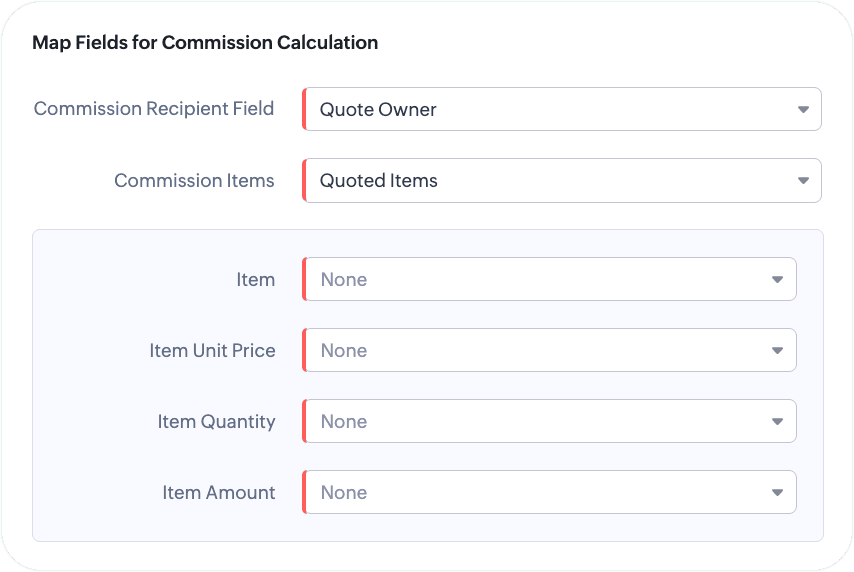
- The last step in the event configuration is to map the fields that are needed for computation of commissions. Manually choose the equivalent fields from your module to the following:
- Item: Select the field that stores the items participating in the commissioning activity (Example: Product name, a column in the subform)
- Item unit price: Select the field that stores the list price or unit price of the item
- Item quantity: Mention which fields have value for the quantity.
- Item amount: Choose the field that displays the total amount including the quantities and discounts.

Note: Commissions are generally computed for unit price in most organizations. If you’d like to calculate commissions for the discounted price, then in place of Item Unit Price, mapping a field that stores the net price will help achieve this.