Discrepancy Handling and Clawbacks
Transactions can change even after commissions have been generated. Without a mechanism to account for these changes, partner commissions may no longer reflect the final transaction outcome.
A customer may purchase additional products, request modifications, return an order, or cancel a transaction altogether. When these changes affect the value or validity of a transaction, the commission originally calculated for a partner may no longer be accurate.
Discrepancy Handling and Clawbacks help organizations reconcile these changes and ensure that partner commissions continue to reflect the final outcome of a transaction.
Understanding discrepancies
A discrepancy occurs when the value of a transaction changes after a commission has already been generated.
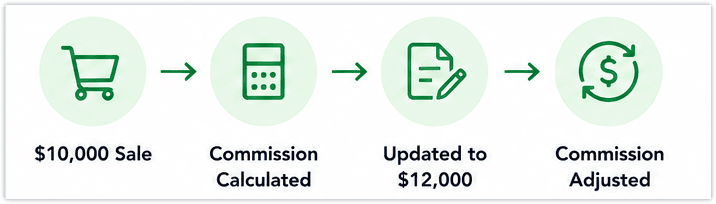
Let's say a partner generates a transaction worth $10,000 and earns a commission based on that amount. Later, the customer decides to add another product to the order, increasing the transaction value to $12,000. Since the commission was originally calculated using the earlier transaction value, it no longer reflects the latest amount.
Similarly, a discrepancy can occur when a customer removes products, receives additional discounts, or modifies the transaction in a way that reduces its value.
In each of these situations, the transaction remains valid, but the commission needs to be adjusted to reflect the updated transaction value.
How discrepancy handling works
When a transaction associated with a commission record is modified, the system identifies the difference between the original transaction value and the updated value.
Administrators can review the discrepancy and determine whether the commission should be adjusted.
Once the discrepancy is resolved, the commission record is updated to reflect the latest transaction value.
Discrepancy handling is configured within a commission plan and works as follows:
- Commission is calculated
When a transaction meets the defined conditions, commission is calculated. - Transaction is updated
The transaction is modified after the initial calculation (for example, value change or cancellation). - Discrepancy is detected
The system identifies that the updated transaction no longer matches the original commission basis. - Clawback is applied
The commission is adjusted based on the defined rules and conditions.
Resolving discrepancies
Resolving a discrepancy allows organizations to reconcile the difference between the original commission amount and the revised transaction value.
For example, if a partner initially earns a commission based on a $10,000 transaction and the value later increases to $12,000, the commission can be adjusted to account for the additional revenue. Likewise, if the transaction value decreases to $8,000, the commission can be updated accordingly.
This ensures that partner earnings remain aligned with the latest transaction information.
Depending on the updated transaction details, resolving a discrepancy may result in:
Depending on the updated transaction details, resolving a discrepancy may result in:
- Reduced commission
- Reversed commission
- Updated earnings based on revised values
Discrepancy processing window
The discrepancy processing window defines the time period during which adjustments can be made.
- It is configured in number of days
- It is based on a selected reference event (for example, created time or modified time)
This window typically aligns with business policies such as:
- Return or refund periods
- Payment verification timelines
Only discrepancies identified within this window are eligible for adjustment.
Understanding clawbacks
While discrepancies deal with changes to transaction values, clawbacks deal with transactions that are no longer eligible for commission.
A clawback allows organizations to recover previously approved or issued commissions when a transaction is canceled, refunded, returned, or otherwise invalidated.
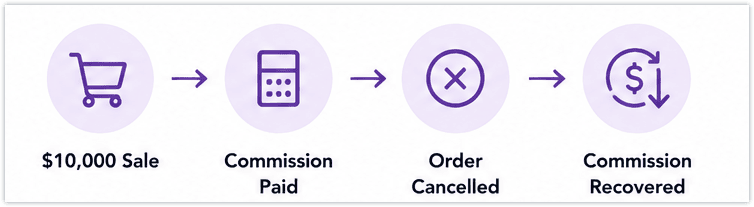
For example, a partner may generate a transaction worth $10,000 and earn a commission after the transaction is approved. If the customer later cancels the order or receives a full refund, the transaction no longer qualifies for commission. In such cases, the organization can recover all or part of the commission through a clawback.
Common clawback scenarios
Clawbacks are commonly used when:
- Orders are canceled after commission approval
- Customers receive refunds
- Products are returned
- Subscriptions are canceled
- Contracts are terminated before fulfillment
These scenarios result in a loss of revenue, making the originally generated commission inaccurate.
How clawbacks work
When a clawback event occurs, the system identifies the commission associated with the affected transaction and applies the configured clawback rules.
Depending on the organization's commission policy, the recovered commission may be deducted from future payouts or reflected as an adjustment in commission records.
Defining clawback conditions
You can control when clawbacks are applied by defining criteria based on record fields.
These conditions are evaluated based on the Event Trigger module selected in the Event tab of the commission plan. The fields available for defining clawback criteria are limited to the fields in that module (excluding subform fields).
These conditions are evaluated based on the Event Trigger module selected in the Event tab of the commission plan. The fields available for defining clawback criteria are limited to the fields in that module (excluding subform fields).
For example:
- Apply clawback only if deal status = canceled
- Apply clawback if payment status = failed
This ensures that:
- Only relevant discrepancies trigger adjustments
- Commission changes follow defined business rules
Discrepancies vs Clawbacks
Although both features help maintain commission accuracy, they serve different purposes.
Discrepancy Handling | Clawbacks |
Used when a transaction value changes | Used when a transaction becomes invalid |
Adjusts commission amounts | Recovers previously issued commissions |
Transaction remains active | Transaction is canceled, refunded, or reversed |
Maintains commission accuracy | Prevents overpayment of commissions |
When to use discrepancy handling
Consider enabling discrepancy handling and clawbacks when:
- Transaction values frequently change after creation
- Refunds or cancellations are common
- Partner commissions are based on finalized revenue
- Accurate commission tracking is critical for the business
These controls help ensure that partner payouts remain accurate throughout the transaction lifecycle.