Reviewing and Approving Commissions
Commission approvals ensure that calculated commissions are validated before payout. This step helps maintain accuracy, enforce internal controls, and prevent incorrect or premature payouts.
Once commissions are generated, they must go through an approval process before they are finalized.
How commission approvals work
At a high level, the approval process follows this flow:
- Commission is calculated
A commission record is generated when defined conditions are met. - Approval request is triggered
The commission is sent to the configured approver(s). - Review and decision
Approvers review the commission details and either approve or reject it. - Finalization
Approved commissions are finalized for payout. Rejected commissions require re-evaluation.
Configuring approval workflows
Approval workflows are defined as part of a commission plan. You can configure:
Approvers
You can assign one or more approvers using:
- Users: Specific individuals
- Roles: Any user within a role (for example, finance manager)
- Groups: A set of users responsible for approvals
Approval type
When multiple approvers are involved, you can define how approvals are processed:
Anyone
- Approval from any one approver is sufficient
- Faster processing
Everyone
- All selected approvers must approve
- Ensures stricter validation
Approval order
If “Everyone” is selected, you can define the order of approval:
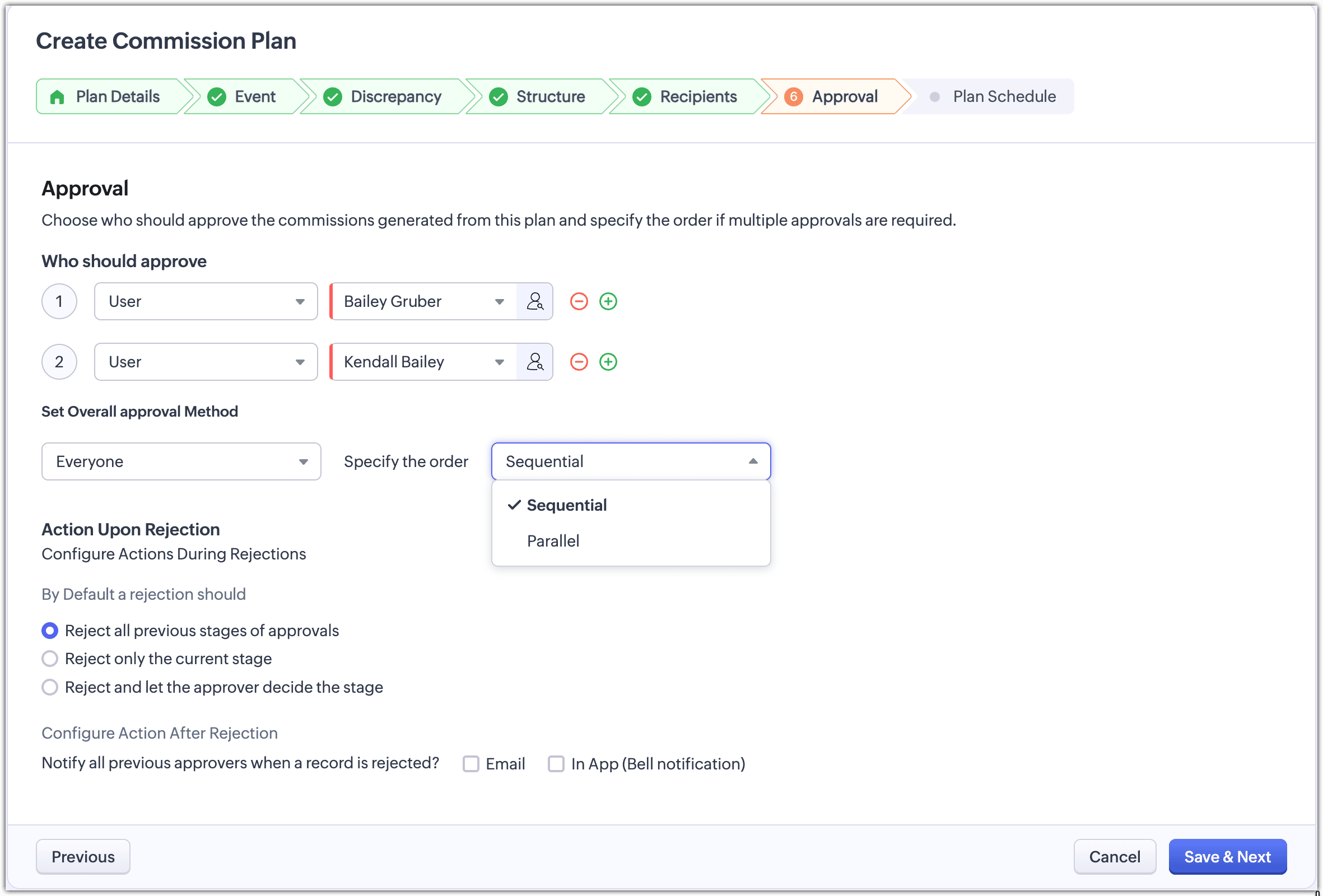
Sequential
- Approvals happen one after another.
- Each stage must be completed before moving to the next.
Parallel
- All approvers receive the request at the same time.
- Approval is completed only when all respond.
Actions on rejection
When a commission is rejected, you can define how the process behaves:
- Restart approval
The commission goes through the full approval flow again - Retry current stage
The commission is sent back to the same approver or stage - Let approver decide
The approver determines how the approval flow continues
What approvers can do
Approvers can:
- Approve the commission
- Reject the commission
- Delegate the approval to another user (if applicable)
They can review:
- Commission amount
- Associated transaction details
- Approval status and history
What happens after approval
- The commission is finalized and locked.
- It becomes eligible for payout processing.
- The approved commission is visible for tracking and reporting.
If discrepancies occur later, adjustments can still be applied based on configured rules.
When to use approvals
Approval workflows are important when:
- Commission payouts require validation from finance or management
- Multiple stakeholders are involved in decision-making
- You need control over high-value or complex commissions
- Compliance and auditability are required
Best practices
- Use single-level approval for simple commission plans
- Use multi-level approval for high-value or sensitive payouts
- Choose parallel approval to speed up decisions
- Use sequential approval when hierarchy matters