Setting Case Escalation Rules
Important Notice
Effective April 15, 2026, Case Escalation Rules will no longer be available for new accounts. If you signed up after this date and cannot find this feature, this is expected — it has been discontinued for new users.
This also applies to existing users who have not yet configured Case Escalation Rules. After April 15, 2026, the option to set it up will no longer be available.
For existing users who have already configured Case Escalation Rules, it will reach end of life on December 31, 2026. Until then, it will continue to work as expected. We'll update this page with more details as the end-of-life date approaches.

- At a time, you can activate only one escalation rule.
- If a newly created rule is set as active then the existing active rule will get deactivated.

To set the case escalation rule
- Enable the Escalation Scheduler
- Set up Case Escalation Rule
- Create Rule Entry
- Define Escalation Action for the Rule Entry
Part 1 - Enable the Escalation Scheduler
The Escalation Scheduler should be enabled prior to creating the Case Escalation Rule.
- Go to Setup[
] > Automation > Case Escalation Rules.
- In the Case Escalation Rules page, click Enable Escalation Scheduler.
To disable Case Escalation Scheduler, click Disable Escalation Scheduler
Part 2 - Create Case Escalation Rule
- Go to Setup[
- In the Case Escalation Rule Name page, click New Case Escalation Rule.
- In the Create Case Escalation Rule Name page, enter the Case Escalation Rule Name.
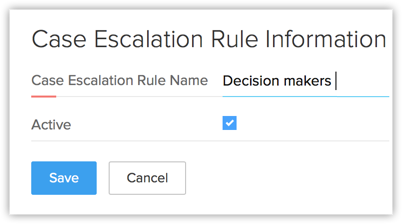
- Select the Active check box.
- Click Save.
- Activating any Rule, automatically deactivates the existing active Rule
- After creating case escalation rule, you need to create the rule entry.
Part 3 - Create Rule Entry
- Go to Setup[
- In the
Case Escalation Rule Name page, select the case escalation rule name from the list.
- Click Rename or Del link to rename or delete the corresponding rule respectively.
- Click Create Rule Entry.
- In the Rule Entry page, specify the criteria for the rule.
- Select your organization's Business Hours . Note, that you should have already defined the business hours. See Also Business Hours
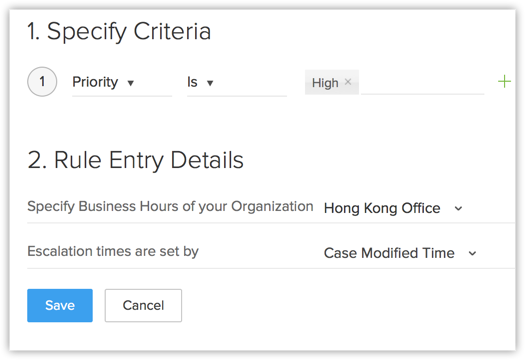
- Select the option from the list based on which the Escalation Time is set.
- Click Save.
- Once the Rule Entries are created, you can click Reorder and specify the escalation order of the rules.
Part 4 - Define Escalation Action for the Rule Entry
- Go to Setup[
- Click on the active Rule Name.
- In the Case Escalation Rule page, click the Rule Entries' criteria from the list.
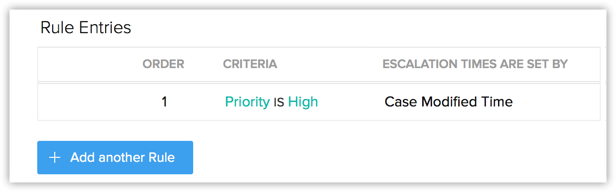
- In the Rule Entry page, the rule entry details are displayed.
- Click New Escalation Action.
- In the New Escalation Action page, do the following:
- Select the Age of Escalation Actions from the list.
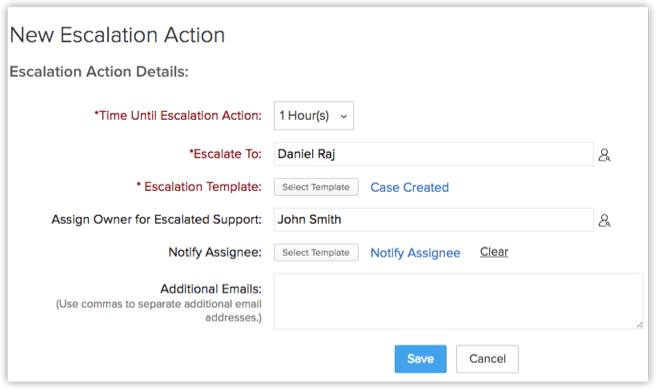
- Select the person to whom the case needs to be escalated from the Escalate To pick list.
- Select the Escalate Template from the list.
- Select the owner for the escalation case from the pick list.
- Select the email template from the list used to Notify Assignee.
- Enter the Additional Emails, if any.
- Select the Age of Escalation Actions from the list.
- Click Save.