Mark a field as public
Public fields
Definition:
Public fields are fields that are made visible for all users in the organization irrespective of their permission(s).
The current problem: Delay in deliverables due to dependency
When it comes to business process management, inter-team collaboration plays a crucial role in completing a transaction. Despite this "collaboration," businesses tend to incur delays in their deliverables. An important cause of these process lags is mostly dependency.
Although teams work closely with a common vision, each team works autonomously with a defined set of process goals. They gate their process with tight permissions, such that they only relay their output to the neighboring team. While this boundary may ensure privacy, preserve the sensitivity of data, and provide context to their processes, limiting the accessibility of essential data by teams impacts collaboration. It will not give the neighboring team the required visibility, hence creating dependencies and delays.
Let's look at the classic business process, for example.
As you can see from the above illustration, the customer request is passed through various stages and teams. As it evolves, their raw data grows contextual to the respective processes.
To generate demand, the marketing team stores information about their target persona, demography, budget, events, and channel preferences in the campaigns module.
The leads generated by the marketing teams are channeled into the leads module. The sales team collects all basic information about the prospective and enriches the lead records. They then create a deal with budget pricing and propose an idea of the outcome.
Upon agreement, an order is created by the order fulfillment team. The order team validates if the customer information and requirements agree with the order created; they push it to the factory for production.
Once the manufacturing is complete, a legal invoice is prepared, and the warehouse is requested for shipment.
This may look like it is all linear. But, if you take a closer look, these are steps carried out by different teams and different functions.
- What if—the marketing team wants to know the account information like size and revenue to undertake a case study?
- Or, the factory would like to know of any special instruction that the customer has shared from the contacts?
- Or, the finance team would like to audit the cost of campaigns to streamline budgeting?
- Or, the stockist would like to know the contact information like state, zip code to manage regional demands and specifications?
- Or, the supply chain team would like to cross-check the final order with that of the agreed deal?
All these are essential information that different teams in the organization may depend upon to fulfill the respective agenda.
What business do as a workaround:
As a workaround, the business would do one of the following:
- Provide permissions for modules to users that require these data.
- Moderate the data sharing rules and keep the modules visible for all users in the organization.
- Furnish all the essential details in a separate file outside the system and share them with respective teams upon individual requests.
While these options are viable, they come with some limitations:
- The problem with providing information outside the system is sharing itself. The essential fields are essential only to that process; the minute it gets out of the system, it can be distributed easily, questioning the security of the same. Plus, the record owner has to take time to do this activity.
- Granting permission to the entire module or the record, just for the sake of the data, will reveal other process or business information to users.
- If not for a standard module, to make these dependent field values visible, you'd end up displaying private modules for public visibility.
This is a real catch-22 situation. And, to address this, Zoho CRM has a visibility moderating field property called Public fields.
Public fields are fields whose property is marked as public.
It provides unguarded visibility of field values of records that are associated with one another for collaboration.
Basis of collaboration in Zoho CRM
In Zoho CRM, one of the ways you can achieve collaboration is by using lookup fields in your records and the related lists as a result.
Lookup fields help seek a record from a neighboring module and associate them with the current record as a value. Associating one record with another connects the two records with mutual data (looked up value) and serves as a point of reference for the users that are executing the processes. This enables data interoperability and user collaboration.
But, if the record owner does not have permission to access the associated record, then the whole point of associating a record itself will be defied.
- The record owner cannot refer to the associated record.
- They have to work with admins for record permissions.
- Depend on the respective record owner to obtain the related details.
Thus, identifying fields that could be beneficial for the subsequent processes and marking them public will display only those field values to the users accessing the record, thereby cutting off the process dependency while simultaneously preserving the security and sensitivity of the record intact.
Mark fields as public to remove avoidable data dependencies: Working of public fields
To mark a field as public,
- In the layout editor, go to the desired field.
- Click on the ellipsis (...) and select the option Edit Properties.
- Select the Mark as Public checkbox and click Done.
Once fields are marked public, a user without access to the associated record can see the data in a separate sliding pane( upon clicking the lookup field value ) only with those public fields on display.
- If you have access to the associated record, you will be directly landed onto that record.
- Say you have access to that module by profile permission, but you do not have the access to that particular record, you would still only see the public fields data in the sliding pane.
Behavior of Public fields:
Public fields offer visibility of those essential and bare minimum data in a record to those doesn’t have the access.
That said, fields that are marked as public will be visible to all users in the organization. It applies for data associated:
- Between organization modules, Custom modules, and Team modules
- With any module and layout permissions
- Exposed via Portals

In a nutshell:
- Public fields are public and is meant for collaboration without dependencies.
- For users with access to the associated records will be able to view that record
- For users without access to the associated records, fields marked as public alone will be displayed in a sliding pane from the very place without taking you the looked up module.
Business scenario:
Let’s explore Public fields in a business setting
Zylker is an online shop that prints and manufactures clothing for designers, on demand. Following is their modus operandi:
- They attract and onboard designers across the country.
- Upon onboarding, they share their material collection, techniques, and machinery with the designers via the Portals feature.
- After a designer chose what material they want, which technique to apply, and all that, the order for that lot gets created, and the production of the same commences.
- Once the production is over, the QC teams take over. They go through every piece for quality, before they are boxed by the shipping team.
- Once packaging is over, the finished goods are shipped and delivered via courier to the designer that ordered it.
Here are the stakeholders and modules involved:
The teams involved: Sales and marketing team, designer onboarding team, order management team, production team, fulfillment team, and delivery.
Modules and features involved: Leads, Designers, Deals, Quotes, Purchase Order, Production, Packing, Shipments
With Public fields enabled in
Leads module, the packing team can understand the source these leads are from and subsidize their delivery charges.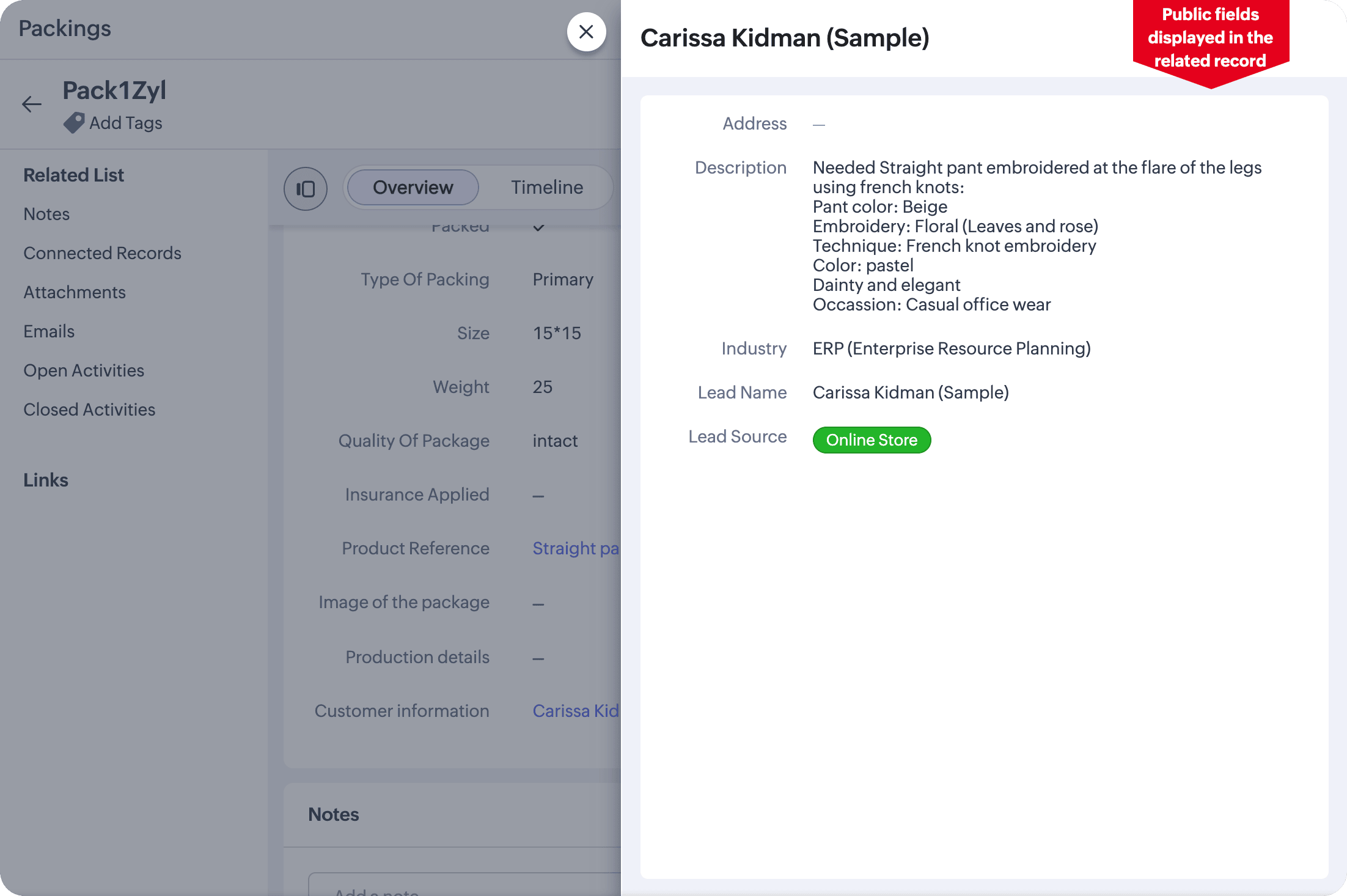
Designers module, the factory can understand specific designer-based preferences before production.
Deals module, the order management can cross-verify the final amount with the amount mentioned in the PO.