On-the-Go Customer Insights with VoC Summary Analysis Chart (Zoho CRM)

Summary analyses: A VoC chart for on-the-go insights

Summary analysis is a VoC dashboard built to provide a rundown of your customers’ responses and behaviors. The dashboard comes with multiple summaries providing insights about various analysis.

Structure of a summary component 

Quote
A summary component is a text-based analysis, that lists insights from your consumers’ response as bulletins and they are classified based on their own attributes.
Here’s an example of a summary component:
Let’s look at all the components available in the summary dashboard and see how each of them are classified:
 

Notes:
Notes
By default, the summary analysis is equipped to provide the top 5 points to display. That is, even if you select Allowed values as part of your grouping, the component will still display the top 5 points about the selected values in the chart. This will give you 5 lines of bulletins in each classification.

How is a summary chart different from keyword analyses and how does it benefit your business? 

Keyword analysis brings out key excerpts from customer reviews and responses and displays them as a word cloud. Based on the colors and size, the intensity and importance of those keywords can be interpreted. This gives a high-level understanding about your customers’ voices.

Whereas with summaries, you get all of your reviews curated, compiled, and classified as attributes, so that you analyze one measure from multiple perspectives.

How does it benefit your business?

Summaries allow on-the-go skimming of insights. Unlike analytical charts, you need not infer or interpret data and behavior—you already have all the responses, contextually collated for direct consumption.

Scenario 1:
Imagine you are a customer success manager looking to understand the experience of the customers you recently onboarded. A summary dashboard created based on VoC Responses and  VoC Answers makes an ideal choice to understand their experience. With measure as count of VoC Responses, you can see “how many” of these responses carry the attributes and  when grouped by sentiment or emotion, or customer satisfaction, you can collate all the VoC responses, its count, as crisp summaries with the respective sentiment, emotion, or customer satisfaction as the theme of the component.Here’sHereWith
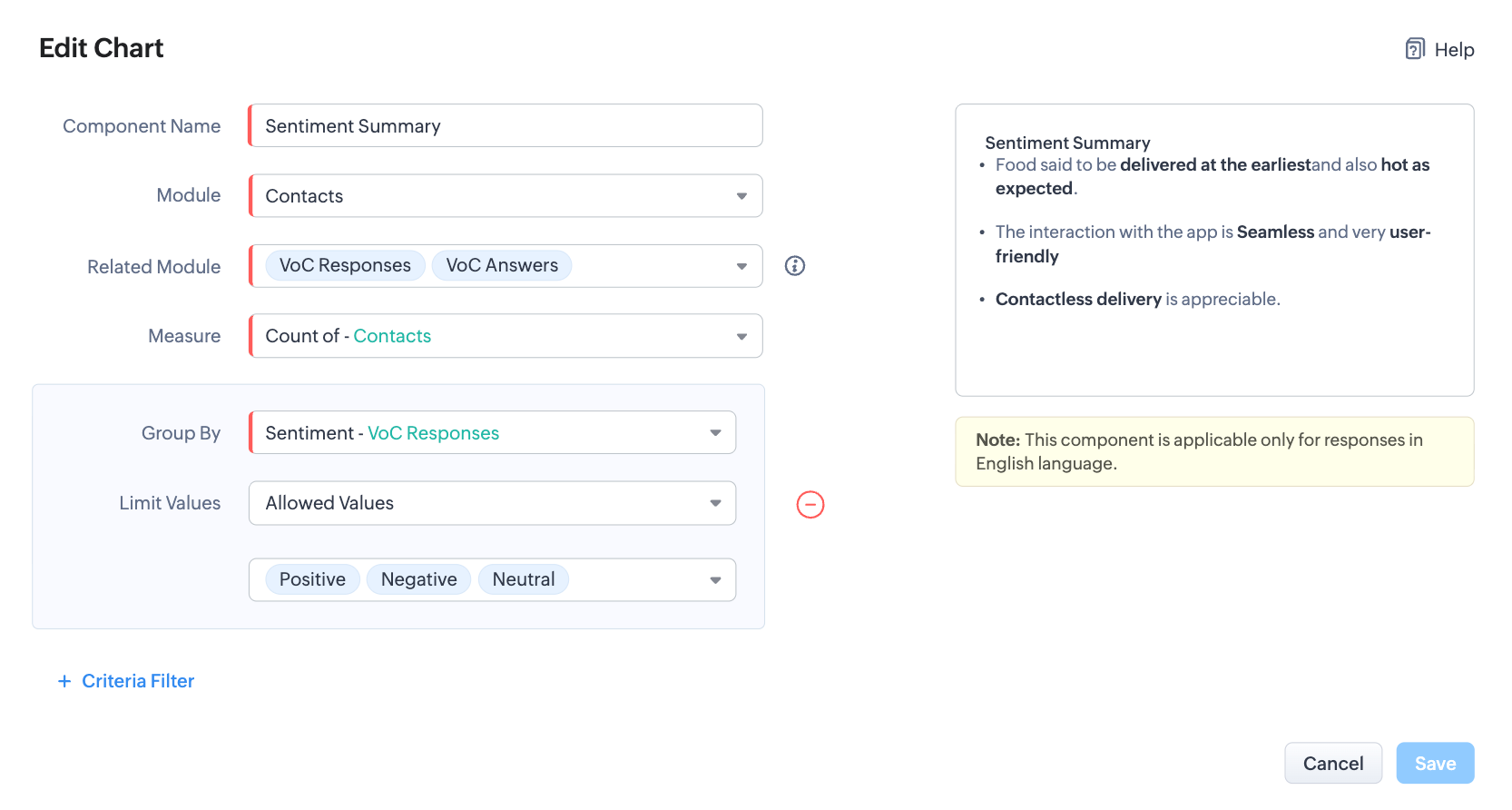
The above settings will result in the below result:
  1. Response summarized as crisp and contextual bulletins, owing to the type of chart
  2. Further, they are collated (based on the module and related module) and classified based on sentiments, owing to the group by settings.
  3. And, each classifications are labeled by count, thanks to the measure the summaries are computed for.
Let’s also look at another example where you are a marketer looking to understand the SWOT of your product in the market:
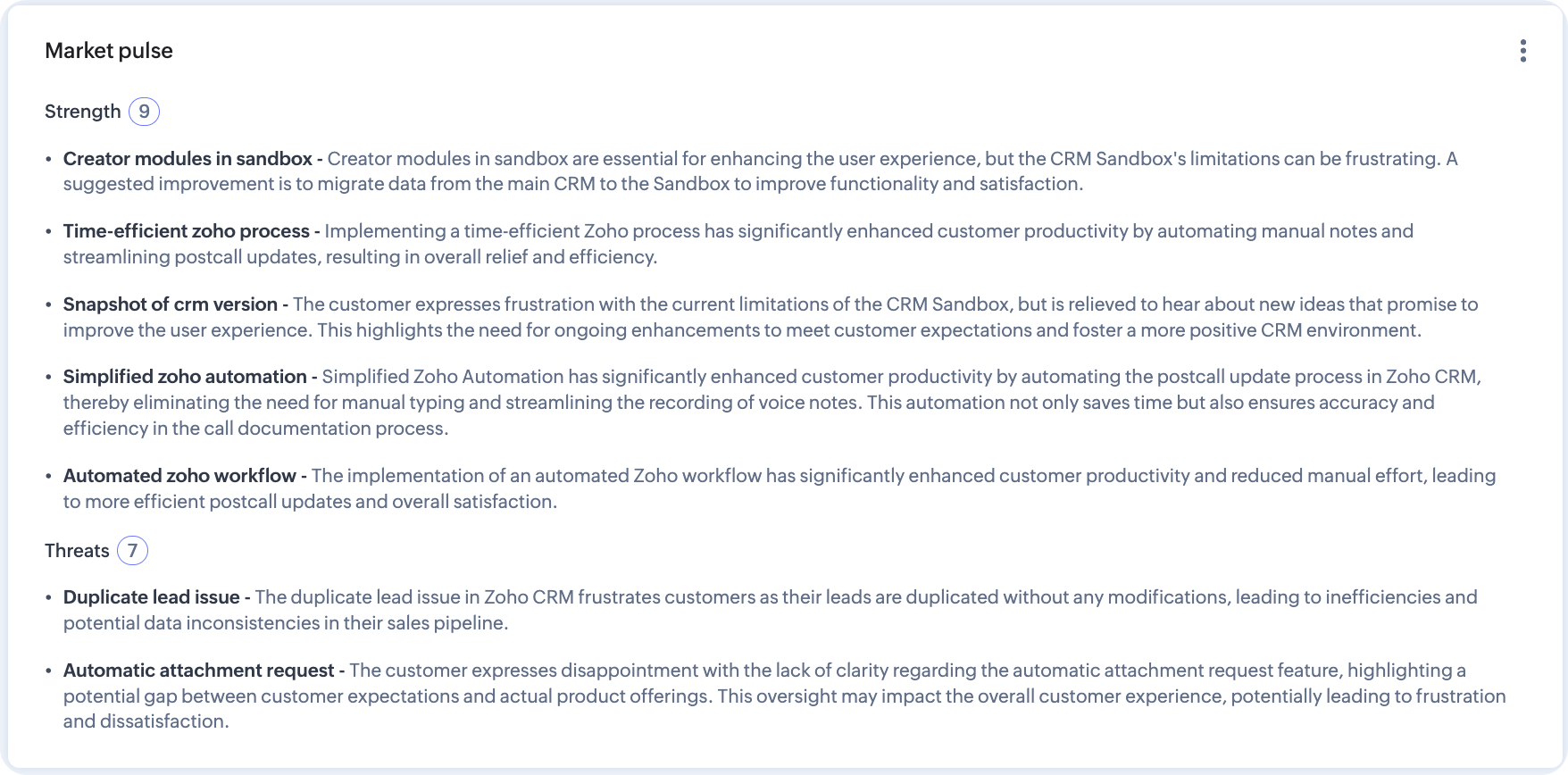
There—by putting insights as bulletins, summary analytics help put CX in perspective.

How to configure summary analytics dashboard

Summary analytics is readily available as a default dashboard with all the analytic components as mentioned in the table above.
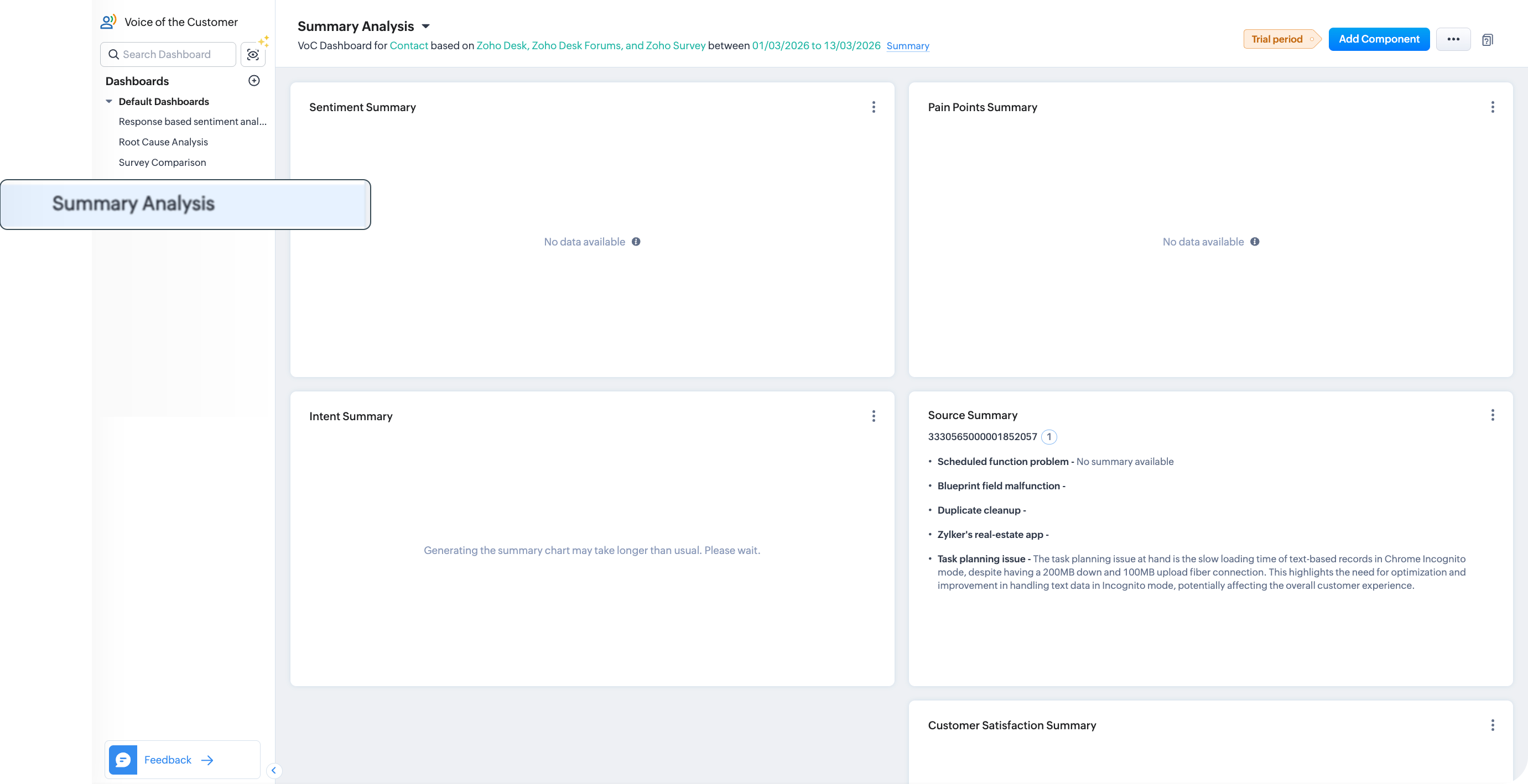
You can use them as such for a summary-exclusive analyses or you can just use one or more summary components into a custom dashboard based on your requirement.
Notes
Note: You can have an overall  of ten VoC dashboards for an organization, including default and user created dashboards.
To use the default summary dashboard, you can click the summary analysis under the default dashboards of the Voice of the Customer module. It will have all types of summaries. You can use them as such or change the dashboard configuration.
  1. To change the configuration, click Ellipsis near Add component > Configure dashboards.
  2. Change your preferences of modules, source channels, data type, time frame, grouping, preferences, keyword preferences, and criteria as required. Click Configure.
  3. The parameters for the entire Summary dashboards will be altered.
To use one of the summaries in your dashboards
  1. Go to the dashboard you created.
  2. Click Add component button from top-right corner of the page and choose Summary.
  3. In the Add Chart configuration page, configure the module, measure, grouping, and criteria.
  4. Click Save.
  5. Click Add and Reorder to arrange the component amongst the other components in the dashboard before you add them.

        Create. Review. Publish.

        Write, edit, collaborate on, and publish documents to different content management platforms.

        Get Started Now


          Access your files securely from anywhere

            Zoho CRM Training Programs

            Learn how to use the best tools for sales force automation and better customer engagement from Zoho's implementation specialists.

            Zoho CRM Training
              Redefine the way you work
              with Zoho Workplace

                Zoho DataPrep Personalized Demo

                If you'd like a personalized walk-through of our data preparation tool, please request a demo and we'll be happy to show you how to get the best out of Zoho DataPrep.

                Zoho CRM Training

                  Create, share, and deliver

                  beautiful slides from anywhere.

                  Get Started Now


                    Zoho Sign now offers specialized one-on-one training for both administrators and developers.

                    BOOK A SESSION


                                Quick LinksWorkflow AutomationData Collection
                                Web FormsEnterpriseOnline Data Collection Tool
                                Embeddable FormsBankingBegin Data Collection
                                Interactive FormsWorkplaceData Collection App
                                CRM FormsCustomer ServiceAccessible Forms
                                Digital FormsMarketingForms for Small Business
                                HTML FormsEducationForms for Enterprise
                                Contact FormsE-commerceForms for any business
                                Lead Generation FormsHealthcareForms for Startups
                                Wordpress FormsCustomer onboardingForms for Small Business
                                No Code FormsConstructionRSVP tool for holidays
                                Free FormsTravelFeatures for Order Forms
                                Prefill FormsNon-Profit

                                Intake FormsLegal
                                Mobile App
                                Form DesignerHR
                                Mobile Forms
                                Card FormsFoodOffline Forms
                                Assign FormsPhotographyMobile Forms Features
                                Translate FormsReal EstateKiosk in Mobile Forms
                                Electronic Forms
                                Drag & drop form builder

                                Notification Emails for FormsAlternativesSecurity & Compliance
                                Holiday FormsGoogle Forms alternative GDPR
                                Form to PDFJotform alternativeHIPAA Forms
                                Email FormsFormstack alternativeEncrypted Forms

                                Wufoo alternativeSecure Forms

                                TypeformWCAG


                                      All-in-one knowledge management and training platform for your employees and customers.

                                                Create. Review. Publish.

                                                Write, edit, collaborate on, and publish documents to different content management platforms.

                                                Get Started Now


                                                                  You are currently viewing the help pages of Qntrl’s earlier version. Click here to view our latest version—Qntrl 3.0's help articles.


                                                                      Manage your brands on social media


                                                                        • Desk Community Learning Series


                                                                        • Digest


                                                                        • Functions


                                                                        • Meetups


                                                                        • Kbase


                                                                        • Resources


                                                                        • Glossary


                                                                        • Desk Marketplace


                                                                        • MVP Corner


                                                                        • Word of the Day


                                                                        • Ask the Experts


                                                                          Zoho Sheet Resources


                                                                              Zoho Forms Resources


                                                                                Secure your business
                                                                                communication with Zoho Mail


                                                                                Mail on the move with
                                                                                Zoho Mail mobile application

                                                                                  Stay on top of your schedule
                                                                                  at all times


                                                                                  Carry your calendar with you
                                                                                  Anytime, anywhere


                                                                                        Zoho Sign Resources

                                                                                          Sign, Paperless!

                                                                                          Sign and send business documents on the go!

                                                                                          Get Started Now


                                                                                                  Zoho TeamInbox Resources


                                                                                                            Zoho DataPrep Demo

                                                                                                            Get a personalized demo or POC

                                                                                                            REGISTER NOW


                                                                                                              Design. Discuss. Deliver.

                                                                                                              Create visually engaging stories with Zoho Show.

                                                                                                              Get Started Now


                                                                                                                                  • Related Articles

                                                                                                                                  • Personal customer insights by VoC

                                                                                                                                    NOTE: Permission required: View record level insights: Users with this permission can access and view insightful charts in eligible records from the modules for which VoC dashboards have been created. "The best vision is customer insight" - Malcolm ...
                                                                                                                                  • Creating dashboards

                                                                                                                                    Analytics is a summarized view of the custom report data in Zoho CRM. It provides a platform for real-time analysis of the sales stages and business operations. You can create a dashboard and share it with all the users or a few selected users. You ...
                                                                                                                                  • Email Insights: An Overview

                                                                                                                                    Email remains a primary communication tool with customers within many organizations. However, tracking interactions for multiple emails sent through a CRM system can be challenging. Key questions might include: Has the customer opened the email? Did ...
                                                                                                                                  • Voice of the Customer: Frequently asked questions

                                                                                                                                    What languages is VoC available in? VoC currently only analyzes incoming data in the English language. Your CRM account can be set to any other language without impacting VoC's analysis capabilities. If no integration is done what will happen? We ...
                                                                                                                                  • Zia note summary

                                                                                                                                    This feature is currently available only for users in the US and EU data centers. Overview Sales reps often find themselves bogged down by the sheer volume of customer interaction notes they must review and analyze daily. This critical but ...
                                                                                                                                    Wherever you are is as good as
                                                                                                                                    your workplace

                                                                                                                                      Resources

                                                                                                                                      Videos

                                                                                                                                      Watch comprehensive videos on features and other important topics that will help you master Zoho CRM.


                                                                                                                                      eBooks

                                                                                                                                      Download free eBooks and access a range of topics to get deeper insight on successfully using Zoho CRM.


                                                                                                                                      Webinars

                                                                                                                                      Sign up for our webinars and learn the Zoho CRM basics, from customization to sales force automation and more.


                                                                                                                                      CRM Tips

                                                                                                                                      Make the most of Zoho CRM with these useful tips.


                                                                                                                                        Zoho Show Resources