Zoho DataPrep IP Addresses

Zoho DataPrep IP Addresses

To import data from applications such as Amazon RDS, Amazon Redshift, Microsoft Azure, Amazon S3 and DigitalOcean, it is necessary to whitelist Zoho DataPrep's IP Addresses in your application.  Only when it is done, Zoho DataPrep can access your data in the application. 

Notes
Note:
1. If you've whitelisted IP addresses for Zoho Analytics already, you don't have to do it for Zoho DataPrep again.
2. Ideally, configuring one IP range is enough if all the necessary IP addresses fall within that range. But to avoid any issues with the connection, it is recommended to configure all for your respective data center. 
Given below is the list of Zoho DataPrep's IP Addresses to be whitelisted. 

https://dataprep.zoho.com  (US Data Center)

CIDR
Range
136.143.178.0/23
136.143.178.0 - 136.143.179.255
136.143.176.0/23
136.143.176.0 - 136.143.177.255
Notes
Note: We have collated all the previous IP Ranges to the above-mentioned ranges for the US Data Center.

https://dataprep.zoho.eu   (EU  Data Center)

CIDR Range
31.186.243.98/32 31.186.243.98 - 31.186.243.98
185.20.209.98/32 185.20.209.98-185.20.209.98
185.230.212.98/32 185.230.212.98-185.230.212.98
87.252.213.98/32 87.252.213.98-87.252.213.98
89.36.170.98/32 89.36.170.98-89.36.170.98
185.230.214.98/32 185.230.214.98-185.230.214.98
Notes
Note: We have collated all the previous IP Ranges to the above-mentioned ranges for the EU Data Center.

https://dataprep.zoho.in  (IN  Data Center)

 CIDR
Range

154.83.3.41/32

154.83.3.41 - 154.83.3.41

103.89.74.49/32

103.89.74.49 - 103.89.74.49

103.89.75.23/32

103.89.75.23 - 103.89.75.23
  169.148.146.23/32

169.148.146.23 - 169.148.146.23
Notes
Note: We have collated all the previous IP Ranges to the above-mentioned ranges for the IN Data Center.

https://dataprep.zoho.com.au  (AU  Data Center)

CIDR
Range
101.97.36.0/24
101.97.36.0 - 101.97.36.255
103.138.128.0/23
103.138.128.0 - 103.138.129.255
103.91.166.0/24 103.91.166.0 - 103.91.166.255
165.173.191.0/24
165.173.1910 - 165.173.91.255

https://dataprep.zoho.com.cn  (CN Data Center)

CIDR
Range
163.53.93.0/24 163.53.93.0 - 163.53.93.255
163.53.94.0/27 163.53.94.0 - 163.53.94.31
118.126.63.128/25 118.126.63.128 - 118.126.63.255
118.126.63.64/26
 118.126.63.64 - 118.126.63.127
103.212.59.96/29
 103.212.59.96 - 103.212.59.103
124.251.121.0/24
124.251.121.0 - 124.251.121.255
124.251.122.0/25
124.251.122.0 - 124.251.122.127
124.251.128.0/24
 124.251.128.0 - 124.251.128.255

https://dataprep.zoho.jp  (JP Data Center)

 CIDR
Range

103.163.152.0/23

103.163.152.0 - 103.163.153.255

193.118.160.0/24


193.118.160.0 - 193.118.160.255

193.118.161.0/24

193.118.161.0 - 193.118.161.255

https://dataprep.zohocloud.ca (CA Data Center) 

CIDRRange
199.67.84.37/32199.67.84.37 - 199.67.84.37
199.67.86.38/32199.67.86.38 - 199.67.86.38


https://dataprep.zoho.sa
(SA Data Center) 

CIDRRange
199.67.80.0/23199.67.80.0 - 199.67.81.255
199.67.82.0/23199.67.82.0 - 199.67.83.255

FAQ

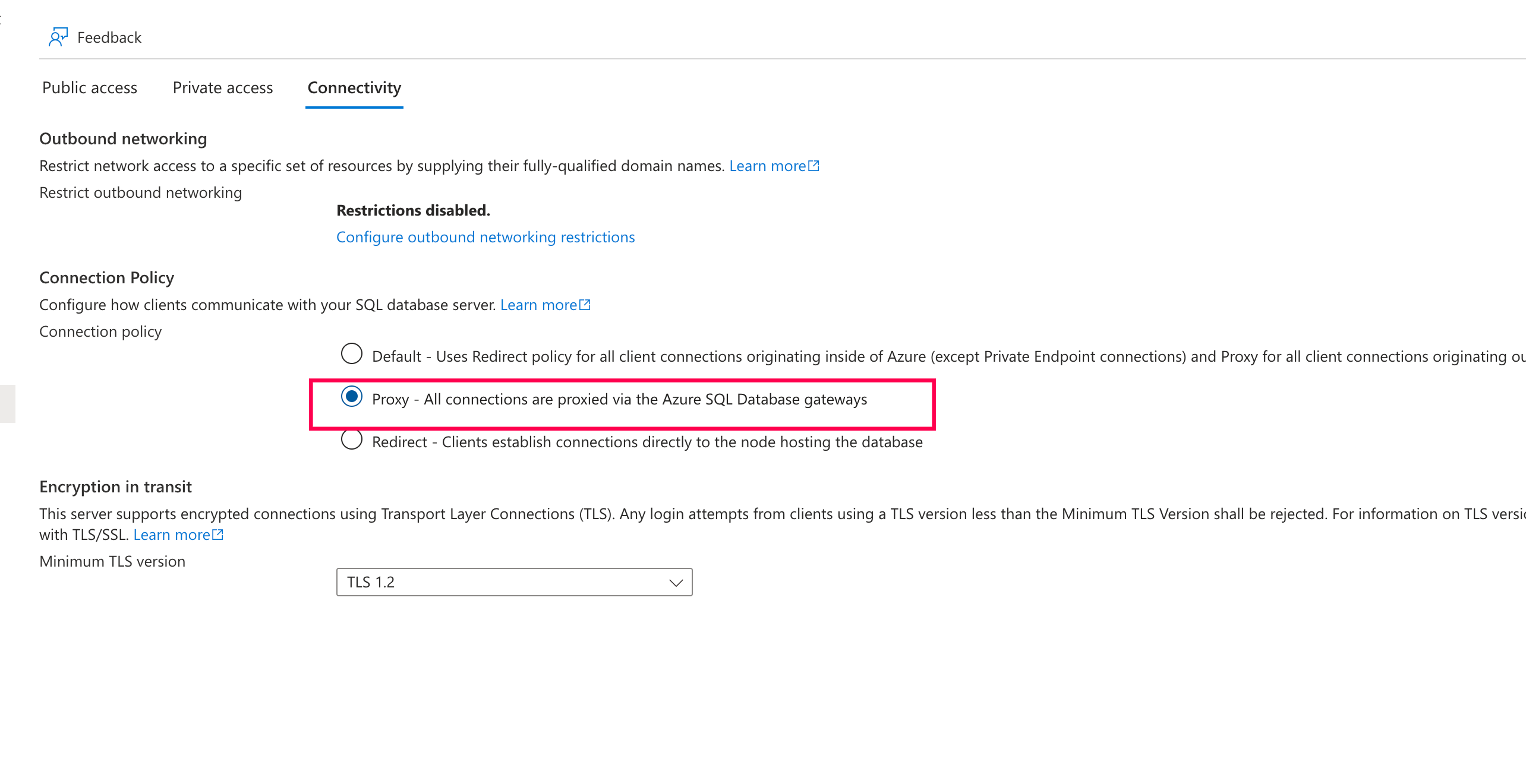
1. Why am I getting a TCP/IP connection timeout when connecting Azure SQL Database to Zoho DataPrep even after whitelisting the IP addresses?

This can happen if your Azure SQL connection policy is set to Default or Redirect mode. Switch the connection policy to Proxy mode and retry the connection.
To change the connection policy, sign in to the Azure portal, open your SQL Server resource, go to Security > Networking > Connectivity tab, select Proxy under Connection Policy, and save the changes.