Inviting Customers to the Help Center - Online Help | Zoho Desk

Inviting Customers to the Help Center

Customers can track the status of their tickets submitted through various channels by accessing Zoho Desk's help center. Customers can access the help center in two ways:
  1. Creating their own user accounts via self-registration
  2. Being invited by agents via the Contacts module
There are two ways to invite contacts to become help center users:
  1. Sending a bulk invite to all contacts
  2. Selecting contacts individually
Info Permission Required
Users with the Support Channels administrative permission can access this feature.
Check Feature Availability and Limits

Inviting customers to the help center

To invite contact individually
  1. In the Customers module, click the Contacts tab from the left menu.
  2. Click on the desired contact record.
  3. Click the More icon in the top panel.
  4. Click Add as End User in the menu.
  5. Click Invite.
  6. Click Continue in the dialog box to send the invitation.


The contact will receive an email invite to join your help center at https://desk.zoho.com/portal/<portal name>/home.
Note: The Add as End User option will be disabled for unverified user profiles.

Inviting contacts to a multi-brand help center

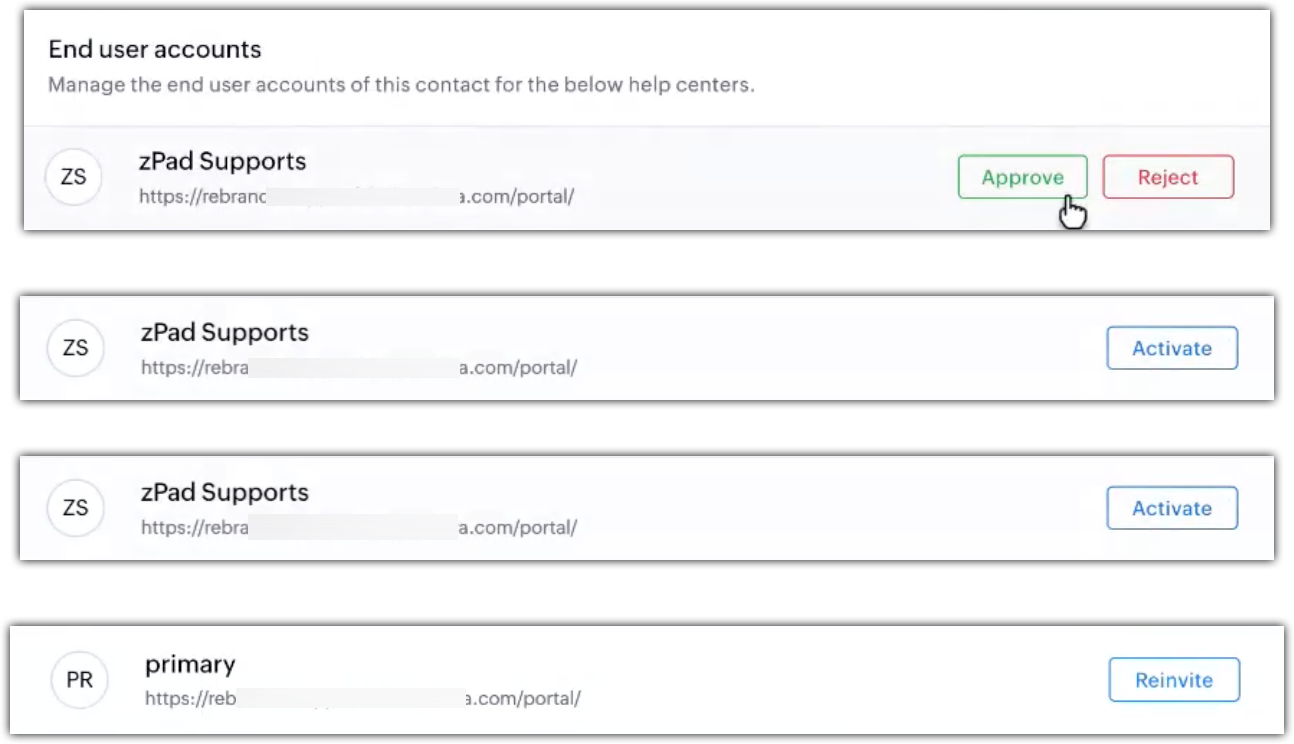
If you have multiple help centers, you can invite contacts individually to each help center to ensure they have access only to the relevant brand. End users can be invited from the Customers module under the Contacts Overview section of the Help Center sub-tab. Administrators can invite, re-invite, approve, reject, reactivate, and deactivate users.
To invite individual contact to the multi-brand help center
  1. Navigate to the Customers module and click Contacts from the left tab.
  2. Select the desired record.
  3. In the Contact Detail page, click the Help center sub-tab.
  4. Click Invite on the required help center, based on the user base type:
    1. Common user base: A single invitation grants access to all linked help centers with one set of login credentials.

    2. Unique user base: The contact gets access only to the selected help center, with separate credentials for each help center.

This will invite the user only to the specific help center. If you want to invite the end user to multiple help centers, click Invite for each help centers.

The contact will receive an email invite to join the help center at https://desk.zoho.com/portal/<portal name>/home.
To deactivate end-user individually
  1. You can also deactivate an individual end-user and restrict the respective customer to access the help center.
  2. Click the Customers module.
  3. Open the desired Contact (end-user) to deactivate.
  4. Click More icon from the top pane.
  5. Click Deactivate End User from the menu.
  6. Click Deactivate from the dialog box to confirm the selection.

To invite contacts in bulk

  1. You can add contacts in bulk to enable them access to the help center.
  2. Click the Customers module.
  3. Select a Contact List View from the left panel.
  4. Select the contacts you would like to invite.
  5. Click Add as End User(s) from the mass actions list.
  6. Select the desired help center.
  7. Click Continue on the dialog box, to invite the contacts. 
Note 
  1. The customer self-sign-up feature have to be enabled by the support manager.
  2. Contacts can be invited only when they have an email address.
  3. Deactivate end user function cannot be performed for bulk contacts.
  4. The Add as End User(s) option will not be available for unverified user profiles.


        Create. Review. Publish.

        Write, edit, collaborate on, and publish documents to different content management platforms.

        Get Started Now


          Access your files securely from anywhere

            Zoho CRM Training Programs

            Learn how to use the best tools for sales force automation and better customer engagement from Zoho's implementation specialists.

            Zoho CRM Training
              Redefine the way you work
              with Zoho Workplace

                Zoho DataPrep Personalized Demo

                If you'd like a personalized walk-through of our data preparation tool, please request a demo and we'll be happy to show you how to get the best out of Zoho DataPrep.

                Zoho CRM Training

                  Create, share, and deliver

                  beautiful slides from anywhere.

                  Get Started Now


                    Zoho Sign now offers specialized one-on-one training for both administrators and developers.

                    BOOK A SESSION


                                Quick LinksWorkflow AutomationData Collection
                                Web FormsEnterpriseOnline Data Collection Tool
                                Embeddable FormsBankingBegin Data Collection
                                Interactive FormsWorkplaceData Collection App
                                CRM FormsCustomer ServiceAccessible Forms
                                Digital FormsMarketingForms for Small Business
                                HTML FormsEducationForms for Enterprise
                                Contact FormsE-commerceForms for any business
                                Lead Generation FormsHealthcareForms for Startups
                                Wordpress FormsCustomer onboardingForms for Small Business
                                No Code FormsConstructionRSVP tool for holidays
                                Free FormsTravelFeatures for Order Forms
                                Prefill FormsNon-Profit

                                Intake FormsLegal
                                Mobile App
                                Form DesignerHR
                                Mobile Forms
                                Card FormsFoodOffline Forms
                                Assign FormsPhotographyMobile Forms Features
                                Translate FormsReal EstateKiosk in Mobile Forms
                                Electronic Forms
                                Drag & drop form builder

                                Notification Emails for FormsAlternativesSecurity & Compliance
                                Holiday FormsGoogle Forms alternative GDPR
                                Form to PDFJotform alternativeHIPAA Forms
                                Email FormsFormstack alternativeEncrypted Forms

                                Wufoo alternativeSecure Forms

                                TypeformWCAG


                                      All-in-one knowledge management and training platform for your employees and customers.

                                                Create. Review. Publish.

                                                Write, edit, collaborate on, and publish documents to different content management platforms.

                                                Get Started Now


                                                                  You are currently viewing the help pages of Qntrl’s earlier version. Click here to view our latest version—Qntrl 3.0's help articles.


                                                                      Manage your brands on social media


                                                                        • Desk Community Learning Series


                                                                        • Digest


                                                                        • Functions


                                                                        • Meetups


                                                                        • Kbase


                                                                        • Resources


                                                                        • Glossary


                                                                        • Desk Marketplace


                                                                        • MVP Corner


                                                                        • Word of the Day


                                                                        • Ask the Experts


                                                                          Zoho Sheet Resources


                                                                              Zoho Forms Resources


                                                                                Secure your business
                                                                                communication with Zoho Mail


                                                                                Mail on the move with
                                                                                Zoho Mail mobile application

                                                                                  Stay on top of your schedule
                                                                                  at all times


                                                                                  Carry your calendar with you
                                                                                  Anytime, anywhere


                                                                                        Zoho Sign Resources

                                                                                          Sign, Paperless!

                                                                                          Sign and send business documents on the go!

                                                                                          Get Started Now


                                                                                                  Zoho TeamInbox Resources


                                                                                                            Zoho DataPrep Demo

                                                                                                            Get a personalized demo or POC

                                                                                                            REGISTER NOW


                                                                                                              Design. Discuss. Deliver.

                                                                                                              Create visually engaging stories with Zoho Show.

                                                                                                              Get Started Now


                                                                                                                                  • Related Articles

                                                                                                                                  • FAQs: Help Center

                                                                                                                                    What is help center in Desk? Help Center is a customer portal that allows users to learn about the product and understand its processes by accessing knowledge base articles. It provides a platform for self-help and learning, where users can find ...
                                                                                                                                  • Managing Help Center Users

                                                                                                                                    Help Center users are users who prefer to find solutions by reading through your knowledge base articles or community posts. When they are unable to find answers they can get it resolved from your agents by submitting a ticket. Users can also ...
                                                                                                                                  • Switching to the new help center domain URL

                                                                                                                                    If you have been using the Help Center without mapping your subdomain (for example, support.mycompany.com) to the default domain, this article is for you. When you sign up to use Zoho Desk, your help center's default address is a Zoho Desk subdomain, ...
                                                                                                                                  • Setting up the ASAP Help Widget on the Web

                                                                                                                                    Availability Permission required Users with Administrator permission in their profile can access this feature. &amp;amp;amp;amp;amp;amp;amp;amp;lt;br&amp;amp;amp;amp;amp;amp;amp;amp;gt; Introduction The ASAP help widget for websites makes your help ...
                                                                                                                                  • Accessing and Using Zoho Desk Help Center - An Onboarding Guide

                                                                                                                                    What is a Help Center? A help center is a self-help and learning platform built by the company, service, or a business provider for its customers. It empowers the customers to resolve their inquiries by referring to the knowledge base resources and ...
                                                                                                                                    Wherever you are is as good as
                                                                                                                                    your workplace

                                                                                                                                      Resources

                                                                                                                                      Videos

                                                                                                                                      Watch comprehensive videos on features and other important topics that will help you master Zoho CRM.


                                                                                                                                      eBooks

                                                                                                                                      Download free eBooks and access a range of topics to get deeper insight on successfully using Zoho CRM.


                                                                                                                                      Webinars

                                                                                                                                      Sign up for our webinars and learn the Zoho CRM basics, from customization to sales force automation and more.


                                                                                                                                      CRM Tips

                                                                                                                                      Make the most of Zoho CRM with these useful tips.


                                                                                                                                        Zoho Show Resources