Viewing Formula Field in Android

Formula field is currently available only on Early Access. Kindly fill out this Registration Form to request early access.
Formula field is a custom field that automatically derives a value by computing the values in the different fields. The output is, for example, the sum, difference, mean, or average of two or more values. It eliminates the need for manual computations that can render inaccurate inputs.
The users can compute various types of values, including numeric, string, and date values, or more complex formulas involving multiple fields. For example:
- Calculate warranty period using purchase date
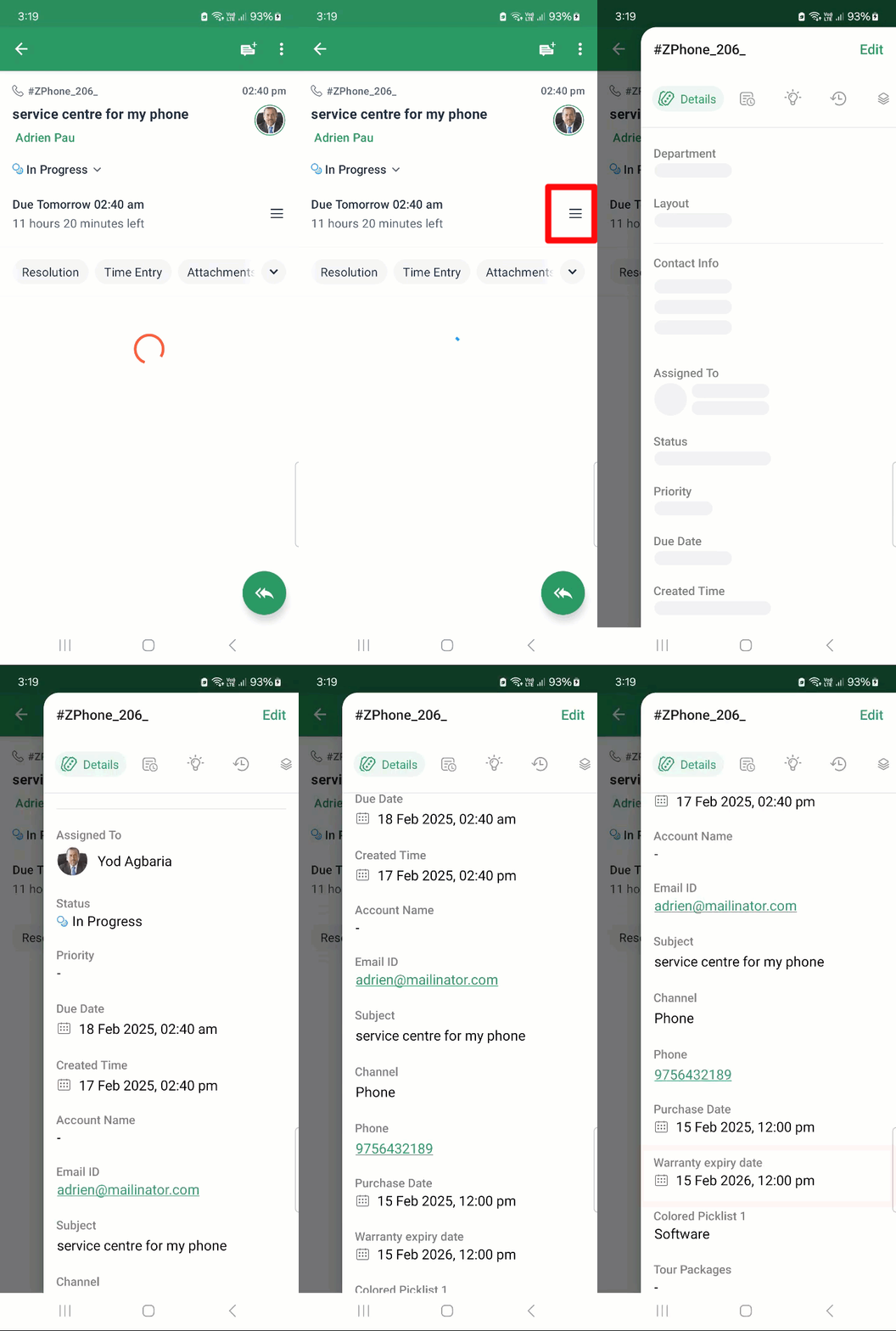
The tickets coming to a customer support team handling product service requests will compute the expiry of the warranty period based on the purchase date, which will be visible under the respective field.
- Total work experience using the employment date
When all the employee details are added under the Contacts module, the formula field can be used to calculate the total years of experience from the date of joining of each employee.See also More about the formula field.

The formula fields can only be created in the web application.
In the mobile app, users can only view the fields. Once a formula field is created, it will be reflected in the mobile app only after refreshing the portal metadata.
To refresh the portal metadata, open the Zoho Desk app > Hamburger Menu  > Settings
  > Refresh Portal Metadata.
The computed data will be visible in the following pages in six different data types (Decimal, Boolean, Currency, String, Date, Datetime):
- Ticket properties
- Activities (Events and Tasks),
- Contacts
- Accounts
It will not be visible while creating or editing a ticket.