Performance Review Dashboard for Support reps - Online Help | Zoho Desk

Performance Review Dashboard for Support reps

Support reps can view their performance and work progress under the personal overview dashboard. The dashboard is a graphical representation of important metrics that allow reps to monitor their efficiency, service, and support quality across channels.


To access your activity dashboard
  1. Log into your Zoho Desk account.

  2. Click the Account Photo on the top-right corner of the help desk.

  3. Click My Profile or your Name on the profile window.
    You will be redirected to the Overview page.


Overview dashboard

By default, the scorecard will display information for the Last 7 days. Users can customize it to view the data over different time periods, including 'Last 30 days', 'Current week', 'Last week', 'Current month' and 'Previous month'.
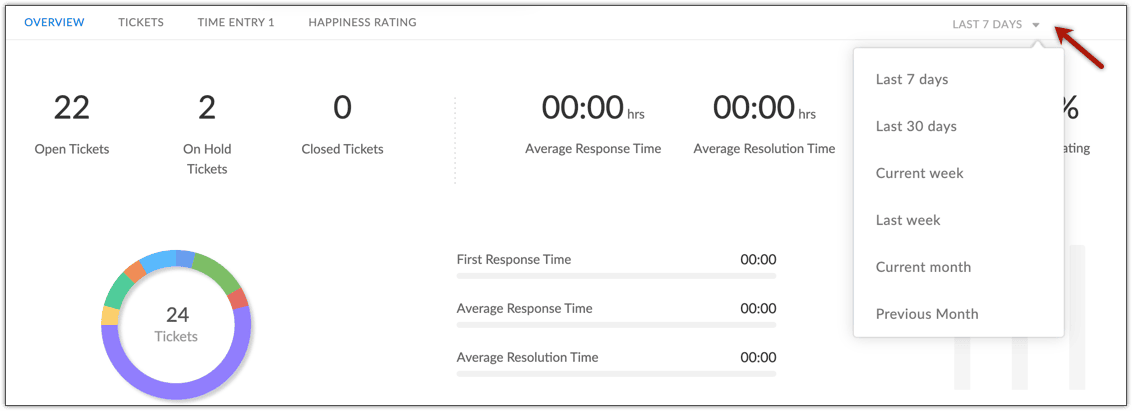

The overview displays the following:
  1. Ticket statistics
  2. First response time, average response time, and resolution time
  3. Happiness ratings

Ticket statistics

Displays the total number of open, on hold, and closed tickets owned by you. A donut chart will indicate the tickets from various support channels. Each donut slice depicts a channel, and its size corresponds to its percentage share. You can hover the mouse pointer over a slice to view the number of tickets received through that channel and its percentage share.
 
      
Notes
Note:
The Open Tickets count will also include tickets that were created before the reporting period. For example, if you select 'last 7 days' it will show all the open tickets you have including the ones created before 7 days.

FRT, Average Response, and Resolution Time

The tool displays your average response and resolution time. The ticker symbol displayed below the respective times, will help you assess how better ( ) or worse ( ) is your performance compared to the benchmark figures. The benchmark data is the average of all the agents in the help desk account.


You can also view your average First Response time, which is the number of minutes (or hours) elapsed between the time a ticket was assigned to you and the time you took to send the first response.

Happiness ratings

This tool will display the overall happiness score (i.e., the percentage of good ratings) you received from the customers. You can also see a break-up of the number of Good, Okay, and Bad ratings. This is an aggregate of the ratings received on all tickets.


The ticker symbol below the overall score will help you assess how better or worse is your performance when compared to the benchmark score. The benchmark score is the average rating score for all agents in the Zoho Desk account. Also, you can click the Happiness Rating tab at the top of the page to view the ratings and the feedback received for each ticket. Total number of good, bad or okay ratings from all the assigned tickets can also be viewed from the Happiness rating tab.

Ticket volume

This is a trend graph that helps monitor the ticket flows over different time periods. The graph plots the number of closed, on hold, and backlog tickets. The color coded legends indicate the number of closed, on hold, and backlog tickets. Hovering on the data points will show the breakdown of tickets under each status.


The graph also displays the following performance parameters:
  1. Tickets (Total): The total number of tickets that are owned by you now. It includes both open and closed tickets.
  2. Responses (Total): The total number of responses sent for the tickets that are owned by you.
  3. Threads/Ticket (Avg): The average number of replies or agent responses per ticket.
  4. Closed Tickets (Avg): The average number of tickets closed each day during the reporting period.

Tickets dashboard

The tickets tab displays all the tickets that you own and also allows to filter the tickets based on the status. The total count of tickets at each stage is displayed.
Also, clicking on the ticket subject redirects to the respective record.

Time entry dashboard

You can get the details of the time entries made for each ticket, task, call, and event. It shows the total time spent on each activity according to which the billable amount is calculated and displayed against each activity. You can also find the total billable amount.

Happiness rating dashboard

The average happiness rating percentage is displayed at the top. Rating provided for each ticket can be seen along with a breakdown of good, bad, and okay.


        Create. Review. Publish.

        Write, edit, collaborate on, and publish documents to different content management platforms.

        Get Started Now


          Access your files securely from anywhere

            Zoho CRM Training Programs

            Learn how to use the best tools for sales force automation and better customer engagement from Zoho's implementation specialists.

            Zoho CRM Training
              Redefine the way you work
              with Zoho Workplace

                Zoho DataPrep Personalized Demo

                If you'd like a personalized walk-through of our data preparation tool, please request a demo and we'll be happy to show you how to get the best out of Zoho DataPrep.

                Zoho CRM Training

                  Create, share, and deliver

                  beautiful slides from anywhere.

                  Get Started Now


                    Zoho Sign now offers specialized one-on-one training for both administrators and developers.

                    BOOK A SESSION


                                Quick LinksWorkflow AutomationData Collection
                                Web FormsEnterpriseOnline Data Collection Tool
                                Embeddable FormsBankingBegin Data Collection
                                Interactive FormsWorkplaceData Collection App
                                CRM FormsCustomer ServiceAccessible Forms
                                Digital FormsMarketingForms for Small Business
                                HTML FormsEducationForms for Enterprise
                                Contact FormsE-commerceForms for any business
                                Lead Generation FormsHealthcareForms for Startups
                                Wordpress FormsCustomer onboardingForms for Small Business
                                No Code FormsConstructionRSVP tool for holidays
                                Free FormsTravelFeatures for Order Forms
                                Prefill FormsNon-Profit

                                Intake FormsLegal
                                Mobile App
                                Form DesignerHR
                                Mobile Forms
                                Card FormsFoodOffline Forms
                                Assign FormsPhotographyMobile Forms Features
                                Translate FormsReal EstateKiosk in Mobile Forms
                                Electronic Forms
                                Drag & drop form builder

                                Notification Emails for FormsAlternativesSecurity & Compliance
                                Holiday FormsGoogle Forms alternative GDPR
                                Form to PDFJotform alternativeHIPAA Forms
                                Email FormsFormstack alternativeEncrypted Forms

                                Wufoo alternativeSecure Forms

                                TypeformWCAG


                                      All-in-one knowledge management and training platform for your employees and customers.

                                                Create. Review. Publish.

                                                Write, edit, collaborate on, and publish documents to different content management platforms.

                                                Get Started Now


                                                                  You are currently viewing the help pages of Qntrl’s earlier version. Click here to view our latest version—Qntrl 3.0's help articles.


                                                                      Manage your brands on social media


                                                                        • Desk Community Learning Series


                                                                        • Digest


                                                                        • Functions


                                                                        • Meetups


                                                                        • Kbase


                                                                        • Resources


                                                                        • Glossary


                                                                        • Desk Marketplace


                                                                        • MVP Corner


                                                                        • Word of the Day


                                                                        • Ask the Experts


                                                                          Zoho Sheet Resources


                                                                              Zoho Forms Resources


                                                                                Secure your business
                                                                                communication with Zoho Mail


                                                                                Mail on the move with
                                                                                Zoho Mail mobile application

                                                                                  Stay on top of your schedule
                                                                                  at all times


                                                                                  Carry your calendar with you
                                                                                  Anytime, anywhere


                                                                                        Zoho Sign Resources

                                                                                          Sign, Paperless!

                                                                                          Sign and send business documents on the go!

                                                                                          Get Started Now


                                                                                                  Zoho TeamInbox Resources


                                                                                                            Zoho DataPrep Demo

                                                                                                            Get a personalized demo or POC

                                                                                                            REGISTER NOW


                                                                                                              Design. Discuss. Deliver.

                                                                                                              Create visually engaging stories with Zoho Show.

                                                                                                              Get Started Now


                                                                                                                                  • Related Articles

                                                                                                                                  • AI Tools To Optimize The Performance Of Support Reps

                                                                                                                                    AI in Zoho Desk focuses on improving agent performance and optimizing how support reps work day‑to‑day. It improves ticket handling capability in more ways than one; by not just automating replies but involving itself in the bigger scheme of the ...
                                                                                                                                  • FAQs: Lifecycle Report

                                                                                                                                    1. What is a lifecycle report? A Lifecycle Report tracks the various stages of a support ticket from creation to resolution, showing every stage that it goes through (like Open, In Progress, On Hold, Escalated, and Completed). For example, a customer ...
                                                                                                                                  • Blueprint Dashboard

                                                                                                                                    Availability Permission required Users with placeholder permission in their profile can access this feature. <br> Performing tasks, both in and out of business settings, is easier when ...
                                                                                                                                  • Headquarters Dashboard: Real-Time Customer Support Management

                                                                                                                                    Availability Permission required Users with placeholder permission in their profile can access this feature. <br> The Headquarters dashboard is designed to provide live and actionable ...
                                                                                                                                  • Understanding the Agent Performance report

                                                                                                                                    One of the most useful reports for monitoring the day-to-day performance of your agents is the Agent Performance report. This report offers detailed statistics on several agent performance metrics and can be configured to show data for one or more ...
                                                                                                                                    Wherever you are is as good as
                                                                                                                                    your workplace

                                                                                                                                      Resources

                                                                                                                                      Videos

                                                                                                                                      Watch comprehensive videos on features and other important topics that will help you master Zoho CRM.


                                                                                                                                      eBooks

                                                                                                                                      Download free eBooks and access a range of topics to get deeper insight on successfully using Zoho CRM.


                                                                                                                                      Webinars

                                                                                                                                      Sign up for our webinars and learn the Zoho CRM basics, from customization to sales force automation and more.


                                                                                                                                      CRM Tips

                                                                                                                                      Make the most of Zoho CRM with these useful tips.


                                                                                                                                        Zoho Show Resources