Rerun
There are two types of reruns:
- Auto rerun - For executions failed due to Zoho Flow's internal errors or API errors from the apps that you have used in your flows.
- Manual rerun - For executions failed due to flow configuration, data mapping, or other similar errors.
What is auto rerun?
Auto rerun provides automatic attempts to run failed executions that are caused due to Zoho Flow's internal errors or API errors from the apps that you have used in your flows. The attempts will continue in defined intervals after the initial task failure for a period of 24 hours.
What types of errors will be handled by auto rerun?
Errors can occur due to numerous reasons, such as service failure or timeout issues. To identify and get details about the error, go to Settings > History. Navigate to the failed execution, and click the error tab.
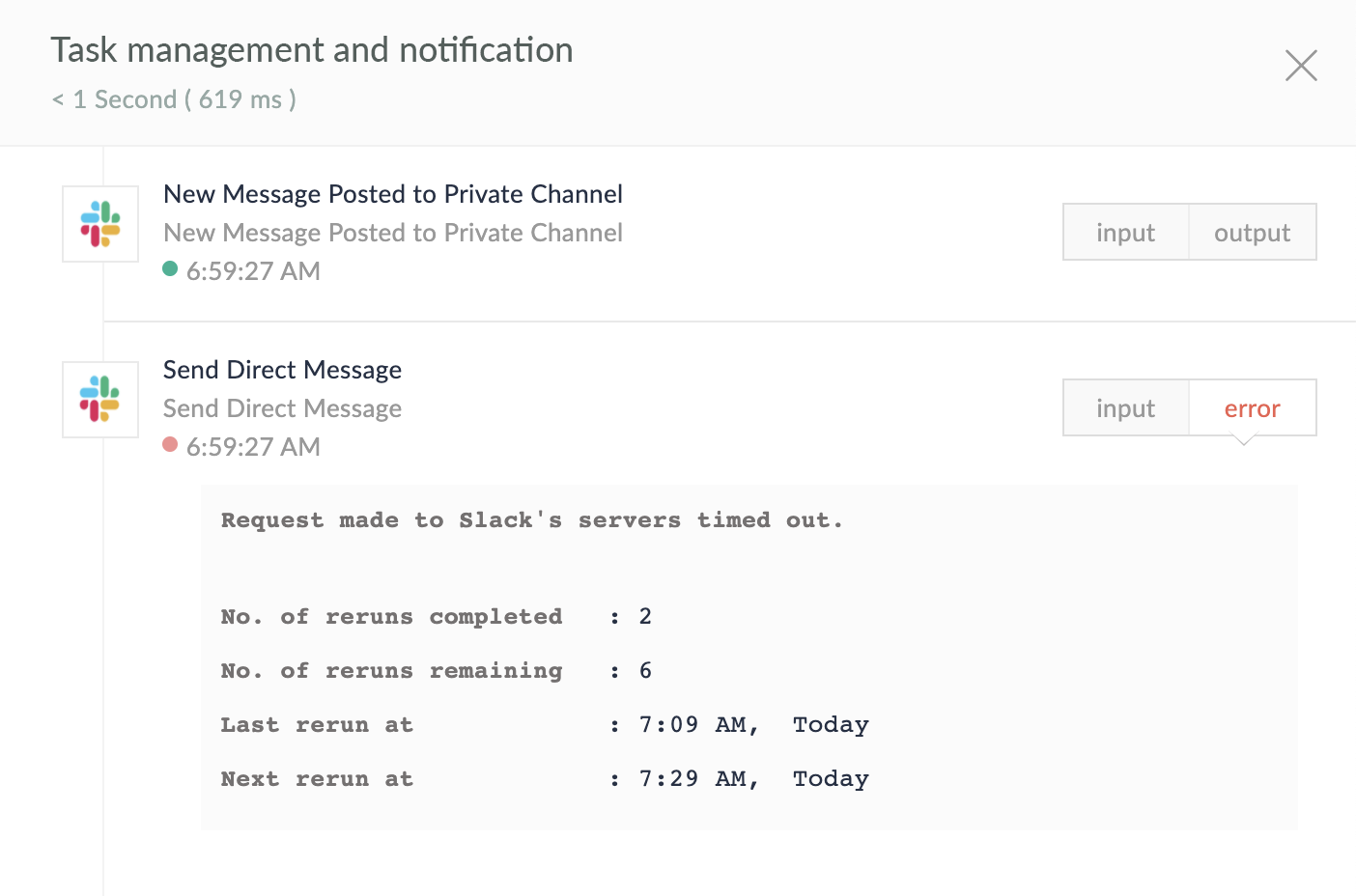
Auto rerun is performed for the following errors:
Zoho Flow's internal errors:
- Internal exception errors (Not related to user configuration.)
- Connection to dependent services failed
API errors from the apps you have connected:
- Request timed out. (Status Code: 408)
- Conflict due to multiple simultaneous updates. (Status code: 409)
- Rate limiting from too many requests (Status code: 429)
- Internal server error (Status Code: 500)
- Third-party server not reachable (Status code: 503)
- Gateway timeout (Status code: 504)
How does it work?
When a task fails to execute, Zoho Flow will wait for five minutes before it automatically attempts a rerun. The flow will try to resume from the point (action) of the previous failure. The reruns will continue at frequent intervals if the executions keep failing.
Failed tasks will be rerun for a maximum of eight times before marking the execution as failed. The rerun intervals are given below:
| Rerun count | Minutes/Hours after initial failure |
| 1 | 5 minutes |
| 2 | 10 minutes |
| 3 | 30 minutes |
| 4 | 1 hour |
| 5 | 3 hours |
| 6 | 6 hours |
| 7 | 12 hours |
| 8 | 24 hours |
If the execution is successful in one of these runs, the tasks will be marked with a success message. The available task count for your account will only be deducted upon successful executions of tasks.
- During the Auto rerun window of 24 hours, you cannot manually rerun a failed task.
- If you have edited your flow before an upcoming rerun, the future reruns will take place as per the edited configuration of the flow.
- If you have switched off the flow in between reruns, the rerun will not take place. However, if you switched off a flow in between, and switched it back on before the next rerun, the rerun process will continue.
- Triggers are not included in auto rerun. However, triggers with 'polling' mechanisms periodically check for new entries. If new data is found that did not trigger the flow initially, a new execution will be started.
- If an action failed for a certain number of reruns, and succeeded in the next attempt, but another action in the same flow failed during this rerun, the rerun count will be reset, and the most recently failed action will be retried eight times.
- Until all eight reruns are over, the record will be shown to the user as Failed: Rerunning automatically.
When will auto rerun not work?
Auto rerun will not work in the following situations:
- Triggers (including Webhook triggers and Realtime app triggers)
- When a flow is switched off
- When a flow is deleted
- When the task has already run successfully
What is manual rerun?
Manual rerun lets you run the executions that would have failed due to errors arising from the following:
- Incomplete or improper flow configuration
- Invalid data mapping
- Tasks that failed 20 consecutive auto reruns
You can attempt to run these tasks again instantly by using manual rerun. Zoho Flow provides two options to manually rerun failed executions:
- Resume: This option lets you instantly resume a flow execution from the step that failed due to errors.
- Restart: This option lets you start a flow execution from the beginning (from the task following the trigger). All steps, including the successful ones, will run again. However, it might cause some actions to fail, create duplicate entries in the connected apps, and cause further errors, leading to failed executions.
 Warning: Be cautious when using Restart. Use this option only when you are sure that all actions in your flow need to be run again.

How do I use manual rerun?
- Log in to your Zoho Flow account.
- Navigate to the required flow from My Flows, then click Flow History. (You can also access the flow history of your organization from Settings > History.)
- Select the failed executions you want to rerun using the checkboxes.
- If you wish to resume the execution from the step that failed in the flow, click Run. (The default option, Resume will be selected)
- Alternatively, use the dropdown arrow beside Run, then click Restart to restart the flow executions from their triggers.
Common questions
Will the available task count in my account get reduced for every rerun?
No. Task count will be deducted only on successful execution of tasks.
When selecting multiple executions for rerun, will it all run simultaneously?
Yes, All executions will be rerun independently.
What is the maximum number of executions that I can retry manually at a time?
You can select up to 100 executions for rerun simultaneously.
Can I resume auto rerun if I have switched off a flow before a rerun?
Yes. Auto rerun will resume when you switch the flow on.