API access in Salesforce
To connect your Salesforce account with Zoho Forms, your Salesforce administrator should enable API access for you.
To use Salesforce API, your organization must be on one of the following 4 editions (the API is enabled by default):
- Enterprise Edition
- Unlimited Edition
- Developer Edition
- Performance Edition
Enabling API access in Salesforce by Profile
- Click Setup.
-
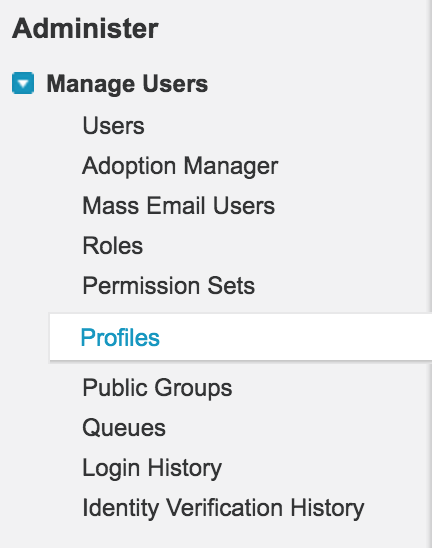
Click Manage Users > Profiles.
-
Click Edit
next to the specific Profile.

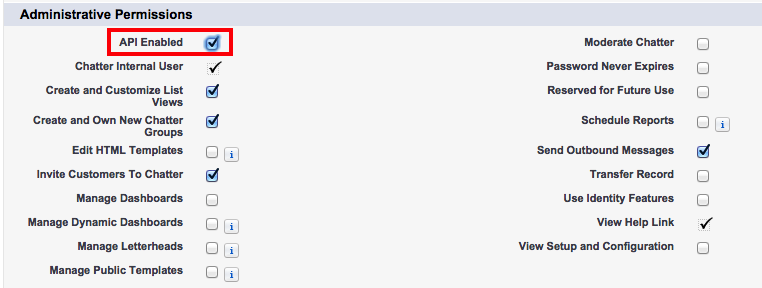
- Scroll down to Administrative Permissions and select API Enabled.
-
Click Save.
Enabling API Access in Salesforce by Permission Set
- Click Setup.
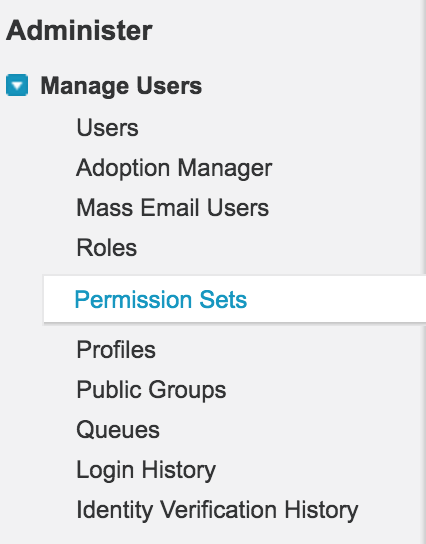
- Click Manage Users > Permission Sets.
- Select the specific Permission Set.

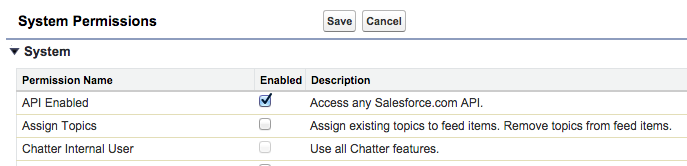
- Click System > System Permissions > Edit.
- Select API Enabled.
- Click Save.