Adding your sender address to an email client's address book

Adding your sender address to an email client's address book

Adding an email sender address to address book or safe senders' list help mailbox providers (Gmail, Outlook, etc) understand that the sender can be trusted. This small step gives a great positive impact on the safe delivery of emails to inbox. We have listed down the steps to add sender addresses to contacts for various mailbox providers and anti-spam services.

Mailbox providers

The easiest process followed by most mailbox providers is,
  1. Open an email from the sender you want to whitelist.
  2. Click the from/sender address in the top of the email.
  3. Click Add to contacts or Add to safe senders' list.
This process may vary slightly for every email client. We've listed down the whitelist steps for major mailbox providers.

AOL
Gmail
Zoho Mail
Outlook
Yahoo! Mail
Orange.fr
iCloud Mail
Mail.ru
Rediffmail
Web.de
Comcast.net
Freenet.de
Mail.com
GMX Mail
Yandex
Bellsouth/AT&T Webmail
Telekom


AOL

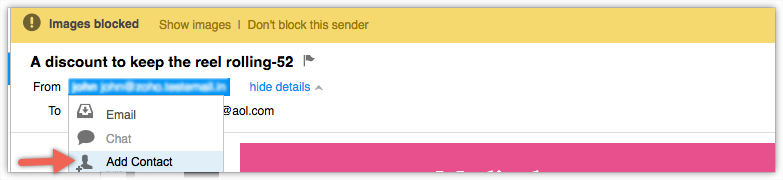
  1. Log in to your  AOL  account.
  2. Open an email from the sender you want to whitelist.
  3. Click the sender name and a drop down will pop up.
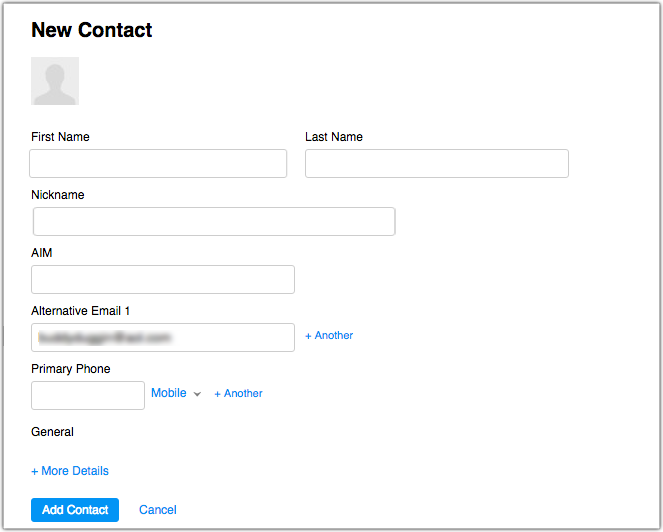
  4. Click  Add Contact .

       5. Fill the sender details in Add contact pop up and click Add Contact.
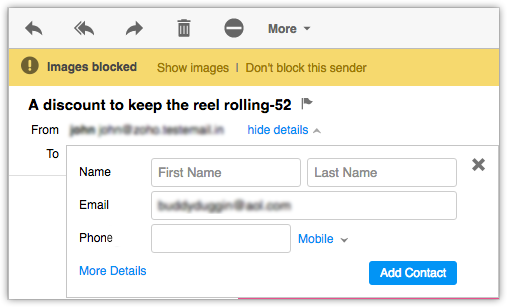
      6. To fill up additional details, click More details link.
Gmail

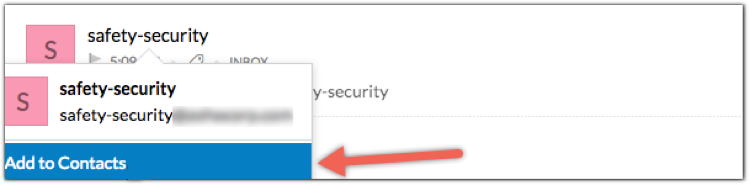
  1. Log in to your  Gmail  account.
  2. Open an email from the sender you want to whitelist.
  3. Hover over the sender's name and a window will pop up.
  4. Click  Add to contacts  to save the sender in your contact list. Alternatively, you can add click the More button on the right side of the email and click Add to contacts.

Gmail address book

Zoho Mail

  1. Login to your  Zoho Mail  account.
  2. Open the email from the specified sender.
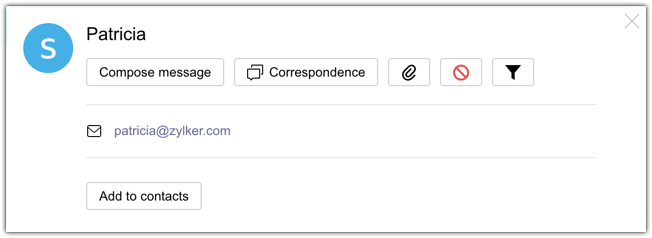
  3. Click on  sender name  from the email.
  4. Click  Add to contacts  that appear.

Outlook

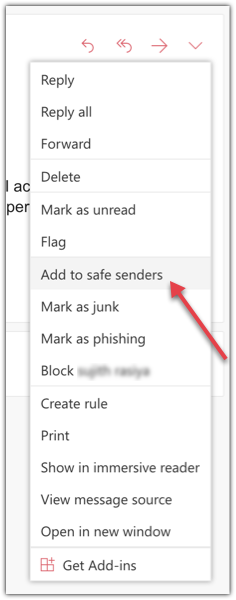
  1. Log in to your  Outlook  account.
  2. Open an email from the sender you want to whitelist.
  3. Click  More actions  in the top right.
  4. Click  Add to safe senders .
outlook whitelist
      5. Click  OK .

Yahoo! Mail

  1. Log in to your  Yahoo! Mail  account.
  2. Click on  Settings  on the right end of top menu.
  3. Click  More Settings .
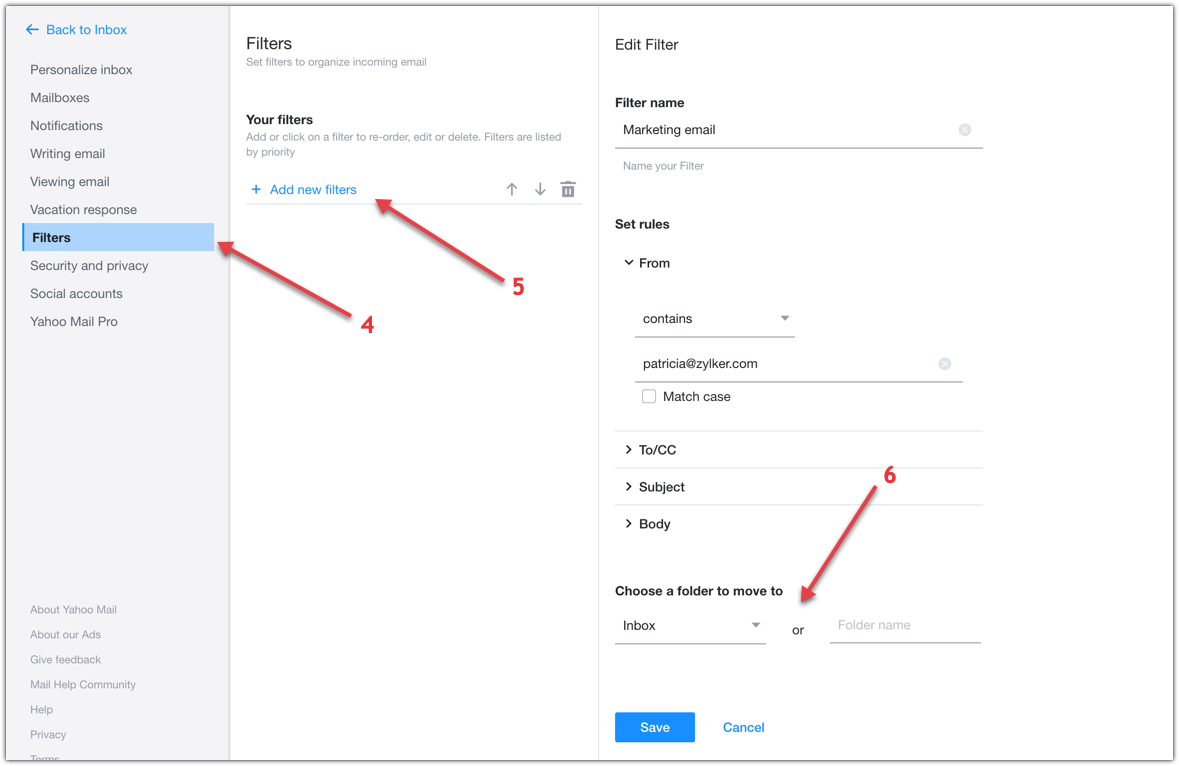
  4. Click  Filters .
  5. Click  Add new filters .
  6. Add sender details and choose Inbox as the folder to deliver the email in.
  7. Click  Save .
whitelist sender

Orange.fr

  1. Log in to your  Orange.fr  account.
  2. Open an email from the sender you want to whitelist.
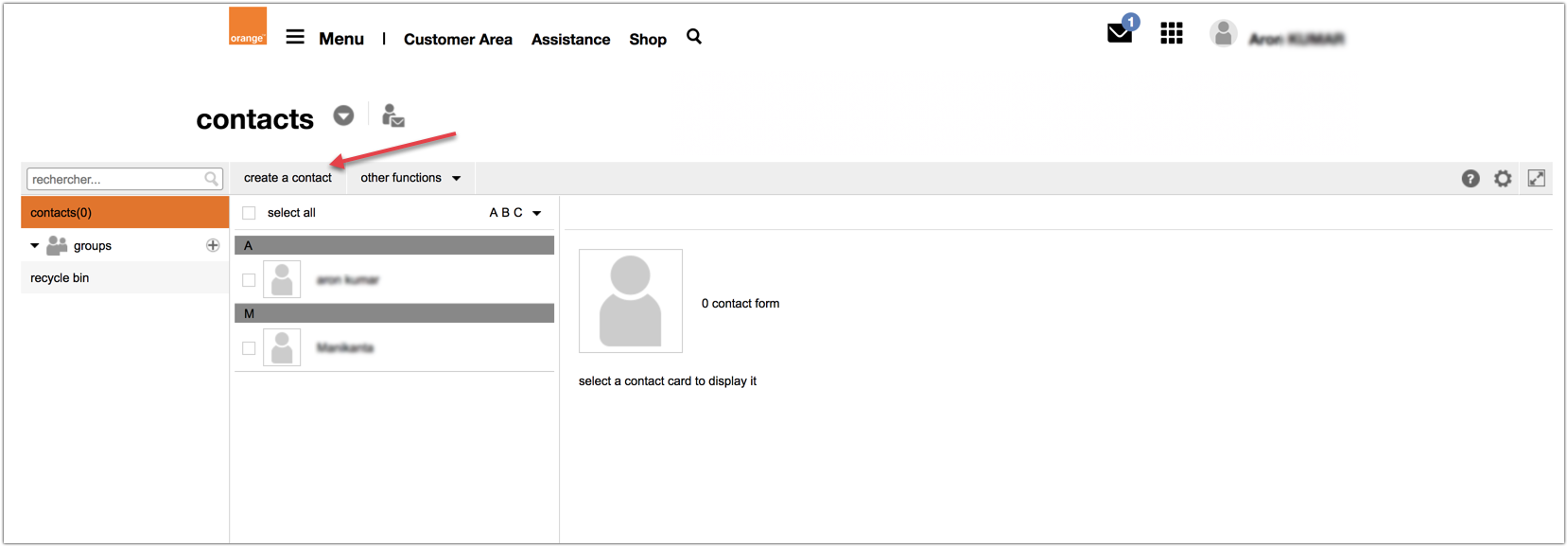
  3. Click  add to my contacts  option in right menu.
  4. Click  add  button.
  5. After adding a sender address, you can view your contacts in contacts menu. You can also add a new address by clicking on  create a contact  option in  contacts  section.
iCloud Mail

  1. Log in to your  iCloud  account.
  2. Click  Mail  in the top menu and choose  Preferences .
  3. Click  Rules  from the dialog box that opens.
  4. Click  Add Rule  button on the right side of the dialog box.
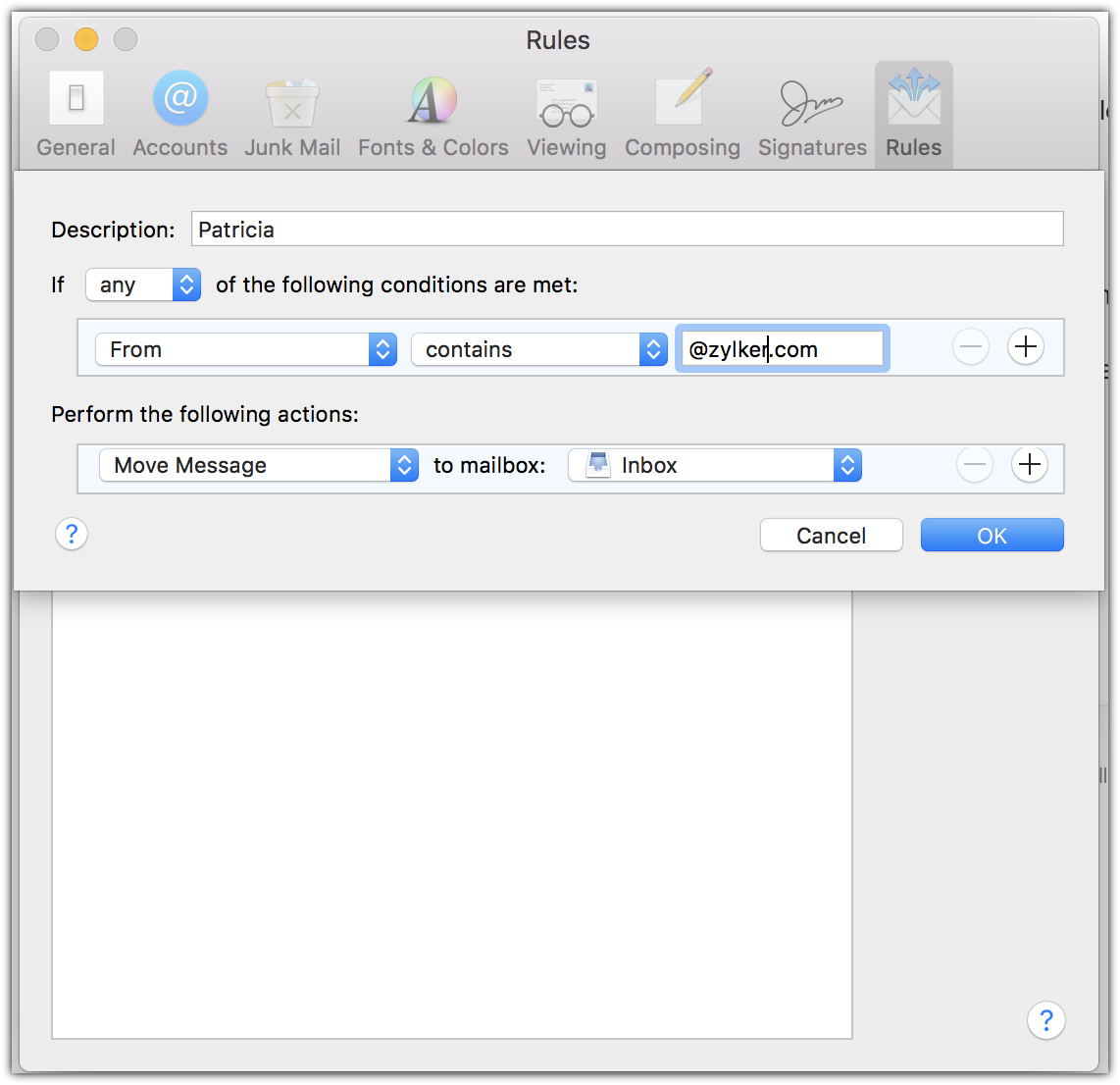
      5. Enter the sender domain or email address and set the action as  Move message to Inbox .
      6. Click  OK .

Mail.ru

  1. Log in to your  Mail.Ru  account.
  2. Open an email from the sender you want to whitelist.
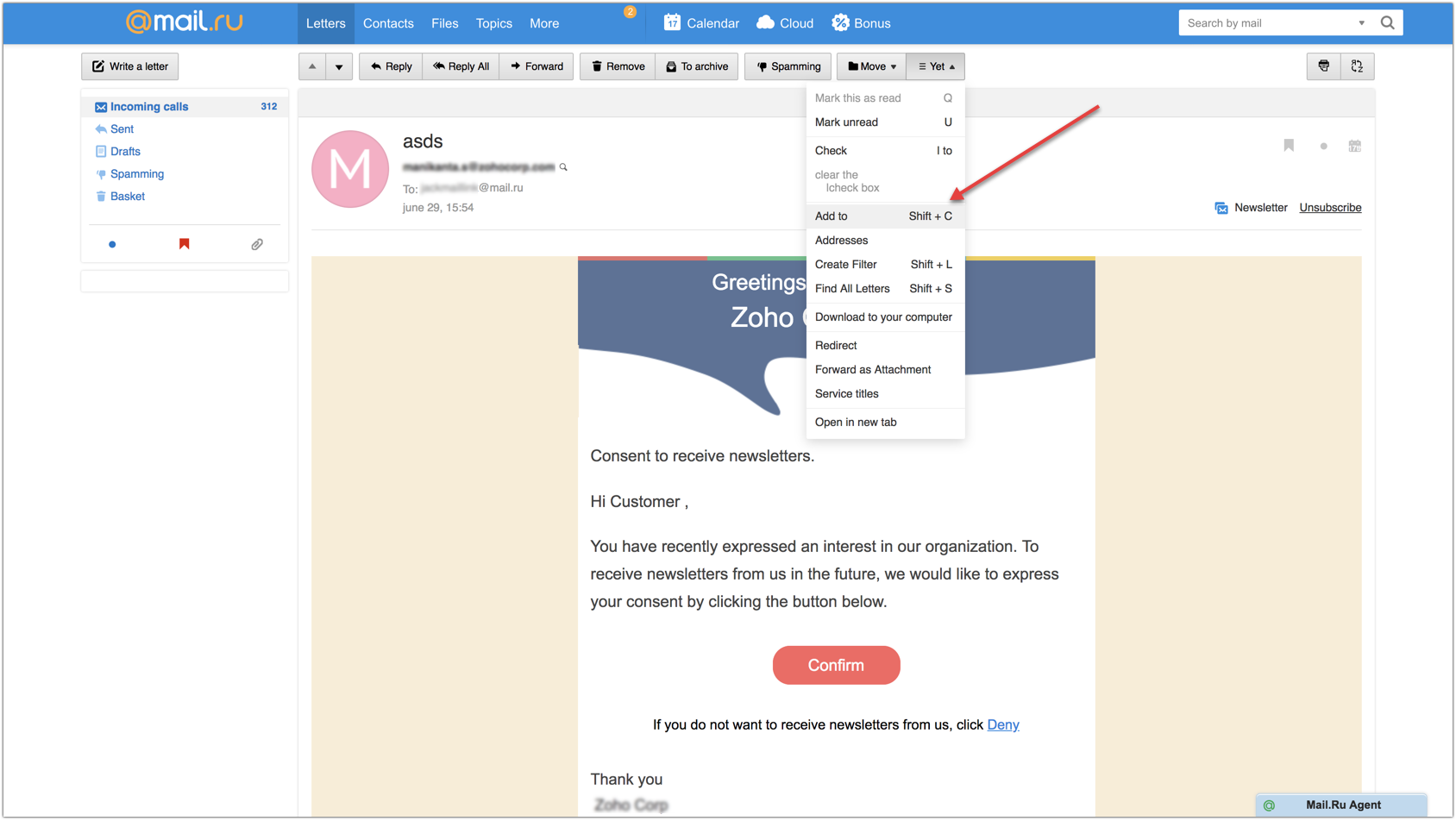
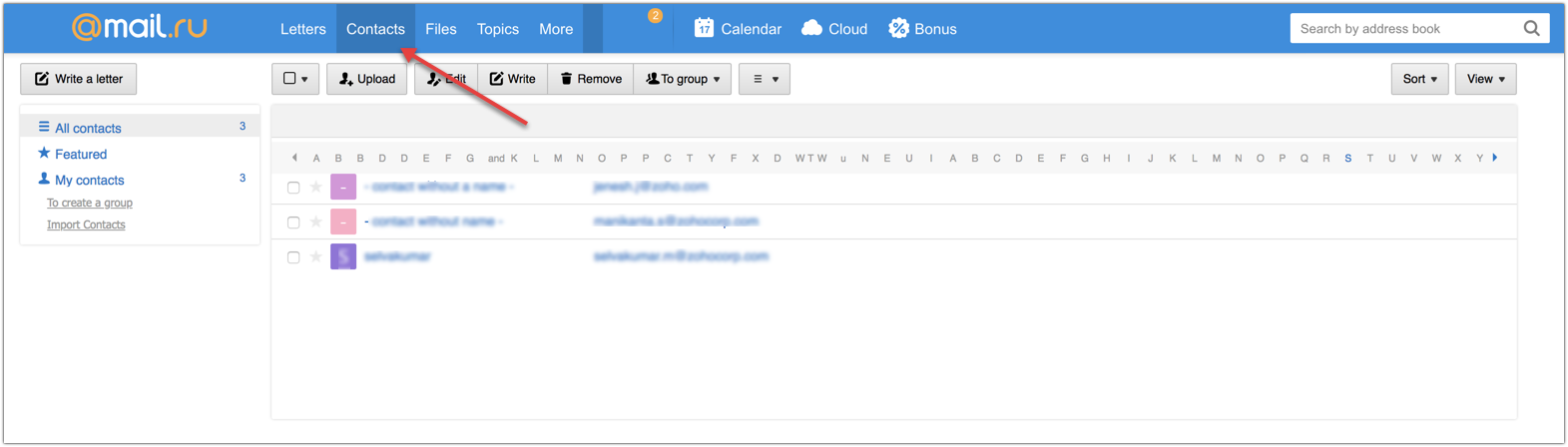
  3. Click the  Yet  dropdown from the menu above your email.
  4. Select  Add to .

The sender address will be added to your address book. You can check the sender details in Contacts menu on the top bar.
Rediffmail

  1. Log in to your  Rediff  account.
  2. Open the email from a specified sender.
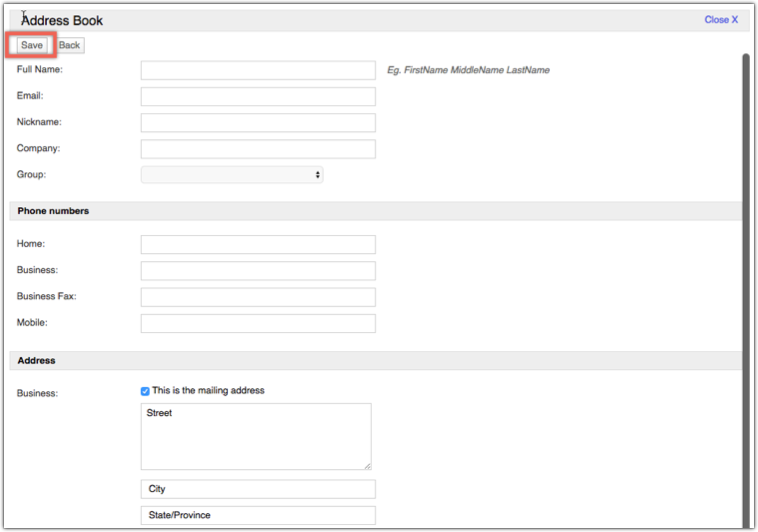
  3. Click  add to address book  (which is beside the from) to save the sender in your contact list.

      4. You will be taken to the  Address book  page wherein you have to fill in the necessary details.
      5. Click  Save  on top of the page.
Web.de

  1. Log in to your  Web.de  (Freemail) account.
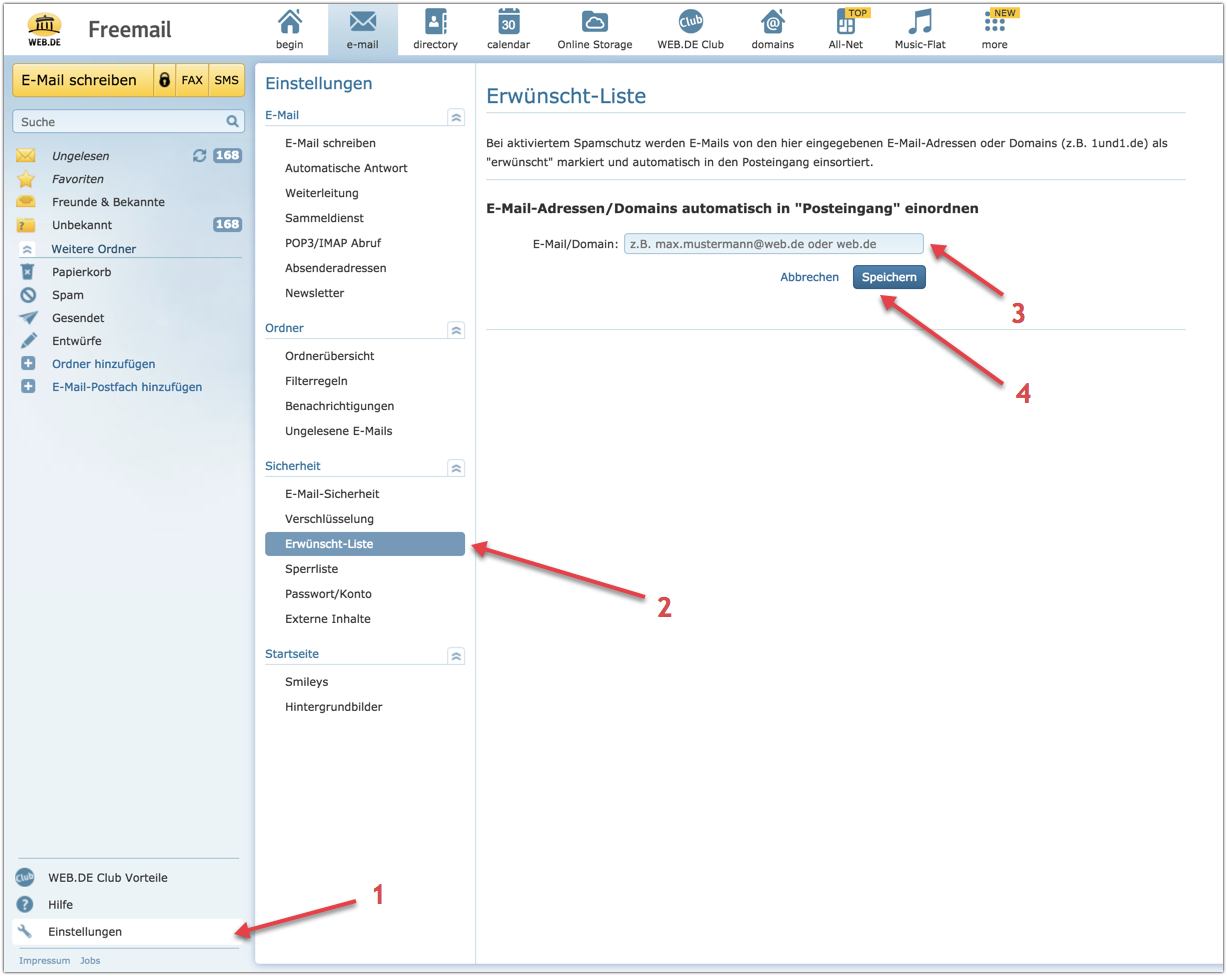
  2. Click  Settings  (Einstellungen) option in the bottom-left corner of the page.
  3. Click  Desired List  (Erwünscht-Liste) from the list of options.
  4. Enter the desired email address or domain.
  5. Click  Save .

Comcast.net

  1. Log in to your  XFINITY (Comcast.net)  account.
  2. Open an email of the sender you want to whitelist.
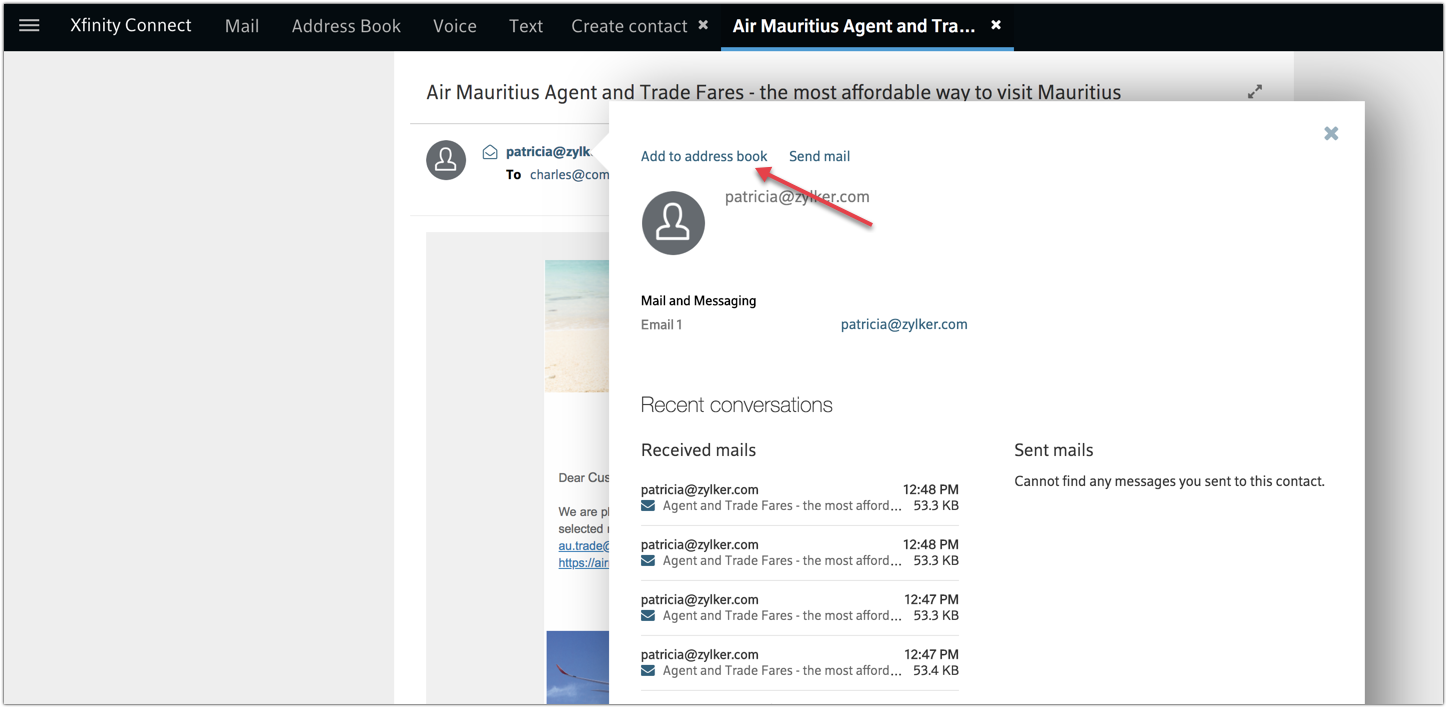
  3. Click on the sender email address from the email.
  4. Click  Add to address book .

      5. Enter sender details.
      6. Click  save .
                  or
      7.  Click Address Book on the top menu.
      8. Select Create contact icon.
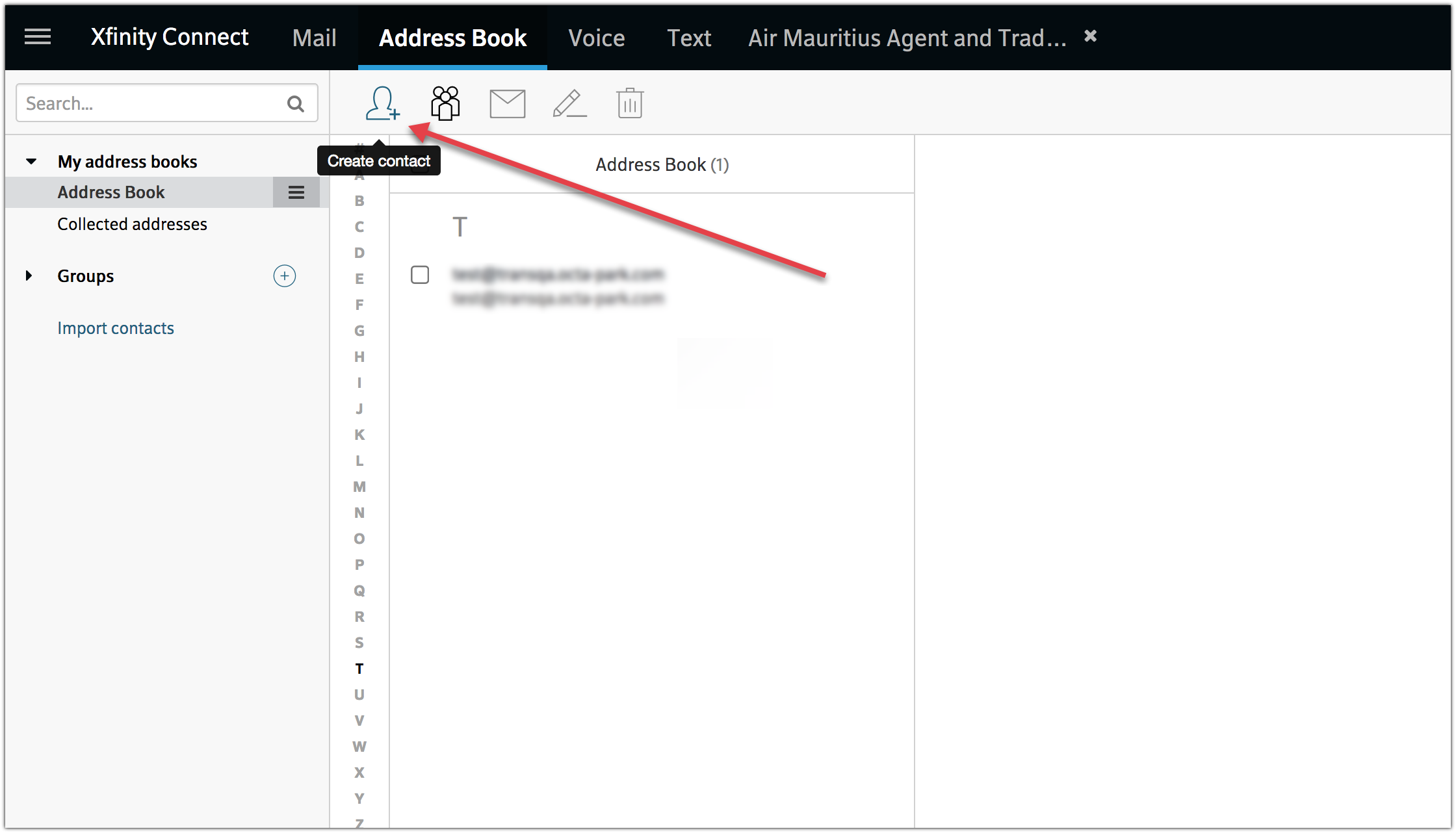
      9. Enter the sender details.
      10. Click  Save .

Freenet.de

  1. Log in to your  Freenet.de  account.
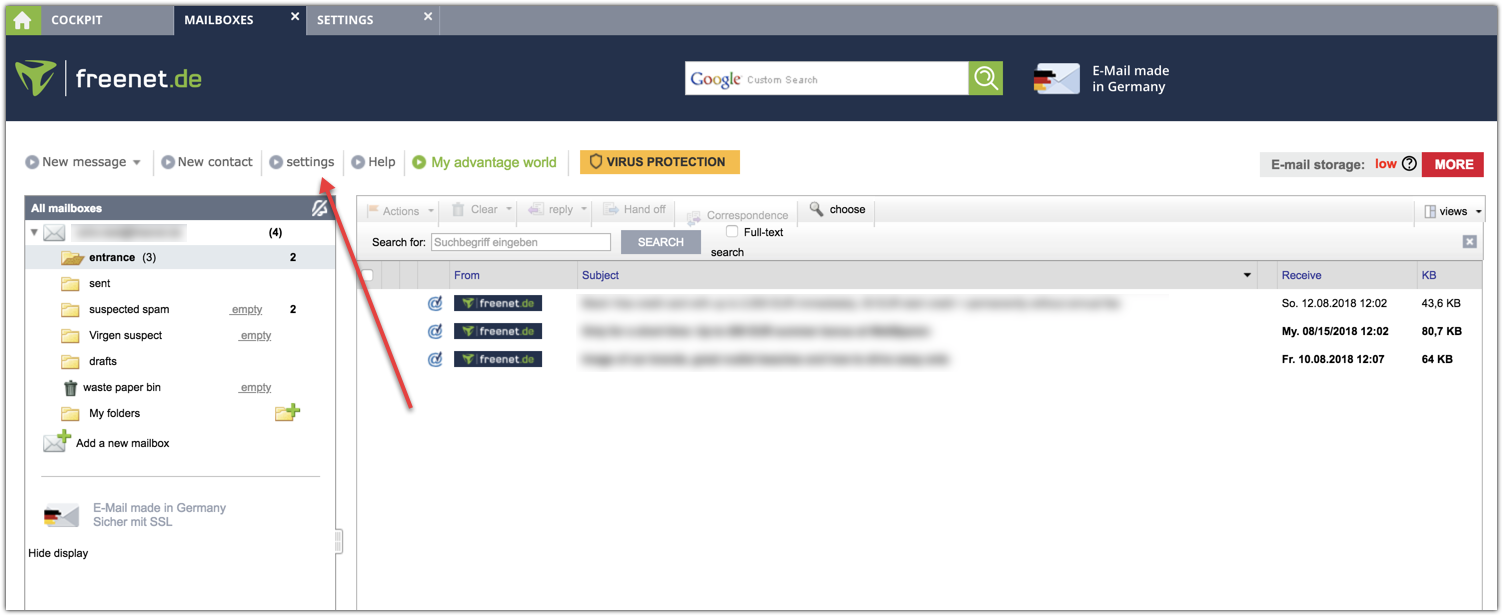
  2. Click  Settings  in top menu bar.

      3. Under Security and Spam Protection, click Edit Desired/Unwanted Recipients (Whitelist/Blacklist).
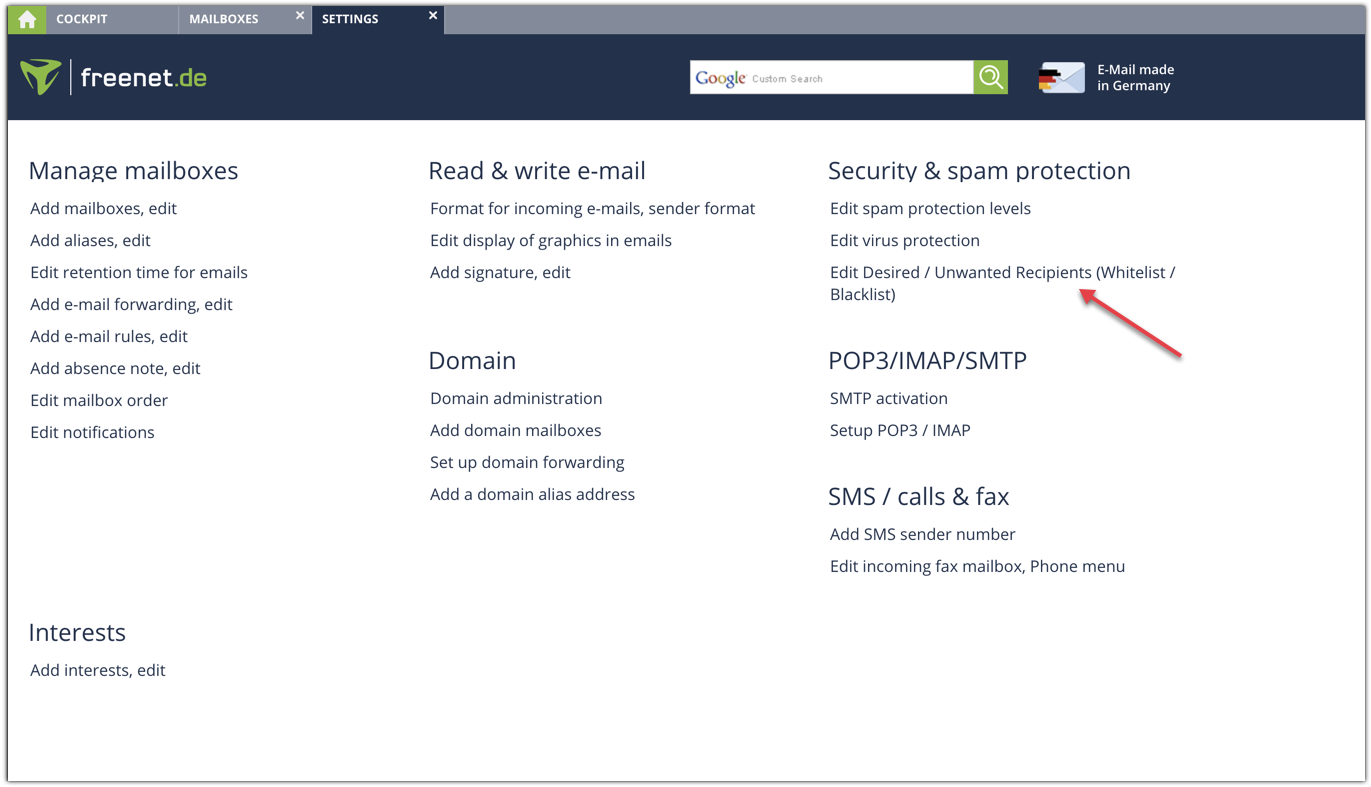
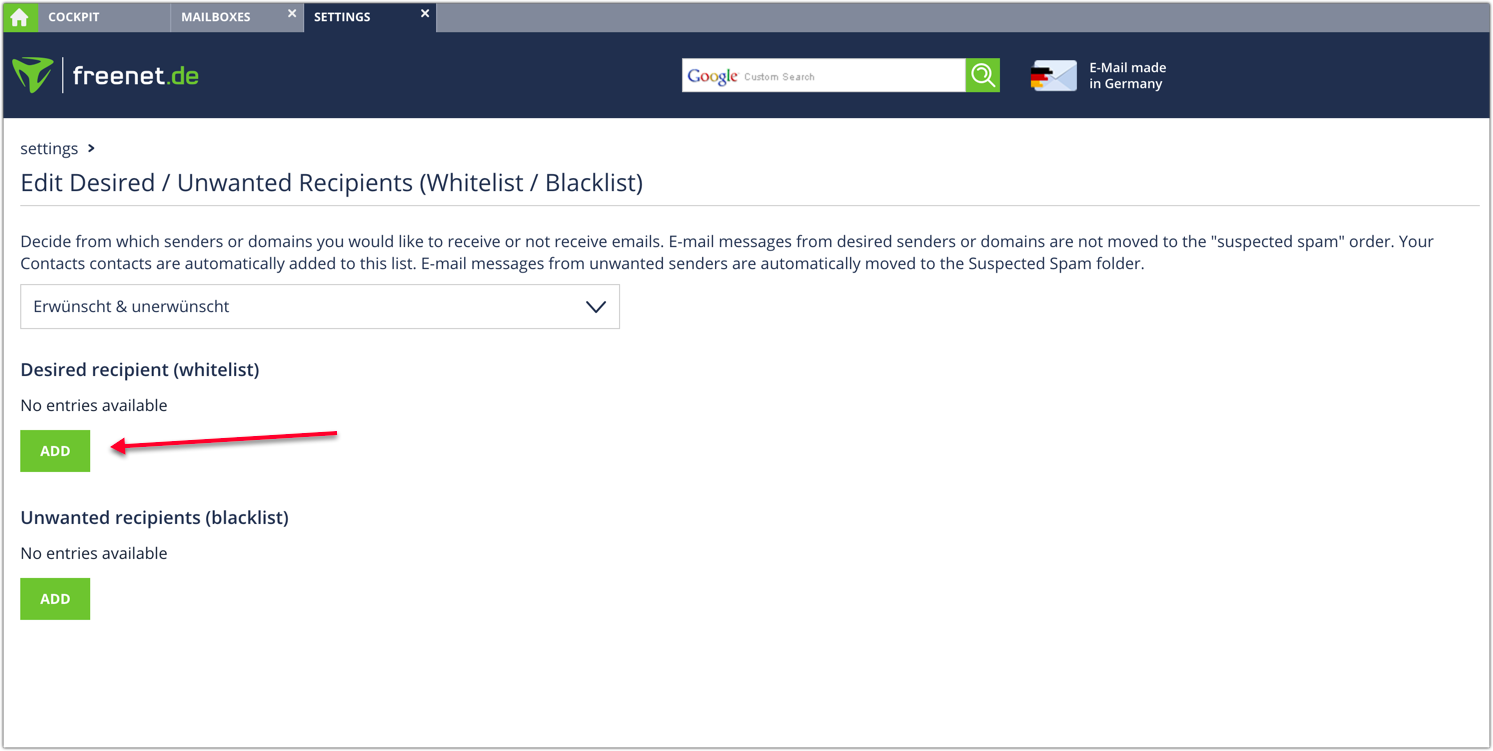
      4. In  Desired recipient  (whitelist), click  ADD  button and enter the sender details.
Mail.com

  1. Log in to your  Mail.com  account.
  2. Open an email of the sender you want to whitelist.
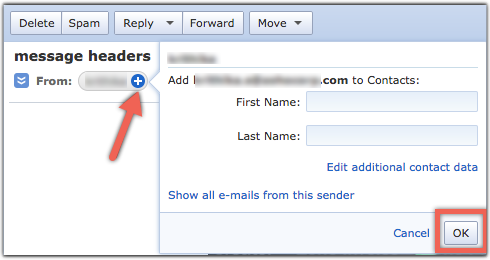
  3. Click the  plus  symbol beside the  From : in the email.
  4. Fill  details  like first name and last name.
  5. Click  OK  button.

GMX mail

  1. Log in to your  GMX mail  account.
  2. Open an email of the sender you want to whitelist.
  3. Click the  plus  symbol beside the  From : in the email.
  4. Fill  details  like first name and last name.
  5. Click  OK  button.

Yandex

  1. Log in to your  Yandex mail  account.
  2. Open an email from the sender you want to whitelist.
  3. Click on the sender's name. A pop-up box will appear.
  4. Click  Add to contacts .

BellSouth/AT&T Webmail

  1. Log in to your  BellSouth/AT&T Webmail  account.
  2. Open an email from the sender you want to whitelist.
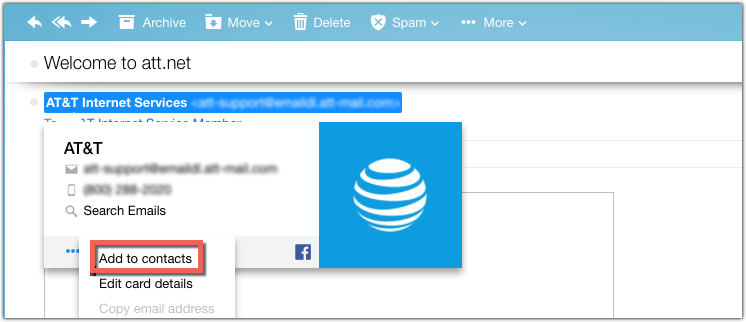
  3. Click the sender's name and a window will pop up.
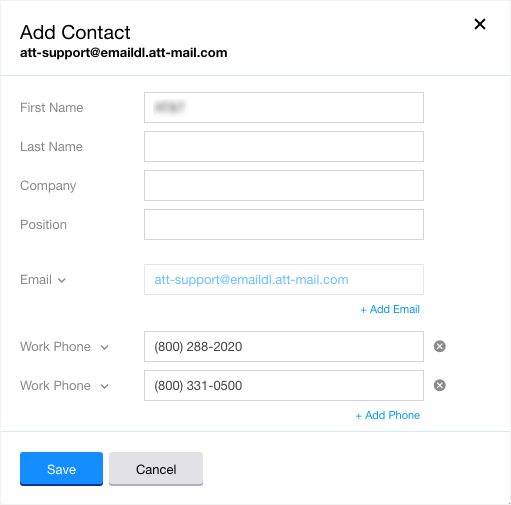
  4. Click  More  icon at bottom right corner to save the sender in your contact list.
  5. Click  Add to contacts  that appear.

        6. You have to fill up details in Add contact page and click  Save .
Telekom

  1. Log in to your  Telekom (t-online.de)  account.
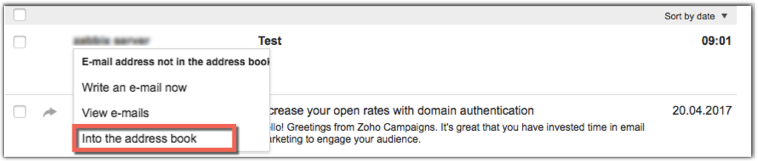
  2. Right click the email whose sender is to be made a contact.
  3. Select  Into the address book  option from the drop down that appears.
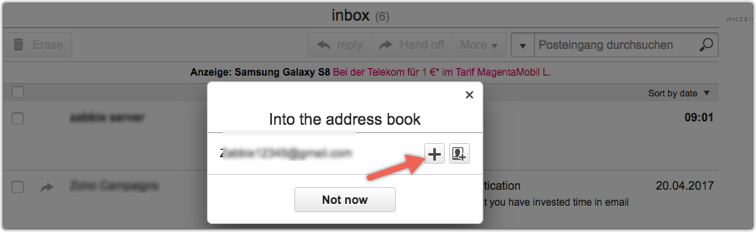
      4. Click on  plus symbol to add the sender as a new contact.
      5. Fill in the details in the  New Contact box  that appears.
      6. Click  to save  on the bottom right corner.

Anti-spam services

If the email recipients have an anti-spam filter, whitelisting the sender address with that anti-spam service is recommended. We've listed below a few reputed anti-spam services:
  1. Barracuda
  2. Trendmicro
  3. Anti-spamcloud.com

Barracuda

  1. Log in to your  Barracuda  account.
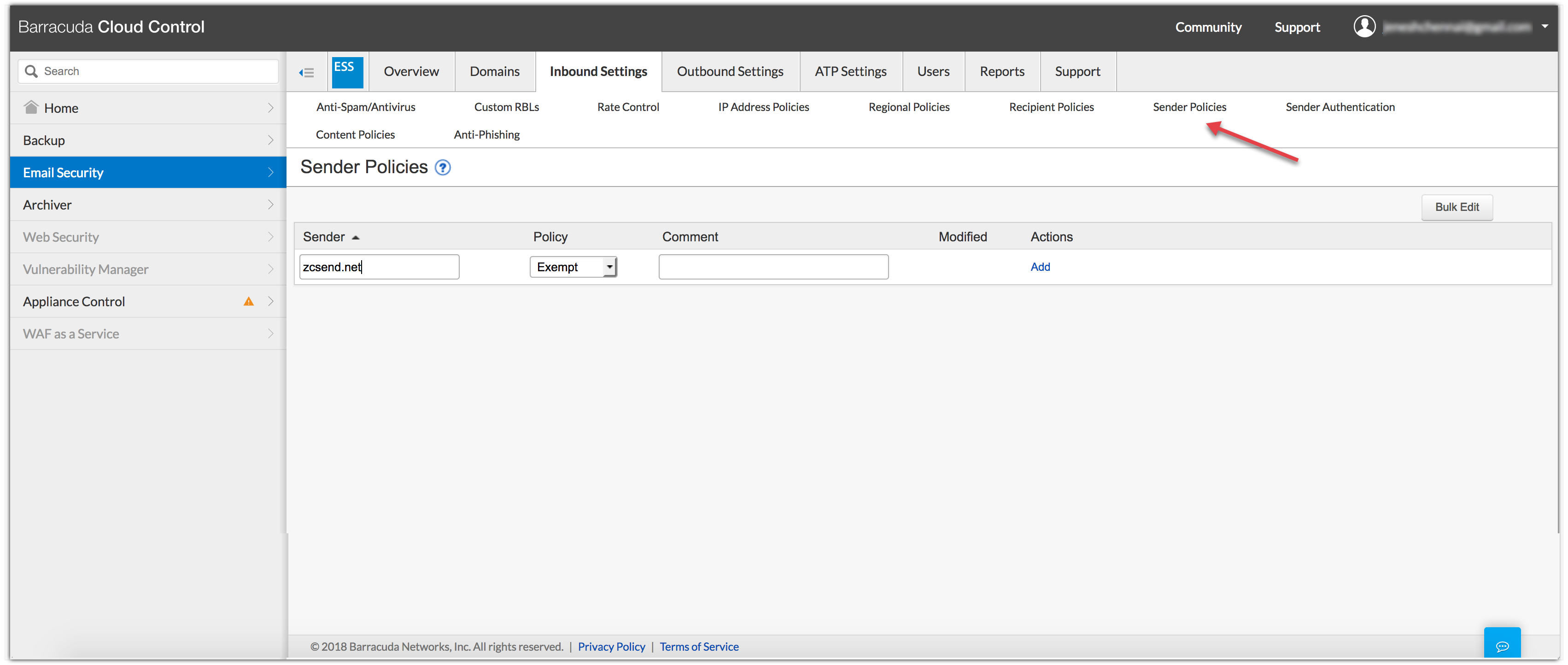
  2. Click  Email Security  in the left menu and choose  Inbound Settings .
  3. Click  Sender Policies .
  4. Enter the sender domain, choose  Exempt for Policy , and click  Add .
Trendmicro

  1. Log in to your  Trendmicro  account.
  2. Click  Inbound Preferences  from the top menu.
  3. Click  Approved Senders  under  Sender Filter .
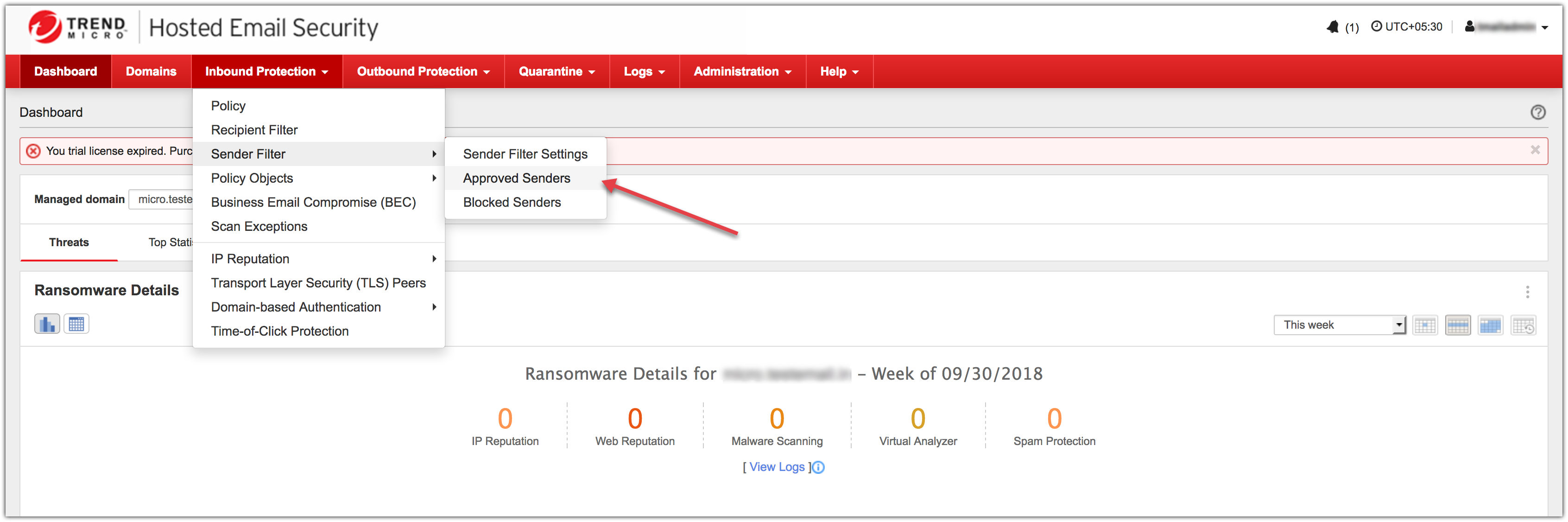
      4. Click  Add  button and enter the sender domain in the text box shown below.
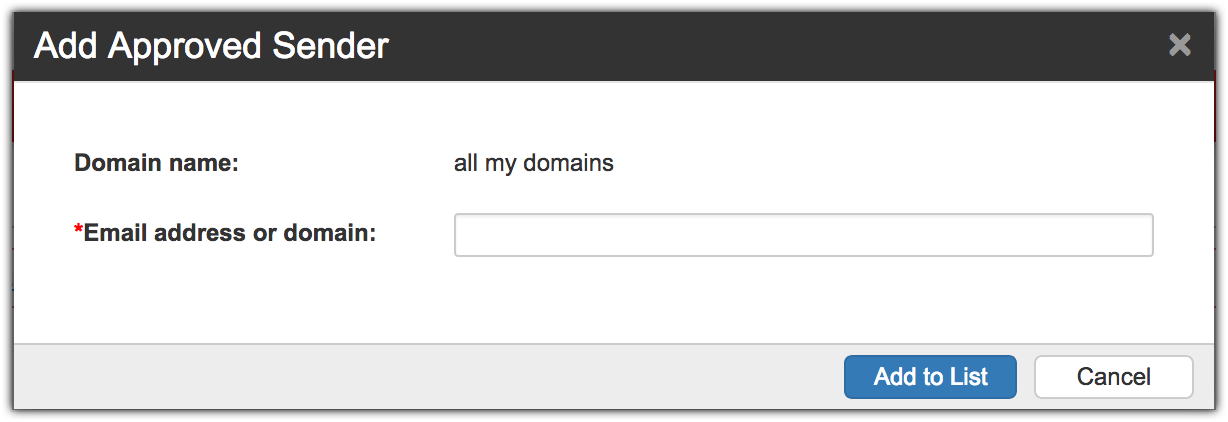
      5. Click  Add to List .

Antispamcloud.com

  1. Log in to your  antispamcloud.com  account.
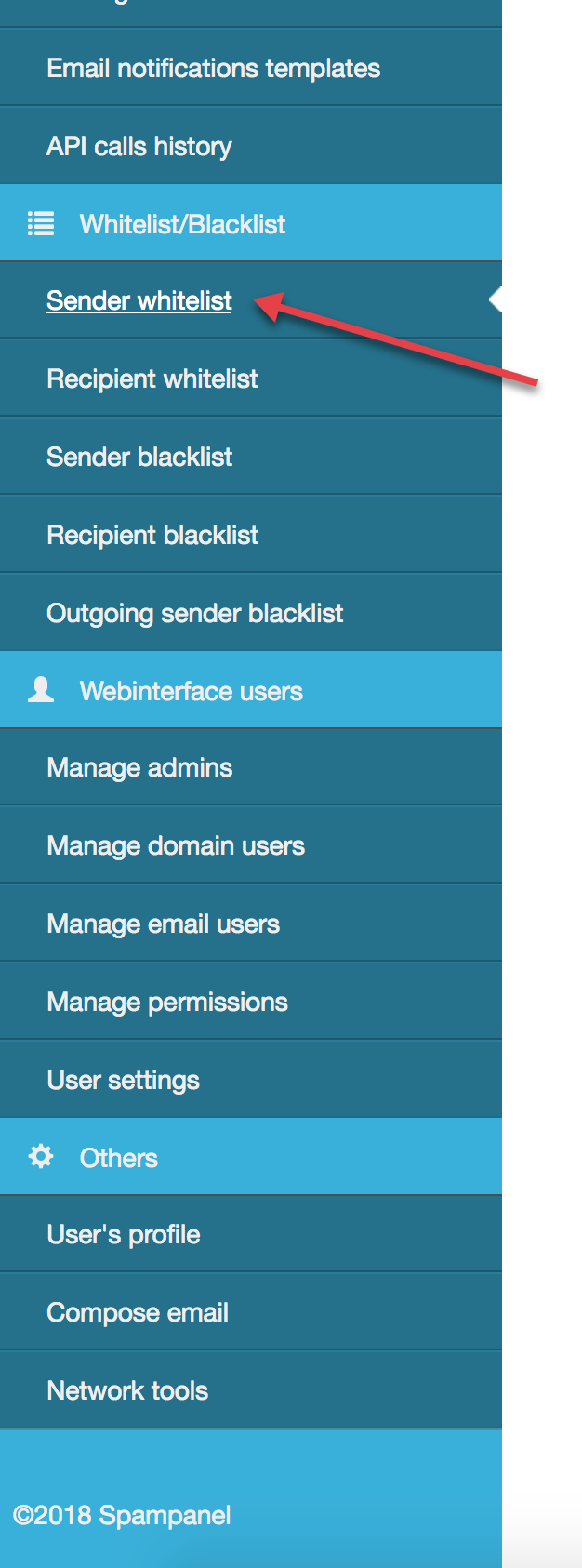
  2. Click  Sender Whitelist  under  Whitelist/Blacklist  from the left side menu.
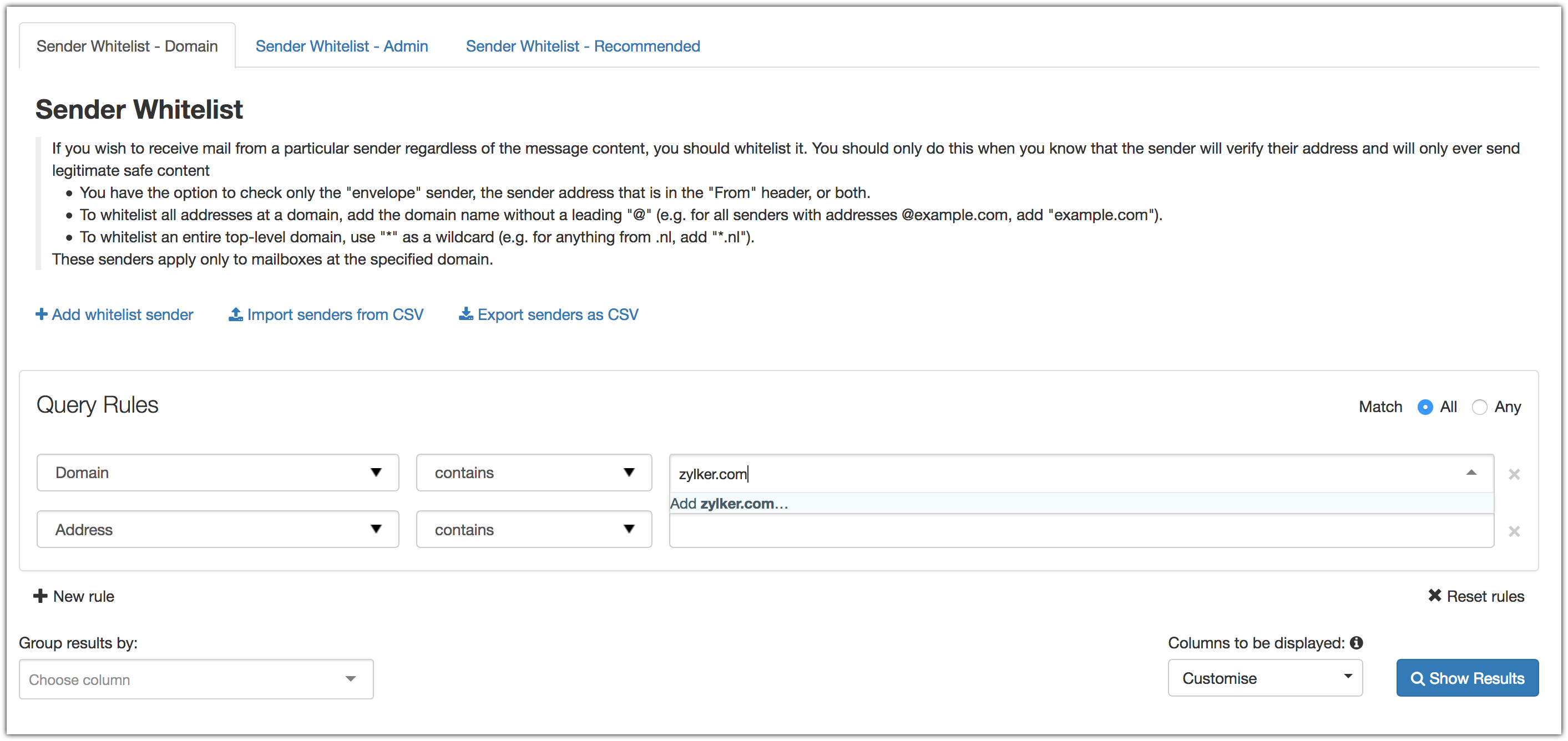
      3. You can choose whether to whitelist the sender domain or address from the menu at the top.
      4. Enter the sender domain or sender address.
        Create. Review. Publish.

        Write, edit, collaborate on, and publish documents to different content management platforms.

        Get Started Now


          Access your files securely from anywhere

            Zoho CRM Training Programs

            Learn how to use the best tools for sales force automation and better customer engagement from Zoho's implementation specialists.

            Zoho CRM Training
              Redefine the way you work
              with Zoho Workplace

                Zoho DataPrep Personalized Demo

                If you'd like a personalized walk-through of our data preparation tool, please request a demo and we'll be happy to show you how to get the best out of Zoho DataPrep.

                Zoho CRM Training

                  Create, share, and deliver

                  beautiful slides from anywhere.

                  Get Started Now


                    Zoho Sign now offers specialized one-on-one training for both administrators and developers.

                    BOOK A SESSION


                                Quick LinksWorkflow AutomationData Collection
                                Web FormsEnterpriseOnline Data Collection Tool
                                Embeddable FormsBankingBegin Data Collection
                                Interactive FormsWorkplaceData Collection App
                                CRM FormsCustomer ServiceAccessible Forms
                                Digital FormsMarketingForms for Small Business
                                HTML FormsEducationForms for Enterprise
                                Contact FormsE-commerceForms for any business
                                Lead Generation FormsHealthcareForms for Startups
                                Wordpress FormsCustomer onboardingForms for Small Business
                                No Code FormsConstructionRSVP tool for holidays
                                Free FormsTravelFeatures for Order Forms
                                Prefill FormsNon-Profit

                                Intake FormsLegal
                                Mobile App
                                Form DesignerHR
                                Mobile Forms
                                Card FormsFoodOffline Forms
                                Assign FormsPhotographyMobile Forms Features
                                Translate FormsReal EstateKiosk in Mobile Forms
                                Electronic Forms
                                Drag & drop form builder

                                Notification Emails for FormsAlternativesSecurity & Compliance
                                Holiday FormsGoogle Forms alternative GDPR
                                Form to PDFJotform alternativeHIPAA Forms
                                Email FormsFormstack alternativeEncrypted Forms

                                Wufoo alternativeSecure Forms

                                TypeformWCAG

                                  Zoho FSM Video Tutorials


                                        All-in-one knowledge management and training platform for your employees and customers.

                                                  Create. Review. Publish.

                                                  Write, edit, collaborate on, and publish documents to different content management platforms.

                                                  Get Started Now


                                                                    You are currently viewing the help pages of Qntrl’s earlier version. Click here to view our latest version—Qntrl 3.0's help articles.


                                                                        Manage your brands on social media


                                                                          • Desk Community Learning Series


                                                                          • Digest


                                                                          • Functions


                                                                          • Meetups


                                                                          • Kbase


                                                                          • Resources


                                                                          • Glossary


                                                                          • Desk Marketplace


                                                                          • MVP Corner


                                                                          • Word of the Day


                                                                          • Ask the Experts


                                                                            Zoho Sheet Resources


                                                                                Zoho Forms Resources


                                                                                  Secure your business
                                                                                  communication with Zoho Mail


                                                                                  Mail on the move with
                                                                                  Zoho Mail mobile application

                                                                                    Stay on top of your schedule
                                                                                    at all times


                                                                                    Carry your calendar with you
                                                                                    Anytime, anywhere


                                                                                          Zoho Sign Resources

                                                                                            Sign, Paperless!

                                                                                            Sign and send business documents on the go!

                                                                                            Get Started Now


                                                                                                    Zoho TeamInbox Resources


                                                                                                              Zoho DataPrep Demo

                                                                                                              Get a personalized demo or POC

                                                                                                              REGISTER NOW


                                                                                                                Design. Discuss. Deliver.

                                                                                                                Create visually engaging stories with Zoho Show.

                                                                                                                Get Started Now


                                                                                                                                    • Related Articles

                                                                                                                                    • How does a public domain sender address affects email deliverability

                                                                                                                                      Whenever you send campaigns, they will be delivered to the receiving server of the respective mailbox provider. The receiving server will offer inbox placement after carefully scrutinizing the email. If the emails are from a source that the mailbox ...
                                                                                                                                    • Sender Recognition

                                                                                                                                      For your email campaigns to be successful, you need to be recognizable. If your recipients don't recognize where an email is coming from, they're less likely to open it. Trust is one of the primary currencies by which your brand is valued, and it ...
                                                                                                                                    • Getting started with email deliverability

                                                                                                                                      Identifying the needs and interests of contacts and conceptualizing email campaigns around those are part and parcel of a marketer's daily routine. Sometimes marketers may assume that crafting a compelling campaign alone will help them hit their ...
                                                                                                                                    • Boost your email deliverability with the Google Postmaster tool

                                                                                                                                      Mailbox providers consider the reputation of your sender domain when making inbox decisions. If your sender domain has a negative reputation, your emails may land in the spam folder. If your sender domain has a positive reputation, the chances of ...
                                                                                                                                    • Eight frequent activities that affect email deliverability

                                                                                                                                      Email deliverability is the ability to land emails in the inbox of your recipients. If your campaign's deliverability takes a hit, it might be due to certain email marketing practices you follow. Let's dive deep and learn about practices that affect ...
                                                                                                                                      Wherever you are is as good as
                                                                                                                                      your workplace

                                                                                                                                        Resources

                                                                                                                                        Videos

                                                                                                                                        Watch comprehensive videos on features and other important topics that will help you master Zoho CRM.


                                                                                                                                        eBooks

                                                                                                                                        Download free eBooks and access a range of topics to get deeper insight on successfully using Zoho CRM.


                                                                                                                                        Webinars

                                                                                                                                        Sign up for our webinars and learn the Zoho CRM basics, from customization to sales force automation and more.


                                                                                                                                        CRM Tips

                                                                                                                                        Make the most of Zoho CRM with these useful tips.


                                                                                                                                          Zoho Show Resources