List Summary
List summary gives you various reports on how contacts in a particular list are performing in terms of associated activities, contact stages, contact sources, etc. Using these insights, you can construct proper propaganda for each list thereby increasing the chances of contact conversion. You can also refine or repurpose lists based on these data. This helps you in maintaining a healthy database.
To view contact summary of a list:
- From the Navigation Toolbar select Contacts and then Lists. All the lists will appear by default.
- Click on the list for which you would like to see the summary. A page containing the contacts data will be displayed.
Understanding list summary:
Under the Contact Stats inside a list tab you can gain insight for the list by scrolling through the various statistics displayed.
Overall stats:
- Contacts: Total number of contacts present in the list
- Unsubscribes: Number of contacts in the list who unsubscribed.
- Bounces: Number of contacts in the list whose email address was invalid or mail was undeliverable.
Contact Growth Stats:
This graph gives you the number of contacts that have been added over a time period to the list.
Associated Entities:
- Forms: Number of forms associated with the list.
- Journeys: Number of journeys associated with the list.
- Campaigns: Number of campaigns associated with the list.
Contact Status:
You will get to know the consent status of active and passive contacts in the list. Use the drop down to toggle between active and passive contacts.
- Opt-in: Contacts who were added through double opt-in method
- Bounced: Number of contacts in the list.
- Unsubscribes: Number of contacts in the list who unsubscribed.
Contacts by Stage:
This graph gives you the number of contacts of the list present in different contact stages.
Contacts by Source:
This graph deals with various sources from where the contacts were added to this list.
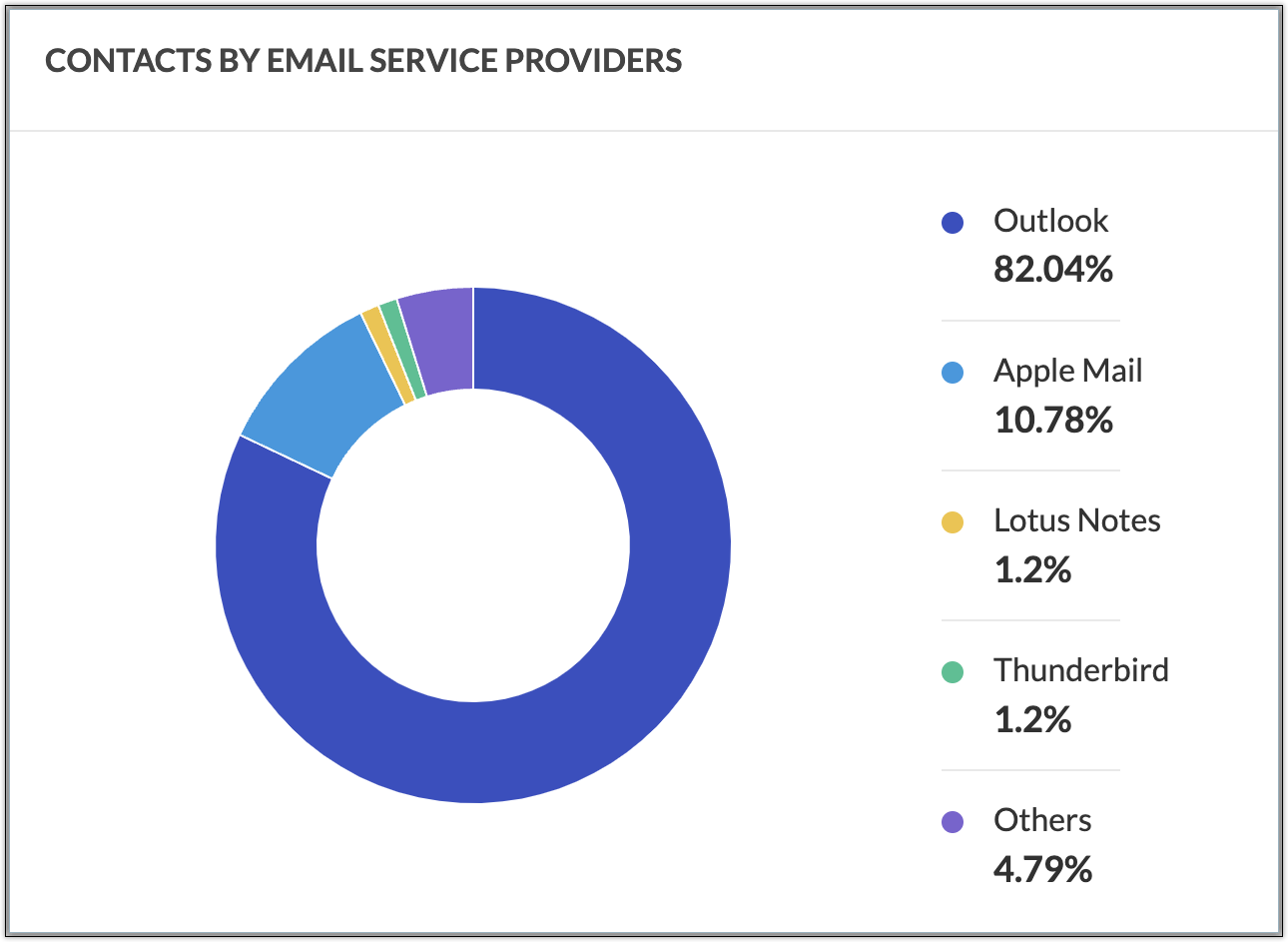
Contacts by Email Service Providers:
This chart compares the usage of different email service providers by the contacts of the list.
Contacts by Location:
You will be able to know the geographical positioning of the contacts of the list. This way, you will know the concentration of contacts at different locations.