How to record an online meeting? - Zoho Meeting

Record a meeting

Record online meetings and share it with members who could not attend your meeting. Play recordings in your browser or download it to your computer.
Info'Session Recording'  is only available in Zoho Meeting's paid editions.
How-to:

Record a meeting

  • Start your meeting.
  • Click Start Recording from the More option on the meeting toolbar to start recording the meeting.


  • The recording can also be paused by clicking the Pause recording button in the toolbar, and resumed by clicking the Resume recording button.


  • When you're done recording, you can click Stop recording.


Play, share, download, and delete recordings

  1. In your Zoho Meeting account, click Files on the left pane. Your recordings will be displayed under Recordings. Play the recording by clicking the recording. Click the three dots menu to Download, Share and Delete the recordings.
  2. Click and perform the action you want.


Advanced recording settings 

Advanced recording settings can be accessed from under Settings-> Organization-> Recording

You can enable/disable recording settings under Advanced recording settings as shown in the below screenshot.


Notes
You can set a maximum of 48 participants profiles displayed in the gallery view per screen.

Manage Recordings 

You can manage and access all your recordings from the Files tab.


The Recordings tab in Zoho Meeting helps you manage all your meeting and webinar recordings efficiently. You can click Filter icon on the right-hand side and narrow down your search using Filter panel.
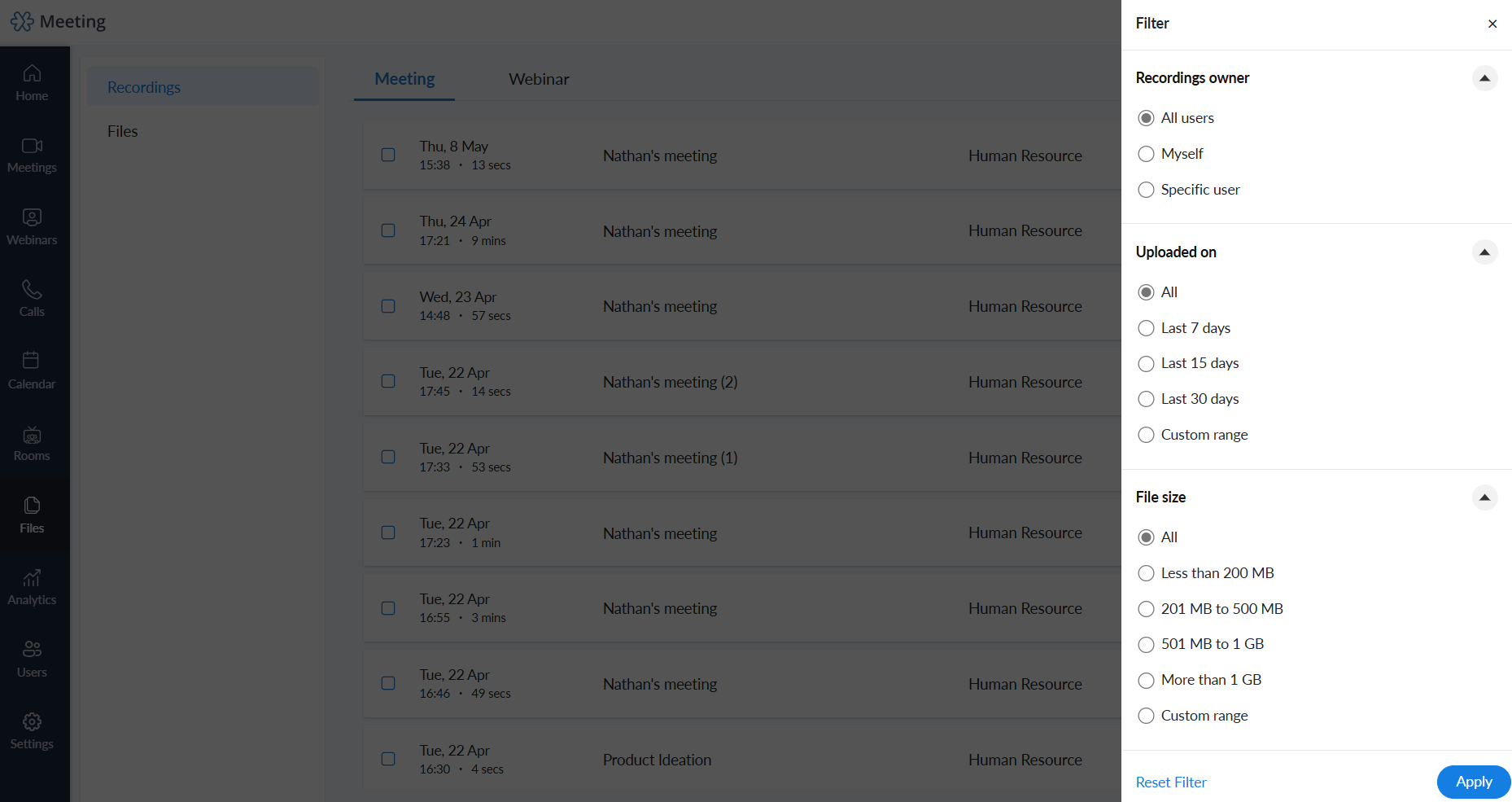

Manage Recording Access

  1. Click the Share button to manage recording access and configure link settings. 
  2. Under Manage Access, select an option. Based on your choice, only the people you specify will have access to the recording. 
  3. Enable or Disable the link settings. 
  4. Copy the link to share the recording. 


Note
  • All recordings are encrypted and saved securely.
  • Only paid subscribers to Zoho Meeting can use the Record feature.
  • If you exhaust the recording storage that comes with your paid plan, you can buy the recording add-on to store more recordings.
  • Only the presenter of a meeting can record the meeting.
  • Recordings links once shared cannot be revoked. Please take extra care when you share recordings that contain confidential information.
  • Deleted recordings cannot be accessed via recording links. To keep a copy, download the recording before deletion.

Points to know
  • Audio (through VoIP or telephone) and screen sharing will be captured in recordings. However, video will not be recorded. If you need the video to be recorded, you can turn on the Record meeting video under My Settings
  • You can record for up to a maximum duration of 12 hours.
  • You can watch and share recordings online or download them to your computer in MP4 format.
  • Your recordings will be stored on the cloud permanently based on your subscription plan, unless you delete them.
  • All recordings will be sent to your email address once your meeting gets over. You can also access and manage your recordings in the Recordings tab of your Zoho Meeting account.


      Create. Review. Publish.

      Write, edit, collaborate on, and publish documents to different content management platforms.

      Get Started Now


        Access your files securely from anywhere

          Zoho CRM Training Programs

          Learn how to use the best tools for sales force automation and better customer engagement from Zoho's implementation specialists.

          Zoho CRM Training
            Redefine the way you work
            with Zoho Workplace

              Zoho DataPrep Personalized Demo

              If you'd like a personalized walk-through of our data preparation tool, please request a demo and we'll be happy to show you how to get the best out of Zoho DataPrep.

              Zoho CRM Training

                Create, share, and deliver

                beautiful slides from anywhere.

                Get Started Now


                  Zoho Sign now offers specialized one-on-one training for both administrators and developers.

                  BOOK A SESSION


                              Quick LinksWorkflow AutomationData Collection
                              Web FormsEnterpriseOnline Data Collection Tool
                              Embeddable FormsBankingBegin Data Collection
                              Interactive FormsWorkplaceData Collection App
                              CRM FormsCustomer ServiceAccessible Forms
                              Digital FormsMarketingForms for Small Business
                              HTML FormsEducationForms for Enterprise
                              Contact FormsE-commerceForms for any business
                              Lead Generation FormsHealthcareForms for Startups
                              Wordpress FormsCustomer onboardingForms for Small Business
                              No Code FormsConstructionRSVP tool for holidays
                              Free FormsTravelFeatures for Order Forms
                              Prefill FormsNon-Profit

                              Intake FormsLegal
                              Mobile App
                              Form DesignerHR
                              Mobile Forms
                              Card FormsFoodOffline Forms
                              Assign FormsPhotographyMobile Forms Features
                              Translate FormsReal EstateKiosk in Mobile Forms
                              Electronic Forms
                              Drag & drop form builder

                              Notification Emails for FormsAlternativesSecurity & Compliance
                              Holiday FormsGoogle Forms alternative GDPR
                              Form to PDFJotform alternativeHIPAA Forms
                              Email FormsFormstack alternativeEncrypted Forms

                              Wufoo alternativeSecure Forms

                              TypeformWCAG

                                All-in-one knowledge management and training platform for your employees and customers.

                                          Create. Review. Publish.

                                          Write, edit, collaborate on, and publish documents to different content management platforms.

                                          Get Started Now


                                                            You are currently viewing the help pages of Qntrl’s earlier version. Click here to view our latest version—Qntrl 3.0's help articles.


                                                                Manage your brands on social media


                                                                  • Desk Community Learning Series


                                                                  • Digest


                                                                  • Functions


                                                                  • Meetups


                                                                  • Kbase


                                                                  • Resources


                                                                  • Glossary


                                                                  • Desk Marketplace


                                                                  • MVP Corner


                                                                  • Word of the Day


                                                                  • Ask the Experts


                                                                    Zoho Sheet Resources


                                                                        Zoho Forms Resources


                                                                          Secure your business
                                                                          communication with Zoho Mail


                                                                          Mail on the move with
                                                                          Zoho Mail mobile application

                                                                            Stay on top of your schedule
                                                                            at all times


                                                                            Carry your calendar with you
                                                                            Anytime, anywhere


                                                                                  Zoho Sign Resources

                                                                                    Sign, Paperless!

                                                                                    Sign and send business documents on the go!

                                                                                    Get Started Now


                                                                                            Zoho TeamInbox Resources


                                                                                                      Zoho DataPrep Demo

                                                                                                      Get a personalized demo or POC

                                                                                                      REGISTER NOW


                                                                                                        Design. Discuss. Deliver.

                                                                                                        Create visually engaging stories with Zoho Show.

                                                                                                        Get Started Now


                                                                                                                            • Related Articles

                                                                                                                            • Integrating Zoho Sprints with Zoho Meeting

                                                                                                                              Overview Zoho Sprints integrates seamlessly with Zoho Meeting, enabling agile teams to schedule and manage virtual meetings directly within their sprint workflows. This integration facilitates efficient communication, allowing teams to conduct sprint ...
                                                                                                                            • Meeting Rooms

                                                                                                                              Zoho Meeting Rooms Zoho Meeting Rooms is a video conferencing solution designed to make remote meetings and collaboration more efficient. Setting up virtual conference rooms will help organizations conduct video meetings with other rooms or with ...
                                                                                                                            • Conduct a meeting ​

                                                                                                                              Start a meeting To start a meeting: Click Meetings on the left pane. Click Start to the right of the meeting you want to begin. Select your audio option: Phone: If you're using Zoho Audio, enter the dial-in number followed by conference code and pin. ...
                                                                                                                            • About Zoho Meeting

                                                                                                                              Zoho Meeting, a versatile web-based conferencing tool, simplifies online meetings and webinars without downloads. Enjoy seamless audio-video transmission, screen sharing, and recording. Accessible via phone dial-ins, even in areas with poor internet, ...
                                                                                                                            • Online meeting integration in Zoho Connect

                                                                                                                              The online meeting integration of Zoho Meeting in Zoho Connect lets you conduct online meetings with colleagues and groups in your organization, using audio, video, and screen sharing. You can also add external contacts like partners and clients to ...
                                                                                                                              Wherever you are is as good as
                                                                                                                              your workplace

                                                                                                                                Resources

                                                                                                                                Videos

                                                                                                                                Watch comprehensive videos on features and other important topics that will help you master Zoho CRM.


                                                                                                                                eBooks

                                                                                                                                Download free eBooks and access a range of topics to get deeper insight on successfully using Zoho CRM.


                                                                                                                                Webinars

                                                                                                                                Sign up for our webinars and learn the Zoho CRM basics, from customization to sales force automation and more.


                                                                                                                                CRM Tips

                                                                                                                                Make the most of Zoho CRM with these useful tips.


                                                                                                                                  Zoho Show Resources