Customizing Your Notebook

Customizing Your Notebook

Zoho Notebook offers flexible customization options that allow users to personalize both the appearance of the app and the way notes are displayed and organized. These options help improve readability, reduce visual clutter, and adapt Notebook to different workflows and devices.
Users can customize themes, notebook covers, layouts, fonts, note appearance, and sorting preferences to create a workspace that feels intuitive and comfortable.

Notebook-Level Customization

Changing the Notebook Cover

Each notebook includes a unique hand-drawn cover created by Zoho’s in-house artists, making notebooks visually distinct and easy to identify. Users can also upload a custom image as a notebook cover. Covers can be changed at any time and are synced across devices.

Note Layout and View Options

Users can control how notecards are displayed within a notebook based on their working style.

Preview Size

  1. Small
  2. Medium
  3. Large
Adjusting preview size helps users either view more notes at once or focus more clearly on note content.

Layout Options

  1. Grid Layout – Displays notecards in a compact grid
  2. Multi-Plane Layout – Organizes notecards across multiple sections for easier navigation

Theme and App Appearance

Zoho Notebook allows users to control the overall appearance of the application across devices.
Available theme options include:
  1. Light mode
  2. Dark mode
  3. Device theme (automatically follows system settings)
Theme settings affect only the application interface and help improve visual comfort, especially during extended use or low-light conditions.


Notecard Content Customization

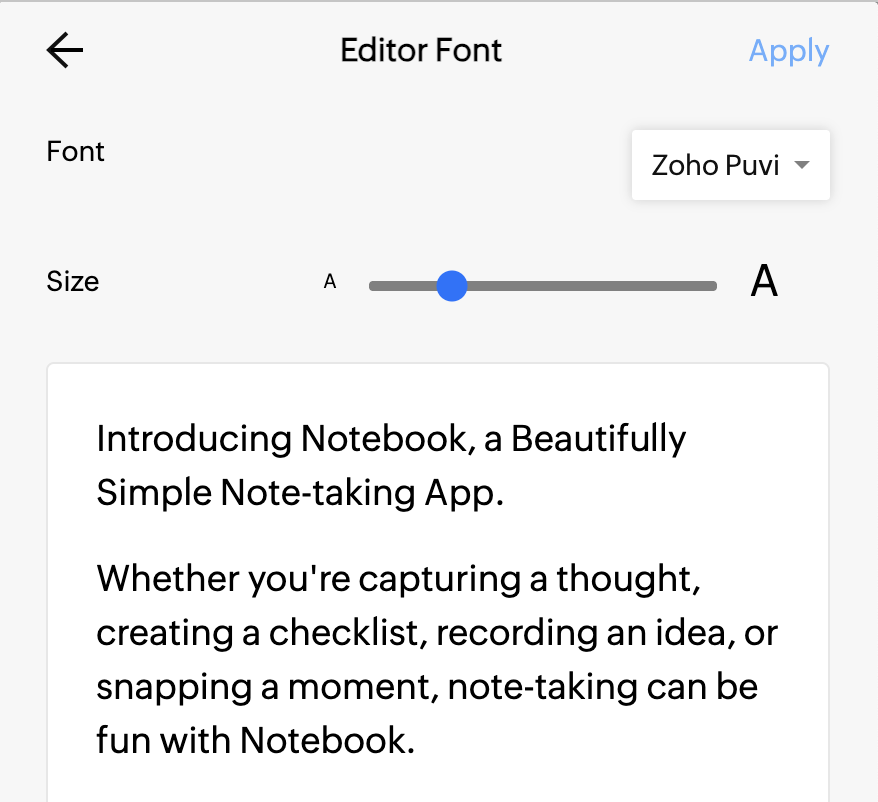
Zoho Notebook supports flexible font handling to ensure readability across different devices while maintaining a consistent writing experience.
  1. Section titles within a notecard follow the default fonts supported by the device or platform (web, desktop, or mobile). This ensures clear structure and optimal rendering across screen sizes and operating systems.
  2. Content inside the notecard (main body text and title) uses the font selected within the Zoho Notebook app. This allows users to control the writing style and maintain consistency across notes.
                                                                               

Notes
Font style changes apply at the globally across all notes not in the individual notecard level. This ensures consistent structure while adapting to different devices.

Advanced Notecard Preferences

Zoho Notebook also provides several additional customization options that allow users to tailor how notecards behave and appear while creating and viewing content.


Open Notes as Tabs

Users can choose to open notecards in separate tabs when working on the web app. This helps switch between multiple notes quickly and improves multitasking while researching or editing content.

Show Time on Notes

Users can enable or disable the display of creation and modification times on notecards. This helps reduce visual clutter or provide quick reference to note activity based on personal preference.

Default Notecard Color

A default color can be selected for newly created notecards. This helps maintain visual consistency and can be useful for organizing notes by category or workflow.

Generate Smart Cards

Notebook can automatically detect supported content such as links and convert them into Smart Cards, providing a richer preview and improved readability without requiring manual formatting.

Photo Card Grouping

Users can enable photo grouping to organize multiple images into a single grouped photo card. This makes image-heavy notebooks cleaner and easier to navigate.


Spell Check

Spell Check can be enabled to identify potential spelling errors while typing. This helps improve writing accuracy and ensures notes remain polished and professional.

Link Preview

When enabled, Notebook automatically generates a preview for supported URLs pasted into notes. Previews display relevant information such as titles, descriptions, and images, making links easier to identify at a glance.

Bookmark Card Preference

Users can choose to save web links as dedicated Bookmark Cards. Bookmark Cards provide a visually rich representation of saved webpages and make important references easier to access later.

Customizing Notecard Appearance

Users can visually personalize individual notecards to make important notes stand out. Customization options include:
  1. Assigning a color to a notecard
  2. Fixing a notecard color so it remains consistent
  3. Enabling or disabling the time display on notecards
These options help users quickly identify priority notes or group related content visually.

Organizing Notes with Filters and Sorting

Zoho Notebook provides tools to quickly locate and manage notes in large notebooks.

Filtering

Notecards can be filtered by:
  1. Favourites
  2. Tags
  3. Reminders
  4. Notecard types
Filtering helps reduce clutter and focus on relevant information.

Sorting

Notecards can be sorted by:
  1. Date created
  2. Date modified
  3. Date accessed
  4. Title
  5. Custom order
Sorting allows users to organize notes based on priority or frequency of use.

Idea
Combine filters and sorting options to quickly focus on the most relevant notes in large or information-heavy notebooks.

Frequently Asked Questions (FAQ)

1. Can I customize the appearance of individual notecards?
      Yes. You can assign a color to a notecard, fix the color so it remains consistent, and enable or disable the time display on notes.

2. Can I change the cover of a notebook?
      Yes. Each notebook includes a default hand-drawn cover, and you can change it at any time. You can also upload your own image to use as a custom notebook cover.

3. Does changing the theme affect my notes?
      No, Changing the theme only affects the appearance of the application interface. Your notes and content remain unchanged.

4. Are customization settings synced across devices?
      Most customization settings, such as notebook covers, layouts, and notecard appearance, are synced across devices when notes are connected to the Zoho cloud.

Need Further Assistance?

If you need additional clarification or assistance, contact Zoho Notebook Support at support@zohonotebook.com

        Create. Review. Publish.

        Write, edit, collaborate on, and publish documents to different content management platforms.

        Get Started Now


          Access your files securely from anywhere

            Zoho CRM Training Programs

            Learn how to use the best tools for sales force automation and better customer engagement from Zoho's implementation specialists.

            Zoho CRM Training
              Redefine the way you work
              with Zoho Workplace

                Zoho DataPrep Personalized Demo

                If you'd like a personalized walk-through of our data preparation tool, please request a demo and we'll be happy to show you how to get the best out of Zoho DataPrep.

                Zoho CRM Training

                  Create, share, and deliver

                  beautiful slides from anywhere.

                  Get Started Now


                    Zoho Sign now offers specialized one-on-one training for both administrators and developers.

                    BOOK A SESSION


                                Quick LinksWorkflow AutomationData Collection
                                Web FormsEnterpriseOnline Data Collection Tool
                                Embeddable FormsBankingBegin Data Collection
                                Interactive FormsWorkplaceData Collection App
                                CRM FormsCustomer ServiceAccessible Forms
                                Digital FormsMarketingForms for Small Business
                                HTML FormsEducationForms for Enterprise
                                Contact FormsE-commerceForms for any business
                                Lead Generation FormsHealthcareForms for Startups
                                Wordpress FormsCustomer onboardingForms for Small Business
                                No Code FormsConstructionRSVP tool for holidays
                                Free FormsTravelFeatures for Order Forms
                                Prefill FormsNon-Profit

                                Intake FormsLegal
                                Mobile App
                                Form DesignerHR
                                Mobile Forms
                                Card FormsFoodOffline Forms
                                Assign FormsPhotographyMobile Forms Features
                                Translate FormsReal EstateKiosk in Mobile Forms
                                Electronic Forms
                                Drag & drop form builder

                                Notification Emails for FormsAlternativesSecurity & Compliance
                                Holiday FormsGoogle Forms alternative GDPR
                                Form to PDFJotform alternativeHIPAA Forms
                                Email FormsFormstack alternativeEncrypted Forms

                                Wufoo alternativeSecure Forms

                                TypeformWCAG

                                  Zoho FSM Video Tutorials


                                        All-in-one knowledge management and training platform for your employees and customers.

                                                  Create. Review. Publish.

                                                  Write, edit, collaborate on, and publish documents to different content management platforms.

                                                  Get Started Now


                                                                    You are currently viewing the help pages of Qntrl’s earlier version. Click here to view our latest version—Qntrl 3.0's help articles.


                                                                        Manage your brands on social media


                                                                          • Desk Community Learning Series


                                                                          • Digest


                                                                          • Functions


                                                                          • Meetups


                                                                          • Kbase


                                                                          • Resources


                                                                          • Glossary


                                                                          • Desk Marketplace


                                                                          • MVP Corner


                                                                          • Word of the Day


                                                                          • Ask the Experts


                                                                            Zoho Sheet Resources


                                                                                Zoho Forms Resources


                                                                                  Secure your business
                                                                                  communication with Zoho Mail


                                                                                  Mail on the move with
                                                                                  Zoho Mail mobile application

                                                                                    Stay on top of your schedule
                                                                                    at all times


                                                                                    Carry your calendar with you
                                                                                    Anytime, anywhere


                                                                                          Zoho Sign Resources

                                                                                            Sign, Paperless!

                                                                                            Sign and send business documents on the go!

                                                                                            Get Started Now


                                                                                                    Zoho TeamInbox Resources


                                                                                                              Zoho DataPrep Demo

                                                                                                              Get a personalized demo or POC

                                                                                                              REGISTER NOW


                                                                                                                Design. Discuss. Deliver.

                                                                                                                Create visually engaging stories with Zoho Show.

                                                                                                                Get Started Now


                                                                                                                                    • Related Articles

                                                                                                                                    • Welcome to Zoho Notebook

                                                                                                                                      Overview Welcome to Zoho Notebook! Whether you're taking personal notes, managing work, planning projects, or migrating from another note-taking app, this guide will help you get started. If you're new to Notebook, we recommend following the sections ...
                                                                                                                                    • Notebook on iOS device

                                                                                                                                      Overview Zoho Notebook is fully optimized for iOS and iPadOS, offering a smooth, intuitive note-taking experience across your iPhone and iPad. With support for native Apple features like Siri Shortcuts, Picture-in-Picture, Widgets, Face ID/Touch ID, ...
                                                                                                                                    • Organizing notes in Zoho Notebook

                                                                                                                                      Overview Zoho Notebook uses a flexible structure to help users capture and organize information in different formats. It includes Notecards for structured content, Noteboards for visual planning, Whiteboards for freehand drawing and brainstorming, ...
                                                                                                                                    • Notebook Extension for ChatGPT

                                                                                                                                      Notebook with ChatGPT helps you to save all your conversations as notes in the Notebook app without switching tabs. Ask all your questions in ChatGPT and save the whole conversation or save each conversation as a note in Notebook. It's as easy as you ...
                                                                                                                                    • Notebook for Finance Suite

                                                                                                                                      Welcome to Notebook for Finance Suite, where we've integrated Zoho Notebook with Zoho Invoice, Zoho Inventory, Zoho Billing, and Zoho Books. With these integrations, you can enhance your financial management experience by easily saving notes, ...
                                                                                                                                      Wherever you are is as good as
                                                                                                                                      your workplace

                                                                                                                                        Resources

                                                                                                                                        Videos

                                                                                                                                        Watch comprehensive videos on features and other important topics that will help you master Zoho CRM.


                                                                                                                                        eBooks

                                                                                                                                        Download free eBooks and access a range of topics to get deeper insight on successfully using Zoho CRM.


                                                                                                                                        Webinars

                                                                                                                                        Sign up for our webinars and learn the Zoho CRM basics, from customization to sales force automation and more.


                                                                                                                                        CRM Tips

                                                                                                                                        Make the most of Zoho CRM with these useful tips.


                                                                                                                                          Zoho Show Resources