This section provides practical recommendations to help you use Zoho Notebook more efficiently. These tips can help you stay organised, improve productivity, and make your notes visually clear and easy to navigate.
1. Productivity Tip:
1. Using Shortcuts:
Keyboard shortcuts help you perform common actions quickly on desktop platforms — Windows, macOS, Linux, and the web version. Using shortcuts can significantly reduce the time required to navigate and edit notes, especially when working with large volumes of information.
Below are commonly used shortcuts:
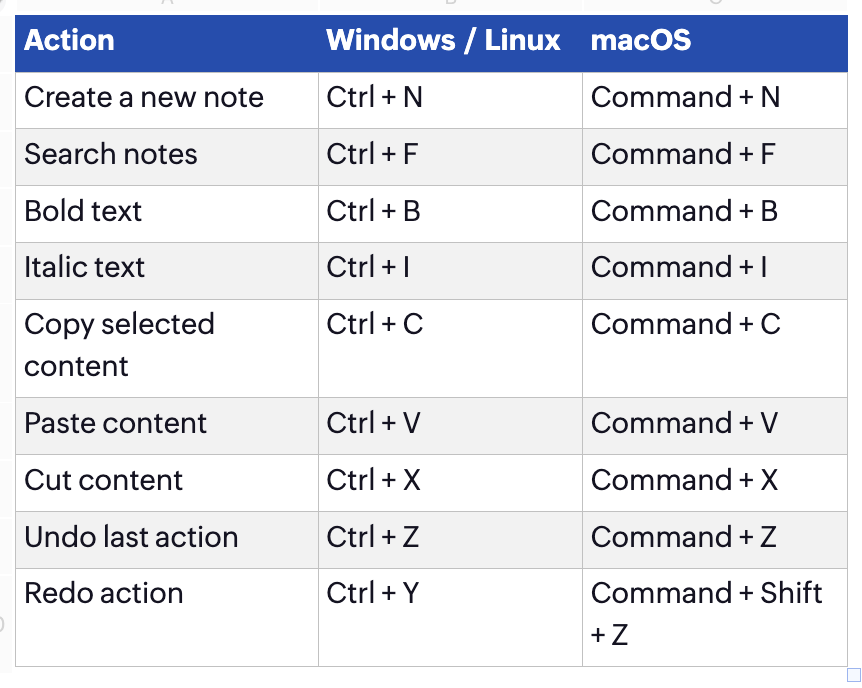
Note: On mobile (iOS and Android), most actions are accessible via the toolbar above the keyboard and long-press context menus.
2. Using Notebook AI:
Notebook AI is a built-in AI assistant that helps you create, summarise, and polish notes faster. It is available across all platforms.
Key capabilities:
- Summarise notes: Generate a concise summary of a long note with a single tap.
- Grammar and writing suggestions: Improve clarity, correct grammar, and refine the tone of your notes.
- Audio-to-text transcription: Record voice memos and have Notebook AI transcribe them automatically. Supports seven languages — English, Spanish, French, German, Italian, Dutch, and Russian.
- Smart search: Search notes using natural language — not just exact keywords.
- AI Mind Map: Turn a long note or prompt into a structured visual mind map across all platforms.
3. Best Practices for Note Organisation:
Keeping notes organised ensures that important information can be found quickly. Zoho Notebook offers several layers of organisation - notebooks, collections, and tags - which work best when used together.
- Use notebooks for major categories
- Create separate notebooks based on broad topics or areas of work.
Examples:
- Work
- Personal
- Study
- Projects
- Travel
This helps maintain a structure within your note library.
4. Use nested collections for sub-grouping:
Collections let you create a hierarchical structure within a notebook — organising notes into sub-groups without creating entirely separate notebooks.
Example structure:
Notebook: Projects
└ Collection: Project Alpha
You can share collections with teammates for collaborative projects.
5. Use tags for cross-referencing:
Tags allow you to group related notes across different notebooks.
Examples of useful tags:
- meeting
- invoice
- idea
- followup
- reference
Using tags alongside notebooks and collections improves searchability and categorisation.
6. Use clear and descriptive note titles:
Avoid vague titles like:
- Notes
- Info
- Draft
Instead, use titles such as:
- Marketing Meeting Summary | Jan 10
- Travel Checklist | Europe Trip
- Client Proposal Notes
Descriptive titles make searching and browsing much easier.
7. Separate long content into multiple notes:
If a note becomes extensive, divide it into smaller, focused notes.
Example structure:
Notebook: Project Alpha
└ Project Overview
└ Meeting Notes
└ Task List
└ Research References
This keeps notes readable and easier to maintain over time.
8. Use custom sorting to maintain your preferred order:
You can reorder notes, notebooks, and collections using simple drag and drop. Your custom order syncs instantly across all your devices. This is especially useful for pinning frequently used notebooks to the top of your list or ordering project notes chronologically.
9. Use Noteboards for project and task management:
Noteboards offer a Kanban-style view for your notes, letting you organise them into columns. This is ideal for tracking project stages, managing tasks with visual status columns, or planning content. Noteboards are available on macOS, and other platforms.
10. Use checklists for tasks:
Instead of writing tasks inside paragraphs, create a checklist note.
Benefits:
- Tasks can be marked as complete
- Progress becomes visible at a glance
- Lists remain structured and easy to update
11. Attach files directly to notes:
You can attach files inside a Text Card, keeping all related materials in one place. File Cards can also be shared with others, making it easier to collaborate on documents, reference files, or any supporting material alongside your notes.
12. Review and clean up notes periodically:
Over time, some notes may become outdated or redundant. A regular cleanup keeps your workspace organised and your search results relevant.
Suggested approach:
- Set a monthly or quarterly reminder to review your notebooks.
- You can mark notes that are no longer actively used as favorites instead of deleting them, so you can still access or search for them whenever needed.
- Delete duplicates and consolidate fragmented notes on the same topic.
- Update outdated information, especially in reference notes.
4. Multipane View and Quick Capture:
Work on multiple notes simultaneously with Multipane view:
The Multipane view lets you open and work on multiple notes at the same time without closing your current note. Notes are accessible via tabs and can also be opened in a new browser tab. This is particularly useful when cross-referencing meeting notes, comparing drafts, or building out a project. Multipane view is available on the web app and iPad.
Capture ideas quickly with Quick Note:
On macOS, the Notebook icon in the menu bar lets you create a Quick Note without opening the full app - ideal for capturing an idea or task mid-flow. On iOS, you can add a Notebook widget to the Lock Screen or Home Screen for one-tap access to a new note.
Clip web content with the Web Clipper:
The Notebook Web Clipper browser extension lets you save articles, selected text, full-page screenshots, and web content directly into a note. You can draft notes while clipping, clip multiple sections at once, and create checklists from clipped content. The extension is available in over 50 languages.
Visual & Design Tips:
Zoho Notebook is designed to make note-taking visually engaging. Using formatting, colours, and covers effectively can improve readability and navigation.
5. Creating Visually Appealing Notes:
Use headings and sections:
Divide long notes into sections with clear headings.
Example structure:
Meeting Notes
└ Agenda
└ Discussion Points
└ Action Items
└ Summary
This helps readers quickly locate specific information.
Keep notes visually simple:
Avoid excessive formatting or large blocks of text.
Best practices:
- Keep paragraphs short.
- Use lists where possible.
This improves readability across both mobile and desktop screens.
Using Covers and Colours Effectively:
Notebook covers and colours help you visually distinguish notebooks and categories at a glance.
- Suggested colour organisation
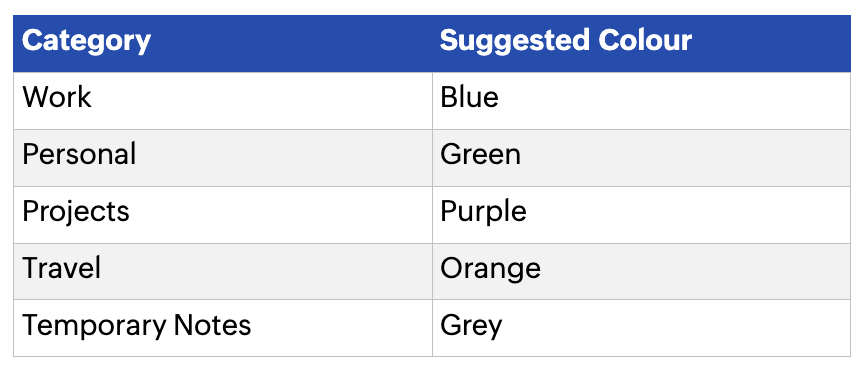
Using a consistent colour scheme helps identify notebooks quickly:
Use covers to highlight important notebooks. You can assign unique covers to notebooks to make them stand out.
Helpful uses:
- Highlight frequently used notebooks.
- Separate personal and work categories visually.
- Distinguish ongoing projects from archived ones.
Avoid excessive colour variation
Using too many colours may reduce clarity. A good approach is to:
- Limit colour usage to major categories.
- Use consistent colour rules across notebooks.
That's a Wrap!
By following the practices in this section, you can keep Zoho Notebook working efficiently for you - whether you are managing personal tasks, collaborating on projects, or capturing ideas on the go.
The combination of shortcuts, Notebook AI, thoughtful organisation with notebooks, collections, and tags, and consistent visual design ensures your notes remain easy to find, read, and maintain across all your devices.
Happy Note-taking :)
