Edit Organization Info
Editing organization information allows you to update key details about your organization, such as company name, URL, address, work location, time zone, zip/postal code, and contact information, to ensure accurate and up-to-date records.
Prerequisites
- Sign in to Zoho One with one of the following roles:
- Org Owner
- Org Admin
In the web application:
The steps to add location vary between the three User Interface versions supported in Zoho One. Select the UI version you use from the tabs below and proceed with the steps that follow.
One Experience UI
Spaces UI
Unified UI
One Experience UI
2. Click Organization from the left menu. Click Edit under Organization Info.
3. Modify your organization details using the pointers given below:
- Company Name: The name of your organization.
- Portal URL: The URL of your Zoho One portal. This will be unique to your organization, and you'll be notified if the URL you've entered isn't available.
- Primary Location: The primary work location or headquarters of your organization.
- Contact Information: Your organization's phone, mobile, fax, and website.
4. Click Update.
Spaces UI
1. Sign in to Zoho One, then click the Directory icon  on the top-right corner.
2. Click Organization in the left menu, then click Edit under Organization Info.
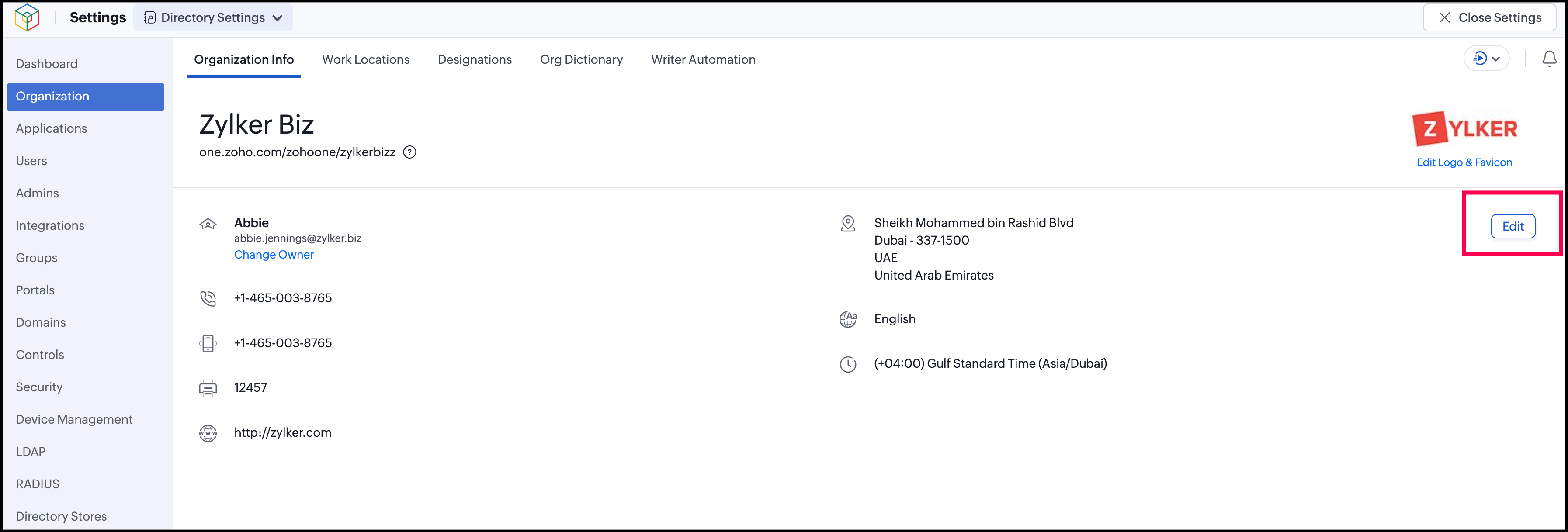
3. Modify your organization details using the pointers given below:
- Company Name: The name of your organization.
- Portal URL: The URL of your Zoho One portal. This will be unique to your organization, and you'll be notified if the URL you've entered isn't available.
- Primary Location: The primary work location or headquarters of your organization.
- Contact Information: Your organization's phone, mobile, fax, and website.
4. Click Update.
Unified UI
1. Sign in to Zoho One, then click Directory in the left menu.
2. Click Organization, then click Edit under Organization Info.
3. Modify your organization details using the pointers given below:
- Company Name: The name of your organization.
- Portal URL: The URL of your Zoho One portal. This will be unique to your organization, and you'll be notified if the URL you've entered isn't available.
- Primary Location: The primary work location or headquarters of your organization.
- Contact Information: Your organization's phone, mobile, fax, and website.
4. Click Update.