Identifying visitors during session recording | Help

Identifying the visitors in your session recordings

Session recordings in PageSense use cookies to identify individual visitors' sessions, and track their behavior on your website. This cookie generates a random name for each of the visitor session, which is a combination of an adjective and an animal name, for example, Magnificent Giraffe. However, if you want to identify a specific user or event from the list of recordings in your report page, you can add our custom Identifier API inside the PageSense tracking snippet code on your website as explained in the steps below. 
IdeaFor example, say you want to identify visitors coming to your site using their email address and later target them with relevant shopping offers/discount coupons to boost conversions on your business. In this case, you can pass the corresponding user ID or variable used to store the particular visitor information on your site into the Identifier API code (as explained below), to quickly show visitor sessions based on their email address. 
InfoIn PageSense, the cookie length for a session is set up for two hours. If a visitor interacts with your website multiple times within the two hours of their first interaction, then we combine all the interactions together, and show them as a single recording under a random username. However, if the same visitor comes to your website after two hours, then a new recording will be created under a different name.

To setup Identifier API in session recordings: 

1. Decide what type of visitors' data you want to identify in your session recordings and later send this list of data to your web developer to see if the values are available on your site.
Idea
For example, it could be anything that's relevant to your business need such as identifying customers based on their phone number in your recordings, or identifying and filtering visitor sessions based on their email address or first name which could help you directly contact or write to them about new product releases and attractive offers in the future.
2. Now, copy and paste the following Javascript Identifier API code inside your website's JS code:
window.pagesense = window.pagesense || [];
window.pagesense.push(['identifyUser', '<name>']);
Notes
Please make sure you call this API code after including PageSense tracking code snippet on your site.

3. Replace the <name> tag in the above script with the corresponding variable that you want to associate with the session. This can be any unique value that is used to identify a visitor based on their personal identification details on your site, such as email address, first name, phone number, etc. This user ID or variable will now be mapped with the respective user sessions on your website and be displayed in your recordings.
Alert
The Identifier API can be implemented with the help of your developer. No data will be passed to PageSense until you've added the required Identifier API code to your site. 
NotesPageSense expects a string as a parameter for the <name> tag, and it can only contain a single value at a time
IdeaLet's reconsider the example, where you want to identify visitors coming to your site with their email address and later target them with relevant shopping offers/discount coupons to boost revenue. In this case, you can enter the corresponding  <name> tag as 'email address' (just for example) in your Identifier API snippet above to quickly identify and view recordings with their email address instead of random names.
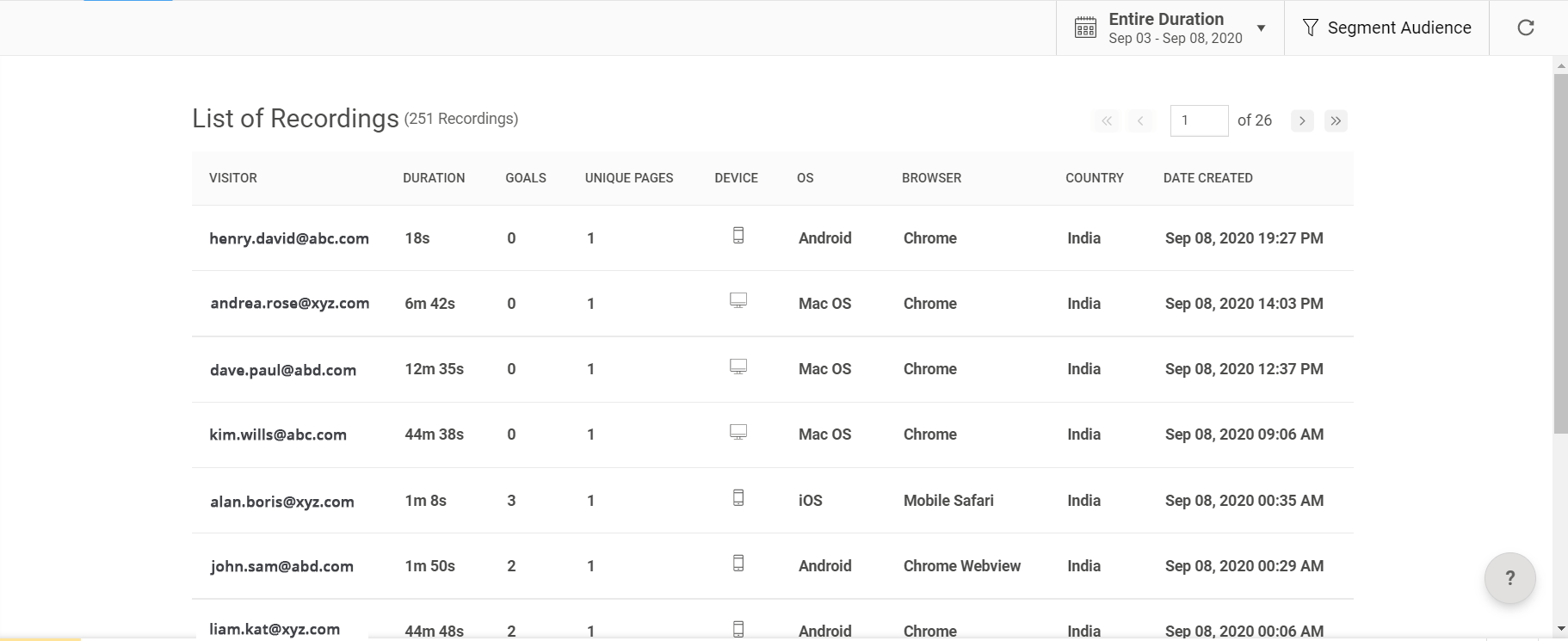
4. Once your developer has implemented the code necessary to send data to PageSense, you will start seeing the session appear along with the email address in your recordings list as shown in the figure below.
Info
Implementing the Identifier API code on your site will also replace the random visitor names displayed in your Pop-up experiment report.

If you want to add the Identifier API to the Zoho Commerce site builder, follow the below-mentioned steps:

1. Open your store where the Identifier API needs to be inserted. Navigate to Site Settings.


2. Under General, select Header & Footer code and add the below code:
<script>
    function getuserDetail(){
        $X.get({
            url: '/portaluser/getCurrentPortalUser',
            handler: function () {
                var response = JSON.parse(this.responseText);
                if(response.status_message === "success"){
                    if(response.current_user.user!== 'null'){
                        let userEmail = response.current_user.emailid;
                        window.pagesense = window.pagesense || [];
                        window.pagesense.push(['identifyUser',userEmail ]);
                    }
                }
            }
        })
    }
    window.addEventListener('load', getuserDetail);
</script>


3. Click on Save and Publish the site.


If you want to add the Identifier API to the Zoho Sites builder, follow the below-mentioned steps:

1.  Login to your Zoho Sites account. 
2. Open your Website > Site settings.
3. Under General, click on Header and Footer code to insert the code.


4. Paste the below Identifier API code in the Header region:
<script>
    function getuserDetail(){
        $X.get({
            url: '/portaluser/getCurrentPortalUser',
            handler: function () {
                var response = JSON.parse(this.responseText);
                if(response.status_message === "success"){
                    if(response.current_user.user!== 'null'){
                        let userEmail = response.current_user.emailid;
                        window.pagesense = window.pagesense || [];
                        window.pagesense.push(['identifyUser',userEmail ]);
                    }
                }
            }
        })
    }
    window.addEventListener('load', getuserDetail);
</script>

5.  Click Save and Publish.

If you want to add the Identifier API to the Zoho SalesIQ, follow the below-mentioned steps:

Copy and paste the following Javascript Identifier API code inside your website's JS code:
  1. $zoho.salesiq.ready=function()

  2. {

  3. $zoho.salesiq.visitor.chat(function(visitid,data)
  4. {
  5. window.pagesense = window.pagesense || [];
  6. window.pagesense.push(['identifyUser', data.email]);

  7. });

  8. }

  9. $zoho.salesiq.visitor.offlineMessage(function(visitid,data)
  10. {
  11. window.pagesense = window.pagesense || [];
  12. window.pagesense.push(['identifyUser', data.email]);
  13. });

Info
Alternatively, you can also refer to this document that explains how you can insert PageSense Identifier API via Google Tag Manager.

We hope this documentation is self-explanatory and helps you understand the process with ease. Please feel to reach out to us anytime by dropping a mail to support@zohopagesense.com, in-case you need more explanation or have any queries.

        Create. Review. Publish.

        Write, edit, collaborate on, and publish documents to different content management platforms.

        Get Started Now


          Access your files securely from anywhere

            Zoho CRM Training Programs

            Learn how to use the best tools for sales force automation and better customer engagement from Zoho's implementation specialists.

            Zoho CRM Training
              Redefine the way you work
              with Zoho Workplace

                Zoho DataPrep Personalized Demo

                If you'd like a personalized walk-through of our data preparation tool, please request a demo and we'll be happy to show you how to get the best out of Zoho DataPrep.

                Zoho CRM Training

                  Create, share, and deliver

                  beautiful slides from anywhere.

                  Get Started Now


                    Zoho Sign now offers specialized one-on-one training for both administrators and developers.

                    BOOK A SESSION


                                Quick LinksWorkflow AutomationData Collection
                                Web FormsEnterpriseOnline Data Collection Tool
                                Embeddable FormsBankingBegin Data Collection
                                Interactive FormsWorkplaceData Collection App
                                CRM FormsCustomer ServiceAccessible Forms
                                Digital FormsMarketingForms for Small Business
                                HTML FormsEducationForms for Enterprise
                                Contact FormsE-commerceForms for any business
                                Lead Generation FormsHealthcareForms for Startups
                                Wordpress FormsCustomer onboardingForms for Small Business
                                No Code FormsConstructionRSVP tool for holidays
                                Free FormsTravelFeatures for Order Forms
                                Prefill FormsNon-Profit

                                Intake FormsLegal
                                Mobile App
                                Form DesignerHR
                                Mobile Forms
                                Card FormsFoodOffline Forms
                                Assign FormsPhotographyMobile Forms Features
                                Translate FormsReal EstateKiosk in Mobile Forms
                                Electronic Forms
                                Drag & drop form builder

                                Notification Emails for FormsAlternativesSecurity & Compliance
                                Holiday FormsGoogle Forms alternative GDPR
                                Form to PDFJotform alternativeHIPAA Forms
                                Email FormsFormstack alternativeEncrypted Forms

                                Wufoo alternativeSecure Forms

                                TypeformWCAG

                                    All-in-one knowledge management and training platform for your employees and customers.

                                              Create. Review. Publish.

                                              Write, edit, collaborate on, and publish documents to different content management platforms.

                                              Get Started Now


                                                                You are currently viewing the help pages of Qntrl’s earlier version. Click here to view our latest version—Qntrl 3.0's help articles.


                                                                    Manage your brands on social media


                                                                      • Desk Community Learning Series


                                                                      • Digest


                                                                      • Functions


                                                                      • Meetups


                                                                      • Kbase


                                                                      • Resources


                                                                      • Glossary


                                                                      • Desk Marketplace


                                                                      • MVP Corner


                                                                      • Word of the Day


                                                                      • Ask the Experts


                                                                        Zoho Sheet Resources


                                                                            Zoho Forms Resources


                                                                              Secure your business
                                                                              communication with Zoho Mail


                                                                              Mail on the move with
                                                                              Zoho Mail mobile application

                                                                                Stay on top of your schedule
                                                                                at all times


                                                                                Carry your calendar with you
                                                                                Anytime, anywhere


                                                                                      Zoho Sign Resources

                                                                                        Sign, Paperless!

                                                                                        Sign and send business documents on the go!

                                                                                        Get Started Now


                                                                                                Zoho TeamInbox Resources


                                                                                                          Zoho DataPrep Demo

                                                                                                          Get a personalized demo or POC

                                                                                                          REGISTER NOW


                                                                                                            Design. Discuss. Deliver.

                                                                                                            Create visually engaging stories with Zoho Show.

                                                                                                            Get Started Now


                                                                                                                                • Related Articles

                                                                                                                                • Session Recording Reports

                                                                                                                                  Session Recording reports provide a detailed, session-level view of how visitors interact with your website. Each recording captures a complete user journey, from entry to exit including clicks, scrolls, navigation paths, and goal completions. Unlike ...
                                                                                                                                • Session Recording in Zoho PageSense

                                                                                                                                  &amp;amp;amp;amp;amp;lt;br&amp;amp;amp;amp;amp;gt; Session Recording in Zoho PageSense allows you to capture and replay real visitor sessions on your website. It helps you visually understand how users navigate through pages, interact with elements, ...
                                                                                                                                • Configure Audience for Session Recording

                                                                                                                                  &amp;amp;amp;lt;br&amp;amp;amp;gt; The Audience tab allows you to define which visitors should be included in your session recording experiment. Instead of recording all visitors, you can filter sessions to specific audience segments using predefined ...
                                                                                                                                • Identifying the visitors in your session recordings

                                                                                                                                  Zoho Commerce site builder If you want to add the Identifier API to the Zoho Commerce site builder, follow the below-mentioned steps: 1. Open your store where the Identifier API needs to be inserted. Navigate to Site Settings. 2. Under General, ...
                                                                                                                                • Frequently Asked Questions

                                                                                                                                  1. Can I tag or bookmark important sessions? Yes. Zoho PageSense allows you to add tags to session recordings for easier organization and analysis. Tags help categorize recordings based on visitor actions or behaviors such as cart abandonment, failed ...
                                                                                                                                  Wherever you are is as good as
                                                                                                                                  your workplace

                                                                                                                                    Resources

                                                                                                                                    Videos

                                                                                                                                    Watch comprehensive videos on features and other important topics that will help you master Zoho CRM.


                                                                                                                                    eBooks

                                                                                                                                    Download free eBooks and access a range of topics to get deeper insight on successfully using Zoho CRM.


                                                                                                                                    Webinars

                                                                                                                                    Sign up for our webinars and learn the Zoho CRM basics, from customization to sales force automation and more.


                                                                                                                                    CRM Tips

                                                                                                                                    Make the most of Zoho CRM with these useful tips.


                                                                                                                                      Zoho Show Resources