FTP Plugin | Attendance Method | Zoho People 5.0 | Administrator Guide |

FTP Plugin

What is FTP Plugin?

The File Transfer Protocol is a standard communication protocol used for the transfer of computer files from a server to a client on a computer network. FTP is built on a client–server model architecture using separate control and data connections between the client and the server.

Why is it useful?

In Zoho People, we help you transfer your files with attendance data in a secure way without having to install a service in the host's data server.

FTP Server Benefits:

  1. Offers a great level of security.
  2. FTP server gives the user a great level of control.
  3. Lets user to send big files at once.
  4. Resumption facility allows the transfer of files even after a break-in connection occurs.
  5. Security of transferring data without installing any service in host's server.
Info
Zoho People supports four types of plugins:
FTP - File Transfer Protocol

FTPS - File Transfer Over Explicit TSL/SSL

FTPS - File Transfer Over Implicit TSL/SSL

SFTP - SSH File Transfer Protocol

Here are some features of these plugins. You can select the type of plugin that best suits the needs of your organization.

FTP
FTPS
SFTP
FTP exchanges data using two separate channels - the command channel and data channel. 

In FTP, both channels are unencrypted.

Data sent over these channels is vulnerable to being intercepted and read.
FTPS adds a security layer to the FTP protocol.

In FTPS, data channel is encrypted. 

FTPS uses multiple port numbers. The first port for the command channel is used for authentication and passing commands. However, every time a file transfer request or directory listing request is made, another port number needs to be opened for the data channel.Therefore we will have to open a range of ports in your firewalls to allow for FTPS connections.

SFTP (SSH File Transfer Protocol) is a secure FTP protocol that sends files over secure shell (SSH), providing a high level of protection for file transfers. 

SFTP needs only a single port number for all SFTP communications, making it easy to secure. 

Configuring FTP Plugin

Only administrators and attendance settings administrators can configure this plugin.
Configuration Steps:

Follow the below steps to configure FTP plugin for your organization. 
1. Navigate to Settings > Attendance > Configuration  > FTP Plugin.


2. Click Configure
3. Under the FTP Details tab, enter the server type, server host name, port, username and password.


4. Under the File Details tab, enter the following details: file name format, file path, the type of sync you would like - either in time or based on days, date format in file, time format in file, check-in/ check-out format, row from which input is to be taken, input data's time zone, time zone in Zoho People, and effective date for the sync. Based on the check-in / check-out format you select, the sample format, as well as the data mapping fields, will vary.
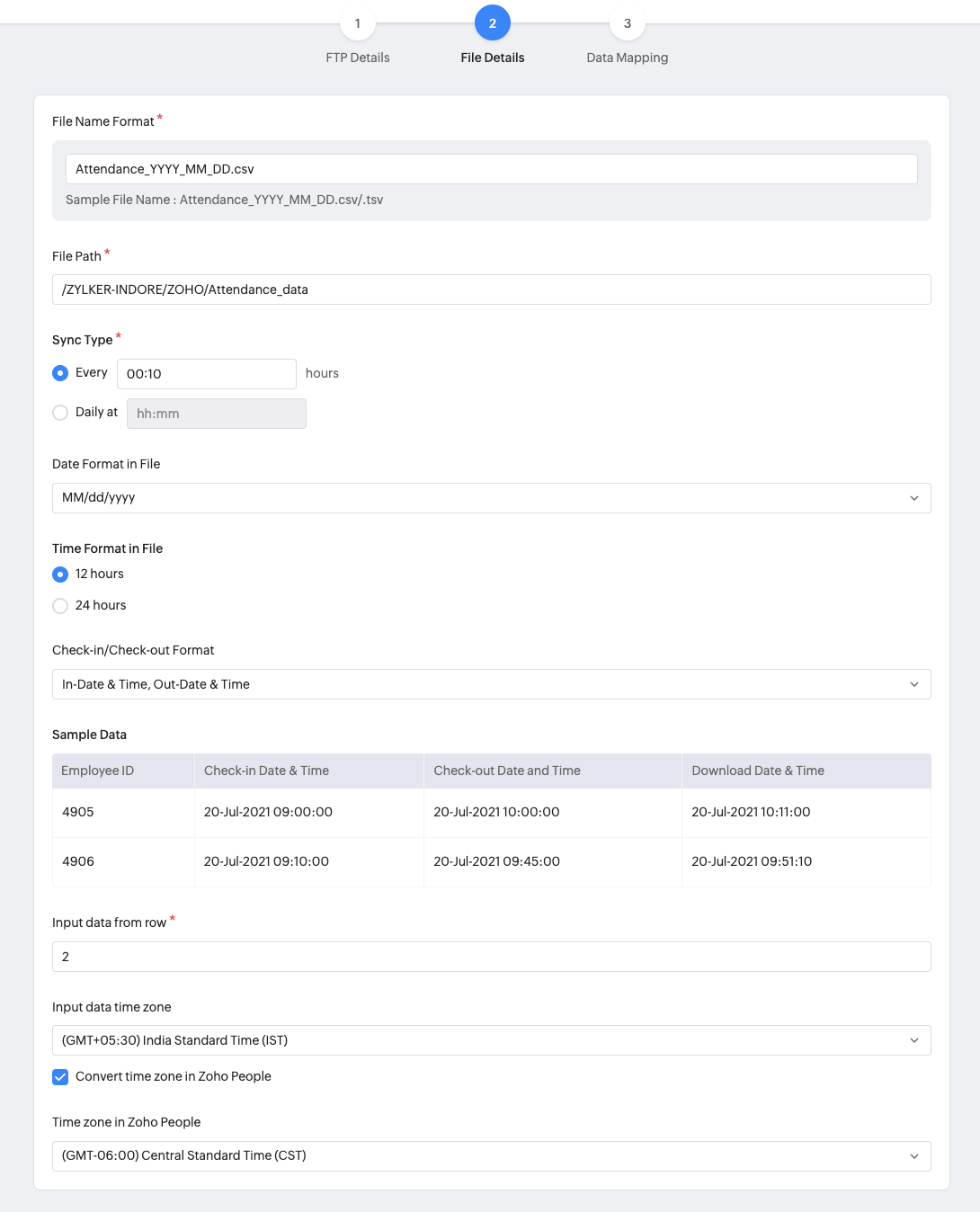


5. Under the Data Mapping page you will need to map the corresponding input fields in the file you are going to upload.


6. Click Save to complete the FTP Plugin configuration.

Tracking your FTP Plugin sync status

 After saving the configuration, click Sync Status to check the plugin's current status.


Sync Status will include a detailed log report:


Info
Details that you can gain from this log:
  1. View the time of action, sync from and to time. 
  2. View the total number of rows that are available and as well as data in these three states - synced, in progress and unsynced.
  3. View possible errors due to which sync did not happen
  4. Export and download the entire log or the error details of a specific log.
  5. View the last synced time and next sync scheduled time
  6. Use the period filter to view the sync status of other periods.

Editing FTP Plugin

All fields are editable except the effective date, which is a one-time field that will not appear when you edit the configuration.

Disabling FTP Plugin

FTP Plugin can be disabled by using the toggle icon beside FTP Plugin. By disabling it, there will not be any loss of data that was already synced. If you enable it again, the data sync will happen from the time the sync was last disabled. 

Notes
NOTE
Only one -server type plugin configuration at a time.
This feature is available from the professional plan onwards.
The FTP sync audit will be maintained up to a year.

      Create. Review. Publish.

      Write, edit, collaborate on, and publish documents to different content management platforms.

      Get Started Now


        Access your files securely from anywhere

          Zoho CRM Training Programs

          Learn how to use the best tools for sales force automation and better customer engagement from Zoho's implementation specialists.

          Zoho CRM Training
            Redefine the way you work
            with Zoho Workplace

              Zoho DataPrep Personalized Demo

              If you'd like a personalized walk-through of our data preparation tool, please request a demo and we'll be happy to show you how to get the best out of Zoho DataPrep.

              Zoho CRM Training

                Create, share, and deliver

                beautiful slides from anywhere.

                Get Started Now


                  Zoho Sign now offers specialized one-on-one training for both administrators and developers.

                  BOOK A SESSION


                              Quick LinksWorkflow AutomationData Collection
                              Web FormsEnterpriseOnline Data Collection Tool
                              Embeddable FormsBankingBegin Data Collection
                              Interactive FormsWorkplaceData Collection App
                              CRM FormsCustomer ServiceAccessible Forms
                              Digital FormsMarketingForms for Small Business
                              HTML FormsEducationForms for Enterprise
                              Contact FormsE-commerceForms for any business
                              Lead Generation FormsHealthcareForms for Startups
                              Wordpress FormsCustomer onboardingForms for Small Business
                              No Code FormsConstructionRSVP tool for holidays
                              Free FormsTravelFeatures for Order Forms
                              Prefill FormsNon-Profit

                              Intake FormsLegal
                              Mobile App
                              Form DesignerHR
                              Mobile Forms
                              Card FormsFoodOffline Forms
                              Assign FormsPhotographyMobile Forms Features
                              Translate FormsReal EstateKiosk in Mobile Forms
                              Electronic Forms
                              Drag & drop form builder

                              Notification Emails for FormsAlternativesSecurity & Compliance
                              Holiday FormsGoogle Forms alternative GDPR
                              Form to PDFJotform alternativeHIPAA Forms
                              Email FormsFormstack alternativeEncrypted Forms

                              Wufoo alternativeSecure Forms

                              TypeformWCAG

                                All-in-one knowledge management and training platform for your employees and customers.


                                            Create. Review. Publish.

                                            Write, edit, collaborate on, and publish documents to different content management platforms.

                                            Get Started Now


                                                              You are currently viewing the help pages of Qntrl’s earlier version. Click here to view our latest version—Qntrl 3.0's help articles.


                                                                  Manage your brands on social media


                                                                    • Desk Community Learning Series


                                                                    • Digest


                                                                    • Functions


                                                                    • Meetups


                                                                    • Kbase


                                                                    • Resources


                                                                    • Glossary


                                                                    • Desk Marketplace


                                                                    • MVP Corner


                                                                    • Word of the Day


                                                                    • Ask the Experts


                                                                      Zoho Sheet Resources


                                                                          Zoho Forms Resources


                                                                            Secure your business
                                                                            communication with Zoho Mail


                                                                            Mail on the move with
                                                                            Zoho Mail mobile application

                                                                              Stay on top of your schedule
                                                                              at all times


                                                                              Carry your calendar with you
                                                                              Anytime, anywhere


                                                                                    Zoho Sign Resources

                                                                                      Sign, Paperless!

                                                                                      Sign and send business documents on the go!

                                                                                      Get Started Now


                                                                                              Zoho TeamInbox Resources


                                                                                                        Zoho DataPrep Demo

                                                                                                        Get a personalized demo or POC

                                                                                                        REGISTER NOW


                                                                                                          Design. Discuss. Deliver.

                                                                                                          Create visually engaging stories with Zoho Show.

                                                                                                          Get Started Now


                                                                                                                              • Related Articles

                                                                                                                              • FTP Connection

                                                                                                                                Zoho People's File Transfer Protocol (FTP) connection allows you to securely transfer Zoho People system and custom form data to your servers for use as needed. Use the FTP Connection feature to set up a connection between Zoho People and your ...
                                                                                                                              • Attendance Service Settings - Overview

                                                                                                                                What is Attendance Service Settings? Attendance service settings are primarily about facilitating the management of employee attendance tracking in your organization. It involves enabling and setting up preferences for attendance tracking methods, ...
                                                                                                                              • Office In and Remote In

                                                                                                                                What is Office in and Remote in feature in Zoho People? This feature allows you to automatically categorize employee check-ins as Office-In or Remote-In based on the selected attendance sources. Configure the rules below to ensure accurate in-office ...
                                                                                                                              • Create Internal Widget or Web tab Packages Using Zet-CLI Tool - Zoho People

                                                                                                                                The Zoho Extension Toolkit (ZET) is a command-line interface designed to assist developers in creating application packages for Widgets or Web tab for integration with Zoho People. Prerequisites Download the nodejs source code from ...
                                                                                                                              • Data Center Migration

                                                                                                                                When you create a Zoho account (including a Zoho People account), all your information is stored in one of Zoho's data centers (DC). Zoho automatically assigns a DC based on your location, determined by your IP address. After your Zoho account is ...
                                                                                                                                Wherever you are is as good as
                                                                                                                                your workplace

                                                                                                                                  Resources

                                                                                                                                  Videos

                                                                                                                                  Watch comprehensive videos on features and other important topics that will help you master Zoho CRM.


                                                                                                                                  eBooks

                                                                                                                                  Download free eBooks and access a range of topics to get deeper insight on successfully using Zoho CRM.


                                                                                                                                  Webinars

                                                                                                                                  Sign up for our webinars and learn the Zoho CRM basics, from customization to sales force automation and more.


                                                                                                                                  CRM Tips

                                                                                                                                  Make the most of Zoho CRM with these useful tips.


                                                                                                                                    Zoho Show Resources