Data Masking in Form Fields
What is Data Masking feature?
Data masking conceals sensitive information by replacing it with asterisks. This feature is available across various fields and forms. The purpose is to protect sensitive information from unauthorized viewing by anyone peeping into another user's screen.
| Without masking | With masking |

Make sure the surroundings are safe when viewing sensitive information. Masked information can be viewed using the eye icon when hovering the pointer over masked data.
When viewing multiple records, administrators can also view masked data using this option.
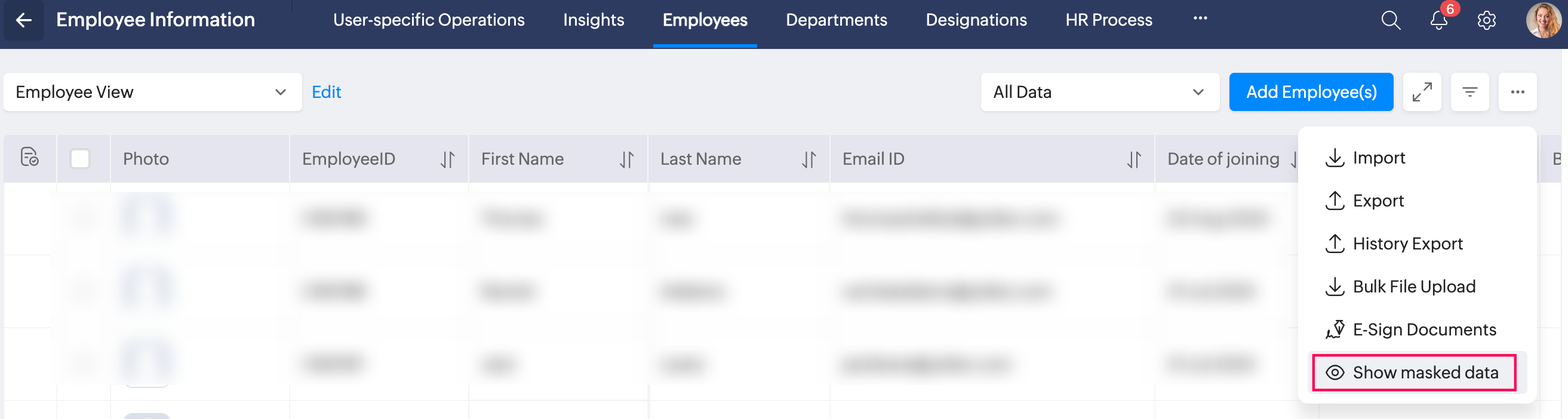

Any exported data will not be masked. Ensure that all data are handled within the safe confines of your organization to ensure data safety.
Fields with Data Masking enabled by default
- UAN
- PAN
- AADHAAR
- SSN

Data masking cannot be disabled for these fields.
Enabling Data Masking
Data masking can be enabled for single line fields and currency fields in Employee, Department and Designation forms. Follow the steps below to enable data masking:
- Navigate to Settings > select a service.
- Go to the Extend Service tab and choose a form.
- Select a single line or currency field and enable Mask option.
Masked data feature can be observed through the form view, related form view, records listing, import records, and Home > Profile pages.
Single line, currency fields within sytem provided custom forms can also be masked.
Single line, currency fields within sytem provided custom forms can also be masked.