Configuring plugin-manifest.json | Online Help | Zoho Projects

Configuring plugin-manifest.json

plugin-manifest.json

Here's a sample JSON descriptor file for your reference.
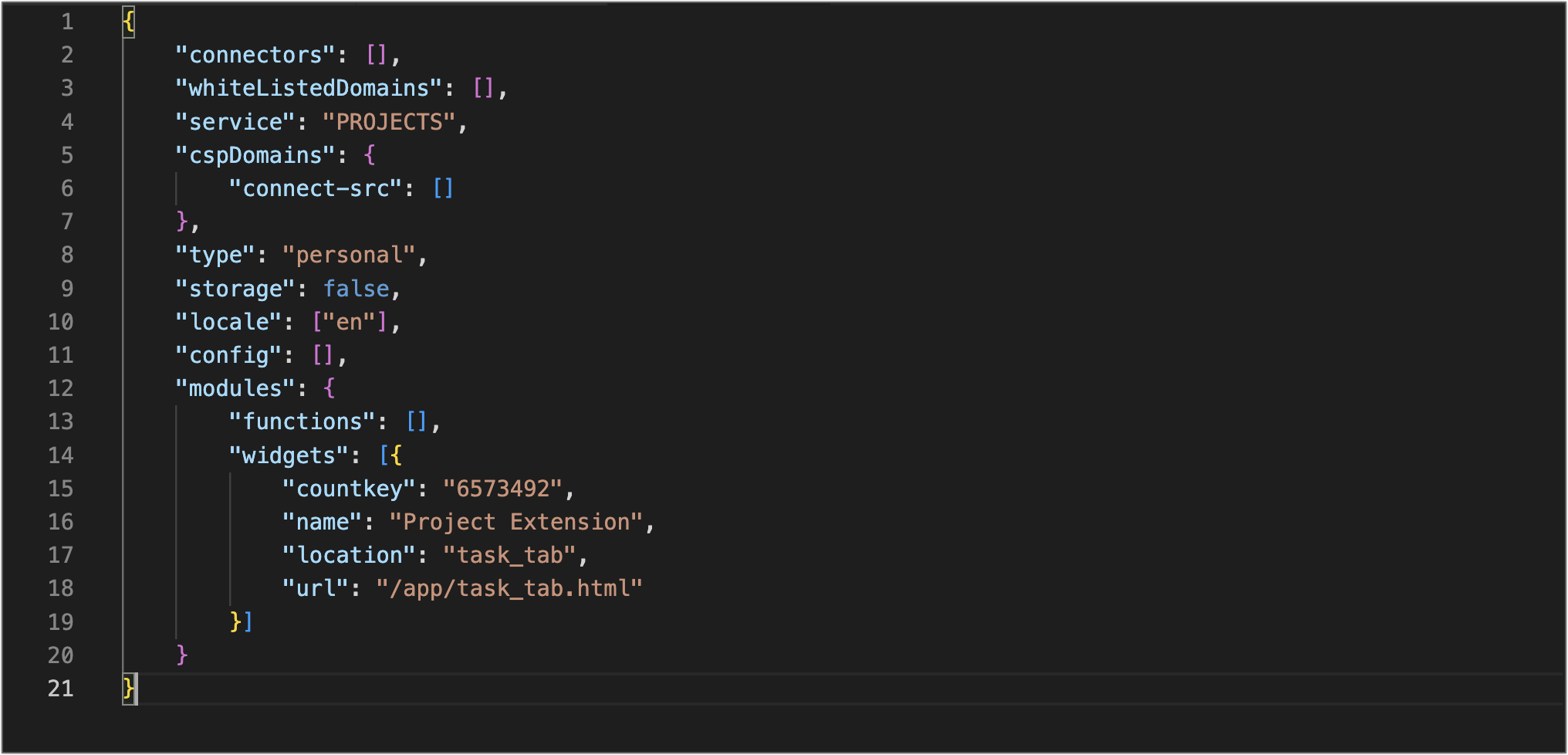


Now we'll see how to define the properties of this file.

type

Enter the type as "personal" to allow all the users to configure the extension and "org" to allow the admin to configure the extension. 

KeyTypeValue
typeString
Accepted Values :  personal, org

locale

The language the extension supports. Currently, we support the locale "en" (English) only.
KeyTypeValue
locale*JSONArrayen

service

Name of the Zoho product for which the extension is created. Here, it is "PROJECTS".
KeyTypeValue
service*StringPROJECTS

storage

If this setting is true, storage space will be allocated in the product for this extension. By default, the value will be false.
KeyTypeValue
storage*Boolean
  • true
  • false

whiteListedDomains

The domains specified in this array can be called from the extension. Calls to other domains, except the ones with which a connection is established, will not be handled from the extension. If your extension doesn't use any third-party service, then this array can be declared empty.
KeyTypeValue
whiteListedDomains*Array 

modules

Modules of the extension. We support widgets currently.
KeyTypeValue
modulesJSONObject

Example:

"widgets":[{
"location":"task_tab",
"name":"GDrive for Zoho Projects",
"url":"/app/index.html",
"countkey" : "extensionUniqueKey"
}]

widgets

This key holds an array of objects. Every object has three keys - 'location', 'name', and 'URL'.
KeyTypeObject Details
widgetsJSONArrayKeyTypeDescriptionValue
 locationStringPlaces where the extension has to be rendered in the product.
  • task_tab
  • issue_tab
  • milestone_tab
  • project_tab
  • app_settings
  • top_band
  • attachment_picker
  • taskdetails_rightpanel
  • issuedetails_rightpanel
  • blueprint_during
  • task_transition

Note: The location name must be unique.

nameStringThe name of the widget.Example: Checklist
urlURLThe relative path of the file that loads the widget./app/index.html
iconStringThe icon of the widget.Icon is mandatory for attachment picker.
 countkey
(available for task_tab, milestone_tab, and issue_tab)
StringUnique id to retrieve the widget count.extensionUniqueKey


An extension can have multiple widgets.
Note: extensionUniqueKey is used to store/update the extension data.

connectors

Like widgets, this key also holds an array of objects. A connector helps to integrate an extension with a third-party service. Authorization of such third-party services is usually handled by Zoho Projects.
KeyTypeObject Details
connectorsJSONArrayKeyTypeDescriptionValue
 connectionLinkNameStringLink name generated for the third-party service connection

The value of the connectionLinkName param generated in the JSON tab of the connection summary.

Note: The connection name must be unique.

connectionNameStringName of the connectionThe value of the connectionName param generated in the JSON tab of the connection summary.
serviceNameStringName of the third-party serviceThe value of the serviceName param generated in the JSON tab of the connection summary.
userAccessBooleanThis parameter decides whether the extension has to be authorized by each user individually or it has to be authorized only by the admin.
  • true
  • false
 isUserDefinedServiceBooleanIs the connection established with a custom service?
  • true
  • false
 ScopeJSONArrayThe access privilege set for the users/admins.Example: ["https://www.googleapis.com/auth/drive.readonly"]

An extension can be connected to a maximum of 5 third-party services at once.

config

This key can be used when you have to get more inputs from the user to operate the extension. Say, you need the user's domain name of a third-party service for your extension to function. To fetch it, you can use this key to get input from the user accordingly. 
KeyTypeObject Details
configJSONArrayKeyTypeDescriptionValue
 name*StringName of the parameter. The name should be unique.
type*StringThe data type of the parameter
  • 'text'
  • 'password'
  • 'checkbox'
  • 'url'
  • 'number'
  • 'multiline'
  • 'selectbox'
  • 'hidden'
defaultStringThe default value of the parameterNote: This parameter is optional.
optionsJSON arrayOptions are mandatory if 'select box' is chosen as the type.Example ["New feature", "Enhancement"]
is_secure*BooleanSetting this to "true" prevents the developer from accessing this configuration from the extension.
  • true
  • false
is_mandatoryBooleanIs the configuration mandatory?
  • true
  • false
descriptionStringA brief description of the configurationNote: This parameter is optional.


        Create. Review. Publish.

        Write, edit, collaborate on, and publish documents to different content management platforms.

        Get Started Now


          Access your files securely from anywhere

            Zoho CRM Training Programs

            Learn how to use the best tools for sales force automation and better customer engagement from Zoho's implementation specialists.

            Zoho CRM Training
              Redefine the way you work
              with Zoho Workplace

                Zoho DataPrep Personalized Demo

                If you'd like a personalized walk-through of our data preparation tool, please request a demo and we'll be happy to show you how to get the best out of Zoho DataPrep.

                Zoho CRM Training

                  Create, share, and deliver

                  beautiful slides from anywhere.

                  Get Started Now


                    Zoho Sign now offers specialized one-on-one training for both administrators and developers.

                    BOOK A SESSION


                                Quick LinksWorkflow AutomationData Collection
                                Web FormsEnterpriseOnline Data Collection Tool
                                Embeddable FormsBankingBegin Data Collection
                                Interactive FormsWorkplaceData Collection App
                                CRM FormsCustomer ServiceAccessible Forms
                                Digital FormsMarketingForms for Small Business
                                HTML FormsEducationForms for Enterprise
                                Contact FormsE-commerceForms for any business
                                Lead Generation FormsHealthcareForms for Startups
                                Wordpress FormsCustomer onboardingForms for Small Business
                                No Code FormsConstructionRSVP tool for holidays
                                Free FormsTravelFeatures for Order Forms
                                Prefill FormsNon-Profit

                                Intake FormsLegal
                                Mobile App
                                Form DesignerHR
                                Mobile Forms
                                Card FormsFoodOffline Forms
                                Assign FormsPhotographyMobile Forms Features
                                Translate FormsReal EstateKiosk in Mobile Forms
                                Electronic Forms
                                Drag & drop form builder

                                Notification Emails for FormsAlternativesSecurity & Compliance
                                Holiday FormsGoogle Forms alternative GDPR
                                Form to PDFJotform alternativeHIPAA Forms
                                Email FormsFormstack alternativeEncrypted Forms

                                Wufoo alternativeSecure Forms

                                TypeformWCAG


                                      All-in-one knowledge management and training platform for your employees and customers.

                                                Create. Review. Publish.

                                                Write, edit, collaborate on, and publish documents to different content management platforms.

                                                Get Started Now


                                                                  You are currently viewing the help pages of Qntrl’s earlier version. Click here to view our latest version—Qntrl 3.0's help articles.


                                                                      Manage your brands on social media


                                                                        • Desk Community Learning Series


                                                                        • Digest


                                                                        • Functions


                                                                        • Meetups


                                                                        • Kbase


                                                                        • Resources


                                                                        • Glossary


                                                                        • Desk Marketplace


                                                                        • MVP Corner


                                                                        • Word of the Day


                                                                        • Ask the Experts


                                                                          Zoho Sheet Resources


                                                                              Zoho Forms Resources


                                                                                Secure your business
                                                                                communication with Zoho Mail


                                                                                Mail on the move with
                                                                                Zoho Mail mobile application

                                                                                  Stay on top of your schedule
                                                                                  at all times


                                                                                  Carry your calendar with you
                                                                                  Anytime, anywhere


                                                                                        Zoho Sign Resources

                                                                                          Sign, Paperless!

                                                                                          Sign and send business documents on the go!

                                                                                          Get Started Now


                                                                                                  Zoho TeamInbox Resources


                                                                                                            Zoho DataPrep Demo

                                                                                                            Get a personalized demo or POC

                                                                                                            REGISTER NOW


                                                                                                              Design. Discuss. Deliver.

                                                                                                              Create visually engaging stories with Zoho Show.

                                                                                                              Get Started Now


                                                                                                                                  • Related Articles

                                                                                                                                  • Configuring Connectors

                                                                                                                                    Establish a connection for an available third-party service If your extension uses a third-party service, you need to configure a connector to establish a connection with the third-party service. You can connect to multiple third-party services at ...
                                                                                                                                  • Widget Locations

                                                                                                                                    List of widget locations in Zoho Projects Location An extension's widget can be rendered in multiple locations inside the product. This key (location) defines where the widgets should be rendered. Zoho Projects provides a list of widget locations. ...
                                                                                                                                  • Import from XLS/CSV/JSON/MPP

                                                                                                                                    You can now import MPP/ MPX/ XLS/ JSON/ CSV files into Zoho Projects and start collaborating. Users can import 5000 tasks at a time. Login to Zoho Projects with Administrator privileges. Click in the upper-right corner of the top navigation band. ...
                                                                                                                                  • Export Tasks to Cloud Widget

                                                                                                                                    Export Tasks to the Cloud Portal users can export tasks in XLS or CSV files and to the cloud. Users can select the specific task view (default or custom) and also choose the columns they want to export. For example, you can export your tasks to a ...
                                                                                                                                  • WhatsApp Notification for Phases

                                                                                                                                    Create a WhatsApp Notification WhatsApp notifications can be created directly or while configuring a workflow rule. Ensure the WhatsApp number is set as the primary mobile number in Zoho Accounts and is verified on the Personal Details page in ...
                                                                                                                                    Wherever you are is as good as
                                                                                                                                    your workplace

                                                                                                                                      Resources

                                                                                                                                      Videos

                                                                                                                                      Watch comprehensive videos on features and other important topics that will help you master Zoho CRM.


                                                                                                                                      eBooks

                                                                                                                                      Download free eBooks and access a range of topics to get deeper insight on successfully using Zoho CRM.


                                                                                                                                      Webinars

                                                                                                                                      Sign up for our webinars and learn the Zoho CRM basics, from customization to sales force automation and more.


                                                                                                                                      CRM Tips

                                                                                                                                      Make the most of Zoho CRM with these useful tips.


                                                                                                                                        Zoho Show Resources