What is task dependency and what is it used for?
Some tasks need to be completed in a particular order. When the approach to a certain task depends on the result of another, dependency helps associate them together and determine an order to work. Projects' end-to-end Gantt visualization provides a bird's eye view of your tasks, helping you track them easily. Using the Task Gantt chart and the Milestone Gantt chart, you can effortlessly establish dependencies between tasks.

Feature Availability:
- Dependency between tasks of the same project: Premium, Enterprise, & Ultimate plans
- Dependency between tasks across projects: Enterprise & Ultimate plans

Types of Dependency
Zoho Projects supports four types of dependency.
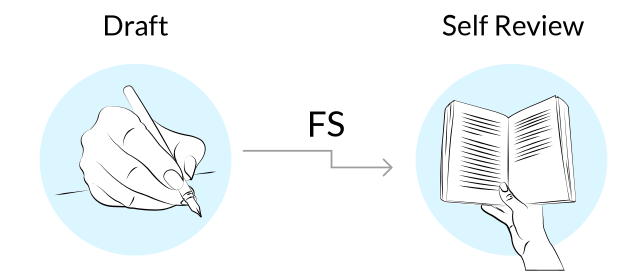
- Finish-To-Start (FS) : The successor or dependent task can’t begin until the predecessor or parent task is finished. For instance, in a journal publishing process, self-review of a journal can’t begin until the draft is completed by the writer.
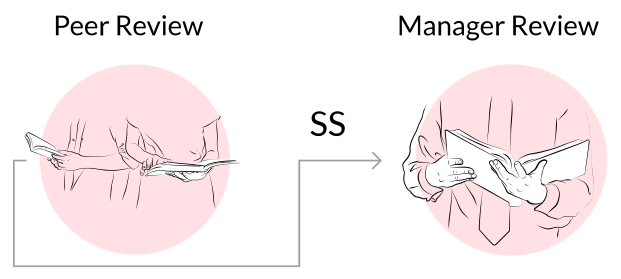
- Start-To-Start (SS): The successor or dependent task can’t begin until after the predecessor or parent task has started. For instance, as the peer review of the journal starts, the manager review can also be initiated.
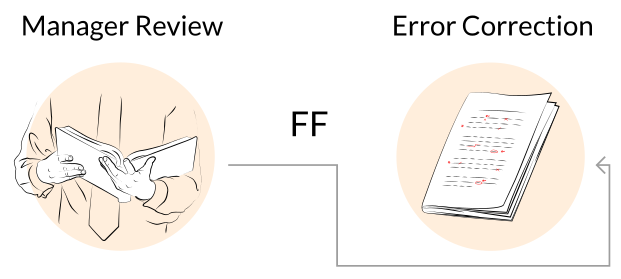
- Finish-To-Finish (FF) : A task (successor/predecessor) can't be completed until the other task is finished.For instance, error correction can't be completed until the manager review is finished.
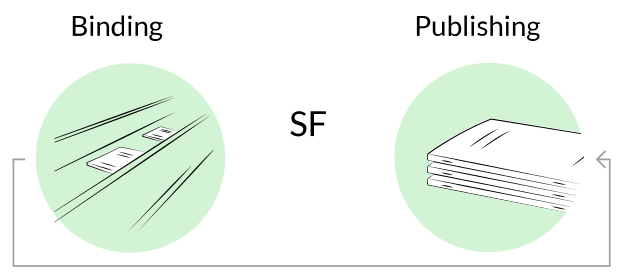
- Start-To-Finish (SF) : The successor or dependent task can be completed when the predecessor or parent task is about to begin. For instance, publishing the journal can’t be completed unless the journal binding starts.
Types of Dependency Link
Zoho Projects gives users the option to set a default task dependency link type: Hard link or Soft link. When a dependency is created the default link type is automatically sets for the new dependency created. This link can be modified for individual tasks at the task level.
- Hard Link: Successor task dates and completion are strictly enforced by the predecessor. Any delay or incomplete status in the predecessor automatically shifts the successor task schedule.
- Soft Link: Successor tasks retain a dependency on the predecessor but are not forced to shift. Changes in the predecessor do not automatically affect successor task dates or completion.

Use case:
Software Development project: Backend API completion task can be hard linked to Frontend integration. Whereas the UI design task can be softlinked to Feature Documentation task.
Aerospace project: Engine installation task can be hard linked to Flight testing task. But a Cabin customisation can be Soft linked to Customer Approval.
Hard link prevents invalid execution order and is for physically dependent activities. Soft link improves agility and is applicable for partially independent activities.
More Reads