Installing Agent

Installing Agent

In a nutshell
The local agent is a lightweight application that connects your local machine to QEngine's cloud infrastructure, enabling you to run automated test cases on your own devices. This page covers the system requirements and installation steps for installing agents on Mac, Windows, and Linux.

1. Download and Install Agent Application

The agent allows you to access your machines or devices remotely, making it easier to debug. Learn more about Agents
To run test cases on local machines, the first step is to download and install the agent.
Notes
Note: The agent is supported for Mac, Windows, and Linux operating systems.

1.1 System Requirements 

Hardware

Minimum

RAM

4 GB

Processor

2 CPU cores

1.2 Installation of Agent

To setup the agent for your machine, follow these steps:
  1.  Navigate to Setup > Test Execution > Agents to download the installable for your machine.


  2. or

    From Projects, navigate to Settings > Agents for the same.
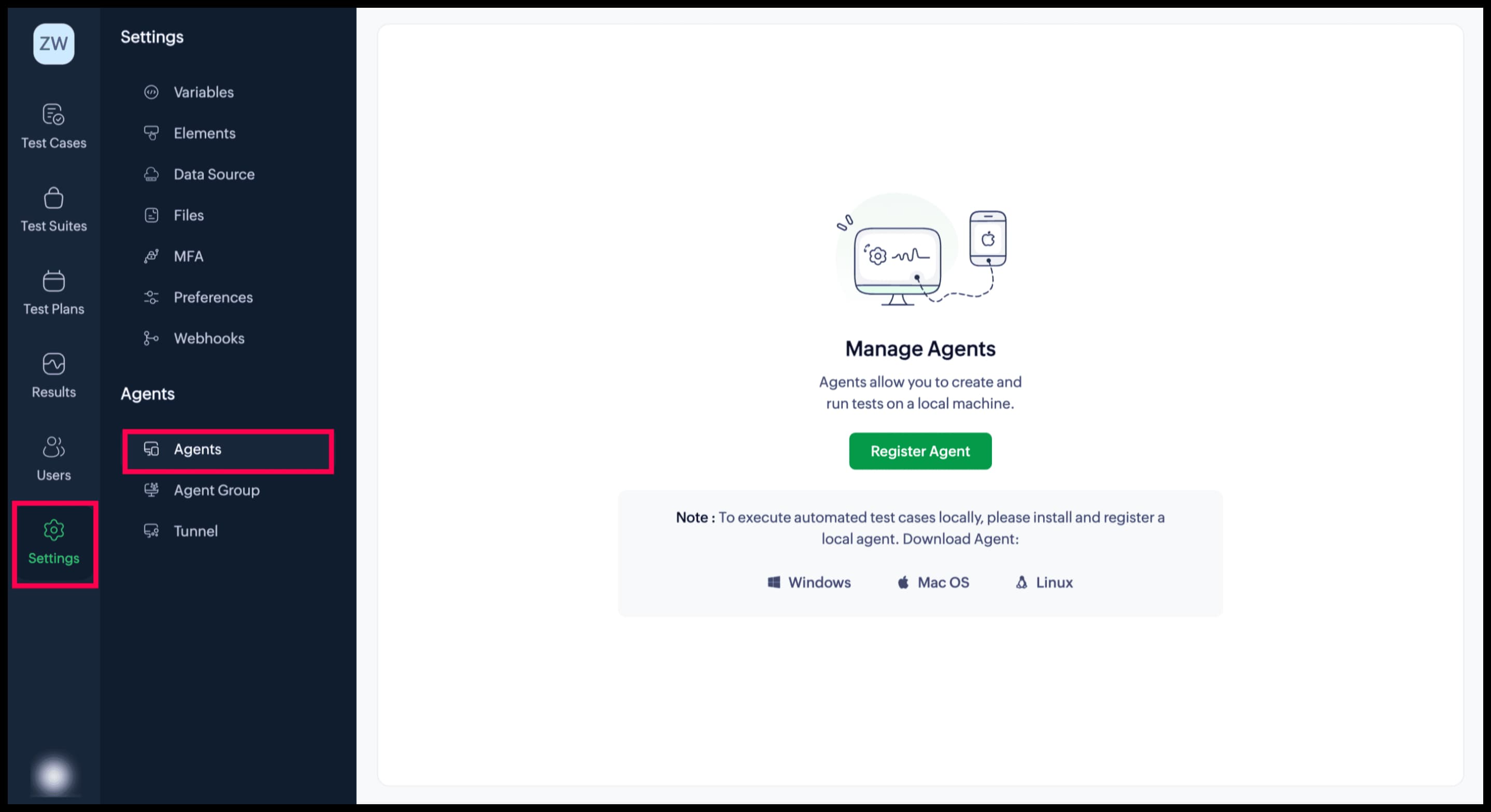


  3. Select and download the file for the required OS.

1.2.1  Install Agent for macOS:  

  1. After download, double-click the file to start the installation process.
  2. In the popup that appears, drag and drop the agent application to the Applications folder.
  3. Run the agent by clicking on the installed application. If the agent is successfully running, you should see the Zoho QEngine () icon in the system tray.
  4. Click OK. Navigate to System Settings > Privacy & Security and scroll down to the Security section. Select the App Store and identified developers option. Give permission to your system to make the changes.
  5. Upon clicking the icon (), the dropdown allows you to perform various actions.

    Restart: To terminate its current state and then initiate it again from the beginning
    Stop: To put a halt on its current state and disconnect from Zoho QEngine
    Register Agent: To register the agent with your desired Zoho QEngine project. <Learn more>.
    About Agent: To display the configuration details of your agent page
    Quit: To exit and close the agent application

1.2.2 Install Agent for Windows: 

  1. To start the installation, double-click the downloaded installable.
  2. Click Next in the InstallShield Wizard for Zoho QEngine.
  3. Read the License Agreement, then accept the terms and conditions.
  4. Set the Destination Folder, then click Next.
  5. Once the installation is complete, click Finish.
  6. If the agent is successfully running, you should see the Zoho QEngine () icon in the system tray.

1.2.3  Install Agent for Linux:

  1. Download the Linux Installation file (.bin) file

  2. Open terminal and navigate to the file downloaded path

  3. Change the bin file to executable mode, using the following command:
    chmod +x ZohoQEngine-Agent-64bit-<version>.bin

  4. To make the file executable, run it as follows:
    ./ZohoQEngine-Agent-64bit-<version>.bin

  5. After executing the bin file, the installer will be open. Follow the steps in the InstallationShield Wizard and complete the installation.
Upon successful installation, the agent will be started automatically.

Steps for Uninstalling Linux Agent:
  1. Navigate to the folder where the Zoho QEngine Agent is installed using the terminal.

  2. Execute the command below:
    ./Uninstall\ ZohoQEngine

  3. Follow the steps in the installer and complete the uninstallation.
Steps to update to the Latest Version:
  1. Download the .bin file from qengine.zoho.com

  2. Open the terminal and navigate to the path where the file is downloaded.

  3. Change the bin file to executable mode using the following command:
    chmod +x ZohoQEngine-Agent-64bit-<version>.bin

  4. To start the installation, run the following command:
    ./ZohoQEngine-Agent-64bit-<version>.bin

  5. After executing the bin file, InstallationShield will open.
    1. If the user tries to update the agent while the older instance is already running, the Prerequisite Window will pop up. Clicking on Yes will remove the older version of agent and the new version will be installed.
    2. If the user tries to update the agent on the existing agent's path, the confirmation window pops up. Clicking on Yes will remove the older version of the agent and new version will be installed.
Upon successful installation, the agent will be started automatically.

Notes
Note: 
  1. Agent will be only be started automatically at the time of installation. For manual start, navigate to the /home/<user-name>/Desktop/ZohoQEngine folder in the terminal and run the command below:
    ./StartServer

  2. For stopping the agent, navigate to the /home/<user-name>/Desktop/ZohoQEngine folder using the terminal and run the command below:
    ./StopServer

 2. Related Links 

  1. Agents


        Create. Review. Publish.

        Write, edit, collaborate on, and publish documents to different content management platforms.

        Get Started Now


          Access your files securely from anywhere

            Zoho CRM Training Programs

            Learn how to use the best tools for sales force automation and better customer engagement from Zoho's implementation specialists.

            Zoho CRM Training
              Redefine the way you work
              with Zoho Workplace

                Zoho DataPrep Personalized Demo

                If you'd like a personalized walk-through of our data preparation tool, please request a demo and we'll be happy to show you how to get the best out of Zoho DataPrep.

                Zoho CRM Training

                  Create, share, and deliver

                  beautiful slides from anywhere.

                  Get Started Now


                    Zoho Sign now offers specialized one-on-one training for both administrators and developers.

                    BOOK A SESSION


                                Quick LinksWorkflow AutomationData Collection
                                Web FormsEnterpriseOnline Data Collection Tool
                                Embeddable FormsBankingBegin Data Collection
                                Interactive FormsWorkplaceData Collection App
                                CRM FormsCustomer ServiceAccessible Forms
                                Digital FormsMarketingForms for Small Business
                                HTML FormsEducationForms for Enterprise
                                Contact FormsE-commerceForms for any business
                                Lead Generation FormsHealthcareForms for Startups
                                Wordpress FormsCustomer onboardingForms for Small Business
                                No Code FormsConstructionRSVP tool for holidays
                                Free FormsTravelFeatures for Order Forms
                                Prefill FormsNon-Profit

                                Intake FormsLegal
                                Mobile App
                                Form DesignerHR
                                Mobile Forms
                                Card FormsFoodOffline Forms
                                Assign FormsPhotographyMobile Forms Features
                                Translate FormsReal EstateKiosk in Mobile Forms
                                Electronic Forms
                                Drag & drop form builder

                                Notification Emails for FormsAlternativesSecurity & Compliance
                                Holiday FormsGoogle Forms alternative GDPR
                                Form to PDFJotform alternativeHIPAA Forms
                                Email FormsFormstack alternativeEncrypted Forms

                                Wufoo alternativeSecure Forms

                                TypeformWCAG


                                      All-in-one knowledge management and training platform for your employees and customers.

                                                Create. Review. Publish.

                                                Write, edit, collaborate on, and publish documents to different content management platforms.

                                                Get Started Now


                                                                  You are currently viewing the help pages of Qntrl’s earlier version. Click here to view our latest version—Qntrl 3.0's help articles.


                                                                      Manage your brands on social media


                                                                        • Desk Community Learning Series


                                                                        • Digest


                                                                        • Functions


                                                                        • Meetups


                                                                        • Kbase


                                                                        • Resources


                                                                        • Glossary


                                                                        • Desk Marketplace


                                                                        • MVP Corner


                                                                        • Word of the Day


                                                                        • Ask the Experts


                                                                          Zoho Sheet Resources


                                                                              Zoho Forms Resources


                                                                                Secure your business
                                                                                communication with Zoho Mail


                                                                                Mail on the move with
                                                                                Zoho Mail mobile application

                                                                                  Stay on top of your schedule
                                                                                  at all times


                                                                                  Carry your calendar with you
                                                                                  Anytime, anywhere


                                                                                        Zoho Sign Resources

                                                                                          Sign, Paperless!

                                                                                          Sign and send business documents on the go!

                                                                                          Get Started Now


                                                                                                  Zoho TeamInbox Resources


                                                                                                            Zoho DataPrep Demo

                                                                                                            Get a personalized demo or POC

                                                                                                            REGISTER NOW


                                                                                                              Design. Discuss. Deliver.

                                                                                                              Create visually engaging stories with Zoho Show.

                                                                                                              Get Started Now


                                                                                                                                  • Related Articles

                                                                                                                                  • Agent groups

                                                                                                                                    In a nutshell Zoho QEngine streamlines large-scale test execution through intelligent agent grouping. By clustering agents based on testing needs and managing them via a central hub, it enables seamless parallel execution. Availability Super admins, ...
                                                                                                                                  • Agent

                                                                                                                                    In a nutshell Agents are software applications you install on your local machine and register with QEngine for test execution. They enable web, mobile, and API testing by giving you access to locally installed browsers, real or virtual devices, and ...
                                                                                                                                  • Installing Tunnel

                                                                                                                                    In a nutshell The tunnel application connects your local network to QEngine's cloud infrastructure, allowing cloud-based browsers to access privately or locally hosted web applications during test execution. This page covers system requirements and ...
                                                                                                                                  • Creating mobile test cases using recorder

                                                                                                                                    In a nutshell Zoho QEngine's recorder captures your physical interactions within a mobile application and converts them into automation test scripts automatically, without requiring you to write scripts manually. It is accessed from the test case ...
                                                                                                                                  • Introduction to Zoho QEngine

                                                                                                                                    In a nutshell Zoho QEngine is a unified test automation platform for your entire testing lifecycle. From test creation and management to execution and reporting, everything lives in one workspace. It supports cross-platform testing across web, ...
                                                                                                                                    Wherever you are is as good as
                                                                                                                                    your workplace

                                                                                                                                      Resources

                                                                                                                                      Videos

                                                                                                                                      Watch comprehensive videos on features and other important topics that will help you master Zoho CRM.


                                                                                                                                      eBooks

                                                                                                                                      Download free eBooks and access a range of topics to get deeper insight on successfully using Zoho CRM.


                                                                                                                                      Webinars

                                                                                                                                      Sign up for our webinars and learn the Zoho CRM basics, from customization to sales force automation and more.


                                                                                                                                      CRM Tips

                                                                                                                                      Make the most of Zoho CRM with these useful tips.


                                                                                                                                        Zoho Show Resources