Attaching from Zoho Workdrive
Zoho Recruit now makes it possible to attach files from Zoho Workdrive. With this feature, you can avoid the hassle of downloading files. You can share Spreadsheets, Presentations, and Documents and they can be collaborated in real time. You can share business information easily with instant access to files.
Benefits
- Save time by sharing documents easily.
- Share and manage all documents, spreadsheets, and presentations within the marketing, sales or support teams.
- Have a single, final version of all documents that are shared.

Availability
Profile Permission Required: Users with permission to Attachments can access this feature.
Attach Files from Zoho Workdrive
To attach files from Zoho Workdrive
- Click the [Module] tab.
- Select a record to which you want to attach documents.
- In the [Module] Details page, under Attachments, click the Zoho Docs link.
- In the Attach from Zoho Docs page, select the required document(s), spreadsheet(s) or presentation(s).
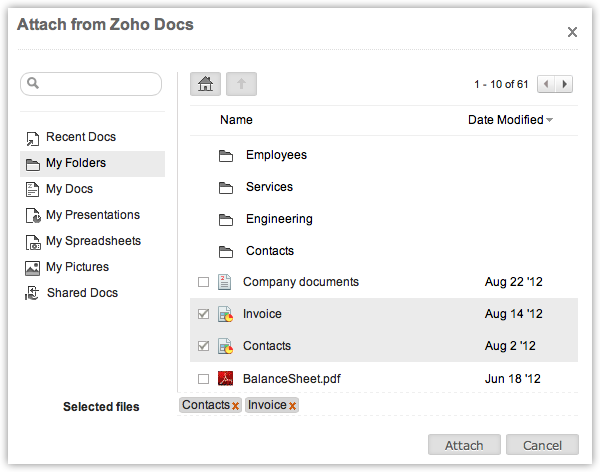
- Click Attach.
The file will be available in the Attachments section.

Note
- The Attachments section is available in all modules except Dashboards, Reports, and Forecasts.
- You can attach a maximum of 5 files (at a time).
- The total size of all attached files should not exceed 20 MB.