Video Interviews: FAQs & Errors
1. Is Zoho Meeting integrated with Zoho Recruit for video interviews?
Currently, Zoho Meeting cannot be directly used within Zoho Recruit for video interviews. Video interviews in Zoho Recruit operate on our platform in a credit-based structure.
2. What are video interview credits?
Video interview credits allow you to schedule and conduct live video interviews or send one-way video interview assessments to candidates
3. How does the video interview credit work?
By default, you receive one free video interview credit for one active job with your subscription. This credit enables you to schedule any number of interviews for the same active job opening. The credit is consumed when the interview is scheduled, regardless of whether it is conducted or cancelled. However, to conduct video interviews for multiple job openings simultaneously, you must purchase additional video credits.
4. Where can I find the available video interview credits?
When scheduling a video interview, you will find the Video Interview Credits information displayed as shown below:
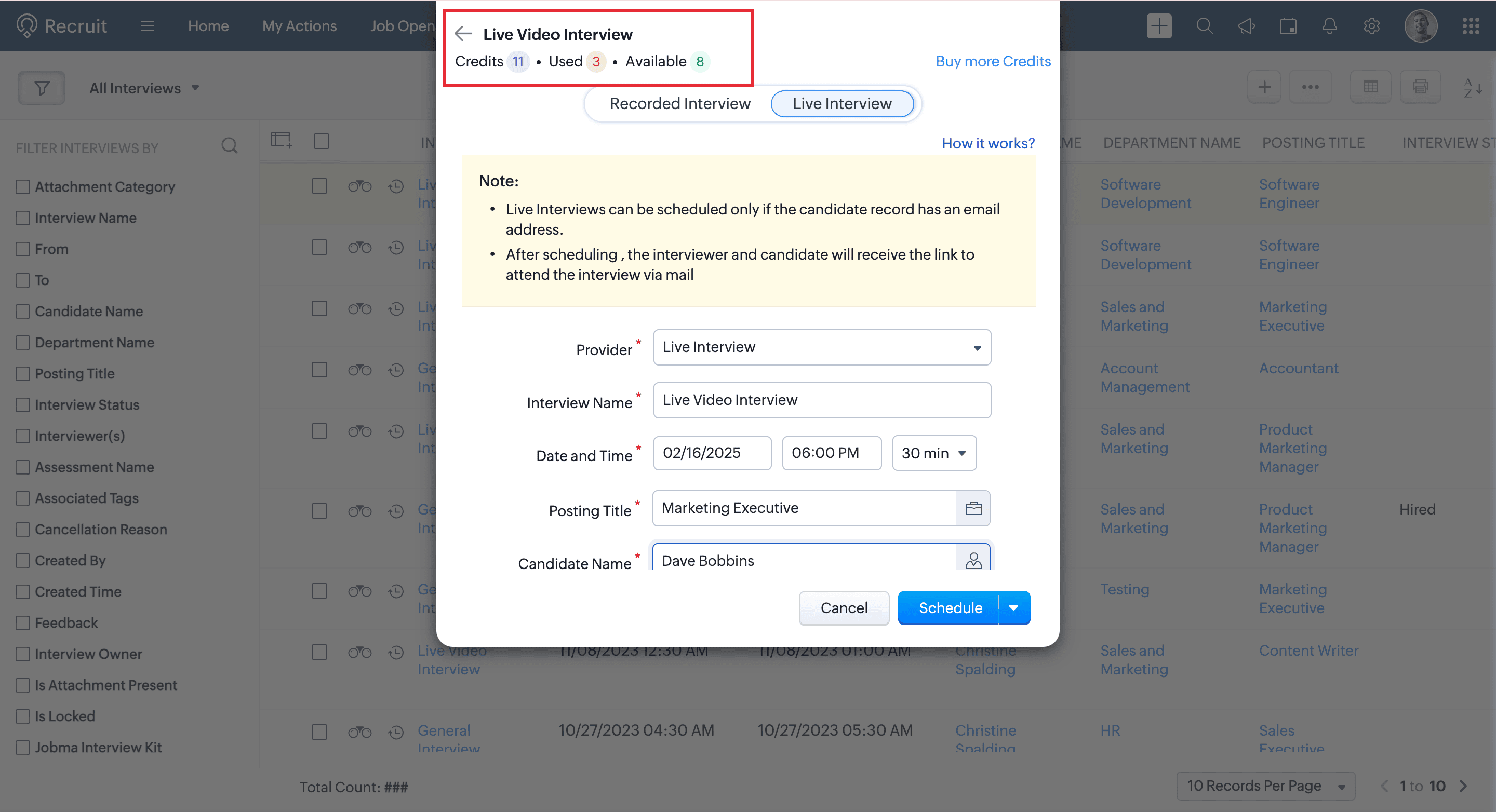
5. How much does additional video credit cost?
We offer one free video interview credit by default for scheduling video interviews. If additional credits are required, they can be purchased as paid add-ons at $12 or ₹600 per month per credit.
6. How do I purchase additional credits?
Method 1:
To purchase additional video interview job slots:
- Go to Profile > Manage Subscription and click Upgrade Users/Add-ons.
- Choose the number of Video Interview Credit Add-Ons you wish to purchase and click Proceed.
- Review your purchase details and click Proceed to Pay.
- Once the payment is successful, the selected number of Video Interview Credit Add-Ons will be added to your account.
Method 2:
- When scheduling an interview, you will see the Buy More Credits option.
- Click on it to purchase additional video interview credits. This will redirect you to the Zoho Store, where you can click on Upgrade Users/Add-ons.
- Select the desired number of Video Interview Credit Add-Ons and click Proceed to complete your purchase.

Note:
Credits are not transferable across accounts.
They are applicable only for Zoho Recruit’s integrated video interview feature.
7. Are there other alternatives for video interviews?
Yes, you can use Google Meet and MS Teams within Recruit.
Additionally, there are more options available in the marketplace, such as Spark Hire, Hireflix, etc.
8. Where can you find the job opening associated with the video credits?
When scheduling an interview, selecting the posting title will highlight the job opening associated with the video credits. The job with the free credit will display a violet-colored line in the posting title as shown below:
9. Can I reassign the free video interview credit to another job?
10. How can we edit a scheduled live video interview?
- Navigate to the Interview module and choose the interview record you want to reschedule.
- Click Reschedule.
- Update the date and time.
- Confirm changes to trigger notifications.
11. Why do we need separate credits when Zoho Meeting is included in our Enterprise solution?
The video interview feature is designed specifically for recruitment, offering:
- Integration with candidate profiles
- Automated scheduling
- Recruitment-specific functionality
Since these features require additional infrastructure and maintenance, video interviews operate on a separate credit system.