Integrate Zoho SalesIQ with Magento plugin

Integrating Magento with SalesIQ
You can easily add a live chat and visitor tracking feature to your Magento store through Zoho SalesIQ. Engage with prospects on your online store through proactive chat and close more deals. Build lasting relationship with your customers by delivering legendary customer service through live chat.

Getting your Zoho SalesIQ Code Snippet

  • Login to your Zoho SalesIQ Operator console.
  • Navigate to  Settings > Brands > Your brand name > Installation > Website.
  • Click on Copy this code to copy the code snippet.


To receive live chat notifications you should be logged in to https://www.zoho.com/salesiq/

Installation of Zoho SalesIQ in Magento Version 1.x through plugin

  • First, download the Magento version 1.x Zip file from  here .
  • Then, extract the Zip file and paste it in your root directory.
  • Log into your Magento admin page.
  • Click on the "System" tab then select " Configuration" from the drop down.
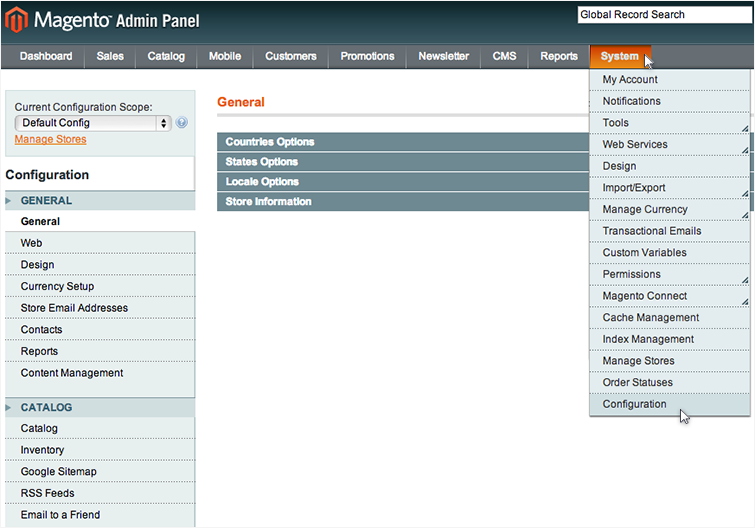

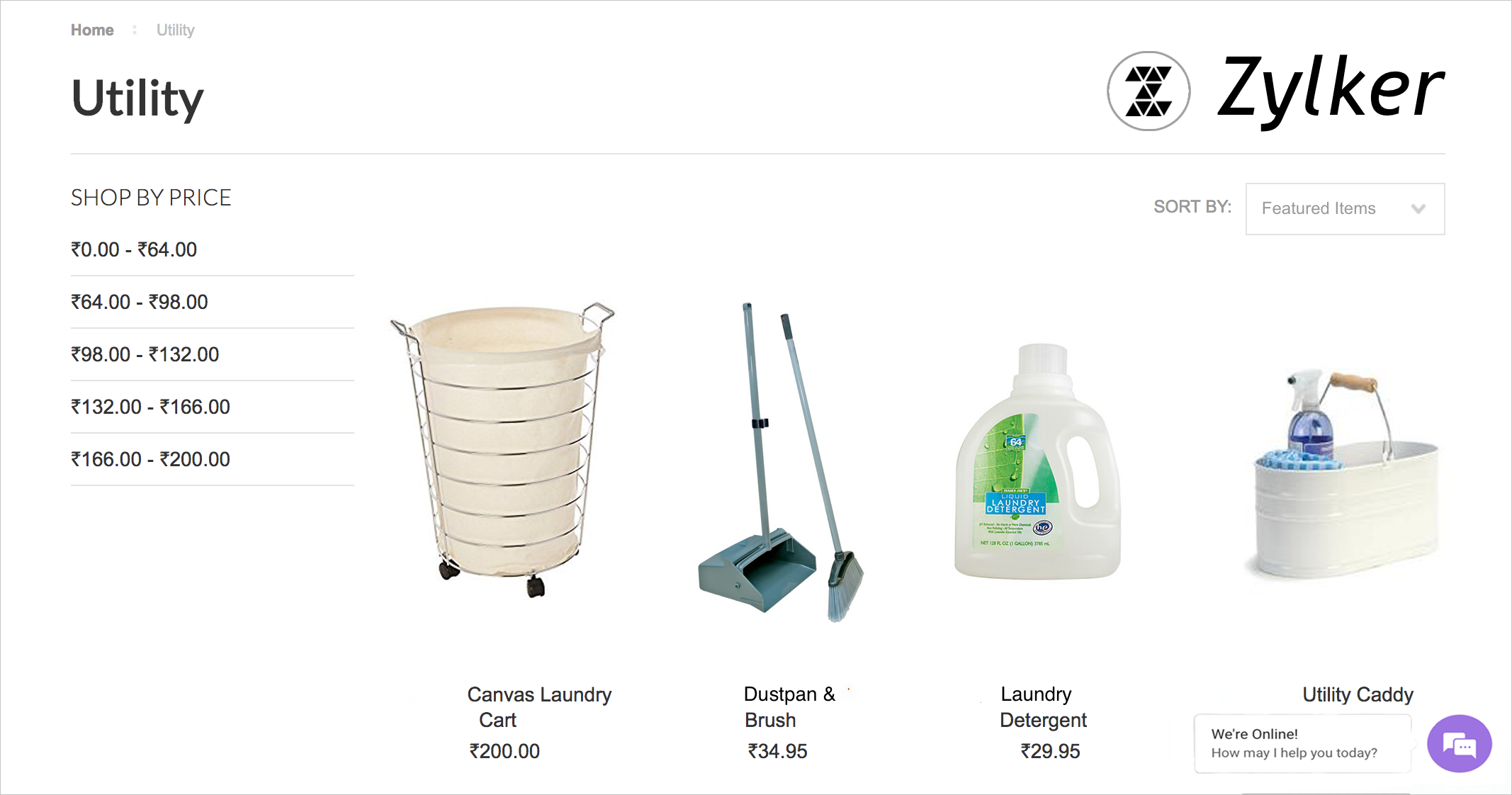
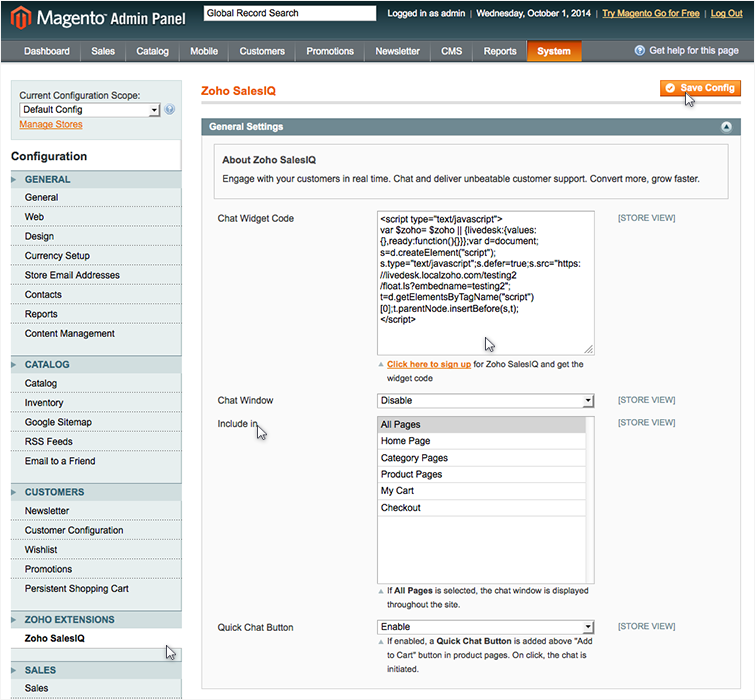
  • Chat window  – This configuration allows you to handle the visibility of chat bubble in your Magento store.
  • Include in  – Select the pages, which you would like to display the chat window. If All Pages is selected, the chat window is displayed throughout the site.
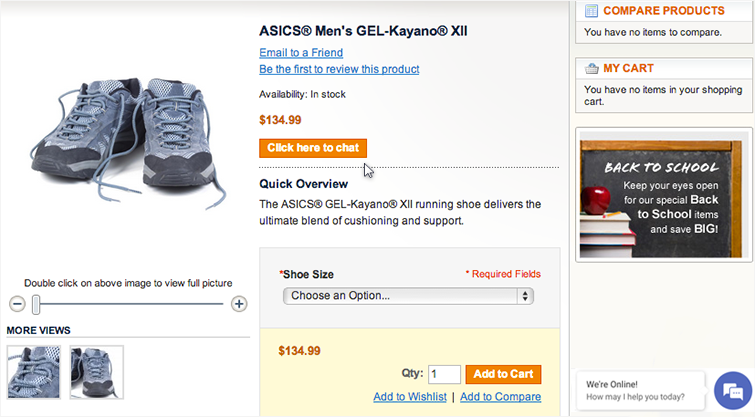
  • Quick Chat Button  - If enabled, a Quick Chat Button is added above "Add to Cart" button in product pages.

Magento Installation through admin page

  1. Log on to your admin panel.
  2. Click at "System" then select "Configuration" from the drop down.

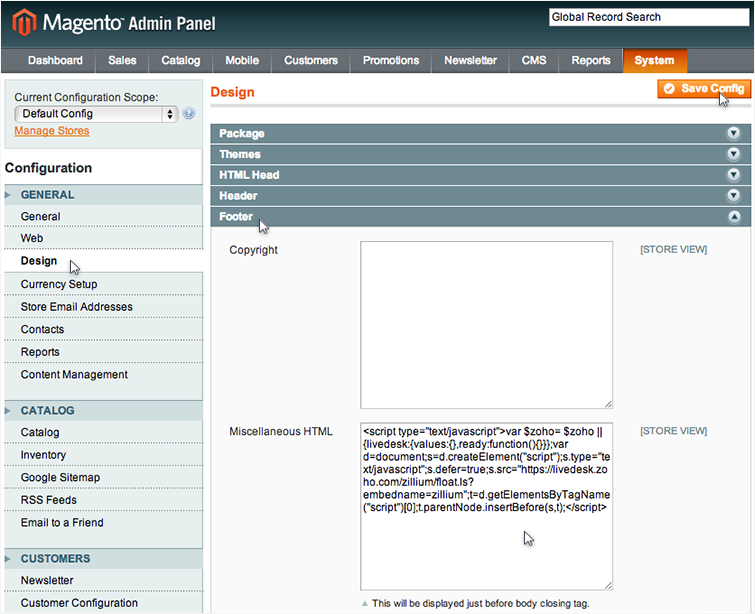
  1. Go to "General" in the left side bar below "Configuration" and click at "Design"
  2. On the "Design" section, click over the “Footer".
  3. Paste your Zoho SalesIQ code inside “Miscellaneous HTML” box and click “save config”


Install the Zoho SalesIQ extension in Magento Version 2.x

  • To install and add the Zoho SalesIQ chat widget to your Magento, do the following.
  • First, download the Magento version 2.x Zip file from here .
  • Then, extract the Zip, goto salesiq-2.x/Zoho folder, copy it and paste into magento Rootdirectory/app/code/ folder.
  • Next, go to the Magento root directory on your server and enter the following commands:     
    •  php bin/magento module:enable Zoho_Salesiq     
    •  php bin/magento setup:upgrade
    •  php bin/magento setup:static-content:deploy
    •  php bin/magento cache:clean
  • Log into the admin section of your Magento site: eg  www.yoursite.com/admin.
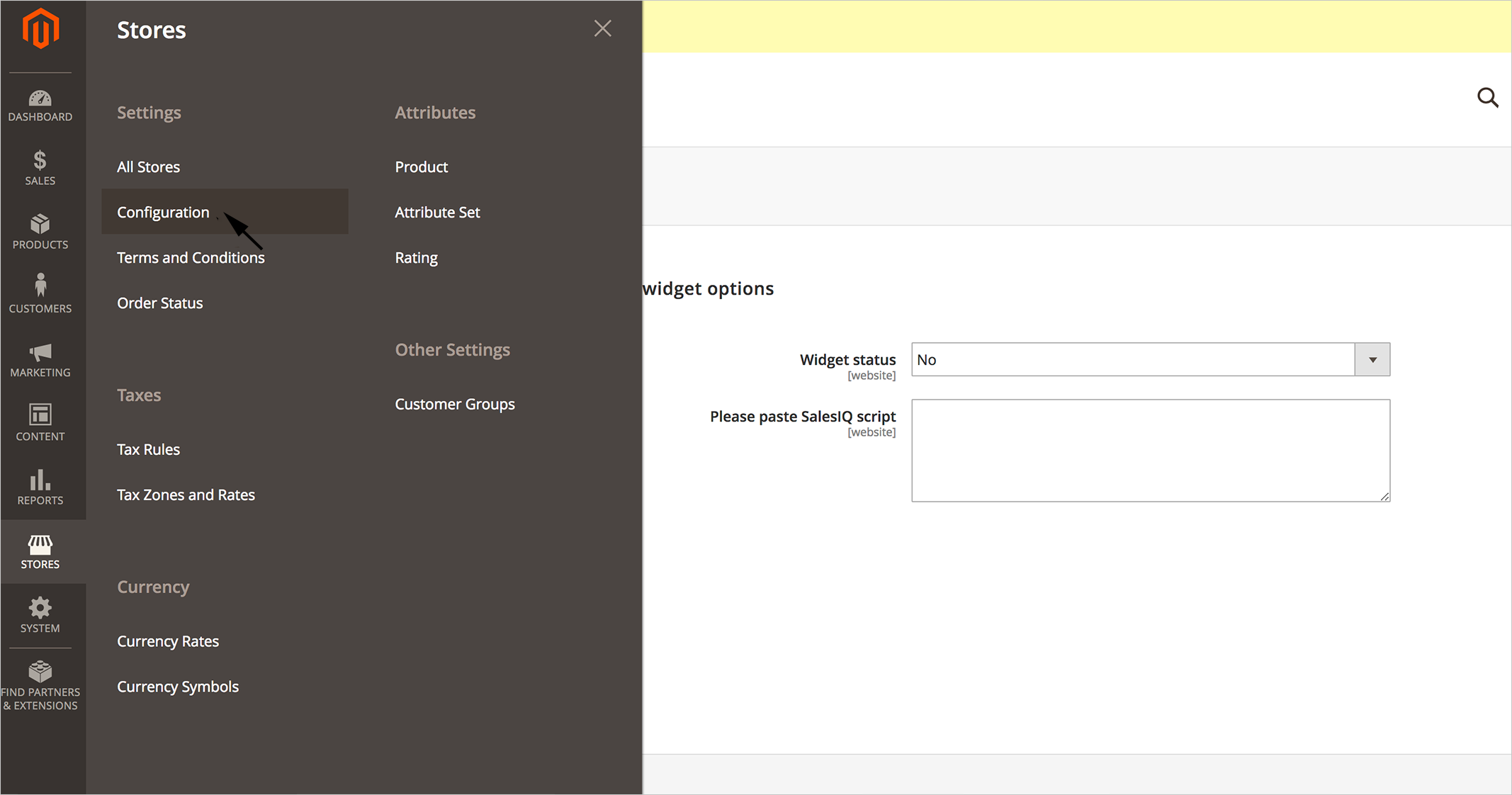
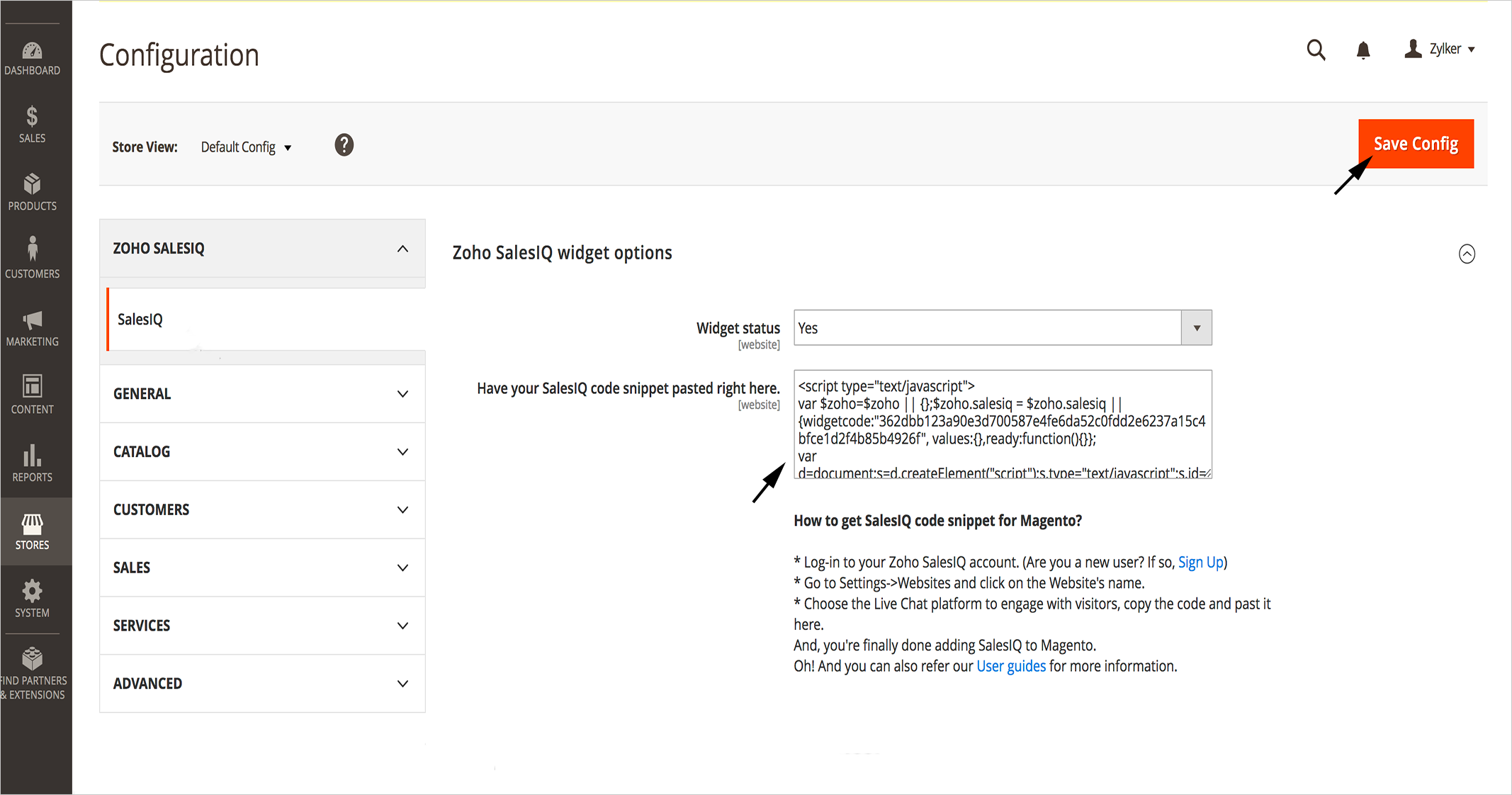
  • In "Stores", select "Configuration" below Settings.

  • Go to "Zoho SalesIQ Extensions" and click "SalesIQ".
  • Paste your Zoho SalesIQ code snippet in the text area given and click "Save Config".  How to Get Zoho SalesIQ Chat Widget Code?
  • Now have your Zoho SalesIQ installed in Magento.
  • After Clicking 'Save Config', click System -> Cache Management -> Flush Magento Cache.

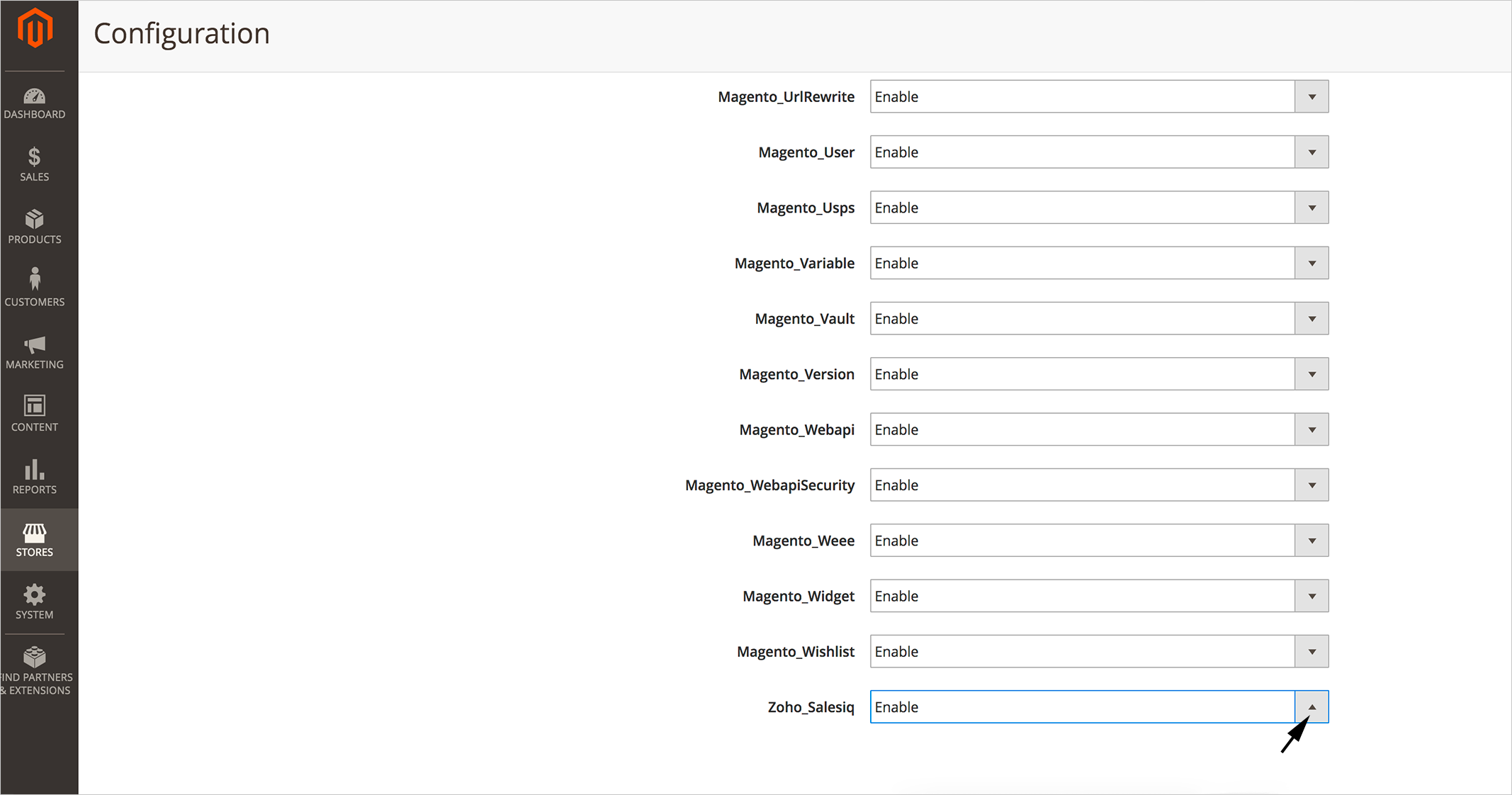
  • By default your Zoho SalesIQ will be Enabled in Magento or you can click on "Advanced" on the left side and then click the Enable/Disable option from the drop-down next to Zoho_Salesiq. Note: This step is applicable upto Magento version 2.2.


        Create. Review. Publish.

        Write, edit, collaborate on, and publish documents to different content management platforms.

        Get Started Now


          Access your files securely from anywhere

            Zoho CRM Training Programs

            Learn how to use the best tools for sales force automation and better customer engagement from Zoho's implementation specialists.

            Zoho CRM Training
              Redefine the way you work
              with Zoho Workplace

                Zoho DataPrep Personalized Demo

                If you'd like a personalized walk-through of our data preparation tool, please request a demo and we'll be happy to show you how to get the best out of Zoho DataPrep.

                Zoho CRM Training

                  Create, share, and deliver

                  beautiful slides from anywhere.

                  Get Started Now


                    Zoho Sign now offers specialized one-on-one training for both administrators and developers.

                    BOOK A SESSION


                                Quick LinksWorkflow AutomationData Collection
                                Web FormsEnterpriseOnline Data Collection Tool
                                Embeddable FormsBankingBegin Data Collection
                                Interactive FormsWorkplaceData Collection App
                                CRM FormsCustomer ServiceAccessible Forms
                                Digital FormsMarketingForms for Small Business
                                HTML FormsEducationForms for Enterprise
                                Contact FormsE-commerceForms for any business
                                Lead Generation FormsHealthcareForms for Startups
                                Wordpress FormsCustomer onboardingForms for Small Business
                                No Code FormsConstructionRSVP tool for holidays
                                Free FormsTravelFeatures for Order Forms
                                Prefill FormsNon-Profit

                                Intake FormsLegal
                                Mobile App
                                Form DesignerHR
                                Mobile Forms
                                Card FormsFoodOffline Forms
                                Assign FormsPhotographyMobile Forms Features
                                Translate FormsReal EstateKiosk in Mobile Forms
                                Electronic Forms
                                Drag & drop form builder

                                Notification Emails for FormsAlternativesSecurity & Compliance
                                Holiday FormsGoogle Forms alternative GDPR
                                Form to PDFJotform alternativeHIPAA Forms
                                Email FormsFormstack alternativeEncrypted Forms

                                Wufoo alternativeSecure Forms

                                TypeformWCAG

                                  Zoho FSM Video Tutorials


                                        All-in-one knowledge management and training platform for your employees and customers.

                                                  Create. Review. Publish.

                                                  Write, edit, collaborate on, and publish documents to different content management platforms.

                                                  Get Started Now


                                                                    You are currently viewing the help pages of Qntrl’s earlier version. Click here to view our latest version—Qntrl 3.0's help articles.


                                                                        Manage your brands on social media


                                                                          • Desk Community Learning Series


                                                                          • Digest


                                                                          • Functions


                                                                          • Meetups


                                                                          • Kbase


                                                                          • Resources


                                                                          • Glossary


                                                                          • Desk Marketplace


                                                                          • MVP Corner


                                                                          • Word of the Day


                                                                          • Ask the Experts


                                                                            Zoho Sheet Resources


                                                                                Zoho Forms Resources


                                                                                  Secure your business
                                                                                  communication with Zoho Mail


                                                                                  Mail on the move with
                                                                                  Zoho Mail mobile application

                                                                                    Stay on top of your schedule
                                                                                    at all times


                                                                                    Carry your calendar with you
                                                                                    Anytime, anywhere


                                                                                          Zoho Sign Resources

                                                                                            Sign, Paperless!

                                                                                            Sign and send business documents on the go!

                                                                                            Get Started Now


                                                                                                    Zoho TeamInbox Resources


                                                                                                              Zoho DataPrep Demo

                                                                                                              Get a personalized demo or POC

                                                                                                              REGISTER NOW


                                                                                                                Design. Discuss. Deliver.

                                                                                                                Create visually engaging stories with Zoho Show.

                                                                                                                Get Started Now


                                                                                                                                    • Related Articles

                                                                                                                                    • Integrating Zoho Bookings with Zoho SalesIQ

                                                                                                                                      Zoho Bookings in SalesIQ Zoho Bookings is an online tool that your customers can use to book appointments with your experts and specialists to avail your services. When you publish your services on Zoho Bookings, your customers can access this ...
                                                                                                                                    • Integrating WhatsApp Channel with SalesIQ

                                                                                                                                      Integrating your WhatsApp business with SalesIQ helps you handle your business' chat conversations on your SalesIQ dashboard. When a user messages your business on WhatsApp, you will receive that message right within your SalesIQ dashboard, allowing ...
                                                                                                                                    • SalesIQ for Zoho Forms

                                                                                                                                      Zoho forms is a software solution that let's you create visually appealing forms easily with a no-code online form builder, for all your data collection needs. Integrating Zoho SalesIQ with Zoho Forms will allow you to receive the data collected on ...
                                                                                                                                    • Integrating WooCommerce with SalesIQ

                                                                                                                                      WooCommerce is the best way to turn your WordPress website into a fully functional e-commerce store. Technically speaking, WooCommerce is a WordPress plugin. It needs to be installed and activated inside the Wordpress to function. Zoho SalesIQ serves ...
                                                                                                                                    • Integrating Vision with SalesIQ

                                                                                                                                      You can set up your predefined smart rules in Vision for the chat transcript sent from Zoho SalesIQ on Chats and Missed chats. All the attended chat transcript will be addressed with the subject line “Chats :” followed by the visitor question. All ...
                                                                                                                                      Wherever you are is as good as
                                                                                                                                      your workplace

                                                                                                                                        Resources

                                                                                                                                        Videos

                                                                                                                                        Watch comprehensive videos on features and other important topics that will help you master Zoho CRM.


                                                                                                                                        eBooks

                                                                                                                                        Download free eBooks and access a range of topics to get deeper insight on successfully using Zoho CRM.


                                                                                                                                        Webinars

                                                                                                                                        Sign up for our webinars and learn the Zoho CRM basics, from customization to sales force automation and more.


                                                                                                                                        CRM Tips

                                                                                                                                        Make the most of Zoho CRM with these useful tips.


                                                                                                                                          Zoho Show Resources