Integrating OsCommerce with SalesIQ
Add SalesIQ to your osCommerce store and get connected with your customers at the right moment. Track and engage your visitors and in real time.
How to install Zoho SalesIQ extension to osCommerce?
- Download the Zip file from here .
- Upload the Zip into your root directory and Extract it.
-
Place the following files into the right directories.
- includes/modules/boxes/zoho_salesiq.php
- includes/languages/english/modules/boxes/zoho_salesiq.php
- includes/modules/boxes/zoho_salesiq.php
- Log into the admin section of your osCommerce store.
- Click on the modules on the left and select Boxes from the drop down.
- Now click on “+Install Module”.
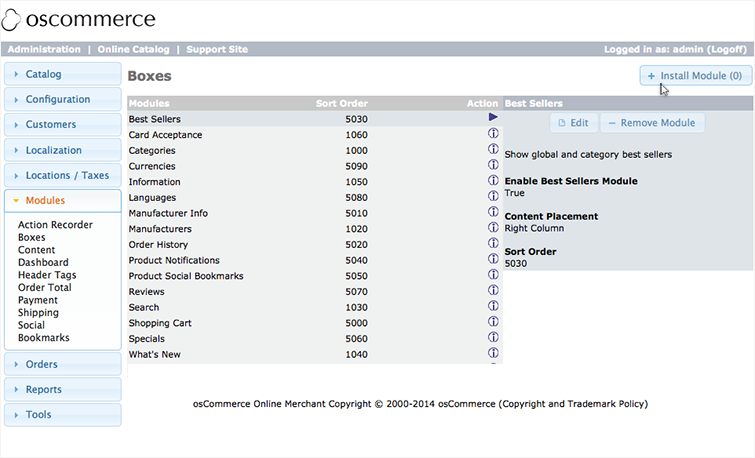
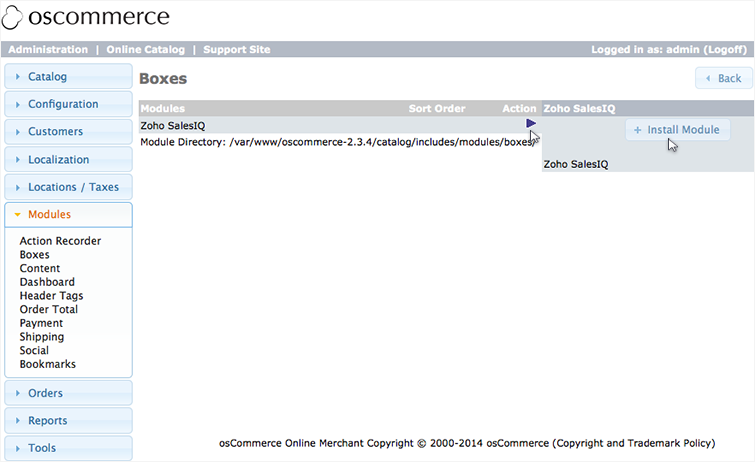
- Select “Zoho SalesIQ Module” and click ““+Install Module”.
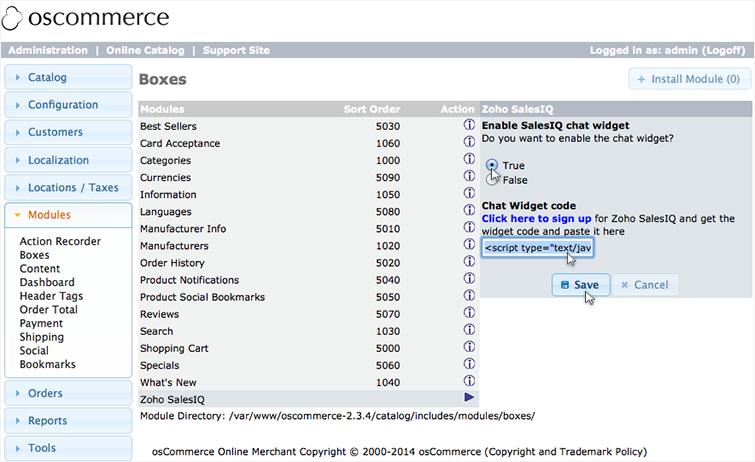
- Paste your Zoho SalesIQ float code and enable “true” to enable the chat widget.
- Click “Save”
Getting your Zoho SalesIQ Code Snippet
- Login to your Zoho SalesIQ Operator console.
- Navigate to Settings > Brands > Your brand name > Installation > Website.
- Click on Copy this code to copy the code snippet.
 To receive live chat notifications you should be logged in to https://www.zoho.com/salesiq/