Shift Differential
Shift Differential is extra compensation paid to employees who work odd hours, such as night shifts, holiday shifts, and weekend shifts. You can create multiple shift differentials under the single pay rule.
You can configure shift differential by,
- Percentage of hourly rate: A fixed percentage per hour is added as extra compensation for employees in addition to the regular wage.
- Fixed amount per hour: A fixed amount per hour is added as extra compensation for employees in addition to the regular wage.
- Fixed amount per shift: A fixed amount for the entire shift is added as extra compensation for employees in addition to the regular wage.
To configure shift differential,
- Click to the Settings icon in the top-right corner, which will open the Settings window.
- Click Pay Rules in the Time and Attendance tab.
- Select Edit on the specific pay rules you want to make changes to.
- Click the Shift Differential tab and select +Shift Differential. Enter shift differential details, either percentage, a fixed amount per hour, or a fixed amount per shift.
- Click Save.
Case 1: Shift differential for night shifts
Shift Differential for night shifts after 10 p.m.
Shift Differential rate: $10 per hour.
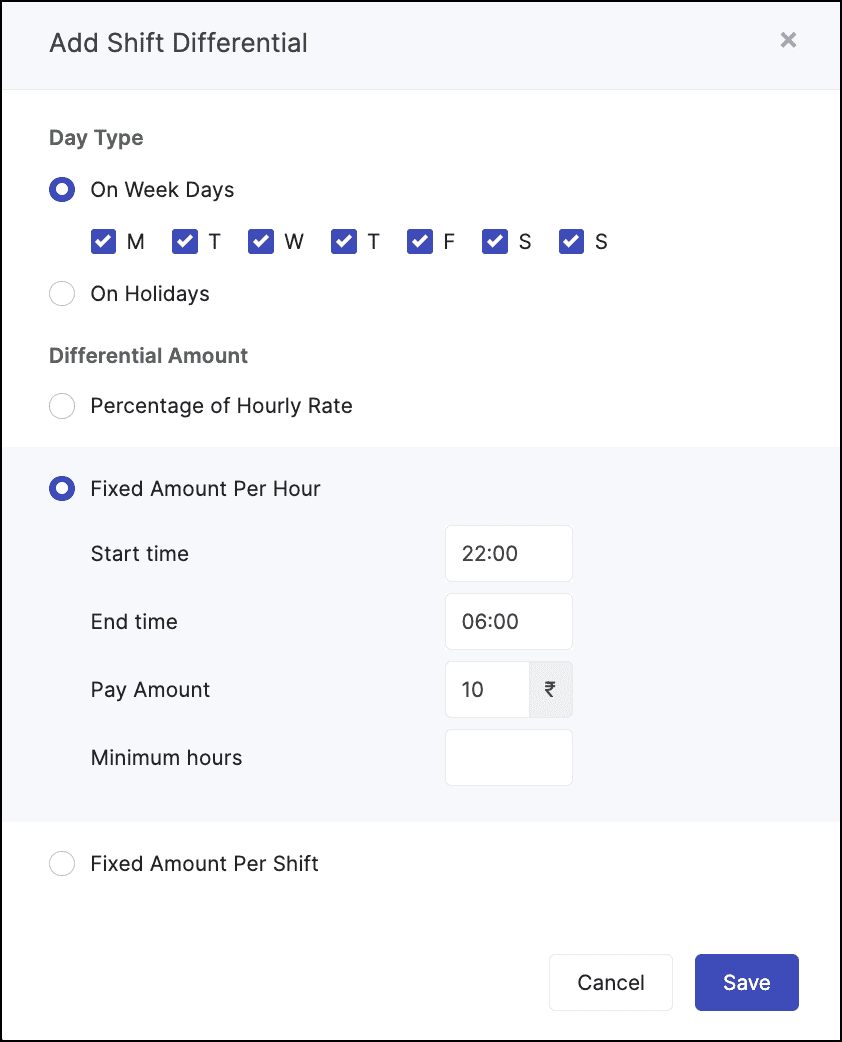
Example:
Let's say Amelia is a healthcare professional and works as a nurse. Her base pay is $30 per hour. However, her clinic has fixed a special pay rate for working apart from the usual work hours. The clinic pays an extra $10 per shift for those who are working after 10 p.m., apart from the usual work hours. Calculate the shift differential configuration for the employee who works after 10 p.m.
The time split is as follows:
Start Time | End Time | Pay Rate |
7 p.m. | 10 p.m. | $30 (Base Pay) |
10 p.m. | 3 a.m. | $30 + $10 (Base pay + night shift allowance) |
Calculations:
Regular hours: 3 hrs (7 p.m. - 10 p.m.)
Shift differential hours: 5 hrs (10 p.m. - 3 a.m.)
Regular wage = 3 hrs x $30 = $90
Shift differential wage = 5 hrs x ($30 + $10) = $200
Total wage = $90 + $200 = $290
Case 2: Shift differential for weekends
Shift differential for employees who work on weekends for at least six hours.
Shift Differential rate: $100.
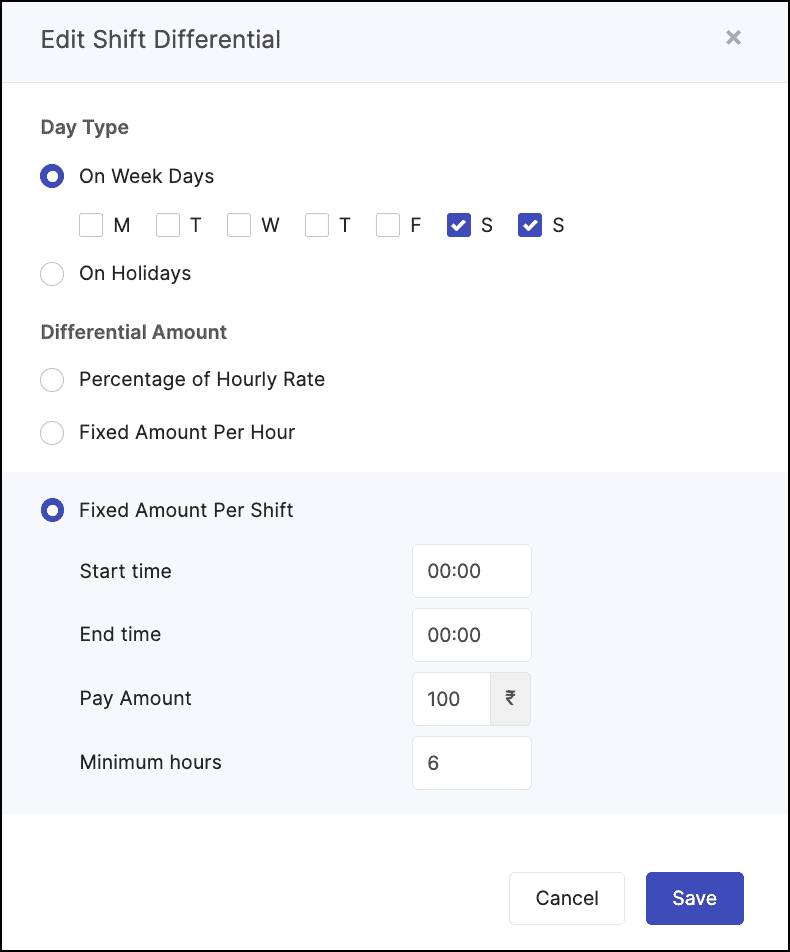
Example:
Let's say Patricia works as a senior chef. Patricia works 9 a.m. - 5 p.m. on Saturday with an hourly rate of $30. However, her hotel has fixed a special pay rate for working apart from the usual work hours. The hotel pays an extra $100 per shift when employees work a shift (of at least 6 hours) on Saturday or Sunday. Calculate the shift differential configuration for the employee who works on weekends.
Calculations:
Total hours worked: 8 hrs
Total hours worked: 8 hrs
Regular wage = 8 hrs x $30 = $240
Shift differential wage = $100 (fixed amount per shift)
Total wage = $240 + $100 = $340
 Note: When Fixed Amount Per Shift is chosen as Differential Amount type, Minimum hours must be specified.
Case 3: Shift differential for holidays
Shift differential for employees who work on holidays.
Shift Differential rate - 100% of the hourly rate.
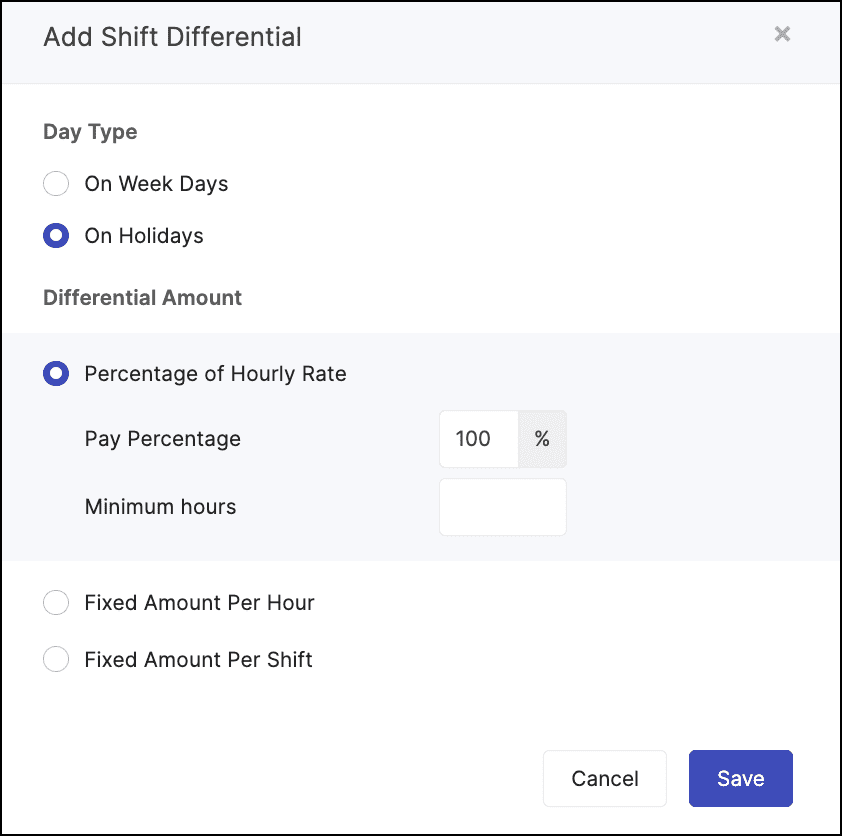
Example:
Let's say Brad works as a field engineer at Zylker Construction. He works 9 a.m. - 5 p.m. on a holiday with an hourly rate of $30. However his agency has fixed a special pay rate for working apart from the usual work hours. Generally, the agency pays twice their normal wage for working on holidays (100% of the hourly rate).
Let's say Brad works as a field engineer at Zylker Construction. He works 9 a.m. - 5 p.m. on a holiday with an hourly rate of $30. However his agency has fixed a special pay rate for working apart from the usual work hours. Generally, the agency pays twice their normal wage for working on holidays (100% of the hourly rate).
Calculations:
Total hours worked: 8 hrs
Hourly Rate + Differential Amount = $30 + ($30 x 100%) = $30 + $30 = $60
Total wage = 8 hrs x $60 = $480
Note: If the start time of a shift falls on a holiday and the minimum hours criteria is satisfied, the entire shift is eligible for the shift differential.