Deliver an On Demand training from ShowTime Web

Create and deliver an On Demand training from ShowTime Web


ShowTime Web allows you to train your audience with a recorded video/session that can be watched anytime. You can start a session either by uploading a video file or choosing one from the library.

Note: This feature is available under ShowTime's standard, professional and enterprise plans.

Launch an On Demand session 

1. Click the Create Session button in the upper-right corner of the Sessions page.

2. Select On Demand as the session type.


3. Enter a name for your session in the pop-up window.

4. Registration is enabled by default for your scheduled session and you can also choose the most suitable trainer from your organization.

5. Click Create Session.

Add training materials

Once you create a session, you can select video and PDF files to showcase during your On Demand training. 

1. Choose Session Material under the Session Details tab. 

2. Select a video from your device using Upload from computer or import one from your recording library by choosing Pick material from library.


You can also drag and reorder these added materials in the preferred order that you want your learners to watch. 


Configure tests 

As a trainer, assessments help you effectively evaluate course-related knowledge and skills on a regular basis.
 
ShowTime allows you to customize these test forms to the trainer's needs and will display them to your learners once a video ends in On Demand sessions.
 
1. Once you create a session, click the Session Details tab at the top. Under Add test, select Create Test


2. Add a name and Select a type of question from the list of options. Type in the question and enter answer choices, the correct answer, and it's weightage. 
 
Note: It's also important to enter the correct answer in the required field so we can verify that with your audience's responses and award them the specified weightage points. 


3. Once you create the fields, you can reorder them in any order you wish. You can also edit and delete the custom fields by clicking on the edit or delete icons.

4. Click Save and add next question to add more questions or Save and close if you are finished adding questions. 

Types of question types available in Test:


1. Single choice: Learners have to specify a single correct answer for the question.
2. Multiple choice:  Learners can choose from multiple correct answers for the given question .
3. Boolean (True/False): Learners have to specify if the given statement is true or false.
4. Fill in the blanks: Learner has to specify the answer which is left as a blank in the given sentence. Kindly note that while configuring a Fill in the blanks question - fill in the correct answer in [ ] so that we can verify that with your audience's responses and award them the specified weightage points . eg. Jack and [Jill] went up the [Hill]

Handouts
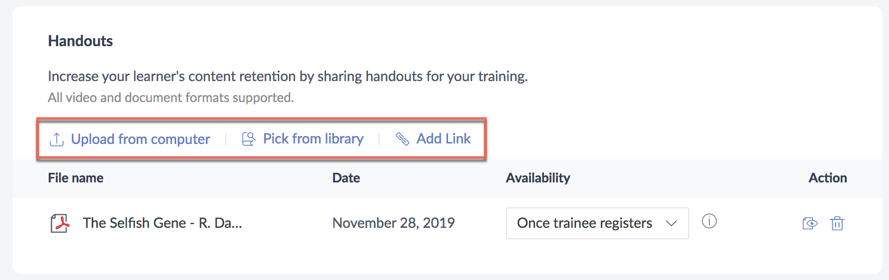
ShowTime helps you increase your learner's content retention by making it easy to share handouts for your training sessions. You can upload video and document materials from your computer, choose from your ShowTime library, or add the file's link. 


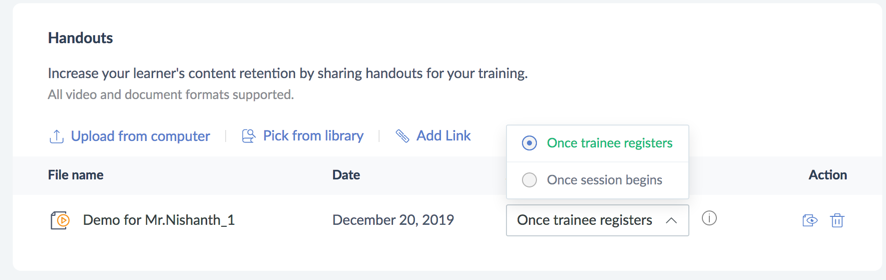
Once a handout or other supplementary material is added, you can choose one of the following three ways to make it available: 


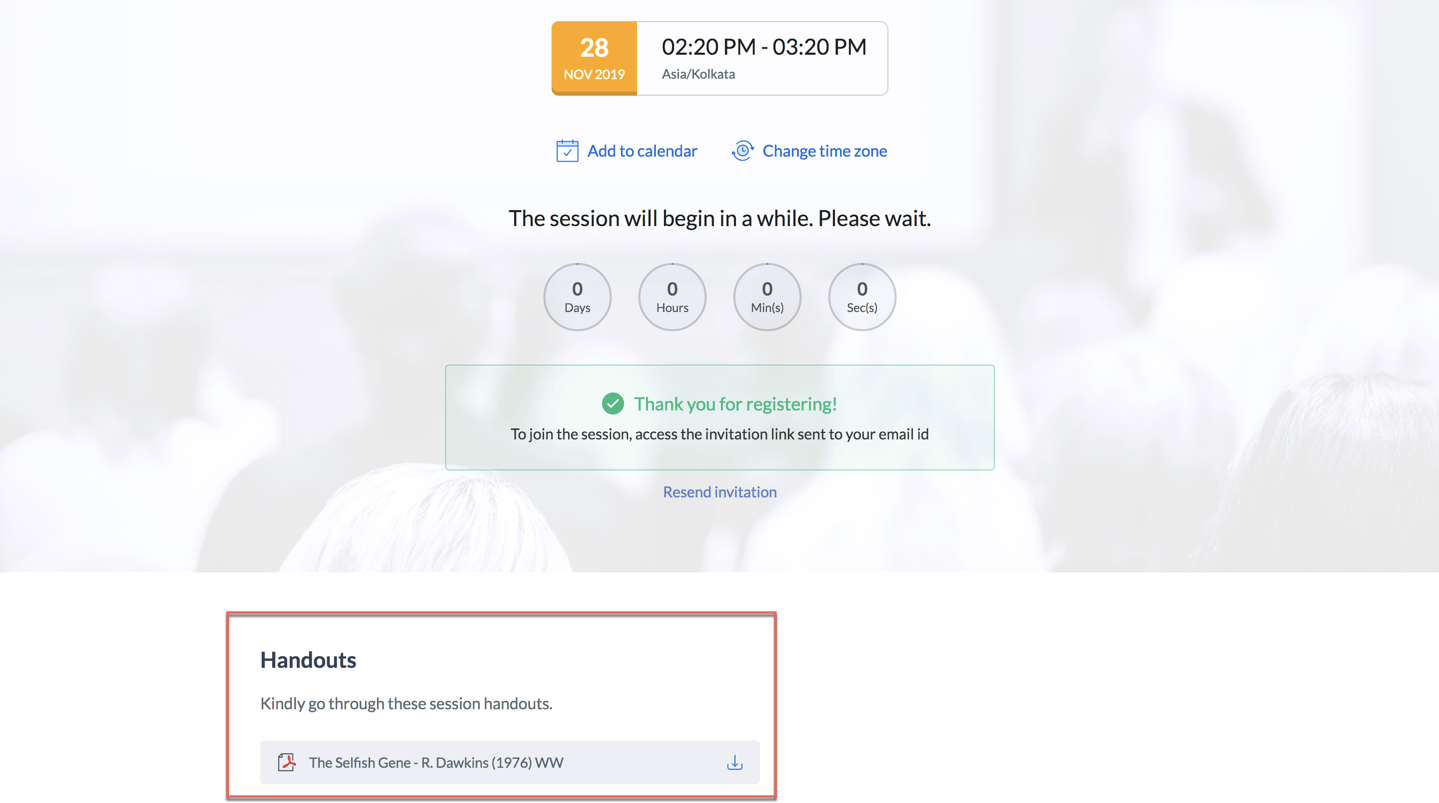
1. Once the trainee registers: As soon as the trainee registers for your training course, these materials will be available on the registration page. To use this option, please make sure you enable registration for that session. 


2. Once your session begins: The handout will be available for your viewers under the Handouts tab in the left pane once the training begins. 

Configure your Tickets

In ShowTime, you can conduct paid on-demand trainings by adding tickets to your sessions. This helps you monetize all your virtual classroom sessions. Before you add tickets, the account Admin has to configure the base currency type and set up a payment gateway. Learn how.

Attendee Interaction

Once your participants register for On Demand training, they can play and learn from the video the trainer has published in the training session by clicking on the video in the window on the left side of the screen. They can also participate in the tests by clicking on the Take test button in the left window or at the bottom right of the screen.
 

View Trainee Information

You can view the registration details of your learners, how long they spent on your training videos, and their test performance by clicking on the People tab. Click on the respective trainee name and select one of the tabs to view the following: user information, training completion, or test performance.
 
User Info: Learner's registration details, device, country of origin, and more. 


Training Completion: Time spent by the learner on your training videos and completion status. 


Test Performance: Your trainee's test performance metrics like total score, individual responses, marks received for each question, and more. 

Note: The size limit for the files uploaded is 1gb per video file and 100mb per document file. But ShowTime allows any number of materials to be uploaded in a training, so there are no restrictions on the volume of content that you can host in your trainings.

Unpublish a session


When you unpublish a session, the training will no longer available and your learners will not be able to access it on-demand . If you wish to unpublish an On Demand training session, kindly click on the Unpublish button in the top right corner after clicking on the session.


Republish a session


Whenever you make changes to published On Demand training, kindly ensure that you republish the training session. These changes might include altering the evaluation settings, configuring tests, adding materials, sharing handouts etc. To republish a session, once you make the desired change, click on republish.


        Create. Review. Publish.

        Write, edit, collaborate on, and publish documents to different content management platforms.

        Get Started Now


          Access your files securely from anywhere

            Zoho CRM Training Programs

            Learn how to use the best tools for sales force automation and better customer engagement from Zoho's implementation specialists.

            Zoho CRM Training
              Redefine the way you work
              with Zoho Workplace

                Zoho DataPrep Personalized Demo

                If you'd like a personalized walk-through of our data preparation tool, please request a demo and we'll be happy to show you how to get the best out of Zoho DataPrep.

                Zoho CRM Training

                  Create, share, and deliver

                  beautiful slides from anywhere.

                  Get Started Now


                    Zoho Sign now offers specialized one-on-one training for both administrators and developers.

                    BOOK A SESSION


                                Quick LinksWorkflow AutomationData Collection
                                Web FormsEnterpriseOnline Data Collection Tool
                                Embeddable FormsBankingBegin Data Collection
                                Interactive FormsWorkplaceData Collection App
                                CRM FormsCustomer ServiceAccessible Forms
                                Digital FormsMarketingForms for Small Business
                                HTML FormsEducationForms for Enterprise
                                Contact FormsE-commerceForms for any business
                                Lead Generation FormsHealthcareForms for Startups
                                Wordpress FormsCustomer onboardingForms for Small Business
                                No Code FormsConstructionRSVP tool for holidays
                                Free FormsTravelFeatures for Order Forms
                                Prefill FormsNon-Profit

                                Intake FormsLegal
                                Mobile App
                                Form DesignerHR
                                Mobile Forms
                                Card FormsFoodOffline Forms
                                Assign FormsPhotographyMobile Forms Features
                                Translate FormsReal EstateKiosk in Mobile Forms
                                Electronic Forms
                                Drag & drop form builder

                                Notification Emails for FormsAlternativesSecurity & Compliance
                                Holiday FormsGoogle Forms alternative GDPR
                                Form to PDFJotform alternativeHIPAA Forms
                                Email FormsFormstack alternativeEncrypted Forms

                                Wufoo alternativeSecure Forms

                                TypeformWCAG

                                    All-in-one knowledge management and training platform for your employees and customers.

                                              Create. Review. Publish.

                                              Write, edit, collaborate on, and publish documents to different content management platforms.

                                              Get Started Now


                                                                You are currently viewing the help pages of Qntrl’s earlier version. Click here to view our latest version—Qntrl 3.0's help articles.


                                                                    Manage your brands on social media


                                                                      • Desk Community Learning Series


                                                                      • Digest


                                                                      • Functions


                                                                      • Meetups


                                                                      • Kbase


                                                                      • Resources


                                                                      • Glossary


                                                                      • Desk Marketplace


                                                                      • MVP Corner


                                                                      • Word of the Day


                                                                      • Ask the Experts


                                                                        Zoho Sheet Resources


                                                                            Zoho Forms Resources


                                                                              Secure your business
                                                                              communication with Zoho Mail


                                                                              Mail on the move with
                                                                              Zoho Mail mobile application

                                                                                Stay on top of your schedule
                                                                                at all times


                                                                                Carry your calendar with you
                                                                                Anytime, anywhere


                                                                                      Zoho Sign Resources

                                                                                        Sign, Paperless!

                                                                                        Sign and send business documents on the go!

                                                                                        Get Started Now


                                                                                                Zoho TeamInbox Resources


                                                                                                          Zoho DataPrep Demo

                                                                                                          Get a personalized demo or POC

                                                                                                          REGISTER NOW


                                                                                                            Design. Discuss. Deliver.

                                                                                                            Create visually engaging stories with Zoho Show.

                                                                                                            Get Started Now


                                                                                                                                • Related Articles

                                                                                                                                • Session Handouts in Zoho ShowTime

                                                                                                                                  Handouts   Increase content retention by sharing handouts for your training. You can upload videos and documents from your computer, choose from ShowTime's library, or add a file link.      Once a handout is added, make it available in one of three ...
                                                                                                                                • Customize certificates in Zoho ShowTime

                                                                                                                                  Certification can be used to incentivize learner participation and success. Awarding a learner a certificate when they successfully complete a training gives them a tangible reward that can be used to promote your trainings. Zoho ShowTime makes it ...
                                                                                                                                • Supported languages in Zoho ShowTime

                                                                                                                                  From the user interface to our communication emails, we have customized ShowTime with localized content catering to users who are proficient in other languages. Supported languages in ShowTime Zoho ShowTime is available in the following ten languages ...
                                                                                                                                • Using Whiteboard in ShowTime

                                                                                                                                  Using Whiteboard in ShowTime   ShowTime offers a virtual whiteboard in your online training room, allowing you to draw, place shapes, and lay text that is viewed in real-time. Whiteboards help you educate your audience through illustrations and ...
                                                                                                                                • Zoho ShowTime Integration with Zoho CRM

                                                                                                                                  Ever found yourself longing for the perfect product that lets you manage your training leads, follow up with them to make successful conversions, and engage with them remotely through virtual training sessions? ShowTime is integrated with Zoho CRM to ...
                                                                                                                                  Wherever you are is as good as
                                                                                                                                  your workplace

                                                                                                                                    Resources

                                                                                                                                    Videos

                                                                                                                                    Watch comprehensive videos on features and other important topics that will help you master Zoho CRM.


                                                                                                                                    eBooks

                                                                                                                                    Download free eBooks and access a range of topics to get deeper insight on successfully using Zoho CRM.


                                                                                                                                    Webinars

                                                                                                                                    Sign up for our webinars and learn the Zoho CRM basics, from customization to sales force automation and more.


                                                                                                                                    CRM Tips

                                                                                                                                    Make the most of Zoho CRM with these useful tips.


                                                                                                                                      Zoho Show Resources