Getting Started with Social Media Monitoring

Getting Started with Social Media Monitoring

Managing social media is like hosting a dinner party. Picture a room full of people who are driven by the desire to talk, relate, or give an opinion, while having independent conversations. Some of these conversations could be about you, your industry, your competitors, or people looking for a product like yours. They'll talk about all this and more, even if you are not listening. However, if you are listening, you may find opportunities to engage potential customers!
 
These days, discussions about your brand and industry mostly take place in the social media space. It's one of the primary reasons to use a social media management tool. We understand that it can be challenging to listen and respond to every interaction. That's why we created Zoho Social's Monitor feature—so you can listen, respond, and keep the conversation going!

Monitor everything, all at once!

The Monitor tab makes it easy to track social media activity. Pay attention to the people who are talking about you, your brand, your product or brands you manage. Social media monitoring helps you discover conversations and opportunities to learn, engage, help, and collaborate.
 
You can create multiple columns to display specific content based on what's important to your business. Columns give you a quick way to keep track of what people are saying about your brand. It's like viewing multiple activities in one window. There will always be people talking about your industry; now you can jump into those conversations in real time. Engage with these posts by liking, commenting, or retweeting them directly from each column.
 
As long as you're in the Monitor tab, all your saved columns will automatically show you the number of real-time new posts as an orange badge, right at the top. When you click on the badge, it refreshes the column to show you the latest posts and updates specific to that column in Monitor.


Types of Monitoring Columns

Zoho Social has many types of columns that you can use to monitor conversations, depending on the specific social channel you wish to monitor. The types of activity you can monitor by adding monitoring columns are:

Facebook Page
  • Reviews
  • Page Search
  • Mentions
X Profile
  • Mentions
  • Timeline
  • Likes
  • Keyword Search
  • User Search
  • Lists
Google Business Profile
  1. Reviews
  2. Questions       
Instagram Business Profile
  1. Hashtag Search
  2. Tagged post
Notes
Note:
  1. Instagram Monitoring is available only for Instagram accounts connected via Facebook. 
LinkedIn Company Profile
  1. Mentions 
YouTube 
  1. Likes 
  2. Dislikes
  3. Playlists 
  4. Moderate Comments
Bluesky
  1. Timeline
  2. Likes
  3. User search
  4. Keyword search
Threads
  1. Mentions
  2. Keyword Search
  3. Username Search.

Adding a new Column to your Monitoring Dashboard

Add columns to the Monitor tab to track social media activity such as posts by particular users, search results of hash-tagged keywords, X lists, likes, and more. When you sign up for Zoho Social, the following columns will already be added for you:
  1. Facebook Visitor Posts (If you've connected a Facebook Page)
  2. X Mentions (If you've connected an X Profile)
  3. Leads/Contacts (If CRM Integration has been enabled)
You can remove, rearrange, or add new columns to customize your view based on what matters most for your business.
 

To add a new column

  1. Navigate to the Monitor tab. If you have only one social channel connected, you can add the columns relevant to only that social channel.

  2. Click the + Add new column button on the top left corner of the window.

  3. Choose the column you want to add from the Select Column Type panel. For example, under Facebook, you can add columns for Visitor Posts, Page Mentions, and Page Searches. For Twitter, you can add columns for Mentions, Timeline, Likes, Keyword Search, User Search, and Lists. For Instagram you can add Hashtag Search Columns. Under Google My Business, you can add search columns for customer Reviews and Questions. For LinkedIn company profile, you can add a column to monitor Mentions.


    The columns you have already added to your dashboard will be marked as you hover the mouse over these options.

  4. You can directly add Twitter columns like Mentions, Likes, Timeline, and Lists, Facebook columns like Visitor Posts and Page Mentions, and Google My Business columns such as Reviews and Questions and LinkedIn columns like Mentions to your monitoring dashboard by simply clicking on them.

  5. To monitor a keyword, user, page, or a hashtag for specific channels, click the option and type in the relevant tags, and click Save. Also, all your Saved Tags will automatically be displayed in the list of column.
To refresh the posts in a column, hover over the top of the column and click the circular arrow.
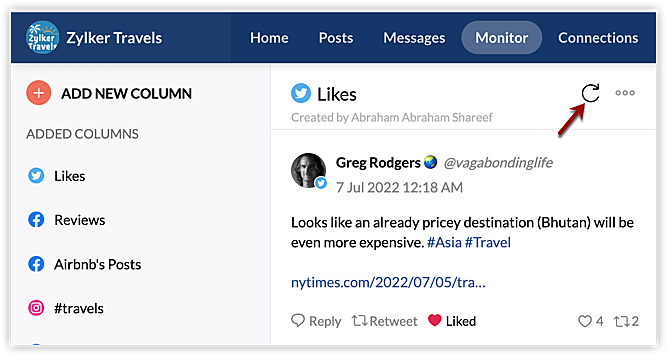
When you start actively listening to your audience, you won't miss opportunities to engage with customers or collect valuable feedback. Make the Monitor tab your own by adding columns relevant to your brand. People mentioning your brand might not tag you in their posts, so make sure you are tracking all the variations of your brand name, with and without the @symbol.  You might also want to track the usernames of your competitors and influencers.
 
Monitoring also includes keyword and hashtag search. Relevant keywords could include your brand name, product name, or industry name. Keyword searches can help you learn more about specific industry trends. You can use specific hashtag searches along with your keywords to deepen your search. Columns you might add include:
  1. Keyword Search - brand name (without @), industry name, product name
  2. Hashtag Search - trending and popular hashtags in your industry
  3. Username - your competitors, your influencers
  4. Page Search - competitor pages, influencer pages
  5. Reviews and Questions - for Google My Business
InfoOn the Professional Plan, you can add  5 keyword search columns per Brand. On the Premium plan and above, you can add up 


        Create. Review. Publish.

        Write, edit, collaborate on, and publish documents to different content management platforms.

        Get Started Now


          Access your files securely from anywhere

            Zoho CRM Training Programs

            Learn how to use the best tools for sales force automation and better customer engagement from Zoho's implementation specialists.

            Zoho CRM Training
              Redefine the way you work
              with Zoho Workplace

                Zoho DataPrep Personalized Demo

                If you'd like a personalized walk-through of our data preparation tool, please request a demo and we'll be happy to show you how to get the best out of Zoho DataPrep.

                Zoho CRM Training

                  Create, share, and deliver

                  beautiful slides from anywhere.

                  Get Started Now


                    Zoho Sign now offers specialized one-on-one training for both administrators and developers.

                    BOOK A SESSION


                                Quick LinksWorkflow AutomationData Collection
                                Web FormsEnterpriseOnline Data Collection Tool
                                Embeddable FormsBankingBegin Data Collection
                                Interactive FormsWorkplaceData Collection App
                                CRM FormsCustomer ServiceAccessible Forms
                                Digital FormsMarketingForms for Small Business
                                HTML FormsEducationForms for Enterprise
                                Contact FormsE-commerceForms for any business
                                Lead Generation FormsHealthcareForms for Startups
                                Wordpress FormsCustomer onboardingForms for Small Business
                                No Code FormsConstructionRSVP tool for holidays
                                Free FormsTravelFeatures for Order Forms
                                Prefill FormsNon-Profit

                                Intake FormsLegal
                                Mobile App
                                Form DesignerHR
                                Mobile Forms
                                Card FormsFoodOffline Forms
                                Assign FormsPhotographyMobile Forms Features
                                Translate FormsReal EstateKiosk in Mobile Forms
                                Electronic Forms
                                Drag & drop form builder

                                Notification Emails for FormsAlternativesSecurity & Compliance
                                Holiday FormsGoogle Forms alternative GDPR
                                Form to PDFJotform alternativeHIPAA Forms
                                Email FormsFormstack alternativeEncrypted Forms

                                Wufoo alternativeSecure Forms

                                TypeformWCAG

                                  Zoho FSM Video Tutorials


                                        All-in-one knowledge management and training platform for your employees and customers.

                                                  Create. Review. Publish.

                                                  Write, edit, collaborate on, and publish documents to different content management platforms.

                                                  Get Started Now


                                                                    You are currently viewing the help pages of Qntrl’s earlier version. Click here to view our latest version—Qntrl 3.0's help articles.


                                                                        Manage your brands on social media


                                                                          • Desk Community Learning Series


                                                                          • Digest


                                                                          • Functions


                                                                          • Meetups


                                                                          • Kbase


                                                                          • Resources


                                                                          • Glossary


                                                                          • Desk Marketplace


                                                                          • MVP Corner


                                                                          • Word of the Day


                                                                          • Ask the Experts


                                                                            Zoho Sheet Resources


                                                                                Zoho Forms Resources


                                                                                  Secure your business
                                                                                  communication with Zoho Mail


                                                                                  Mail on the move with
                                                                                  Zoho Mail mobile application

                                                                                    Stay on top of your schedule
                                                                                    at all times


                                                                                    Carry your calendar with you
                                                                                    Anytime, anywhere


                                                                                          Zoho Sign Resources

                                                                                            Sign, Paperless!

                                                                                            Sign and send business documents on the go!

                                                                                            Get Started Now


                                                                                                    Zoho TeamInbox Resources


                                                                                                              Zoho DataPrep Demo

                                                                                                              Get a personalized demo or POC

                                                                                                              REGISTER NOW


                                                                                                                Design. Discuss. Deliver.

                                                                                                                Create visually engaging stories with Zoho Show.

                                                                                                                Get Started Now


                                                                                                                                    • Related Articles

                                                                                                                                    • Social Library

                                                                                                                                      Social Library is a file management space that helps you add and manage images, GIFs, and videos to use for your social media posts. With the Social Library, you can upload pictures, videos, and GIFs from your Desktop or Cloud and maintain a ...
                                                                                                                                    • Managing your team in Zoho Social

                                                                                                                                      When you sign up for Zoho Social, a Portal will be auto-generated for you in your company name, and you'll be the Portal Owner and assigned the role of a Portal Admin. What's a Portal? A Portal in Zoho Social is an entity where you can manage all ...
                                                                                                                                    • Analyzing Social Media Post Statistics - An Overview

                                                                                                                                      Social media marketing is one of the most important aspects of digital marketing. It helps brands connect with their customers online, establish a presence, and increase sales and engagement. Social media marketers play an active role in building a ...
                                                                                                                                    • Adding Location via Zoho Social

                                                                                                                                      Let's say you run a small retail outlet and want people online to locate and identify your business. This is when plugging-in your location on your social media posts can help potential customers around you, find your product or service. You can add ...
                                                                                                                                    • Getting started with Instagram Reels on Zoho Social

                                                                                                                                      The Reels feature on Instagram has taken the internet by storm, grabbing the attention of users in short bursts through fun and entertaining content. Reels are short vertical videos that have a duration of three seconds up to 90 seconds, and can be ...
                                                                                                                                      Wherever you are is as good as
                                                                                                                                      your workplace

                                                                                                                                        Resources

                                                                                                                                        Videos

                                                                                                                                        Watch comprehensive videos on features and other important topics that will help you master Zoho CRM.


                                                                                                                                        eBooks

                                                                                                                                        Download free eBooks and access a range of topics to get deeper insight on successfully using Zoho CRM.


                                                                                                                                        Webinars

                                                                                                                                        Sign up for our webinars and learn the Zoho CRM basics, from customization to sales force automation and more.


                                                                                                                                        CRM Tips

                                                                                                                                        Make the most of Zoho CRM with these useful tips.


                                                                                                                                          Zoho Show Resources