Tracking and handling reactions in Facebook and LinkedIn in Zoho Social

Tracking and handling reactions in Facebook and LinkedIn

Reactions on social media are one of the simplest and most powerful ways users express how they feel about content. Instead of just a basic “Like,” reactions allow people to respond with a wider range of emotions, such as love, celebration, support, or even concern. This makes conversations more human, expressive, and engaging and also helps brands understand how their audience truly feels about a post. The more reactions a post receives, the stronger the interaction and visibility it gains.

Reactions in Social 

In Zoho Social, reactions to posts and comments can be viewed for Facebook and LinkedIn posts directly within the platform. For LinkedIn, you can also react to posts and comments, and delete reactions. Reaction counts are displayed in multiple places, helping you quickly track how your content is performing and how your audience is responding.

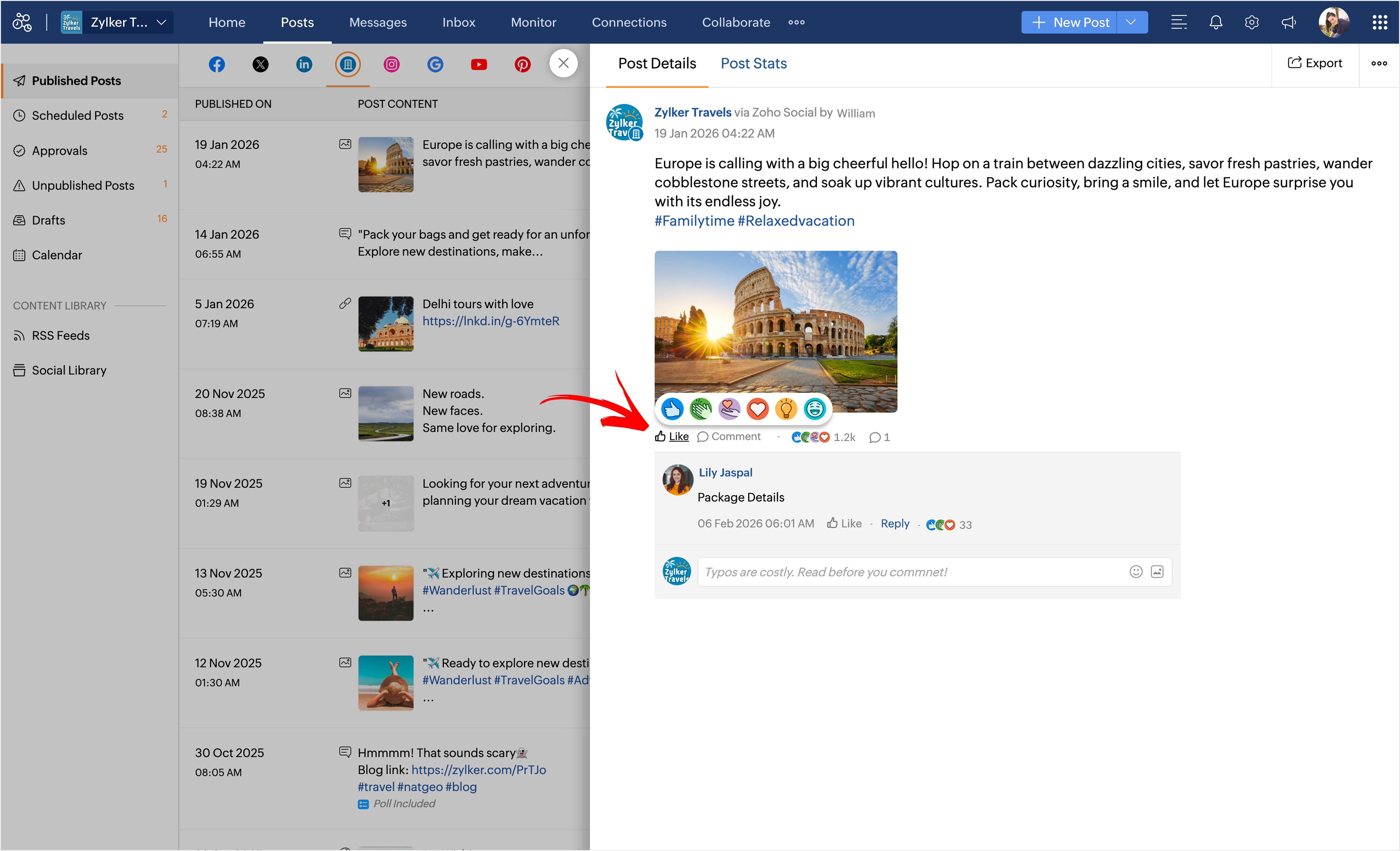
Wherever Zoho Social shows a detailed view of a Facebook or LinkedIn post or comment, you’ll be able to see the available reactions for that content. In all supported views, you can click on the reaction count to see the list of users who reacted, grouped by each reaction type.
Reactions on Facebook

  1. Like
  2. Love
  3. Haha
  4. Wow
  5. Sad
  6. Angry
  7. Care

Reactions on LinkedIn

  1. Like
  2. Celebrate
  3. Support
  4. Love
  5. Insightful 
  6. Funny
Notes
Note: 
  1. For Facebook, you can only view the reaction counts on posts and comments.
  2. For LinkedIn, you can both view and react to posts and comments directly from Zoho Social.

Where can you find Facebook and LinkedIn reactions?

You can view reactions for Facebook and LinkedIn posts in several places across Zoho Social, including the following tabs:
  1. Home
  2. Posts
  3. Inbox

Reactions in the Home Tab

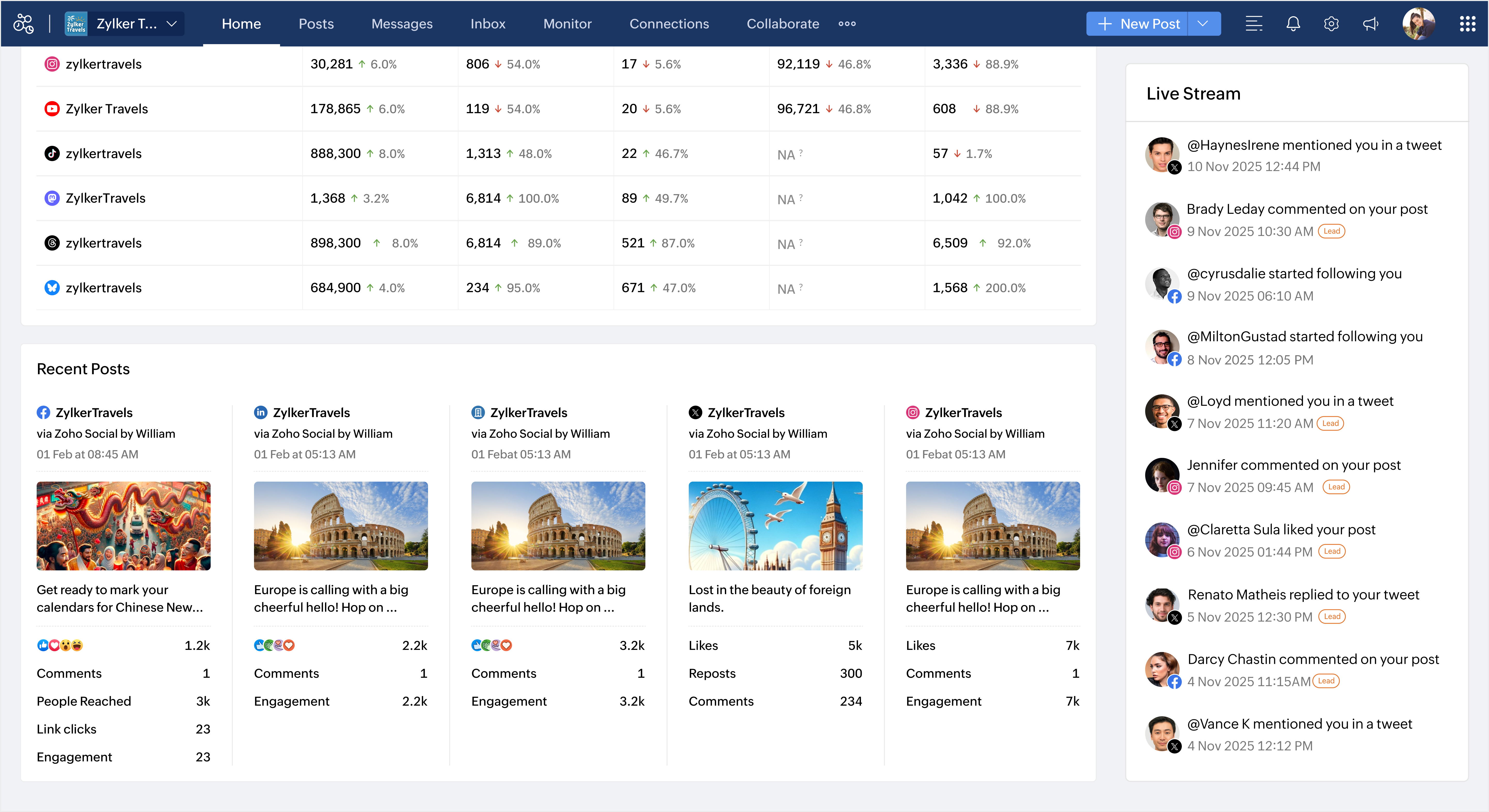
In the Home tab, reactions are in the Recent posts section:

Here, you can view the cumulative count of all reactions on each post at a glance. This helps you quickly understand how your content is performing.
Reactions in the Posts Tab

In the Posts tab, click on any post to open its detailed view

For Facebook:
  1. You’ll see all reactions and their counts for both the post and its comments
  2. Reactions are grouped by type. Click on the reactions to view who reacted to each one.
For LinkedIn:
  1. Hover over the Like button to choose a reaction
  2. Click on the reaction count to view the list of users and reaction types

Reactions in the Inbox Tab

In the Inbox tab, you can view and manage reactions while handling conversations.
  1. Go to the Inbox tab.
  2. Click on a Facebook or LinkedIn comment or reply.
  3. You’ll be able to:
    1. View reactions on Facebook comments and replies.
    2. React to LinkedIn comments and replies directly.
This makes it easy to engage with your audience while responding to messages in one place.

      Create. Review. Publish.

      Write, edit, collaborate on, and publish documents to different content management platforms.

      Get Started Now


        Access your files securely from anywhere

          Zoho CRM Training Programs

          Learn how to use the best tools for sales force automation and better customer engagement from Zoho's implementation specialists.

          Zoho CRM Training
            Redefine the way you work
            with Zoho Workplace

              Zoho DataPrep Personalized Demo

              If you'd like a personalized walk-through of our data preparation tool, please request a demo and we'll be happy to show you how to get the best out of Zoho DataPrep.

              Zoho CRM Training

                Create, share, and deliver

                beautiful slides from anywhere.

                Get Started Now


                  Zoho Sign now offers specialized one-on-one training for both administrators and developers.

                  BOOK A SESSION


                              Quick LinksWorkflow AutomationData Collection
                              Web FormsEnterpriseOnline Data Collection Tool
                              Embeddable FormsBankingBegin Data Collection
                              Interactive FormsWorkplaceData Collection App
                              CRM FormsCustomer ServiceAccessible Forms
                              Digital FormsMarketingForms for Small Business
                              HTML FormsEducationForms for Enterprise
                              Contact FormsE-commerceForms for any business
                              Lead Generation FormsHealthcareForms for Startups
                              Wordpress FormsCustomer onboardingForms for Small Business
                              No Code FormsConstructionRSVP tool for holidays
                              Free FormsTravelFeatures for Order Forms
                              Prefill FormsNon-Profit

                              Intake FormsLegal
                              Mobile App
                              Form DesignerHR
                              Mobile Forms
                              Card FormsFoodOffline Forms
                              Assign FormsPhotographyMobile Forms Features
                              Translate FormsReal EstateKiosk in Mobile Forms
                              Electronic Forms
                              Drag & drop form builder

                              Notification Emails for FormsAlternativesSecurity & Compliance
                              Holiday FormsGoogle Forms alternative GDPR
                              Form to PDFJotform alternativeHIPAA Forms
                              Email FormsFormstack alternativeEncrypted Forms

                              Wufoo alternativeSecure Forms

                              TypeformWCAG


                                          Create. Review. Publish.

                                          Write, edit, collaborate on, and publish documents to different content management platforms.

                                          Get Started Now


                                                            You are currently viewing the help pages of Qntrl’s earlier version. Click here to view our latest version—Qntrl 3.0's help articles.


                                                                Manage your brands on social media


                                                                  • Desk Community Learning Series


                                                                  • Digest


                                                                  • Functions


                                                                  • Meetups


                                                                  • Kbase


                                                                  • Resources


                                                                  • Glossary


                                                                  • Desk Marketplace


                                                                  • MVP Corner


                                                                  • Word of the Day


                                                                  • Ask the Experts


                                                                    Zoho Sheet Resources


                                                                        Zoho Forms Resources


                                                                          Secure your business
                                                                          communication with Zoho Mail


                                                                          Mail on the move with
                                                                          Zoho Mail mobile application

                                                                            Stay on top of your schedule
                                                                            at all times


                                                                            Carry your calendar with you
                                                                            Anytime, anywhere


                                                                                  Zoho Sign Resources

                                                                                    Sign, Paperless!

                                                                                    Sign and send business documents on the go!

                                                                                    Get Started Now


                                                                                            Zoho TeamInbox Resources


                                                                                                      Zoho DataPrep Demo

                                                                                                      Get a personalized demo or POC

                                                                                                      REGISTER NOW


                                                                                                        Design. Discuss. Deliver.

                                                                                                        Create visually engaging stories with Zoho Show.

                                                                                                        Get Started Now


                                                                                                                            • Related Articles

                                                                                                                            • How do I learn positive and negative feedbacks for my Facebook Page?

                                                                                                                              To learn about the positive and negative reactions to your Facebook posts,  - Go to Reports  - Head to Facebook reports - Under the Performance section, you'll see the Cards Positive Feedback, and Negative Feedback.These Cards show the volume of ...
                                                                                                                            • UTM Tracking

                                                                                                                              UTM parameters are simple text-codes attached to any URL to track data about website visitors and traffic sources. The data can be filtered out in the Google Analytics tool by specifying the source, medium, and campaign name for any UTM embedded link ...
                                                                                                                            • Analytics for LinkedIn Profile

                                                                                                                              LinkedIn is one of the most powerful platforms for building your personal brand and growing your professional network from anywhere in the world. To stand out in a competitive landscape and ensure consistent growth, it's important to know if your ...
                                                                                                                            • How do I view my best posts on Facebook and what are the categories they can be sorted by?

                                                                                                                              To view your best posts on Facebook, - Go to Reports  - Head to Facebook reports - Under the Posts & Engagement section, you'll find a Card Top Posts by...Here you can choose the criterion you want to sort your posts by from any of these—Reactions, ...
                                                                                                                            • Why are there no Cards for my LinkedIn Profile?

                                                                                                                              The API restrictions from LinkedIn doesn't allow third-party softwares to collect and analyze certain data for LinkedIn personal profiles. Thus we cannot bring out reports for this channel.
                                                                                                                              Wherever you are is as good as
                                                                                                                              your workplace

                                                                                                                                Resources

                                                                                                                                Videos

                                                                                                                                Watch comprehensive videos on features and other important topics that will help you master Zoho CRM.


                                                                                                                                eBooks

                                                                                                                                Download free eBooks and access a range of topics to get deeper insight on successfully using Zoho CRM.


                                                                                                                                Webinars

                                                                                                                                Sign up for our webinars and learn the Zoho CRM basics, from customization to sales force automation and more.


                                                                                                                                CRM Tips

                                                                                                                                Make the most of Zoho CRM with these useful tips.


                                                                                                                                  Zoho Show Resources