Browser Extensions | Zoho Vault

Browser Extensions

The browser extensions of Zoho Vault help you auto-fill passwords, automatically log in to websites and applications, add new passwords, and much more. These extensions help you with most of your password management operations, helping you work on the go without  having to access your web application. 
Currently, we support extensions for:
Ulaa
Chrome
Firefox
Safari
Edge
Vivaldi
Brave
Opera
Extension for Ulaa Browser
  1. Login to Zoho Vault on Zoho's Ulaa Browser.
  2. Click Install now, then follow the on-screen instructions to complete the installation. The Zoho Vault icon will appear at the end of Ulaa browser’s address bar after installation.  

Extension for Chrome

  1. Log in to Zoho Vault using Google Chrome. 
  2. Click on your profile, then select Chrome from Browser extensions to open Zoho Vault's browser extension from the Chrome web store.


  3. Click Add to Chrome, then follow the on-screen instructions to complete the installation. 
  4. Select the Extensions icon from the address bar, then select Pin next to Zoho Vault to make the extension appear in the address bar after installation. 


Extension for Firefox

  1. Log in to Zoho Vault using Firefox. 
  2. Click on your profile and select  Firefox under Browser extensions to open Zoho Vault's browser extension from the Firefox web store.


  3. Click Add to Firefox, then follow the on-screen instructions to complete the installation. The Zoho Vault icon will appear at the end of your browser’s address bar after installation. 


Extension for Safari

  1. Log in to Zoho Vault using Safari. 
  2. Click on your profile and select Safari under Browser extensions to open Zoho Vault's browser extension from the Safari web store.


  3. Click Install now, then follow the on-screen instructions to complete the installation. The Zoho Vault icon will appear at the end of your browser’s address bar after installation.  

Extension for Edge

  1. Log in to Zoho Vault using Edge. 
  2. Click on your profile and select Edge under Browser extensions to open Zoho Vault's browser extension from the Microsoft web store.


  3. Click Get, then follow the on-screen instructions to complete the installation. The Zoho Vault icon will appear at the end of your browser’s address bar after installation. 


Extension for Vivaldi

  1. Log in to Zoho vault using Vivaldi. 
  2. Click on your profile, then select Vivaldi from Browser extensions to open Zoho Vault's browser extension from the web store.


  3. Click Add, then follow the on-screen instructions to complete the installation. The Zoho Vault icon will appear at the end of your browser’s address bar after installation. 


Extension for Brave

  1. Log in to Zoho Vault using Brave. 
  2. Click on your profile, then select Brave from Browser extensions to open Zoho Vault's browser extension from the web store.


  3. Click Add, then follow the on-screen instructions to complete the installation. The Zoho Vault icon will appear at the end of your browser’s address bar after installation.  

Extension for Opera

  1. Login to Zoho Vault on Opera Browser.
  2. Go to the Opera marketplace and install the extension.
  3. Click Install now, then follow the on-screen instructions to complete the installation. The Zoho Vault icon will appear at the end of Opera browser’s address bar after installation.  

What can browser extensions do?

After installing the extension, log in to your Zoho account if you haven't already, then enter your master password to access data from your Vault account. Using your browser extension, you can:  

  • Log in to websites and web applications from any active browser 
  • AutoFill your credentials on websites and applications. Click the Zoho Vault icon from the login field to select the credentials you wish to log in with
  • Add new passwords to your account and manage existing ones on the go. Save passwords of new sign-ups and capture the updated credentials for existing passwords in your Zoho Vault account 
  • Share your passwords with users and user groups
  • Auto-change passwords for popular websites from your extension and update the new password to your account
  • Configure access control for critical passwords to create a request-release workflow. Users will have to request for access to passwords protected with access control and can only access them after proper approvals are in place.  
  • Keep your extension in sync with all the changes made in your Zoho Vault web application


Configuring browser settings
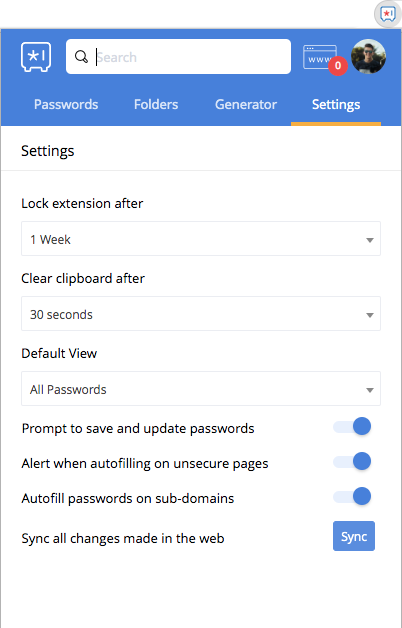

  • Lock extension after: Your master-password gets cleared from your browser extension after 15 minutes by default. You can set an inactivity time of your choice, between one minute and one week. By default, the Master Password will automatically clear if the Vault extension is idle for 10 minutes. Users should increase the inactivity timeout for the Zoho Vault extension to avoid this situation from happening frequently.
  • Clear clipboard after: Define how long the copied data should remain in the clipboard. You can set a time between 30 and 120 seconds.  
  • Default view: Customize the default view of your Passwords tab according to your needs. Set one of our multiple filters (Domain matching, Favorites, Recently used, Recently added, Personal Passwords, Enterprise Passwords, Password shared by me, Passwords shared with me, Unshared passwords, All Passwords) as the default view of your extension's Passwords tab. 
  • Prompt to save and update passwords: Disable this option to allow the extension to store new passwords or update the existing ones.
  • Alert when autofilling on unsecure pages: Zoho Vault warns you of unsecure pages by default before filling your passwords. Uncheck this option to let Zoho warn you before auto-filling on such pages.
  • Autofill passwords on subdomains: Enable this option to allow the extension to auto-fill your credentials on subdomains of a password's domain URL.
  • Password generator: Generate strong, secure passwords using the existing password policies, or by selecting your own custom preferences.

Direct website logins from the address bar

Users can now log in to websites directly from the browser's address bar for faster and easier access. Simply enter "zv <website_url_prefix> or zv <website_url_prefix> <username_prefix>" to select the password and log in directly from the browser toolbar, without needing to open the extension. 

Keyboard navigation for browser extension

Zoho Vault offers a range of keyboard shortcuts to streamline your password management experience. Here are some essential shortcuts to help you navigate and interact with the extension efficiently.

Action
Keyboard shortcut
Activate extension
Ctrl/Command + Shift + E
Trigger action (e.g., Login)
Enter
View password details
Right arrow in the list
Copy current field
Command + C
Copy current username
Command + U
Copy current password
Command + P
Lock extension
Command + L
Search
/
Copy TOTP
Command + T or Command + O
Open detailed view
Command + Shift + D
User presses "Command + Space" on the website input field with a vault icon. The password frame appears, allowing the user to access saved passwords
Command + Space

By utilizing these keyboard shortcuts, you can quickly and efficiently manage your passwords without taking your hands off the keyboard.


        Create. Review. Publish.

        Write, edit, collaborate on, and publish documents to different content management platforms.

        Get Started Now


          Access your files securely from anywhere

            Zoho CRM Training Programs

            Learn how to use the best tools for sales force automation and better customer engagement from Zoho's implementation specialists.

            Zoho CRM Training
              Redefine the way you work
              with Zoho Workplace

                Zoho DataPrep Personalized Demo

                If you'd like a personalized walk-through of our data preparation tool, please request a demo and we'll be happy to show you how to get the best out of Zoho DataPrep.

                Zoho CRM Training

                  Create, share, and deliver

                  beautiful slides from anywhere.

                  Get Started Now


                    Zoho Sign now offers specialized one-on-one training for both administrators and developers.

                    BOOK A SESSION


                                Quick LinksWorkflow AutomationData Collection
                                Web FormsEnterpriseOnline Data Collection Tool
                                Embeddable FormsBankingBegin Data Collection
                                Interactive FormsWorkplaceData Collection App
                                CRM FormsCustomer ServiceAccessible Forms
                                Digital FormsMarketingForms for Small Business
                                HTML FormsEducationForms for Enterprise
                                Contact FormsE-commerceForms for any business
                                Lead Generation FormsHealthcareForms for Startups
                                Wordpress FormsCustomer onboardingForms for Small Business
                                No Code FormsConstructionRSVP tool for holidays
                                Free FormsTravelFeatures for Order Forms
                                Prefill FormsNon-Profit

                                Intake FormsLegal
                                Mobile App
                                Form DesignerHR
                                Mobile Forms
                                Card FormsFoodOffline Forms
                                Assign FormsPhotographyMobile Forms Features
                                Translate FormsReal EstateKiosk in Mobile Forms
                                Electronic Forms
                                Drag & drop form builder

                                Notification Emails for FormsAlternativesSecurity & Compliance
                                Holiday FormsGoogle Forms alternative GDPR
                                Form to PDFJotform alternativeHIPAA Forms
                                Email FormsFormstack alternativeEncrypted Forms

                                Wufoo alternativeSecure Forms

                                TypeformWCAG


                                    All-in-one knowledge management and training platform for your employees and customers.

                                              Create. Review. Publish.

                                              Write, edit, collaborate on, and publish documents to different content management platforms.

                                              Get Started Now


                                                                You are currently viewing the help pages of Qntrl’s earlier version. Click here to view our latest version—Qntrl 3.0's help articles.


                                                                    Manage your brands on social media


                                                                      • Desk Community Learning Series


                                                                      • Digest


                                                                      • Functions


                                                                      • Meetups


                                                                      • Kbase


                                                                      • Resources


                                                                      • Glossary


                                                                      • Desk Marketplace


                                                                      • MVP Corner


                                                                      • Word of the Day


                                                                      • Ask the Experts


                                                                        Zoho Sheet Resources


                                                                            Zoho Forms Resources


                                                                              Secure your business
                                                                              communication with Zoho Mail


                                                                              Mail on the move with
                                                                              Zoho Mail mobile application

                                                                                Stay on top of your schedule
                                                                                at all times


                                                                                Carry your calendar with you
                                                                                Anytime, anywhere


                                                                                      Zoho Sign Resources

                                                                                        Sign, Paperless!

                                                                                        Sign and send business documents on the go!

                                                                                        Get Started Now


                                                                                                Zoho TeamInbox Resources


                                                                                                          Zoho DataPrep Demo

                                                                                                          Get a personalized demo or POC

                                                                                                          REGISTER NOW


                                                                                                            Design. Discuss. Deliver.

                                                                                                            Create visually engaging stories with Zoho Show.

                                                                                                            Get Started Now


                                                                                                                                • Related Articles

                                                                                                                                • Why do Zoho Vault extensions ask for permission during the installation?

                                                                                                                                  When you install Zoho Vault's browser extensions (Chrome, Firefox, Opera, Edge, Vivaldi, and Brave), a list of all possible actions that can be performed by the extension will be displayed. Browsers do so to primarily educate their users about ...
                                                                                                                                • Trouble with browser extension?

                                                                                                                                  Users may encounter issues while using the Zoho Vault browser extension. The following steps can help resolve them: Update the Zoho Vault extension: Ensure that you are using the latest version of the Zoho Vault browser extension. Outdated versions ...
                                                                                                                                • Zoho Vault Integration with Zoho Desk

                                                                                                                                  Zoho Desk, your one-stop shop for managing customer service across various channels, now integrates seamlessly with Zoho Vault. This powerful combo lets your support agents ditch the password struggle and dedicate their time to resolving customer ...
                                                                                                                                • Zoho Vault for macOS

                                                                                                                                  Zoho Vault is a cloud-based password manager that helps individuals, teams, and enterprises to securely store, share, and manage passwords, credit cards, keys, certificates, and other sensitive information from anywhere and at any time in a ...
                                                                                                                                • Zoho Vault Integration with Zoho Projects

                                                                                                                                  Managing project tasks, maintaining clear communication, and staying organized can be daunting. Zoho Projects, an online project management tool, simplifies these challenges with a user-friendly platform for planning, tracking, and collaborating ...
                                                                                                                                  Wherever you are is as good as
                                                                                                                                  your workplace

                                                                                                                                    Resources

                                                                                                                                    Videos

                                                                                                                                    Watch comprehensive videos on features and other important topics that will help you master Zoho CRM.


                                                                                                                                    eBooks

                                                                                                                                    Download free eBooks and access a range of topics to get deeper insight on successfully using Zoho CRM.


                                                                                                                                    Webinars

                                                                                                                                    Sign up for our webinars and learn the Zoho CRM basics, from customization to sales force automation and more.


                                                                                                                                    CRM Tips

                                                                                                                                    Make the most of Zoho CRM with these useful tips.


                                                                                                                                      Zoho Show Resources