Accessibility Controls in WorkDrive

Configure accessibility controls

Accessibility Controls help you customize your WorkDrive interface to improve readability, focus, and ease of interaction based on your personal needs.


Manage accessibility controls

  • Navigate to the bottom right corner of your WorkDrive screen, and click the accessibility icon.
    Alternatively, you can navigate to your Profile icon > Accessibility Controls
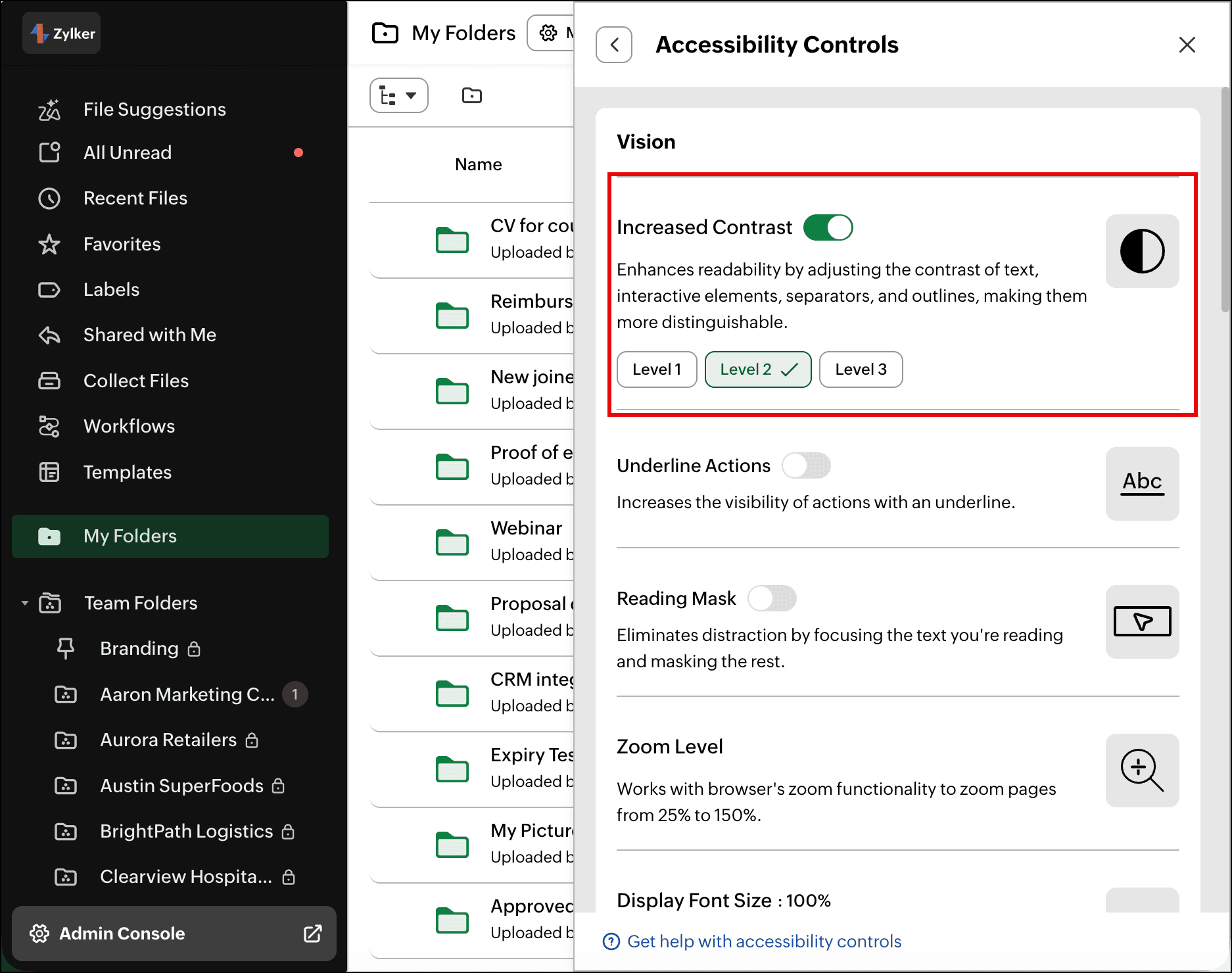
The accessibility settings tab opens, where you can customize the available options based on your preference. The settings will apply instantly.


Vision Accessibility Controls  

Increased Contrast

Enhances readability by adjusting contrast levels for text, interactive elements, separators, and outlines, making them more distinguishable.
Levels: Level 1, Level 2, Level 3
            

Improves the visibility of hyperlinks by adding an underline, making them easier to recognize and click. Underlining provides visual prominence, ensuring users click links intentionally. For color-blind users, underlines offer a clear and reliable way to identify hyperlinks.


Reading Mask

When a page is cluttered with content, it can be challenging for users to focus on key information. The Reading Mask feature enhances focus by highlighting the area under the user’s cursor while dimming the rest of the screen. This reduces distractions, making it easier to read or work, and is especially beneficial for individuals with dyslexia or ADHD.
  • You can use one of the predefined mask options, Large, Medium, and Small, or you can create a custom focus area by adjusting the height, and width.
  • You can also adjust the opacity of the mask using the opacity slider.
            

Zoom Level

Adjust the zoom level to improve readability and ease of navigation. Zoom behavior is controlled by your browser’s default zoom settings.
  • You can use Ctrl (or Cmd on Mac) + plus or minus keys to increase or decrease the zoom level.

Display Font Size

Adjusts the font size to make content easier to read.
Available sizes: 80%, 90%, 100%, 110%, 125%, 150%


Text Spacing

Adjust the character spacing to enhance readability and visual comfort.
Available options: Compact, Default, Moderate, Wide


Toggle Label Status

Displays an on/off label on the toggle switch for easy identification.


Mobility accessibility controls  

Users can navigate to specific sections of the page swiftly using the keyboard. The first press of the Tab button activates the Page Navigator menu. Alternatively, users can directly invoke it by clicking the invoke button or by using the shortcut Shift + G.
Within the Page Navigator menu, users can:
  1. Go to the Main Content: This option allows users to skip directly to the main content of the page. This is useful for accessing the primary information quickly, such as the folder/file list view on the page.
  2. Go to the Header: Users can navigate to the header of the page instantly using this option. The header, also known as the top band, contains account switch dropdown, search, notification, and profile icon.
  3. Go to the Left Panel: This option directs users to the left panel of the page, where sections, such as Recent Files, Favorites, Labels, My Folders, Team Folders, and more, can be accessed.
  4. Go to the Right Panel: Similar to the left panel option, this choice allows users to move to the right panel of the page swiftly, where elements, such as File/Folder Details, Data Templates, Zia, and more, can be accessed.


Emphasize Focus Area

The Emphasize Focus Area option highlights clickable areas around links, allowing users to navigate by clicking anywhere within the area, not just the link itself. For example, users can click near a team folder's name in the left panel to open them. This feature is especially helpful for users with motor disabilities who may find precise clicking challenging.


Custom Cursor

Users can customize the cursor’s color (dark or light) and size to suit their preferences, improving on-screen visibility. This feature is particularly helpful for individuals with visual impairments, making it easier to track the cursor's movement.


Learning accessibility controls  

Highlight Critical Information

Visually emphasizes important details, such as file and folder names in the folder listing, by using distinct colors for quick identification. This helps reduce cognitive load and supports users with memory-related impairments by making important information easy to find and remember.


Toast Notification

Toast notifications are brief messages that appear on the screen to confirm actions, provide updates, or alert users without interrupting their workflow.
Available options: Stack, List


Timing Controls

You can control how long toast notifications remain visible, so you have enough time to read and respond to them.
You can adjust the following settings according to your preferences.
 

Success & Info Toasts

Choose how success and informational notifications are dismissed.
Available options: Auto-close, Manual Close

Timeout Duration (Seconds)

When Auto-close is selected, choose how long the notification remains visible before it disappears automatically.
Available options: 3, 5, 7, 10, 15, 20 seconds


Warning & Error Toasts

Choose how warning and error notifications are dismissed.
Available options: Auto-close, Manual Close

Timeout Duration (Seconds)

When Auto-close is selected, choose how long the notification remains visible before it disappears automatically.
Available options: 3, 5, 7, 10, 15, 20 seconds


Still have questions? Contact our support team:


        Create. Review. Publish.

        Write, edit, collaborate on, and publish documents to different content management platforms.

        Get Started Now


          Access your files securely from anywhere

            Zoho CRM Training Programs

            Learn how to use the best tools for sales force automation and better customer engagement from Zoho's implementation specialists.

            Zoho CRM Training
              Redefine the way you work
              with Zoho Workplace

                Zoho DataPrep Personalized Demo

                If you'd like a personalized walk-through of our data preparation tool, please request a demo and we'll be happy to show you how to get the best out of Zoho DataPrep.

                Zoho CRM Training

                  Create, share, and deliver

                  beautiful slides from anywhere.

                  Get Started Now


                    Zoho Sign now offers specialized one-on-one training for both administrators and developers.

                    BOOK A SESSION


                                Quick LinksWorkflow AutomationData Collection
                                Web FormsEnterpriseOnline Data Collection Tool
                                Embeddable FormsBankingBegin Data Collection
                                Interactive FormsWorkplaceData Collection App
                                CRM FormsCustomer ServiceAccessible Forms
                                Digital FormsMarketingForms for Small Business
                                HTML FormsEducationForms for Enterprise
                                Contact FormsE-commerceForms for any business
                                Lead Generation FormsHealthcareForms for Startups
                                Wordpress FormsCustomer onboardingForms for Small Business
                                No Code FormsConstructionRSVP tool for holidays
                                Free FormsTravelFeatures for Order Forms
                                Prefill FormsNon-Profit

                                Intake FormsLegal
                                Mobile App
                                Form DesignerHR
                                Mobile Forms
                                Card FormsFoodOffline Forms
                                Assign FormsPhotographyMobile Forms Features
                                Translate FormsReal EstateKiosk in Mobile Forms
                                Electronic Forms
                                Drag & drop form builder

                                Notification Emails for FormsAlternativesSecurity & Compliance
                                Holiday FormsGoogle Forms alternative GDPR
                                Form to PDFJotform alternativeHIPAA Forms
                                Email FormsFormstack alternativeEncrypted Forms

                                Wufoo alternativeSecure Forms

                                TypeformWCAG


                                    All-in-one knowledge management and training platform for your employees and customers.

                                              Create. Review. Publish.

                                              Write, edit, collaborate on, and publish documents to different content management platforms.

                                              Get Started Now


                                                                You are currently viewing the help pages of Qntrl’s earlier version. Click here to view our latest version—Qntrl 3.0's help articles.


                                                                    Manage your brands on social media


                                                                      • Desk Community Learning Series


                                                                      • Digest


                                                                      • Functions


                                                                      • Meetups


                                                                      • Kbase


                                                                      • Resources


                                                                      • Glossary


                                                                      • Desk Marketplace


                                                                      • MVP Corner


                                                                      • Word of the Day


                                                                      • Ask the Experts


                                                                        Zoho Sheet Resources


                                                                            Zoho Forms Resources


                                                                              Secure your business
                                                                              communication with Zoho Mail


                                                                              Mail on the move with
                                                                              Zoho Mail mobile application

                                                                                Stay on top of your schedule
                                                                                at all times


                                                                                Carry your calendar with you
                                                                                Anytime, anywhere


                                                                                      Zoho Sign Resources

                                                                                        Sign, Paperless!

                                                                                        Sign and send business documents on the go!

                                                                                        Get Started Now


                                                                                                Zoho TeamInbox Resources


                                                                                                          Zoho DataPrep Demo

                                                                                                          Get a personalized demo or POC

                                                                                                          REGISTER NOW


                                                                                                            Design. Discuss. Deliver.

                                                                                                            Create visually engaging stories with Zoho Show.

                                                                                                            Get Started Now


                                                                                                                                • Related Articles

                                                                                                                                • Zia Privacy Principles

                                                                                                                                  Zia is a built-in AI that brings intelligent capabilities to Zoho WorkDrive. Zoho’s approach to AI is grounded in a security-first, privacy-first philosophy, because we believe the value of AI should never come at the expense of trust. These ...
                                                                                                                                • Zia Acceptable Use Policy

                                                                                                                                  Zia is a built-in AI that brings intelligent capabilities to Zoho WorkDrive. This Policy defines how Zia may be used, what responsibilities users hold, and what uses are not permitted. It works alongside the Zia Principles and Zoho's Terms of ...
                                                                                                                                • Workflow components

                                                                                                                                  Simplify and accelerate your content-specific business operations with WorkDrive Workflow! WorkDrive Workflow empowers you to automate repetitive tasks like approvals, data collection, and task assignments, making your business processes more ...
                                                                                                                                • Bulk agent installation: Deploying WorkDrive TrueSync via Group Policy Object (GPO) for Windows OS

                                                                                                                                  Group Policy Object (GPO) offers system administrators the ability to configure and manage applications, software operations, and user settings across an organization. This guide demonstrates how to utilize Group Policy to deploy the WorkDrive ...
                                                                                                                                • Troubleshooting: WorkDrive Genie not detected in Opera Browser

                                                                                                                                  Recent updates in Opera Browser have introduced stricter security controls. These changes block websites from communicating with applications running on your device unless explicit permission is granted. Zoho WorkDrive relies on this communication to ...
                                                                                                                                  Wherever you are is as good as
                                                                                                                                  your workplace

                                                                                                                                    Resources

                                                                                                                                    Videos

                                                                                                                                    Watch comprehensive videos on features and other important topics that will help you master Zoho CRM.


                                                                                                                                    eBooks

                                                                                                                                    Download free eBooks and access a range of topics to get deeper insight on successfully using Zoho CRM.


                                                                                                                                    Webinars

                                                                                                                                    Sign up for our webinars and learn the Zoho CRM basics, from customization to sales force automation and more.


                                                                                                                                    CRM Tips

                                                                                                                                    Make the most of Zoho CRM with these useful tips.


                                                                                                                                      Zoho Show Resources