Cliq Desktop Application For Mac
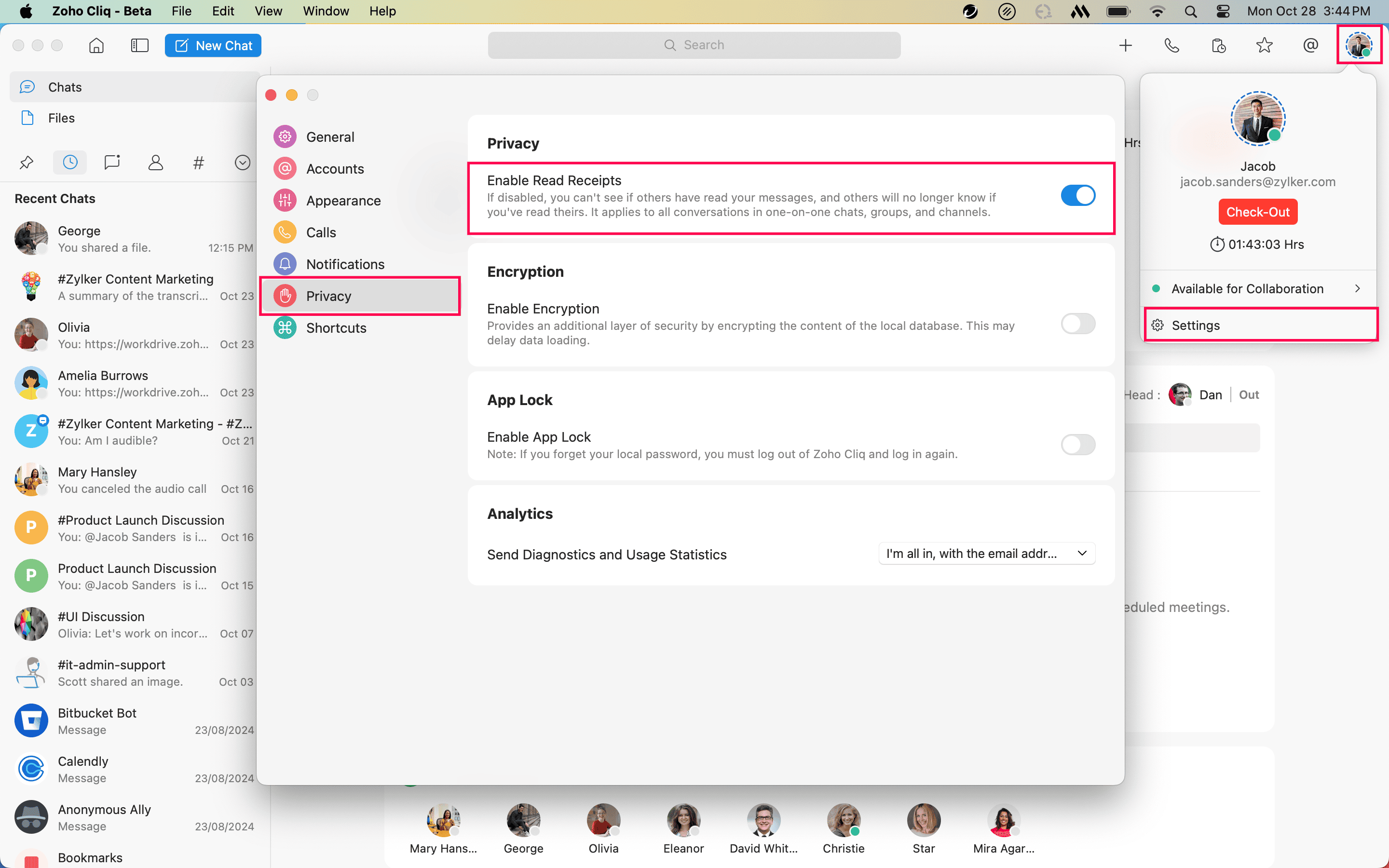
How do I enable read receipts for chats?
To enable read receipts for chats:
Click your profile image in the top-right corner of the app.
Select Settings from the drop-down menu.
Navigate to the Privacy section and check the Enable Read Receipts option.
 How do I reposition the Cliq chat list tabs?
How do I find missing chats in Cliq?
Only up to 50 chats are displayed in the Cliq chat list. You can use the search bar in the Cliq module to find missing chats.
How many languages is Cliq supported in?
In addition to English, the Cliq desktop application is supported in the following languages.
German | Deutsch |
Spanish | Español |
French | Français |
Italian | Italiano |
Netherlands | Dutch |
Portuguese | Português |
Tamil | தமிழ் |
Hindi | हिंदी |
Japanese | 日本語 |
Chinese (Simplified) | 简体中文 |
How do I sign out of the app?
Click your profile image in the top-right corner of the app.
Select Settings from the drop-down menu.
Navigate to the Accounts section and click Sign Out.
How do I update the app to the latest version?
Whenever a new update is available, the app will prompt you to update upon closing and reopening the app. Select Install Update from the prompt.
To update to the latest version manually, click Zoho Cliq - Beta in the system menu bar and select Check for Updates from the drop-down menu.
Alternatively, you can also download the latest build from this link.
How do I send feedback with log files to report bugs?
- Click Help from the system menu bar.
- Select Send Feedback from the drop-down menu.
- Enter the necessary details under Subject and Feedback Content.
- Check the Include Log Files and Include Optional Diagnostic Information options.
- Once ready, click Submit.

Note: By default, the Include Log Files and Include Optional Diagnostic Information options will be toggled on.
How do I view the release notes for the recent app update?
- Click Help from the system menu bar.
- Select Release Notes from the drop-down menu.
How do I disable the app's desktop notifications?
To disable the app's desktop notifications:
Open System Settings and click Notifications.
Select Zoho Cliq - Beta from the list of applications.
Toggle the Allow notifications button off to disable notifications.
How do I enable or disable Cliq notifications?
To enable or disable Cliq notifications:
Click your profile image in the top-right corner of the app.
Select Settings from the drop-down menu.
Navigate to the Notifications section and toggle on or off the Enable Notifications and Notification Sounds for Cliq Chats option to enable or disable Cliq notifications.
How do I enable Do Not Disturb (DND)?
To enable DND:
Click your profile image in the top-right corner of the app.
Select Do Not Disturb from the dropdown menu.
Choose your desired time frame from the available options.
Alternatively, you can also enable DND from the Cliq homepage.
How do I configure a 12-hour or 24-hour time format?
Configuring time format is not yet supported. This will be available in future updates.
How do I customize shortcut keys?
Customizing shortcut keys is not yet supported. This will be available in future updates.
How do I use Hotkeys?
Hotkeys are not yet supported. This will be available in future updates.
What features can be expected with future updates?
The following functionalities will be accessible in the Cliq desktop app for Mac with future updates:
- Scheduling meetings.
- Scheduling messages.
- Annotating images.
- Integrating calendar.
- Slash commands.